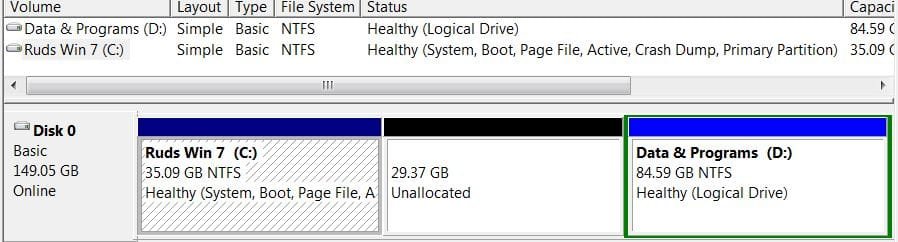
Dual Boot – 1st OS partition not accessible from 2nd OS
The Problem: Dual boot Win7 – but OS on one HHD can’t access OS partition on 2nd HDD
Both HDD’s installed: When I boot to HDD2 with the cloned OS (it’s Disk 0 – C I see & can access both drives & all partitions). So I set up dual boot with EasyBCD. But I couldn’t get original OS - on HDD 1 - to boot; finally got it after more manipulations. However, HDD2 wasn’t seen – had to add a drive letter to “Backup Storage” partition on Drive 0.
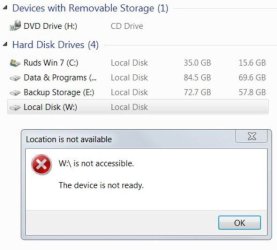
But I can’t add/change a drive letter to the HDD2 - OS partition – W on Drive 0. How do I correct this?
Mgt Console - HDD2/Drive 0 - no problems
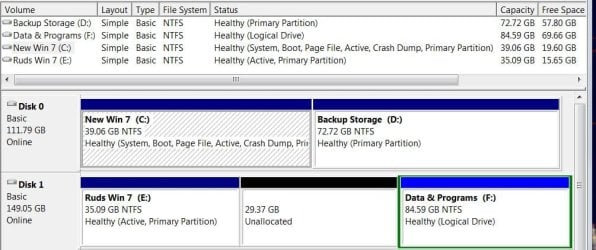
Mgt Console - HDD1/Drive 1 - can't change "W" letter
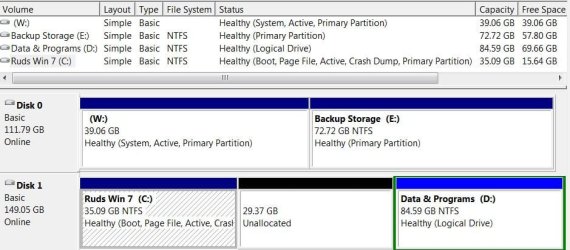
Mgt Console - HDD1/Drive 1 - attempt to change drive letter
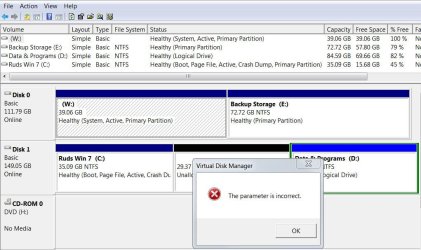
attempt to access the files
Here’ how I got to this point:
A new SSD is coming tomorrow and I want to add it to an existing multi-HDD Dual Boot array (I have several existing setups). In the past, I’ve done clean installs to each HDD or SSD and used EasyBCD to setup the drive boot priority.
This time I want to clone an existing OS to the SSD and avoid the lengthy OS install/settings and tweaks. So I thought I’d do a dry run on a couple of existing systems before the SSD gets here.
Practice #1:
I used Clonezilla & everything worked out (had to run Startup Repair and use Partition Wizard & Paragon Rescue to assign drive letters & repaired boot mgr from command line) and got a successful boot then reinstalled the original HDD, booted then setup dual boot with EasyBCD.
Practice #2:
[FONT="]The second attempt on another PC – I ran into additional problems. After Startup Repair I was getting “autock program not found – skipping autocheck” which I eventually fixed by a regedit editing DosDevices\C: at startup/command line. I finally got the cloned OS to boot so I took out HDD 2 and installed the original HDD. I used Startup Repair & command line but still nothing – looked at disk structure and noticed Clonezilla had removed the drive letter from original HDD (which hadn’t happened in Practice #1). Fixed that then had the Autock not found – and fixed that. I got a good boot with the original HDD1 so I installed the HDD2 with cloned OS.
(PS - practically all my skills & tools/utilities have come from this forum - thanks!)
[/FONT]
The Problem: Dual boot Win7 – but OS on one HHD can’t access OS partition on 2nd HDD
Both HDD’s installed: When I boot to HDD2 with the cloned OS (it’s Disk 0 – C
I see & can access both drives & all partitions). So I set up dual boot with EasyBCD. But I couldn’t get original OS - on HDD 1 - to boot; finally got it after more manipulations. However, HDD2 wasn’t seen – had to add a drive letter to “Backup Storage” partition on Drive 0.But I can’t add/change a drive letter to the HDD2 - OS partition – W on Drive 0. How do I correct this?
Mgt Console - HDD2/Drive 0 - no problems
Mgt Console - HDD1/Drive 1 - can't change "W" letter
Mgt Console - HDD1/Drive 1 - attempt to change drive letter
attempt to access the files
Here’ how I got to this point:
A new SSD is coming tomorrow and I want to add it to an existing multi-HDD Dual Boot array (I have several existing setups). In the past, I’ve done clean installs to each HDD or SSD and used EasyBCD to setup the drive boot priority.
This time I want to clone an existing OS to the SSD and avoid the lengthy OS install/settings and tweaks. So I thought I’d do a dry run on a couple of existing systems before the SSD gets here.
Practice #1:
I used Clonezilla & everything worked out (had to run Startup Repair and use Partition Wizard & Paragon Rescue to assign drive letters & repaired boot mgr from command line) and got a successful boot then reinstalled the original HDD, booted then setup dual boot with EasyBCD.
Practice #2:
[FONT="]The second attempt on another PC – I ran into additional problems. After Startup Repair I was getting “autock program not found – skipping autocheck” which I eventually fixed by a regedit editing DosDevices\C: at startup/command line. I finally got the cloned OS to boot so I took out HDD 2 and installed the original HDD. I used Startup Repair & command line but still nothing – looked at disk structure and noticed Clonezilla had removed the drive letter from original HDD (which hadn’t happened in Practice #1). Fixed that then had the Autock not found – and fixed that. I got a good boot with the original HDD1 so I installed the HDD2 with cloned OS.
(PS - practically all my skills & tools/utilities have come from this forum - thanks!)
[/FONT]
My Computer
At a glance
Microsoft Windows 7 Home Premium 64-bit 7601 ...Intel(R) Core(TM)2 Duo CPU E8400 @ 3.00GHz Wo...Patriot Viper 4GB (2 x 2GB) 240-Pin DDR2 SDRA...ATI Radeon HD 4600 Series (4650) +ARCTIC Acce...
- Computer type
- PC/Desktop
- Computer Manufacturer/Model Number
- Custom
- OS
- Microsoft Windows 7 Home Premium 64-bit 7601 Multiprocessor Free Service Pack 1
- CPU
- Intel(R) Core(TM)2 Duo CPU E8400 @ 3.00GHz Wolfdale
- Motherboard
- Gigabyte Technology Co., Ltd. EP45-UD3R
- Memory
- Patriot Viper 4GB (2 x 2GB) 240-Pin DDR2 SDRAM DDR2
- Graphics Card(s)
- ATI Radeon HD 4600 Series (4650) +ARCTIC Accelero L2 Plus VG
- Sound Card
- (1) Realtek High Definition Audio (2) Unimodem Full-Duplex
- Monitor(s) Displays
- Dell 1908FP & P2312H - Digital
- Screen Resolution
- 1280 x 1024 x 32 bits (4294967296 colors) @ 60 Hz
- Hard Drives
- (1) INTEL SSDSC2CW120A3 ATA Device (2) SanDisk SDSSDA120G ATA Device (3) ST500DM002-1BD142 ATA Device (4) WDC WD2500AAKS-22B3A0 ATA Device (5) WDC WD5000AAKS-00V1A0 ATA Device (6) Brother MFC-J875DW USB Device
- PSU
- Corsair VX550W
- Case
- Antec 300 ATX
- Cooling
- Xigmatek Nepartak S983 H.D.T. with 92mm fan, Yate Loon 140mm
- Keyboard
- Dell Wired USB Keyboard Standard 104-key Model SK-8115 E1456
- Mouse
- Logitech 3-Button USB Optical Wheel Mouse
- Internet Speed
- Down 7.7 Mbps Up 1.93 Mbps
- Antivirus
- MS Security Essentials
- Browser
- Firefox 54.0.1
- Other Info
- 3 additional 120mm case fans SpeedFan shows following temps: #1 43C, #2-36C, #3-(-2C)?, GPU-42C Rocketfish - 2-Port USB 3.0 PCI Express Interface Card Multi Model: RF-P2USB3 Also, LSI Soft Modem