Dual boot 7 and XP problem

Berry14

New member
Local time
4:45 AM
Messages
5
Hi,

I dual booted 7 and XP (7 First). It worked fine. But later i formatted my Hdd and installed 7 only. Then i made a partition and tried to install Windows XP on it. XP decompressed all of the set-up files on the partition in DOS and rebooted. Now my PC can't run the xp Set-up and win 7. I can fix it with the win 7 cd, but then i can boot into win 7 and i want to install win xp. Please can anyone help me?

Kind regards,
Berry, Netherlands
 

My Computer

Computer Manufacturer/Model Number
Packard Bell
OS
Windows 7 Ultimate x86 | Windows XP Pro x86
CPU
AMD Sempron 2800+
Motherboard
Packard Bell
Memory
PQI 1GB DDR2
Graphics Card(s)
Nvidia GeForce GT 220 1GB
Sound Card
7.1 HD Sound
Monitor(s) Displays
Packard Bell 19'' TFT
Hard Drives
Seagate 160GB
PSU
-
Case
Default
Cooling
Default
Sorry, but your post is a little hard to follow. What is you present condition? Can you boot to Win 7? Can you boot to XP?

Is XP installed and you can't boot to it, or has it not yet installed.

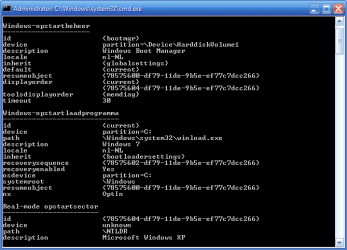
If you are in Win 7 please take a snipping tool picture of the disk management window and attach. A picture of an administrative command window after you typed "bcdedit" might help also.

There is a program called EasyBCD you might want to download to help set up the dual boot. Try to find version 2.0, but 1.7.3 might work.
 

My Computer

Computer Manufacturer/Model Number
Homebuilt
OS
Windows 7 x64
CPU
i7-2600K
Motherboard
Asus P8Z77-v Pro
Memory
8 G
Graphics Card(s)
GTX 480
Sound Card
Onboard
Monitor(s) Displays
LG W2753V
Screen Resolution
1920x1080
Hard Drives
Crucial M4 128 G SSD
Did you format the partition you made for XP using the XP installer? XP has a slightly different partition table.

Boot into the WIn7 DVD Repair console to run Startup Repair repeatedly until Win7 starts again.

Now post back a screenshot of your full Disk Management map so we can advise you specifically the best way to finish your reinstall of XP so it dual boots with Win7.

Use the Snipping Tool in Start Menu attaching file using the paper clip in reply box.
 
Hi, sorry for my bad english:geek:

Yes i can boot into win 7. But i have to use the recover disc to fix the problem. I Tried it about 5 times. Once on a partition made in win 7 (NTFS) and once in the XP set-UP(NTFS).

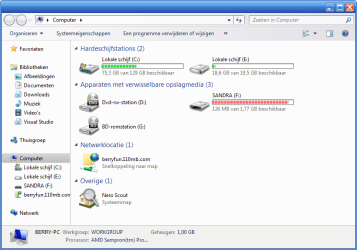
I installed win 7 on C: and i am trying to install XP on E:(screenshot 1).
In Drive E: is a folder called WINDOWS and in that folder are many files and folders (screenshot 3).

1:PROB_COMPUTER_1.png
2:PROB_COMPUTER_2.png
3:PROB_COMPUTER_3.png

EDIT: This is my Win 7 with a xp theme ;)
 
Last edited:

My Computer

Computer Manufacturer/Model Number
Packard Bell
OS
Windows 7 Ultimate x86 | Windows XP Pro x86
CPU
AMD Sempron 2800+
Motherboard
Packard Bell
Memory
PQI 1GB DDR2
Graphics Card(s)
Nvidia GeForce GT 220 1GB
Sound Card
7.1 HD Sound
Monitor(s) Displays
Packard Bell 19'' TFT
Hard Drives
Seagate 160GB
PSU
-
Case
Default
Cooling
Default

My Computer

Computer Manufacturer/Model Number
Packard Bell
OS
Windows 7 Ultimate x86 | Windows XP Pro x86
CPU
AMD Sempron 2800+
Motherboard
Packard Bell
Memory
PQI 1GB DDR2
Graphics Card(s)
Nvidia GeForce GT 220 1GB
Sound Card
7.1 HD Sound
Monitor(s) Displays
Packard Bell 19'' TFT
Hard Drives
Seagate 160GB
PSU
-
Case
Default
Cooling
Default
no, not the whole drive, only the partition i want to install XP on.
 

My Computer

Computer Manufacturer/Model Number
Packard Bell
OS
Windows 7 Ultimate x86 | Windows XP Pro x86
CPU
AMD Sempron 2800+
Motherboard
Packard Bell
Memory
PQI 1GB DDR2
Graphics Card(s)
Nvidia GeForce GT 220 1GB
Sound Card
7.1 HD Sound
Monitor(s) Displays
Packard Bell 19'' TFT
Hard Drives
Seagate 160GB
PSU
-
Case
Default
Cooling
Default
I am now assuming your current condition is you can boot normally to Win 7, but cannot install XP. Sorry, but threads get confusing after many entries.

Please open a run box with Winkey + R. Type in diskmgmt.msc and hit enter. This is the window we need a picture of.

If you cannot install XP, what message are you getting?

It looks like you might have the Reserved System partition Win 7 sometimes puts in.
 

My Computer

Computer Manufacturer/Model Number
Homebuilt
OS
Windows 7 x64
CPU
i7-2600K
Motherboard
Asus P8Z77-v Pro
Memory
8 G
Graphics Card(s)
GTX 480
Sound Card
Onboard
Monitor(s) Displays
LG W2753V
Screen Resolution
1920x1080
Hard Drives
Crucial M4 128 G SSD
Hi all,

I installed XP on an other 15 GB HDD and it works fine now! Thank for the help anyway guys!!!!

Regards,
Berry
 

My Computer

Computer Manufacturer/Model Number
Packard Bell
OS
Windows 7 Ultimate x86 | Windows XP Pro x86
CPU
AMD Sempron 2800+
Motherboard
Packard Bell
Memory
PQI 1GB DDR2
Graphics Card(s)
Nvidia GeForce GT 220 1GB
Sound Card
7.1 HD Sound
Monitor(s) Displays
Packard Bell 19'' TFT
Hard Drives
Seagate 160GB
PSU
-
Case
Default
Cooling
Default
Back
Top