Dual boot 7 and xp

nickmaza

New member
Local time
12:33 PM
Messages
6
I had vista(on C: ) and xp(on D: ) running on my PC. I easily setup a dual boot for vista and xp using bcdedit.

i installed 7 by formatting the drive (C: ) where vista was installed. I read on a blog that the setup will automatically detect the presence of xp and show it as "Earlier version of windows "in boot menu. but after installation there was no such option and windows 7 directly started.

I ran cmd as administrator and used the following command to add xp (as i did in vista) the commands were
bcdedit /create {ntldr} /d "Microsoft Windows XP"
bcdedit /set {ntldr} device partition=c:
bcdedit /set {ntldr} path \ntldr
bcdedit /displayorder {ntldr} /addlast
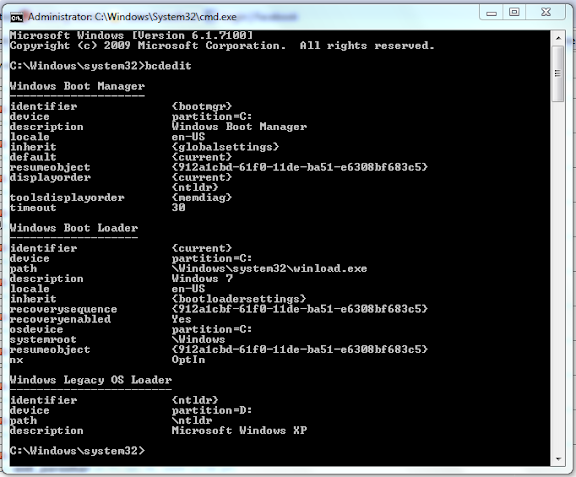
Now my boot manager looks like :

Capture5.PNG


Now an option for windows xp appears but on selecting it i get an error missing ntldr

so i copied the ntldr, ntdetect.com from the xp installation disc to the root of D and created a boot.ini

but that didn't help now the system restarts when i select Windows xp


have i missed some step or what? can any one help?

(I have windows xp Sp3 installed)


i think these screen shots might help ya

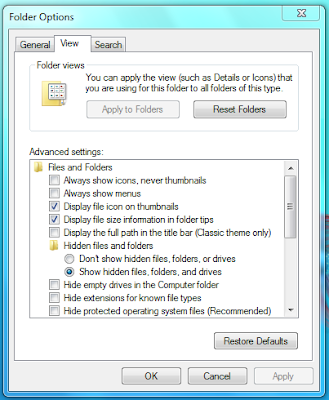
Folder options:

(all hidden files are shown)
Capture4.PNG


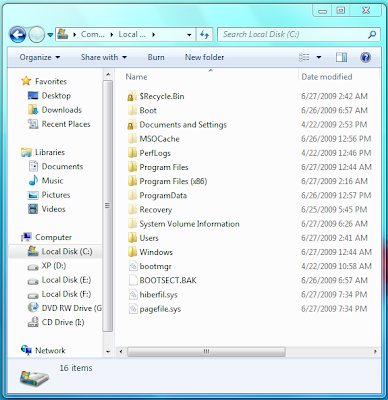
D: Xp is installed here (i have deleted the ntldr and ntdetect.com and the boot.ini files that i had copied )

(after 7's installation none of these files were present the drive was same as it is in the screen shot)

Capture2.PNG


C: 7 is installed here

Capture.PNG


Thanx in advance ;)
 

My Computer

OS
Windows 7 and Windows Xp
CPU
Intel Core2Duo 2.8ghz E7400
Motherboard
Gigabyte G31M S2L
Memory
2GB
Monitor(s) Displays
LG Studioworks 700E
Hard Drives
Seagate 7200rpm 500GB 32MB cache
PSU
Cooler Master 460W
Cooling
Stock
In my case I have all the boot manager stuff on the C: partition (the active partition). That includes bootmgr and ntldr, boot.ini, etc.
 

My Computer

Computer Manufacturer/Model Number
Too many to list.
OS
XP, Seven, 2008R2
CPU
AMD, Intel, VIA
Motherboard
Various
Memory
Corsair, Kingston, etc.
Graphics Card(s)
ATI, NVIDIA
Monitor(s) Displays
Samsung
Hard Drives
Maxtor, Western Digital
Keyboard
qwerty
Internet Speed
22 Mb/s @ home, 1 Gb/s @ server
Other Info
All of my systems still run fastest on XP 32-bit for the most part. Win7 is fun to play with, but I still prefer XP for raw speed, security, and functionality.
Edit your boot.ini file for XP. Change the rdisk value to something new than what it is now. (If it's 1, make it 0. If it's 0, make it 1...you can go all the way up to how many physical disks you have minus 1, to try.)

Change the rdisk value in all instances of the boot.ini.

Keep trying and rebooting until it either works or you run out of numbers. When you chose XP now in the dual boot menu, it is just trying to access the wrong partition or drive, hence the system restart.

Note: You will have to take off read-only on the boot.ini file to edit it. When you're done, replace it. Also, it is a hidden system file so you will have to enable viewing those too.
 

My Computer

Computer Manufacturer/Model Number
self built
OS
7600.20510 x86
CPU
P4 550 3.4 GHz HT running at 3.5 GHz
Motherboard
MSI PM8M3-V (MS-7211 v1.x) Micro-ATX mainboard
Memory
OCZ 2 GB(2x1GB) DDR400mHz running @ 414 mHz
Graphics Card(s)
HIS Radeon HD 3850 IceQ 3 Turbo HDMI Dual DL-DVI AGP
Sound Card
MOTU Traveler firewire studio interface 192 kHz 24 bit
Monitor(s) Displays
22" widescreen Acer X223W LCD, 17" Compaq P75 CRT
Screen Resolution
1680x1050 and 1280x1024
Hard Drives
SATA I x2 WD, 400 GB and 120 GB, SATA 2 WD Caviar Black 1 TB
PSU
350W generic
Case
Cybertronpc, it glows blue
Cooling
stock cpu fan, Ice-Q 3 gpu and system, many case fans
Keyboard
Logitch Classical Keyboard 200
Mouse
Logitech Mediaplay cordless
Internet Speed
1792/448 kbits/sec
Other Info
SATA II PCI fake RAID adapter, 1 GB Readyboost, original ATI Remote Wonder (even works with WMC perfectly), Logitech Rumblepad 2 game controller x2
Jebus, this is what I signed up for the forums for. I'm having this exact same issue. I tried using EasyBCD 2.0 beta 63 (which will autowrite the boot.ini and NTLDR if you don't have them)... but I checked out the boot.ini they gave me and its pointing to partition 4.

Here is my layout

|------XP----||-----Linux-----||-----7-----||swap|

So I think boot.ini should be pointing to partition 1, but its a read only file so I can't edit it =/

Edit: wow I feel dumb considering I knew that flag was easy to take off. Also just tried these settings and I get an error 0xc000007b whenever I try to boot it.

I then tried the command line commands (almost exactly what you did) and this is what I have:

Code:
Entry #1
Name: Windows 7 7229 x64
BCD ID: {current}
Drive: C:\
Bootloader Path: \Windows\system32\winload.exe

Entry #2
Name: Microsoft Windows XP
BCD ID: {ntldr}
Drive: C:\
Bootloader Path: \ntldr
Oh and Boot.ini
Code:
[boot loader]
timeout=20
default=multi(0)disk(0)rdisk(0)partition(1)\WINDOWS
[operating systems]
multi(0)disk(0)rdisk(0)partition(1)\WINDOWS="Windows XP on D:\" /fastdetect
 
Last edited:

My Computer

Computer Manufacturer/Model Number
Acer VM264-BE2200C
OS
Windows 7 7232 x64, Windows XP SP3 x86, Ubunu 9.04 x64
CPU
Intel Pentium Dual Core E2220 @ 2.4GHz
Motherboard
nForce 620i
Memory
4 GB (2x2 GB) DDR2 800MHz
Graphics Card(s)
GeForce 7050 (Integrated)
Sound Card
Realtek High Definition Audio 7.1
Monitor(s) Displays
Acer X193Wb 19" wide-screen TFT LCD
Screen Resolution
1440x900
Hard Drives
160 GB SATA Hitachi 7200 RPM
500 GB USB Samsung 5400 RPM
500 GB USB Seagate FreeAgent Go 5400 RPM
40 GB USB Seagate 5400 RPM
30 GB USB Hitachi 5400 RPM
PSU
250W
Keyboard
Acer PS/2
Mouse
Acer PS/2
Internet Speed
nVidia nForce Gigabit Ethernet
you can clear the read-only flag by showing hidden system files and then right-clicking on boot.ini and go properties. Or use something like Notepad++ which lets you do it from the Edit menu.

Also just tried these settings and I get an error 0x000007bf whenever I try to boot it.

a blue screen of death? hmmm I don't think I've ever gotten a BSOD just from missing boot loader.
 

My Computer

Computer Manufacturer/Model Number
Too many to list.
OS
XP, Seven, 2008R2
CPU
AMD, Intel, VIA
Motherboard
Various
Memory
Corsair, Kingston, etc.
Graphics Card(s)
ATI, NVIDIA
Monitor(s) Displays
Samsung
Hard Drives
Maxtor, Western Digital
Keyboard
qwerty
Internet Speed
22 Mb/s @ home, 1 Gb/s @ server
Other Info
All of my systems still run fastest on XP 32-bit for the most part. Win7 is fun to play with, but I still prefer XP for raw speed, security, and functionality.
I think my problem is, I originally had the same layout, but a 32 bit version of 7 which I changed to 64 bit (with Linux installed last for the GRUB bootloader) so XP was "hidden" behind GRUB (which BCD can't handle natively)... so somewhere along the way I lost my XP boot information.

is it possible for me to pop in my xp disk, use the repair command to get the original ntldr boot, then use a program like EasyBCD or some such to get the BCD back on?
 

My Computer

Computer Manufacturer/Model Number
Acer VM264-BE2200C
OS
Windows 7 7232 x64, Windows XP SP3 x86, Ubunu 9.04 x64
CPU
Intel Pentium Dual Core E2220 @ 2.4GHz
Motherboard
nForce 620i
Memory
4 GB (2x2 GB) DDR2 800MHz
Graphics Card(s)
GeForce 7050 (Integrated)
Sound Card
Realtek High Definition Audio 7.1
Monitor(s) Displays
Acer X193Wb 19" wide-screen TFT LCD
Screen Resolution
1440x900
Hard Drives
160 GB SATA Hitachi 7200 RPM
500 GB USB Samsung 5400 RPM
500 GB USB Seagate FreeAgent Go 5400 RPM
40 GB USB Seagate 5400 RPM
30 GB USB Hitachi 5400 RPM
PSU
250W
Keyboard
Acer PS/2
Mouse
Acer PS/2
Internet Speed
nVidia nForce Gigabit Ethernet
a blue screen of death? hmmm I don't think I've ever gotten a BSOD just from missing boot loader.

No, not a blue screen. its a simple error screen. (its black and white just like the bootloader) and all it says is there's something wrong and I need to insert my installation disc to repair the problem. and "hit enter to continue" (which takes me back to the loader) or "hit esc to cancel" (which restarts the PC)
 

My Computer

Computer Manufacturer/Model Number
Acer VM264-BE2200C
OS
Windows 7 7232 x64, Windows XP SP3 x86, Ubunu 9.04 x64
CPU
Intel Pentium Dual Core E2220 @ 2.4GHz
Motherboard
nForce 620i
Memory
4 GB (2x2 GB) DDR2 800MHz
Graphics Card(s)
GeForce 7050 (Integrated)
Sound Card
Realtek High Definition Audio 7.1
Monitor(s) Displays
Acer X193Wb 19" wide-screen TFT LCD
Screen Resolution
1440x900
Hard Drives
160 GB SATA Hitachi 7200 RPM
500 GB USB Samsung 5400 RPM
500 GB USB Seagate FreeAgent Go 5400 RPM
40 GB USB Seagate 5400 RPM
30 GB USB Hitachi 5400 RPM
PSU
250W
Keyboard
Acer PS/2
Mouse
Acer PS/2
Internet Speed
nVidia nForce Gigabit Ethernet
Oh, yes I see what you mean about the error message. Sorry for the confusion.

I use a program called VistaBootPro to fix problems like this.

I never did spend much time on the command line options because that program makes it so easy. Others will know more about the commands than I do.
 

My Computer

Computer Manufacturer/Model Number
Too many to list.
OS
XP, Seven, 2008R2
CPU
AMD, Intel, VIA
Motherboard
Various
Memory
Corsair, Kingston, etc.
Graphics Card(s)
ATI, NVIDIA
Monitor(s) Displays
Samsung
Hard Drives
Maxtor, Western Digital
Keyboard
qwerty
Internet Speed
22 Mb/s @ home, 1 Gb/s @ server
Other Info
All of my systems still run fastest on XP 32-bit for the most part. Win7 is fun to play with, but I still prefer XP for raw speed, security, and functionality.
EasyBCD is essentially the same idea, I'll give it a look and see

oh and correction to above error code:
0xc000007b (which seems to be a general failure to initialize error)
 

My Computer

Computer Manufacturer/Model Number
Acer VM264-BE2200C
OS
Windows 7 7232 x64, Windows XP SP3 x86, Ubunu 9.04 x64
CPU
Intel Pentium Dual Core E2220 @ 2.4GHz
Motherboard
nForce 620i
Memory
4 GB (2x2 GB) DDR2 800MHz
Graphics Card(s)
GeForce 7050 (Integrated)
Sound Card
Realtek High Definition Audio 7.1
Monitor(s) Displays
Acer X193Wb 19" wide-screen TFT LCD
Screen Resolution
1440x900
Hard Drives
160 GB SATA Hitachi 7200 RPM
500 GB USB Samsung 5400 RPM
500 GB USB Seagate FreeAgent Go 5400 RPM
40 GB USB Seagate 5400 RPM
30 GB USB Hitachi 5400 RPM
PSU
250W
Keyboard
Acer PS/2
Mouse
Acer PS/2
Internet Speed
nVidia nForce Gigabit Ethernet
You're right, EasyBCD is a lot alike. They each seem to have some unique features. VistaBootPro will let you pick the drive or partition to install the system boot loader on. And you can choose between legacy and Vista bootloader (the Vista bootloader is the same as Windows 7).
 

My Computer

Computer Manufacturer/Model Number
Too many to list.
OS
XP, Seven, 2008R2
CPU
AMD, Intel, VIA
Motherboard
Various
Memory
Corsair, Kingston, etc.
Graphics Card(s)
ATI, NVIDIA
Monitor(s) Displays
Samsung
Hard Drives
Maxtor, Western Digital
Keyboard
qwerty
Internet Speed
22 Mb/s @ home, 1 Gb/s @ server
Other Info
All of my systems still run fastest on XP 32-bit for the most part. Win7 is fun to play with, but I still prefer XP for raw speed, security, and functionality.
Edit your boot.ini file for XP. Change the rdisk value to something new than what it is now. (If it's 1, make it 0. If it's 0, make it 1...you can go all the way up to how many physical disks you have minus 1, to try.)

Change the rdisk value in all instances of the boot.ini.

Keep trying and rebooting until it either works or you run out of numbers. When you chose XP now in the dual boot menu, it is just trying to access the wrong partition or drive, hence the system restart.

Note: You will have to take off read-only on the boot.ini file to edit it. When you're done, replace it. Also, it is a hidden system file so you will have to enable viewing those too.


based on info from DiskPart I edited my boot.ini

it now looks like

[boot loader]
timeout=20
default=multi(0)disk(0)rdisk(0)partition(4)\WINDOWS
[operating systems]
multi(0)disk(0)rdisk(0)partition(4)\WINDOWS="Windows XP"
DiskPart

Microsoft Windows [Version 6.1.7100]
Copyright (c) 2009 Microsoft Corporation. All rights reserved.

C:\Windows\system32>diskpart

Microsoft DiskPart version 6.1.7100
Copyright (C) 1999-2008 Microsoft Corporation.
On computer: 626-PC

DISKPART> select disk 0 <<------- disk(0)

Disk 0 is now the selected disk.

DISKPART> detail disk

ST3500320AS ATA Device
Disk ID: A075DAD2
Type : ATA
Status : Online
Path : 0
Target : 0
LUN ID : 0
Location Path : PCIROOT(0)#PCI(1F02)#ATA(C00T00L00)
Current Read-only State : No
Read-only : No
Boot Disk : Yes
Pagefile Disk : Yes
Hibernation File Disk : No
Crashdump Disk : Yes
Clustered Disk : No

Volume ### Ltr Label Fs Type Size Status Info
---------- --- ----------- ----- ---------- ------- --------- --------
Volume 2 C NTFS Partition 45 GB Healthy System
Volume 3 D XP NTFS Partition 19 GB Healthy
Volume 4 E NTFS Partition 200 GB Healthy
Volume 5 F NTFS Partition 199 GB Healthy

DISKPART> select partition = 4 <<------- partition(4)

Partition 4 is now the selected partition.

DISKPART> detail partition

Partition 4
Type : 07
Hidden: No
Active: No
Offset in Bytes: 49180311552

Volume ### Ltr Label Fs Type Size Status Info
---------- --- ----------- ----- ---------- ------- --------- --------
* Volume 3 D XP NTFS Partition 19 GB Healthy

DISKPART>
but my PC is still restarting
 
Last edited:

My Computer

OS
Windows 7 and Windows Xp
CPU
Intel Core2Duo 2.8ghz E7400
Motherboard
Gigabyte G31M S2L
Memory
2GB
Monitor(s) Displays
LG Studioworks 700E
Hard Drives
Seagate 7200rpm 500GB 32MB cache
PSU
Cooler Master 460W
Cooling
Stock
according to diskpart, your XP partition is number 3. I don't believe the partitions in boot.ini start at 0 but I could be wrong.

Plus, the boot.ini file needs to be on the same partition as the ntldr and ntdetect. As well as the Windows 7 boot manager needs to point to ntldr on the correct partition.
 

My Computer

Computer Manufacturer/Model Number
Too many to list.
OS
XP, Seven, 2008R2
CPU
AMD, Intel, VIA
Motherboard
Various
Memory
Corsair, Kingston, etc.
Graphics Card(s)
ATI, NVIDIA
Monitor(s) Displays
Samsung
Hard Drives
Maxtor, Western Digital
Keyboard
qwerty
Internet Speed
22 Mb/s @ home, 1 Gb/s @ server
Other Info
All of my systems still run fastest on XP 32-bit for the most part. Win7 is fun to play with, but I still prefer XP for raw speed, security, and functionality.
^ i logged into xp few miniutes back :party:

and i used the boot.ini mentioned in in my post

I placed boot.ini in C: (where 7 is installed) along with ntdetect.com and ntldr

I had to place ntldr and ntldr.com in D: too else I get ntldr missing.
 

My Computer

OS
Windows 7 and Windows Xp
CPU
Intel Core2Duo 2.8ghz E7400
Motherboard
Gigabyte G31M S2L
Memory
2GB
Monitor(s) Displays
LG Studioworks 700E
Hard Drives
Seagate 7200rpm 500GB 32MB cache
PSU
Cooler Master 460W
Cooling
Stock
I had to place ntldr and ntldr.com in D: too else I get ntldr missing.

Well they should only need to be in one place, but as you can see multiple places won't hurt. The boot manager will load whichever one it finds.
 

My Computer

Computer Manufacturer/Model Number
Too many to list.
OS
XP, Seven, 2008R2
CPU
AMD, Intel, VIA
Motherboard
Various
Memory
Corsair, Kingston, etc.
Graphics Card(s)
ATI, NVIDIA
Monitor(s) Displays
Samsung
Hard Drives
Maxtor, Western Digital
Keyboard
qwerty
Internet Speed
22 Mb/s @ home, 1 Gb/s @ server
Other Info
All of my systems still run fastest on XP 32-bit for the most part. Win7 is fun to play with, but I still prefer XP for raw speed, security, and functionality.
Can ne1 explain why a copy of ntdetect.com and ntldr is required in both drives???
 

My Computer

OS
Windows 7 and Windows Xp
CPU
Intel Core2Duo 2.8ghz E7400
Motherboard
Gigabyte G31M S2L
Memory
2GB
Monitor(s) Displays
LG Studioworks 700E
Hard Drives
Seagate 7200rpm 500GB 32MB cache
PSU
Cooler Master 460W
Cooling
Stock
hmm :sarc: don't know, because they are only in one place on my system. The C: partition.
 

My Computer

Computer Manufacturer/Model Number
Too many to list.
OS
XP, Seven, 2008R2
CPU
AMD, Intel, VIA
Motherboard
Various
Memory
Corsair, Kingston, etc.
Graphics Card(s)
ATI, NVIDIA
Monitor(s) Displays
Samsung
Hard Drives
Maxtor, Western Digital
Keyboard
qwerty
Internet Speed
22 Mb/s @ home, 1 Gb/s @ server
Other Info
All of my systems still run fastest on XP 32-bit for the most part. Win7 is fun to play with, but I still prefer XP for raw speed, security, and functionality.
hmm...
:)
i tried many P&Cs and the working one was:

C:\

boot.ini
ntdetect.com

D:\

ntldr

removing ntldr from D: gave the error ntldr missing placing one in C: didn't help

removing ntdetect.com from C: restarted my PC placing this file on D: instead didn't help

removing boot.in from C: and placing it on D: gave an error "ntoskrnl.exe is corrupt"

:party:

thanks to everyone who posted here:geek: ;)

mods can lock the thread if they want:cool:
 

My Computer

OS
Windows 7 and Windows Xp
CPU
Intel Core2Duo 2.8ghz E7400
Motherboard
Gigabyte G31M S2L
Memory
2GB
Monitor(s) Displays
LG Studioworks 700E
Hard Drives
Seagate 7200rpm 500GB 32MB cache
PSU
Cooler Master 460W
Cooling
Stock
Back
Top