DUAL BOOT CRISIS

GWilkie

New member
Local time
8:21 PM
Messages
11
Ok I am in dire need of saving guys. I have to confess I am really embarrassed to be posting here because I have been in the business for 15+ years and never had something I couldn't fix myself or with a white paper or two.....
I installed Win 7 on the secondary partition of my HP laptop (Core I5 great specs...etc...etc..) today. Originally it had XP SP3 installed on it from work, which I can no longer access, and I have CRITICAL data on my XP drive that I can not loose.
I installed 7 by booting from the disc, and choose Disk 1, and the second partition. It installed fine, but killed the XP MBR I assume. When I run EasyBCD and try to add an XP Entry it tells me that there is no valid drive containing XP. It also seems that the XP partition isn't mounted??? Why in the heck would this happen and Please for the love of God someone tell me that we can fix this. Thanks guys.


-GeekInNeed
 

My Computer

OS
7 - 64 bit and XP
HI GW, when you boot from your win7 can you see the xp partition?
 

My Computer

Computer Manufacturer/Model Number
Gigabyte
OS
windows 7 home premium
CPU
Dual Core Intel E5300 @ 3,25MHZ
Motherboard
Gigabyte G31M-esc2
Memory
3Gb generic
Graphics Card(s)
Xfx nvidia GT240
Sound Card
Creative SB Audigy2 oem
Monitor(s) Displays
AOC 2036 20"
Screen Resolution
1600x900
Hard Drives
Seagate 320 gb sata + WD 80GB
PSU
generic 500 watts
Case
Mustiff
Cooling
Coolermaster
Keyboard
Logitech wireless
Mouse
Razer Diamondback
Internet Speed
4.28 Mb/s 0.50 Mb/s 65 ms
Nope. I can't see or access it. I had to assign it a drive letter as well in Win7. I thought that would fix it, but I was wrong.
 

My Computer

OS
7 - 64 bit and XP
I doubt that has anything to do with the MBR. looks like you lost XP from the bootmgr. Nevertheles, if the XP partition is still there, it should be easy to access it from Win7 and recover the data.

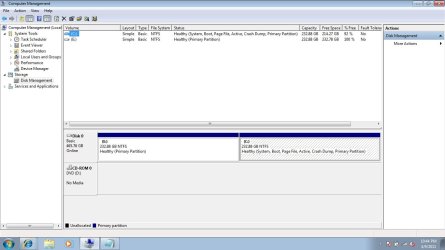
But before we proceed, I suggest you post a picture of your Win7 Disk Management. Then we'll see.
 

My Computer

Computer Manufacturer/Model Number
HP, Dell, Gateway, Toshiba - 4 laptops and 2 desktops
OS
Vista, Windows7, Mint Mate, Zorin, Windows 8
CPU
from 1.6GHz Duo to i7
Monitor(s) Displays
2x HP w2207
Hard Drives
5x HDD, 7x SSD, 12x Externals
Keyboard
with trackball - no mices
Mouse
Trackball mice
Internet Speed
DSL 6000
Disk Management.jpg
 

My Computer

OS
7 - 64 bit and XP
Here we go
 

Attachments

  • Disk Management.jpg
    Disk Management.jpg
    80.8 KB · Views: 29

My Computer

OS
7 - 64 bit and XP

My Computer

Computer Manufacturer/Model Number
Gigabyte
OS
windows 7 home premium
CPU
Dual Core Intel E5300 @ 3,25MHZ
Motherboard
Gigabyte G31M-esc2
Memory
3Gb generic
Graphics Card(s)
Xfx nvidia GT240
Sound Card
Creative SB Audigy2 oem
Monitor(s) Displays
AOC 2036 20"
Screen Resolution
1600x900
Hard Drives
Seagate 320 gb sata + WD 80GB
PSU
generic 500 watts
Case
Mustiff
Cooling
Coolermaster
Keyboard
Logitech wireless
Mouse
Razer Diamondback
Internet Speed
4.28 Mb/s 0.50 Mb/s 65 ms

My Computer

Computer Manufacturer/Model Number
Gigabyte
OS
windows 7 home premium
CPU
Dual Core Intel E5300 @ 3,25MHZ
Motherboard
Gigabyte G31M-esc2
Memory
3Gb generic
Graphics Card(s)
Xfx nvidia GT240
Sound Card
Creative SB Audigy2 oem
Monitor(s) Displays
AOC 2036 20"
Screen Resolution
1600x900
Hard Drives
Seagate 320 gb sata + WD 80GB
PSU
generic 500 watts
Case
Mustiff
Cooling
Coolermaster
Keyboard
Logitech wireless
Mouse
Razer Diamondback
Internet Speed
4.28 Mb/s 0.50 Mb/s 65 ms
Looks like you have Win7 on C and E is wiped out. Was E the XP partition? You must have specified formatting or another installation option when you installed Win7. Else I have no explanation why that partition was cleaned up.

With your level of experience I assume you have an image of the XP partition. If yes, the partition is easy to repopulate. Then you only have to fix the bootmgr.
 

My Computer

Computer Manufacturer/Model Number
HP, Dell, Gateway, Toshiba - 4 laptops and 2 desktops
OS
Vista, Windows7, Mint Mate, Zorin, Windows 8
CPU
from 1.6GHz Duo to i7
Monitor(s) Displays
2x HP w2207
Hard Drives
5x HDD, 7x SSD, 12x Externals
Keyboard
with trackball - no mices
Mouse
Trackball mice
Internet Speed
DSL 6000
This is the part I don't get.... You see here is the original Vs what I have now.

Original:

1 Disk - 2 partitions.
Disk 1 - partition 0 = C: This contained Win XP
Disk 1 - Partition 1 = E: This was empty.

After installing Win 7 I have the following:

Disk 1 partition 0 = NO Letter initially - After reading some I decided to assign it E in the hopes that the boot loader might pick it up. NO luck.
Disk 1 partition 1 = C: now with Win 7.

**Originally my partition with XP did have PGP whole disk encryption on it and was 32 bit, which is why I think it is showing as unrecognized and unmounted... This Win 7 is 64 bit. This is just a guess though.
 

My Computer

OS
7 - 64 bit and XP
And yea I have a clone back up at my office, but I have a flight out in the morning. No idea what possessed me to do this on the night before I fly out.... I normally laugh at people who do this sort of thing and call them rookies.....
 

My Computer

OS
7 - 64 bit and XP
The active partition is always C - and that is Win7 right now. Right now your E shows 100% free space, but I am not sure what role the PGP encryption could play in that.

What do you see when you open the E partition from Win7 ?
 

My Computer

Computer Manufacturer/Model Number
HP, Dell, Gateway, Toshiba - 4 laptops and 2 desktops
OS
Vista, Windows7, Mint Mate, Zorin, Windows 8
CPU
from 1.6GHz Duo to i7
Monitor(s) Displays
2x HP w2207
Hard Drives
5x HDD, 7x SSD, 12x Externals
Keyboard
with trackball - no mices
Mouse
Trackball mice
Internet Speed
DSL 6000
it shows 116MB utilzed, but no files show when I go to look. I came across this error many moons ago when dual booting Win98 and (FAT32) and Win2k (NTFS) This was what one OS would say about the other because they didn't recognize each other.... My main problem is that the tool EasyBCD won't work.... grrrr FML....
 

My Computer

OS
7 - 64 bit and XP
Hi GWilkie,

Do you have a folder on the C: drive called Windows.old? HOPEFULLY Win7 left it there for you and you can extract stuff from it.
 

My Computer

Computer Manufacturer/Model Number
Myself
OS
Win7 Ultimate x64, Server 2008 R2
CPU
AMD Phenom II X6 1055T Thuban 2.8GHz
Motherboard
GIGABYTE GA-890FXA-UD5
Memory
8GB G.SKILL Ripjaws Series DDR3 1600 (PC3 12800)
Graphics Card(s)
2x HIS/Sapphire ATI Radeon HD 5830 in CrossfireX
Sound Card
Sound Blaster X-Fi Xtreme
Monitor(s) Displays
Dell 2407WFP 24", Dell 22"
Screen Resolution
1920x1200
Hard Drives
Patriot Torqx 128GB SSD
3TB other HD
PSU
CORSAIR HX Series CMPSU-750HX 750W
Case
Antec Nine Hundred
Cooling
Cooler Master Hyper 212 Plus CPU cooler
Keyboard
SteelSeries MercStealth
Mouse
Razer Lachesis
Internet Speed
HAHA NO MOAR COMCAST. Now, FiOS :D
Other Info
I am a virtualization enthusiast. I like Hyper-V. It's free.
I'm a Windows 7 fangirl. I will teach a class for you or write a custom course for you RIGHT NOW.
I love EVE Online. I'm Sayra Sainer. I play Starcraft II. My gamertag is Tal0nn. I'm trying not to play Minecraft.
I also like coffee. I'll take a basic triple grande extra-hot breve stirred ristretto caramel machiatto.
That would be great; however, the windows.old directory wouldn't exist on dual boot or clean install which is what I have. Thank you for the post though.
 

My Computer

OS
7 - 64 bit and XP
have you tried the software that i tell you before
 

My Computer

Computer Manufacturer/Model Number
Gigabyte
OS
windows 7 home premium
CPU
Dual Core Intel E5300 @ 3,25MHZ
Motherboard
Gigabyte G31M-esc2
Memory
3Gb generic
Graphics Card(s)
Xfx nvidia GT240
Sound Card
Creative SB Audigy2 oem
Monitor(s) Displays
AOC 2036 20"
Screen Resolution
1600x900
Hard Drives
Seagate 320 gb sata + WD 80GB
PSU
generic 500 watts
Case
Mustiff
Cooling
Coolermaster
Keyboard
Logitech wireless
Mouse
Razer Diamondback
Internet Speed
4.28 Mb/s 0.50 Mb/s 65 ms
The 116MBs is peanuts for a missing system. Not sure what that is - maybe the residual XP bootmgr. There is a possibility that Win7 may not see any files because of the encryption. But I have no experience with that encryptiom program and what it would do to you. I suggest you persue that encryption path a bit more. But there I cannot help you because I just have no knowledge in that area.

Btw. There will be not Windows.old. You get that only with an upgrade. But you made a clean install.
 

My Computer

Computer Manufacturer/Model Number
HP, Dell, Gateway, Toshiba - 4 laptops and 2 desktops
OS
Vista, Windows7, Mint Mate, Zorin, Windows 8
CPU
from 1.6GHz Duo to i7
Monitor(s) Displays
2x HP w2207
Hard Drives
5x HDD, 7x SSD, 12x Externals
Keyboard
with trackball - no mices
Mouse
Trackball mice
Internet Speed
DSL 6000
I am in that software now. The partition shows just like it did in windows.... Just gotta figure out what step to take next.
 

My Computer

OS
7 - 64 bit and XP
Hmm, that sounds like progress. I would focus on recovering your user data. The XP you can always reinstall - if you still need it.
 

My Computer

Computer Manufacturer/Model Number
HP, Dell, Gateway, Toshiba - 4 laptops and 2 desktops
OS
Vista, Windows7, Mint Mate, Zorin, Windows 8
CPU
from 1.6GHz Duo to i7
Monitor(s) Displays
2x HP w2207
Hard Drives
5x HDD, 7x SSD, 12x Externals
Keyboard
with trackball - no mices
Mouse
Trackball mice
Internet Speed
DSL 6000
OK.... so... PGP whole disk encryption will not let Win7 see anything on the disk. That is why little to no data shows up on the "new" e: that should be/used to be C:

This is also why EasyBCD will not allow me to add Win XP boot loaded because it doesn't see WIN XP anywhere....

Now that I uncovered this.... anybody got an idea?
 

My Computer

OS
7 - 64 bit and XP
Back
Top