Dual boot delima

Warewasher

New member
Local time
11:07 PM
Messages
23
Location
Florida
So here's the problem........
I just rebuilt my system with an Asus Sabertooth Z97 with a new SSD Samsung EVO 120 GB.
Installed Windows 7 and all is well.
Not to waste my WD 2 TB hard drive I also installed another copy of windows 7 on one partition and windows 8.1 on the second partition. By way of a manual hard drive switch and Easy BSD I can switch between either hard drive. And on the 2 TB hard drive and Easy BSD I can choose which OS to boot.
Now when I go back to the SSD it says I need to insert Windows & to repair the installation. It works and now go back to the other drive and I get the same message.....windows 8.1 makes the repairs.
This worked OK on my old system.
With the hard drive switch ,one drive is dead while the other is on. How can the boot manager see the other drive?
Any ideas. I also have a 3rd hard drive with data on it that is common to both.
I'm a little stumped.
 

My Computer

OS
Windows XP/ Vista/ 7
CPU
AMD
Motherboard
M4A79 Delux
Memory
4 G
Sound Card
on Board
Don't use a hard drive switch, the BIOS provides a key to do this on every model. You can also rely on EasyBCD to create a Windows Boot Menu if BIOS booting is not to your liking.

Plug in all drives and post back a screenshot of Disk Management - Post a Screen Capture Image
so we can help you sort it out.

Why do you need two Win7 installations? You have to buy two licenses. Better to have one perfect install.
 
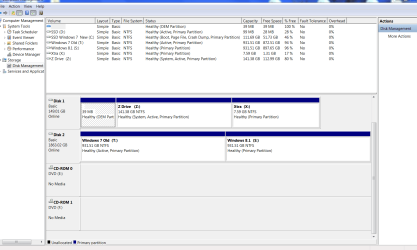
OK here's the screen shot you asked for.
I have 2 installations of windows 7 for a couple of reasons. I have a lot of data on there from my last system and I was not so sure about the SSD yet.

So to recap I want to dual boot the WD 2 tb hard drive windows 7 and windows 8.1 ( it's all ready installed) And boot the SSD separately as needed. I removed the hard drive switch as requested.
Thanks for your help.
 

Attachments

  • Capture   072214.PNG
    Capture 072214.PNG
    44.3 KB · Views: 4

My Computer

OS
Windows XP/ Vista/ 7
CPU
AMD
Motherboard
M4A79 Delux
Memory
4 G
Sound Card
on Board
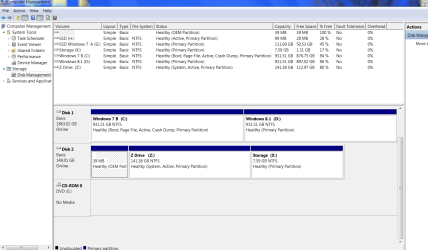
Here's the whole thing....sorry
 

Attachments

  • Capture2.PNG
    Capture2.PNG
    42.8 KB · Views: 4

My Computer

OS
Windows XP/ Vista/ 7
CPU
AMD
Motherboard
M4A79 Delux
Memory
4 G
Sound Card
on Board
Now you should be able to use the BIOS to choose which OS you want to boot from.

You should also remove the letter D from the 99MB partition on Drive 0, it does not need a letter.
 
Last edited:

My Computer

Computer type
PC/Desktop
Computer Manufacturer/Model Number
Skylake Special #666
OS
Windows 10 Pro x64
CPU
Intel Core i7 6700K
Motherboard
Asus Sabertooth Z170 Mark 1
Memory
GSkill TridentZ RGB 16GB 3600 16-16-16-36
Graphics Card(s)
EVGA GTX 980 Ti SC x2
Sound Card
Realtek High Definition
Monitor(s) Displays
AOC G2460PG
Screen Resolution
1920 x 1080 144Hz
Hard Drives
Samsung 860 Pro 256GB, Seagate Barracuda 4TB x2
PSU
EVGA 1000 P2, EVGA White Custom Braided Cables
Case
Corsair Vengeance C70 Gunmetal Black
Cooling
Corsair H100i v2, Corsair ML120 x2, Thermal Grizzly Kryonaut
Keyboard
Logitech G910 Orion Spectrum
Mouse
Logitech G700s
Internet Speed
Verizon Fios Quantum Gateway 75/75
Antivirus
Windows Defender, Malwarebytes Free 3.8.3
Browser
Chrome
Other Info
Corsair SP120 x4, LG Blu-ray Drive, Durabrand HT-395 100 Watt Dolby Digital Amp, Corsair H2100 Wireless 7.1 Headset
All are being booted by Z as signified by the System label on it. Is it even an OS partition?

Before doing anything else lets see a screenshot of Disk Mgmt from the other Win7.

To make the SSD independently bootable unplug all other Hard drives and run 3 separate Startup Repairs on it til it starts and wears the System Active flags. Take another screenshot.

Then I'll give you steps to make the separate 7/8 Dual Boot independently bootable via BIOS , although if you prefer we can still add all or some to a Windows Boot menu while they remain independently bootable.
 
All is well thanks. All boot separately using Easy BSD.
 

My Computer

OS
Windows XP/ Vista/ 7
CPU
AMD
Motherboard
M4A79 Delux
Memory
4 G
Sound Card
on Board
If you didn't make the repairs then neither the SSD or the 2tb HD OS's are able to boot themselves but are being booted via the Z partition. It would be better to make them independently bootable now rather than wait until you make changes and find that they will not boot. Isn't this why you asked for our help? You will not find this level of support anywhere else.
 
Yes you are correct. I'm am traveling for a few days and away from my desktop machine.
I will proceed when I get back early next week.
I appreciate all the help from this site.
 

My Computer

OS
Windows XP/ Vista/ 7
CPU
AMD
Motherboard
M4A79 Delux
Memory
4 G
Sound Card
on Board
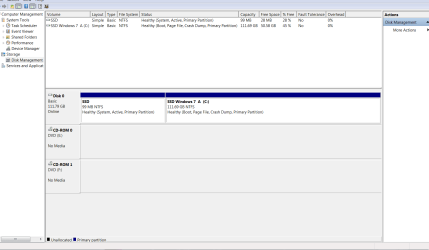
OK here's the screen shot from my other Windows 7 /Windows 8 HD.
Now I will follow your instructions to run system repair 3 time with the SSD only plugged in.
I will follow with a screen shot after.
Thanks again for all the help and support.
 

Attachments

  • Capture 3.PNG
    Capture 3.PNG
    43.7 KB · Views: 2

My Computer

OS
Windows XP/ Vista/ 7
CPU
AMD
Motherboard
M4A79 Delux
Memory
4 G
Sound Card
on Board
Here's the next screen shot.
I'm assuming that I should do the same with my other windows 7 installation?
 

Attachments

  • Capture 4.PNG
    Capture 4.PNG
    26.5 KB · Views: 2

My Computer

OS
Windows XP/ Vista/ 7
CPU
AMD
Motherboard
M4A79 Delux
Memory
4 G
Sound Card
on Board
Yes, you should, then both systems will boot independently.
 

My Computer

Computer type
PC/Desktop
Computer Manufacturer/Model Number
Skylake Special #666
OS
Windows 10 Pro x64
CPU
Intel Core i7 6700K
Motherboard
Asus Sabertooth Z170 Mark 1
Memory
GSkill TridentZ RGB 16GB 3600 16-16-16-36
Graphics Card(s)
EVGA GTX 980 Ti SC x2
Sound Card
Realtek High Definition
Monitor(s) Displays
AOC G2460PG
Screen Resolution
1920 x 1080 144Hz
Hard Drives
Samsung 860 Pro 256GB, Seagate Barracuda 4TB x2
PSU
EVGA 1000 P2, EVGA White Custom Braided Cables
Case
Corsair Vengeance C70 Gunmetal Black
Cooling
Corsair H100i v2, Corsair ML120 x2, Thermal Grizzly Kryonaut
Keyboard
Logitech G910 Orion Spectrum
Mouse
Logitech G700s
Internet Speed
Verizon Fios Quantum Gateway 75/75
Antivirus
Windows Defender, Malwarebytes Free 3.8.3
Browser
Chrome
Other Info
Corsair SP120 x4, LG Blu-ray Drive, Durabrand HT-395 100 Watt Dolby Digital Amp, Corsair H2100 Wireless 7.1 Headset
The SSD is fine. Unplug Z drive to run 3 Startup Repairs to write boot files to Active partition until it starts. Then if necessary install EasyBCD to add Win8 to boot menu.

Plug back in SSD, set it first to boot in BIOS setup. Trigger HD when needed using one-time BIOS boot menu key.

When/if you plug back in Z mark it Inactive as given earlier.

Let us know how you like this.
 
Back
Top