dual boot dual drive

dredge3

New member
Member
Local time
2:57 AM
Messages
33
Ok I have read the tutorial.
This is my first post..HI;)
I have Win XP 32 bit on my old drive. I buy Win 7 full retail and a new HD. I set bios to boot from cd etc. Win 7 starts up. It shows the 2 drives, so I select new drive...no problems. It starts install. I leave it to do its stuff.When I come back its up and all ok.I dint get any option to boot from XP. The drive was listed as "SYSTEM" but not old Windows or anything.
HELP!!
Also ASUS chipset drivers dont work and they were listed as 7 drivers.I tried Vista drivers but it normally shuts down and restarts. Nothing. Took only a second and screen pops up asking if it worked? how do I know lol
 

My Computer

OS
win 7 full retail 64....xp 32
CPU
I7 920
Motherboard
ASUS P6T Del
Memory
3gb
Graphics Card(s)
ati 4800
Hard Drives
WD Raptor X 150
WD black 500
PSU
corsair 620
Case
thermaltake
Cooling
8 case fans
Internet Speed
cable

My Computer

OS
ME/XP/Vista/Win7
If I remove new drive it boots. Thats what I am on now. Ill connect new drive up and look in Win 7 Disc Manaqger. I dont think bios puts letters to drives, just boot order...I thing
 

My Computer

OS
win 7 full retail 64....xp 32
CPU
I7 920
Motherboard
ASUS P6T Del
Memory
3gb
Graphics Card(s)
ati 4800
Hard Drives
WD Raptor X 150
WD black 500
PSU
corsair 620
Case
thermaltake
Cooling
8 case fans
Internet Speed
cable
Hope this works
 

Attachments

  • disk man.jpg
    disk man.jpg
    75.3 KB · Views: 179

My Computer

OS
win 7 full retail 64....xp 32
CPU
I7 920
Motherboard
ASUS P6T Del
Memory
3gb
Graphics Card(s)
ati 4800
Hard Drives
WD Raptor X 150
WD black 500
PSU
corsair 620
Case
thermaltake
Cooling
8 case fans
Internet Speed
cable
The 465 gb drive is the W7 drive and 139 XP
 

My Computer

OS
win 7 full retail 64....xp 32
CPU
I7 920
Motherboard
ASUS P6T Del
Memory
3gb
Graphics Card(s)
ati 4800
Hard Drives
WD Raptor X 150
WD black 500
PSU
corsair 620
Case
thermaltake
Cooling
8 case fans
Internet Speed
cable
He has the situation where the boot files are in the System Reserved Partition.

Can you reinstall Win 7? If you do, pre-partition the drive and format that partition so you do not get the Reserved partition.

The most important thing about installing in a dual boot situation is to determine which drive is primary. If you look in the bios, there is a drive order, not boot order, listing. The first one listed is the primary drive. The SATA connectors determine which drive is drive 0.

In your case, you installed Win 7 with the new drive listed as primary, so Win 7 made it own special partition, but it did not see the XP drive because it did not need to. setting up a dual boot with independent OSes is not a problem, but doing it with the system reserved partition adds new challenges.

NOTE: I have heard the reserved partition may be used for bitlocker. If you are using that, you may not want remove the partition.

Don't worry about the chipset drivers for now.
 

My Computer

Computer Manufacturer/Model Number
Homebuilt
OS
Windows 7 x64
CPU
i7-2600K
Motherboard
Asus P8Z77-v Pro
Memory
8 G
Graphics Card(s)
GTX 480
Sound Card
Onboard
Monitor(s) Displays
LG W2753V
Screen Resolution
1920x1080
Hard Drives
Crucial M4 128 G SSD
Hi dredge,

Rt click the 100mb partition in Disk Management and give it drive letter S.

Copy the 3 files from this .zip onto S.

View attachment xpbtfiles.zip

Open an elevated command ( type cmd in start serch - when the black box pops up, rt click it and Run As Admin).

Type: (press enter after each line)

bcdedit /create {ntldr} /d "Windows XP"
bcdedit /set {ntldr} device boot
bcdedit /set {ntldr} path \ntldr
bcdedit /displayorder {ntldr} /addlast

close cmd.

You're good.
 
Last edited:

My Computers

System One System Two

  • Computer type
    PC/Desktop
    OS
    7 X64
    CPU
    i5 8400
    Motherboard
    gigabyte b365m ds3h
    Memory
    2x8gb 3200mhz
    Hard Drives
    various
    PSU
    pure power 11 400w cm
    Case
    Coolermaster
    Cooling
    cryorig m9i
  • Computer type
    PC/Desktop
    OS
    7x64
    CPU
    g5400
    Motherboard
    ga b365m ds3h
    Memory
    8gb ddr4 2400
    PSU
    xfx pro 450w
It is not a good idea to change the drivers given in the Win7 installer and via Updates unless they cause performance problems.

This is not XP or Vista. MS sponsored the WHQL partnership with all manufacturers to build drivers for Win7, so they have them first since they paid the bill.

There are exceptions but you should wait for them to present themselves in performance, or the case of hardware in Device Manager being in an error state.
 
He has the situation where the boot files are in the System Reserved Partition.

Can you reinstall Win 7? If you do, pre-partition the drive and format that partition so you do not get the Reserved partition.

The most important thing about installing in a dual boot situation is to determine which drive is primary. If you look in the bios, there is a drive order, not boot order, listing. The first one listed is the primary drive. The SATA connectors determine which drive is drive 0.

In your case, you installed Win 7 with the new drive listed as primary, so Win 7 made it own special partition, but it did not see the XP drive because it did not need to. setting up a dual boot with independent OSes is not a problem, but doing it with the system reserved partition adds new challenges.

NOTE: I have heard the reserved partition may be used for bitlocker. If you are using that, you may not want remove the partition.

Don't worry about the chipset drivers for now.
When I first instaled 7, bios didnt detect new HD. I have tried setting main drive as both. The only issue I have picked up was main drive and cdrom drive were set in sata6 and 7. Ill re connect to sats 12 and 3. Then ill do what what greg said.
 

My Computer

OS
win 7 full retail 64....xp 32
CPU
I7 920
Motherboard
ASUS P6T Del
Memory
3gb
Graphics Card(s)
ati 4800
Hard Drives
WD Raptor X 150
WD black 500
PSU
corsair 620
Case
thermaltake
Cooling
8 case fans
Internet Speed
cable
It starts to get confusing after several posts about the current situation. From what I can tell, you had
Win 7 booting fine but needed to dual boot with XP. SIW2 was telling you how to do that since you need to put the XP boot files in the Special partition.

The 3 files from the .zip were probably ntldr, boot.ini, and ntdetect.

Maybe if you post another picture of the disk management window and a picture of an administrative command window after your type bcdedit. If you have not modified the boot.ini file, you will probably need to, and you might as well put in a copy of the boot.ini file also.
 

My Computer

Computer Manufacturer/Model Number
Homebuilt
OS
Windows 7 x64
CPU
i7-2600K
Motherboard
Asus P8Z77-v Pro
Memory
8 G
Graphics Card(s)
GTX 480
Sound Card
Onboard
Monitor(s) Displays
LG W2753V
Screen Resolution
1920x1080
Hard Drives
Crucial M4 128 G SSD
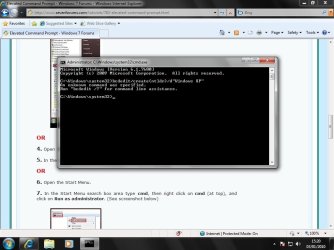
Changed drive to "S" no problem.extracted 3 files and put them into S drive.Then opened elevated command (in win 7)tryed typing this. as you can see it didnt like it. Have I typed it wrong
 

Attachments

  • bcdedit.jpg
    bcdedit.jpg
    75.5 KB · Views: 31

My Computer

OS
win 7 full retail 64....xp 32
CPU
I7 920
Motherboard
ASUS P6T Del
Memory
3gb
Graphics Card(s)
ati 4800
Hard Drives
WD Raptor X 150
WD black 500
PSU
corsair 620
Case
thermaltake
Cooling
8 case fans
Internet Speed
cable
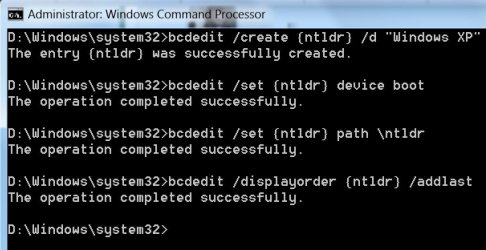
You haven't got the spaces in there.

It might be easier for you to copy and paste the commands.

bcdedit /create {ntldr} /d "Windows XP"

bcdedit /set {ntldr} device boot

bcdedit /set {ntldr} path \ntldr

bcdedit /displayorder {ntldr} /addlast


Like this ( except you are doing it from C:\Windows\system32> )

BCDEDIT-ADD-XP-2010-01-03_175545.jpg
 
Last edited:

My Computers

System One System Two

  • Computer type
    PC/Desktop
    OS
    7 X64
    CPU
    i5 8400
    Motherboard
    gigabyte b365m ds3h
    Memory
    2x8gb 3200mhz
    Hard Drives
    various
    PSU
    pure power 11 400w cm
    Case
    Coolermaster
    Cooling
    cryorig m9i
  • Computer type
    PC/Desktop
    OS
    7x64
    CPU
    g5400
    Motherboard
    ga b365m ds3h
    Memory
    8gb ddr4 2400
    PSU
    xfx pro 450w
Ok I have read the tutorial.
This is my first post..HI;)
I have Win XP 32 bit on my old drive. I buy Win 7 full retail and a new HD. I set bios to boot from cd etc. Win 7 starts up. It shows the 2 drives, so I select new drive...no problems. It starts install. I leave it to do its stuff.When I come back its up and all ok.I dint get any option to boot from XP. The drive was listed as "SYSTEM" but not old Windows or anything.
HELP!!
Also ASUS chipset drivers dont work and they were listed as 7 drivers.I tried Vista drivers but it normally shuts down and restarts. Nothing. Took only a second and screen pops up asking if it worked? how do I know lol

Hi dredge. If u have installed 7 from within xp, this problem wount occur. But now you are to get rid of it, so u should install xp bootloader. Try vista boot pro or easybcd to install xp bootloader, and everything should be solved.

In my experience, 7 doesnt need chipset drivers, neither for graphics nor for network. i also have an asus motherboard, it runs fine without drivers.
 

My Computer

Computer type
PC/Desktop
Computer Manufacturer/Model Number
Self Assembled
OS
Microsoft Windows 10 Pro Insider Preview 64-bit
CPU
Intel(R) Core(TM) i3-4130 CPU @ 3.40GHz
Motherboard
Gigabyte Technology Co., Ltd. B85M-D3H
Memory
Corsair Vengence 4GB x2 (8.00GB Dual-Channel DDR3 @ 798MHz)
Graphics Card(s)
2047MB GeForce GTS 450 (ZOTAC International)
Sound Card
Onboard (Realtek High Definition Audio)
Monitor(s) Displays
LG Flatron E2040T
Screen Resolution
1600x900
Hard Drives
Western Digital 1 TB
Seagate 500 GB
PSU
Corsair VS550
Case
Cooler Master K380
Cooling
Cooler Master Seidon 120V Plus
Keyboard
Logitech MK260r
Mouse
Logitech MK260r
Internet Speed
PMPL Broadband
Antivirus
Windows Defender + MBAM
Browser
Firefox
Other Info
Dell Studio 15" Laptop
Ok I have read the tutorial.
This is my first post..HI;)
I have Win XP 32 bit on my old drive. I buy Win 7 full retail and a new HD. I set bios to boot from cd etc. Win 7 starts up. It shows the 2 drives, so I select new drive...no problems. It starts install. I leave it to do its stuff.When I come back its up and all ok.I dint get any option to boot from XP. The drive was listed as "SYSTEM" but not old Windows or anything.
HELP!!
Also ASUS chipset drivers dont work and they were listed as 7 drivers.I tried Vista drivers but it normally shuts down and restarts. Nothing. Took only a second and screen pops up asking if it worked? how do I know lol

Hi dredge. If u have installed 7 from within xp, this problem wount occur. But now you are to get rid of it, so u should install xp bootloader. Try vista boot pro or easybcd to install xp bootloader, and everything should be solved.

In my experience, 7 doesnt need chipset drivers, neither for graphics nor for network. i also have an asus motherboard, it runs fine without drivers.

I havnt installed 7 from within XP, if I am undertanding what you mean
 

My Computer

OS
win 7 full retail 64....xp 32
CPU
I7 920
Motherboard
ASUS P6T Del
Memory
3gb
Graphics Card(s)
ati 4800
Hard Drives
WD Raptor X 150
WD black 500
PSU
corsair 620
Case
thermaltake
Cooling
8 case fans
Internet Speed
cable
You haven't got the spaces in there.

It might be easier for you to copy and paste the commands.

bcdedit /create {ntldr} /d "Windows XP"

bcdedit /set {ntldr} device boot

bcdedit /set {ntldr} path \ntldr

bcdedit /displayorder {ntldr} /addlast


Like this ( except you are doing it from C:\Windows\system32> )

View attachment 45388

Where should I be doing it from?
 

My Computer

OS
win 7 full retail 64....xp 32
CPU
I7 920
Motherboard
ASUS P6T Del
Memory
3gb
Graphics Card(s)
ati 4800
Hard Drives
WD Raptor X 150
WD black 500
PSU
corsair 620
Case
thermaltake
Cooling
8 case fans
Internet Speed
cable
Exactly the way you did it before ( except you didn't type it in right ). Copy and paste the above commands, instead of typing them - press enter after each one.

What I meant was,in your screenshot, your command window says C:\Windows\system32> . That is how it should be.

My command window says D:\Windows\system32> because I am booted into D.

Do exactly what you were doing - copy and paste this time, instead of trying to type the commands.
 

My Computers

System One System Two

  • Computer type
    PC/Desktop
    OS
    7 X64
    CPU
    i5 8400
    Motherboard
    gigabyte b365m ds3h
    Memory
    2x8gb 3200mhz
    Hard Drives
    various
    PSU
    pure power 11 400w cm
    Case
    Coolermaster
    Cooling
    cryorig m9i
  • Computer type
    PC/Desktop
    OS
    7x64
    CPU
    g5400
    Motherboard
    ga b365m ds3h
    Memory
    8gb ddr4 2400
    PSU
    xfx pro 450w
Ok I have read the tutorial.
This is my first post..HI;)
I have Win XP 32 bit on my old drive. I buy Win 7 full retail and a new HD. I set bios to boot from cd etc. Win 7 starts up. It shows the 2 drives, so I select new drive...no problems. It starts install. I leave it to do its stuff.When I come back its up and all ok.I dint get any option to boot from XP. The drive was listed as "SYSTEM" but not old Windows or anything.
HELP!!
Also ASUS chipset drivers dont work and they were listed as 7 drivers.I tried Vista drivers but it normally shuts down and restarts. Nothing. Took only a second and screen pops up asking if it worked? how do I know lol

Hi dredge. If u have installed 7 from within xp, this problem wount occur. But now you are to get rid of it, so u should install xp bootloader. Try vista boot pro or easybcd to install xp bootloader, and everything should be solved.

In my experience, 7 doesnt need chipset drivers, neither for graphics nor for network. i also have an asus motherboard, it runs fine without drivers.

I havnt installed 7 from within XP, if I am undertanding what you mean

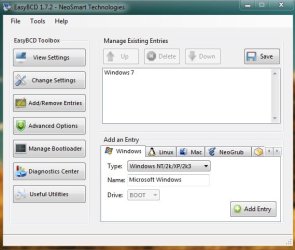
My wanted to say you that now u install a software named easybcd. In the add/remove entry tab, add an windows entry of type xp in the boot drive (system reserved). From the picture u may understand it.

Moreover , a newer version of windows is easily installable in an earlier version. It is the easy way to have a dual boot. In the reverse situation, The process is a bit lengthy. It is to configure the boot then.
 

Attachments

  • Untitled.jpg
    Untitled.jpg
    35.7 KB · Views: 9

My Computer

Computer type
PC/Desktop
Computer Manufacturer/Model Number
Self Assembled
OS
Microsoft Windows 10 Pro Insider Preview 64-bit
CPU
Intel(R) Core(TM) i3-4130 CPU @ 3.40GHz
Motherboard
Gigabyte Technology Co., Ltd. B85M-D3H
Memory
Corsair Vengence 4GB x2 (8.00GB Dual-Channel DDR3 @ 798MHz)
Graphics Card(s)
2047MB GeForce GTS 450 (ZOTAC International)
Sound Card
Onboard (Realtek High Definition Audio)
Monitor(s) Displays
LG Flatron E2040T
Screen Resolution
1600x900
Hard Drives
Western Digital 1 TB
Seagate 500 GB
PSU
Corsair VS550
Case
Cooler Master K380
Cooling
Cooler Master Seidon 120V Plus
Keyboard
Logitech MK260r
Mouse
Logitech MK260r
Internet Speed
PMPL Broadband
Antivirus
Windows Defender + MBAM
Browser
Firefox
Other Info
Dell Studio 15" Laptop
You could use Easybcd to add the XP bcd entry - instead of the commands listed above. Easybcd is a GUI for bcdedit and will run exactly the same commands for you.

Not necessary, though. The commands take 5 seconds to do.

I am on the Neosmart Forums and have been testing the beta versions of the forthcoming Easybcd version - it will offer a lot more functions.

Arc , you are just confusing the issue by suggesting alternatives.
 

My Computers

System One System Two

  • Computer type
    PC/Desktop
    OS
    7 X64
    CPU
    i5 8400
    Motherboard
    gigabyte b365m ds3h
    Memory
    2x8gb 3200mhz
    Hard Drives
    various
    PSU
    pure power 11 400w cm
    Case
    Coolermaster
    Cooling
    cryorig m9i
  • Computer type
    PC/Desktop
    OS
    7x64
    CPU
    g5400
    Motherboard
    ga b365m ds3h
    Memory
    8gb ddr4 2400
    PSU
    xfx pro 450w
Yes you are:D Already lookes up that idea. It was suppost to be a simple, install 7 and it will ask to dual boot :cry: Ill try it now
 

My Computer

OS
win 7 full retail 64....xp 32
CPU
I7 920
Motherboard
ASUS P6T Del
Memory
3gb
Graphics Card(s)
ati 4800
Hard Drives
WD Raptor X 150
WD black 500
PSU
corsair 620
Case
thermaltake
Cooling
8 case fans
Internet Speed
cable
Have you done the commands yet?

It's very quick and easy.
 

My Computers

System One System Two

  • Computer type
    PC/Desktop
    OS
    7 X64
    CPU
    i5 8400
    Motherboard
    gigabyte b365m ds3h
    Memory
    2x8gb 3200mhz
    Hard Drives
    various
    PSU
    pure power 11 400w cm
    Case
    Coolermaster
    Cooling
    cryorig m9i
  • Computer type
    PC/Desktop
    OS
    7x64
    CPU
    g5400
    Motherboard
    ga b365m ds3h
    Memory
    8gb ddr4 2400
    PSU
    xfx pro 450w
Back
Top