Solved Dual Boot Error (Win7 and Win XP)

inwell

New member
Member
Local time
8:05 AM
Messages
53
Hello,

I have two HDDs one with Win7(250GB) and other with WinXP(120GB). As my PC does not allow me to select boot drive by pressing F8 or any key, i tried to make it dual boot using EasyBCD.

I installed EasyBCD on Win7 and as per the tutorial added entry to Win Xp and then follwed the steps to Install WinXP bootloader to MBR and then write MBR.

When i rebooted PC with Win7 disk as my primary boot drive it ended up in error invalid Boot.ini file ,booting from C:\Windows

as i have Win XP installed on another drive i can boot in XP without any problem. (before adding EasyBCD to my Win7,it was working fine too )(but each time i had to change the HDD order in boot order of my BIOS)

what is the resolve ?


thank you


http://www.daniweb.com/hardware-and...9/invalid-boot.ini-file-booting-from-cwindows
 

My Computer

OS
Windows 7 Pro x64 ,Windows 8 Ent x64 and Windows Xp SP2
CPU
AMD FX-8150
Motherboard
ASUS M5A97 R2.0
Memory
32Gb
Hard Drives
500Gb Seagate 7200 rpm
PSU
Coolermaster 600Watt 80+
Case
Coolermaster 690 ii
Keyboard
Logitech
Mouse
Logitech
Do you see the win7 bootmenu? Options win7 works? option winxp is in menu ?

Post boot.ini
 

My Computer

Computer type
Laptop
Computer Manufacturer/Model Number
ACER ASPIRE 5742G
OS
Microsoft Windows 7 Home Premium 64-bits 7601 Multiprocessor Free Service Pack 1
CPU
Intel(R) Core(TM) i3 CPU M 370 @ 2.40GHz
Motherboard
Acer Aspire 5742G
Memory
4,00 GB
Graphics Card(s)
ATI Mobility Radeon HD 5400 Series
Sound Card
(1) AMD High Definition Audio Device (2) Realtek High Defi
Screen Resolution
1366 x 768 x 32 bits (4294967296 colors) @ 60 Hz
Hard Drives
WDC WD5000BEVT-22ZAT0
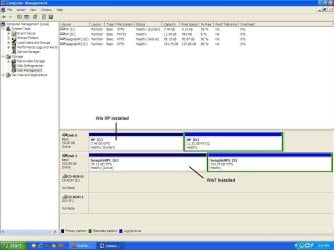
Post disk management screenshot as well
 

My Computer

Computer type
Laptop
Computer Manufacturer/Model Number
ACER ASPIRE 5742G
OS
Microsoft Windows 7 Home Premium 64-bits 7601 Multiprocessor Free Service Pack 1
CPU
Intel(R) Core(TM) i3 CPU M 370 @ 2.40GHz
Motherboard
Acer Aspire 5742G
Memory
4,00 GB
Graphics Card(s)
ATI Mobility Radeon HD 5400 Series
Sound Card
(1) AMD High Definition Audio Device (2) Realtek High Defi
Screen Resolution
1366 x 768 x 32 bits (4294967296 colors) @ 60 Hz
Hard Drives
WDC WD5000BEVT-22ZAT0
@Kaktussoft

no options,no boot menu is seen when booting from Win7 installation HDD. (Selecting XP HDD as boot device takes directly in to Win XP without any error )

boot.ini from win XP installation
[boot loader]
timeout=15
default=multi(0)disk(0)rdisk(0)partition(1)\WINDOWS
[operating systems]
multi(0)disk(0)rdisk(0)partition(1)\WINDOWS="Microsoft Windows XP Professional" /noexecute=optin /fastdetect

from Win7 Installation

; This boot.ini was automatically generated by NeoSmart Technologies' BootGrabber.exe
; Use EasyBCD from EasyBCD - NeoSmart Technologies to manage your bootloader

[boot loader]
timeout=15
default=multi(0)disk(0)rdisk(1)partition(1)\WINDOWS
[operating systems]
multi(0)disk(0)rdisk(1)partition(1)\WINDOWS="Windows XP on G:\" /fastdetect
 

Attachments

  • Disk Management_WinXP.JPG
    Disk Management_WinXP.JPG
    83.6 KB · Views: 10
Last edited:

My Computer

OS
Windows 7 Pro x64 ,Windows 8 Ent x64 and Windows Xp SP2
CPU
AMD FX-8150
Motherboard
ASUS M5A97 R2.0
Memory
32Gb
Hard Drives
500Gb Seagate 7200 rpm
PSU
Coolermaster 600Watt 80+
Case
Coolermaster 690 ii
Keyboard
Logitech
Mouse
Logitech

My Computer

Computer type
Laptop
Computer Manufacturer/Model Number
ACER ASPIRE 5742G
OS
Microsoft Windows 7 Home Premium 64-bits 7601 Multiprocessor Free Service Pack 1
CPU
Intel(R) Core(TM) i3 CPU M 370 @ 2.40GHz
Motherboard
Acer Aspire 5742G
Memory
4,00 GB
Graphics Card(s)
ATI Mobility Radeon HD 5400 Series
Sound Card
(1) AMD High Definition Audio Device (2) Realtek High Defi
Screen Resolution
1366 x 768 x 32 bits (4294967296 colors) @ 60 Hz
Hard Drives
WDC WD5000BEVT-22ZAT0
@Kaktussoft

I cannot boot in to windows 7... :(
windows seven disk halts @ the error invalid Boot.ini
 

My Computer

OS
Windows 7 Pro x64 ,Windows 8 Ent x64 and Windows Xp SP2
CPU
AMD FX-8150
Motherboard
ASUS M5A97 R2.0
Memory
32Gb
Hard Drives
500Gb Seagate 7200 rpm
PSU
Coolermaster 600Watt 80+
Case
Coolermaster 690 ii
Keyboard
Logitech
Mouse
Logitech
Do you boot in UEFI mode or Legacy BIOS mode?
I found this KB article that may help?
M5A97 R2.0 - Motherboards - ASUS

In your specs it also shows you have Win 8 Ent...
 

My Computer

Computer type
PC/Desktop
Computer Manufacturer/Model Number
home built
OS
Multi-Boot W7_Pro_x64 W8.1_Pro_x64 W10_Pro_x64 +Linux_VMs +Chromium_VM
CPU
AMD Athlon II x4 620
Motherboard
Gigabyte GA-MA785G-UD3H
Memory
6GB GSkill DDR2 800
Graphics Card(s)
AMD 4670 GPU + AMD 4200 IGP
Sound Card
on board Realtek ALC889A
Monitor(s) Displays
RCA 40" LCD TV, Insignia 32" LCD TV, HP 15" LCD monitor
Screen Resolution
1680 x 1050
Hard Drives
OCZ Vertex 3 120GB,
Samsung F3 1TB (3),
Several others - WD, Seagate, Hitachi, ...
PSU
Corsair 500 W
Case
Rosewill mid tower
Cooling
CM 90mm rifle
Keyboard
Gyration wireless, Logitech wireless, Dell USB wired
Mouse
Gyration wireless, Logitech wireless, V7 USB wired
Internet Speed
Spectrum - 100Mbps D / 10Mbps U
Antivirus
Avast, MBAM3, EMET, WinPatrol
Browser
Pale Moon, Firefox, IE
Other Info
2 multi-boot PC's
Mainly HTPC/Office/Gen purpose (no gaming).
Trendnet USB KVM.
LG DVD burner/Blue Ray Player.
Tray system for removable SATA backup drives.

Not currently OCd, under-volted.
I use Hybrid sleep, rarely re-boot or shutdown.

Hauppauge HD-PVR, Avermedia PCIe TV Tuner, Hauppauge PCI TV Tuner.
@ David

I do not boot in UEFI mode.. I m using OLD/Legacy BIOS

Windows 8 Ent. is not a part of this setup

btw, this might be useful to help (i forgot to mention in first post).. both OS (7 and XP) are installed separately on their respective HDD (only 1 HDD present at installation time)
 

My Computer

OS
Windows 7 Pro x64 ,Windows 8 Ent x64 and Windows Xp SP2
CPU
AMD FX-8150
Motherboard
ASUS M5A97 R2.0
Memory
32Gb
Hard Drives
500Gb Seagate 7200 rpm
PSU
Coolermaster 600Watt 80+
Case
Coolermaster 690 ii
Keyboard
Logitech
Mouse
Logitech

My Computer

Computer type
PC/Desktop
Computer Manufacturer/Model Number
home built
OS
Multi-Boot W7_Pro_x64 W8.1_Pro_x64 W10_Pro_x64 +Linux_VMs +Chromium_VM
CPU
AMD Athlon II x4 620
Motherboard
Gigabyte GA-MA785G-UD3H
Memory
6GB GSkill DDR2 800
Graphics Card(s)
AMD 4670 GPU + AMD 4200 IGP
Sound Card
on board Realtek ALC889A
Monitor(s) Displays
RCA 40" LCD TV, Insignia 32" LCD TV, HP 15" LCD monitor
Screen Resolution
1680 x 1050
Hard Drives
OCZ Vertex 3 120GB,
Samsung F3 1TB (3),
Several others - WD, Seagate, Hitachi, ...
PSU
Corsair 500 W
Case
Rosewill mid tower
Cooling
CM 90mm rifle
Keyboard
Gyration wireless, Logitech wireless, Dell USB wired
Mouse
Gyration wireless, Logitech wireless, V7 USB wired
Internet Speed
Spectrum - 100Mbps D / 10Mbps U
Antivirus
Avast, MBAM3, EMET, WinPatrol
Browser
Pale Moon, Firefox, IE
Other Info
2 multi-boot PC's
Mainly HTPC/Office/Gen purpose (no gaming).
Trendnet USB KVM.
LG DVD burner/Blue Ray Player.
Tray system for removable SATA backup drives.

Not currently OCd, under-volted.
I use Hybrid sleep, rarely re-boot or shutdown.

Hauppauge HD-PVR, Avermedia PCIe TV Tuner, Hauppauge PCI TV Tuner.
If F8 doesn't work for the Boot Time selection window, that sounds like a BIOS issue to me.
Have you checked if there is a new version of BIOS available?
I see there was a fix in BIOS version 1503 for F8: "Fixed F8 function is abnormal under fastboot"
M5A97 R2.0 - Motherboards - ASUS
 

My Computer

Computer type
PC/Desktop
Computer Manufacturer/Model Number
home built
OS
Multi-Boot W7_Pro_x64 W8.1_Pro_x64 W10_Pro_x64 +Linux_VMs +Chromium_VM
CPU
AMD Athlon II x4 620
Motherboard
Gigabyte GA-MA785G-UD3H
Memory
6GB GSkill DDR2 800
Graphics Card(s)
AMD 4670 GPU + AMD 4200 IGP
Sound Card
on board Realtek ALC889A
Monitor(s) Displays
RCA 40" LCD TV, Insignia 32" LCD TV, HP 15" LCD monitor
Screen Resolution
1680 x 1050
Hard Drives
OCZ Vertex 3 120GB,
Samsung F3 1TB (3),
Several others - WD, Seagate, Hitachi, ...
PSU
Corsair 500 W
Case
Rosewill mid tower
Cooling
CM 90mm rifle
Keyboard
Gyration wireless, Logitech wireless, Dell USB wired
Mouse
Gyration wireless, Logitech wireless, V7 USB wired
Internet Speed
Spectrum - 100Mbps D / 10Mbps U
Antivirus
Avast, MBAM3, EMET, WinPatrol
Browser
Pale Moon, Firefox, IE
Other Info
2 multi-boot PC's
Mainly HTPC/Office/Gen purpose (no gaming).
Trendnet USB KVM.
LG DVD burner/Blue Ray Player.
Tray system for removable SATA backup drives.

Not currently OCd, under-volted.
I use Hybrid sleep, rarely re-boot or shutdown.

Hauppauge HD-PVR, Avermedia PCIe TV Tuner, Hauppauge PCI TV Tuner.
Have you tried using the one-time BIOS Boot Menu key to trigger the other OS HD? I would make sure I'm trying that correctly first. It will be the same key used to trigger a DVD to boot.

If this will not work then the procedure is to install EasyBCD to Win7 to add XP to the Boot Menu - nothing more is needed.

If you've lost the Win7 boot now, then mark its partition Active, set Win7 HD first to boot in BIOS setup, reboot into Win7 DVD or System Repair Disk to run Startup Repair - Run up to 3 Separate Times.

You may need to unplug the XP HD to run the repairs if Win7 will not start otherwise. In some cases it might repair the Dual Boot so I'd try the Repairs with both drives first.
 
@ David and Greg

Thank you for the help.
The startup repair option in Win7 bootable DVD worked like a charm. As soon as repair was finished and RESTART was done,it showed me with OS Selection page Windows and Windows XP.

I was bit curious that what changes it made in these repairs ? coz when i checked the boot.ini files again,they are same as earlier(those i posted)
 

My Computer

OS
Windows 7 Pro x64 ,Windows 8 Ent x64 and Windows Xp SP2
CPU
AMD FX-8150
Motherboard
ASUS M5A97 R2.0
Memory
32Gb
Hard Drives
500Gb Seagate 7200 rpm
PSU
Coolermaster 600Watt 80+
Case
Coolermaster 690 ii
Keyboard
Logitech
Mouse
Logitech
It reasserted the Win7 boot that was taken away by moving the bootloader to XP. Then it wrote XP into the Boot Menu.

Again, all that is needed with EasyBCD is to add XP from Win7. If XP has already stolen the boot then repair and start Win7 first to do this.
 
@greg
yeh,i had followed the tutorial steps and installed EasyBCD from Windows 7 and added the XP entry there.. and then came the boot.ini error at startup (no boot loader)

but now startup repairs made all good (and directly OS Selection menu was appeared without going to EasyBCD again)

still one interesting thing happened during repairs... (i had kept Win XP HDD plugged in)
when windows setup was searching for installed windows , it showed that it found windows on G: drive, and not on C: (though i had set my Win7 HDD as primary BOOT HDD)
 

My Computer

OS
Windows 7 Pro x64 ,Windows 8 Ent x64 and Windows Xp SP2
CPU
AMD FX-8150
Motherboard
ASUS M5A97 R2.0
Memory
32Gb
Hard Drives
500Gb Seagate 7200 rpm
PSU
Coolermaster 600Watt 80+
Case
Coolermaster 690 ii
Keyboard
Logitech
Mouse
Logitech
@greg
yeh,i had followed the tutorial steps and installed EasyBCD from Windows 7 and added the XP entry there.. and then came the boot.ini error at startup (no boot loader)

but now startup repairs made all good (and directly OS Selection menu was appeared without going to EasyBCD again)

still one interesting thing happened during repairs... (i had kept Win XP HDD plugged in)
when windows setup was searching for installed windows , it showed that it found windows on G: drive, and not on C: (though i had set my Win7 HDD as primary BOOT HDD)
Drive letters are defined in registry and can be changed using "disk management". If you boot to winxp you see different drive letters as in win7. If you had vista it could be different as well. It's just a logical drive letter!!

When you boot to recovery environment... it has other drive letters then you expect. Not a problem at all!
 

My Computer

Computer type
Laptop
Computer Manufacturer/Model Number
ACER ASPIRE 5742G
OS
Microsoft Windows 7 Home Premium 64-bits 7601 Multiprocessor Free Service Pack 1
CPU
Intel(R) Core(TM) i3 CPU M 370 @ 2.40GHz
Motherboard
Acer Aspire 5742G
Memory
4,00 GB
Graphics Card(s)
ATI Mobility Radeon HD 5400 Series
Sound Card
(1) AMD High Definition Audio Device (2) Realtek High Defi
Screen Resolution
1366 x 768 x 32 bits (4294967296 colors) @ 60 Hz
Hard Drives
WDC WD5000BEVT-22ZAT0
i was wondering whether my system will fail to boot if i remove either Xp or Win7 HDD due to some reason for some temporary time period (and tried to boot in single windows with only one HDD present..any one )
 

My Computer

OS
Windows 7 Pro x64 ,Windows 8 Ent x64 and Windows Xp SP2
CPU
AMD FX-8150
Motherboard
ASUS M5A97 R2.0
Memory
32Gb
Hard Drives
500Gb Seagate 7200 rpm
PSU
Coolermaster 600Watt 80+
Case
Coolermaster 690 ii
Keyboard
Logitech
Mouse
Logitech
Post back a screenshot of Disk Management - Post a Screen Capture Image - Windows 7 Forums
and we will tell you what to do to unplug each HD if needed.
greg..i have attached the screenshot in my second post of this same thread.. (http://www.sevenforums.com/attachme...t-error-win7-win-xp-disk-management_winxp.jpg)

and about BIOS key..my motherboard is old 845GVSR and it wont allow me to select between 2 hdds.(it will bring up 1HDD,1CD/DVD and 1 removable device in booting options list.
 

My Computer

OS
Windows 7 Pro x64 ,Windows 8 Ent x64 and Windows Xp SP2
CPU
AMD FX-8150
Motherboard
ASUS M5A97 R2.0
Memory
32Gb
Hard Drives
500Gb Seagate 7200 rpm
PSU
Coolermaster 600Watt 80+
Case
Coolermaster 690 ii
Keyboard
Logitech
Mouse
Logitech
The System flag is on XP partition signifying that it is booting both OS's now, so Win7 will not boot itself until it has its own System boot files rewritten and holds the System Active flags on its partition, too.

To make both HD's independently bootable, first install EasyBCD to Win7 to delete the XP listing on the Edit OS Menu tab.

Then power down to unplug the Win7 HD to confirm the XP HD will boot itself. If so go into XP Disk Mgmt and mark it Active which it should already be anyway since any System drive should also be Active. Reboot to confirm it starts.

Then power down to swap the Win7 HD for the XP HD. Boot into the Win7 DVD or Repair CD to run Startup Repair - Run up to 3 Separate Times until Win7 boots on its own and holds the System Active flags. This is the only method that covers all parameters in writing the boot files to Win7.

Now you can power down to plug back in the XP HD, keeping Win7 set first to boot. Start Win7 and from EasyBCD add XP to the Boot Menu on the Add OS Entry tab.

Both OS's will now be independent to come and go as you please.
 
thank you mate
 

My Computer

OS
Windows 7 Pro x64 ,Windows 8 Ent x64 and Windows Xp SP2
CPU
AMD FX-8150
Motherboard
ASUS M5A97 R2.0
Memory
32Gb
Hard Drives
500Gb Seagate 7200 rpm
PSU
Coolermaster 600Watt 80+
Case
Coolermaster 690 ii
Keyboard
Logitech
Mouse
Logitech
Back
Top