dual boot help

pdawod

New member
Local time
1:50 PM
Messages
9
hi i recently installed windows 7 on a new HDD that i bought but it seems like it installed it as guest OS because when i remove my old HDD from the computer i can't run the new window...so my question is what do i have to do to make my New installed windows a Host can i just format the old HDD?
 

My Computer

OS
window 7 64bit

My Computer

Computer type
PC/Desktop
Computer Manufacturer/Model Number
Medion Erazer (note to self: insert model number) - with custom additions
OS
Windows 10 Pro x64
CPU
Intel Core i5 7400 @ 3.00GHz
Motherboard
OEM supllied with PC
Memory
8GB 2133Mhz DDR4 (OEM supplied)
Graphics Card(s)
Gygabyte Windforce GTX 1050Ti (Factory Overclocked)
Sound Card
Realtek
Monitor(s) Displays
Acer Al1980 + HKC
Screen Resolution
1360*768(HKC) / 1280*1024(Acer)
Hard Drives
1TB Toshiba
1TB WD Caviar Green
120GB Samsung Evo 840
PSU
OEM supplied (no power rating on case)
Case
OEM Supplied
Cooling
Stock
Keyboard
Logitech Wireless
Mouse
Logitect Wireless
Internet Speed
40Mb/s Down 10Mb/s Up
Antivirus
Defender
Browser
Firefox

My Computer

OS
ME/XP/Vista/Win7
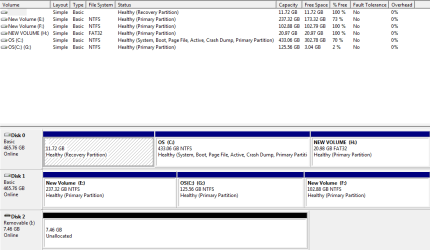
here is an attachment of a pic that i took from the disk management
 

Attachments

  • disk man.PNG
    disk man.PNG
    15.5 KB · Views: 9

My Computer

OS
window 7 64bit
Ah yes, the problem is that your Windows boot manager is stored on Disk 0, and the new install has just attached itself to it.

Follow Theog's advice above and that should fix it.
 

My Computer

Computer type
PC/Desktop
Computer Manufacturer/Model Number
Medion Erazer (note to self: insert model number) - with custom additions
OS
Windows 10 Pro x64
CPU
Intel Core i5 7400 @ 3.00GHz
Motherboard
OEM supllied with PC
Memory
8GB 2133Mhz DDR4 (OEM supplied)
Graphics Card(s)
Gygabyte Windforce GTX 1050Ti (Factory Overclocked)
Sound Card
Realtek
Monitor(s) Displays
Acer Al1980 + HKC
Screen Resolution
1360*768(HKC) / 1280*1024(Acer)
Hard Drives
1TB Toshiba
1TB WD Caviar Green
120GB Samsung Evo 840
PSU
OEM supplied (no power rating on case)
Case
OEM Supplied
Cooling
Stock
Keyboard
Logitech Wireless
Mouse
Logitect Wireless
Internet Speed
40Mb/s Down 10Mb/s Up
Antivirus
Defender
Browser
Firefox
@theog i already tried that, and i get a blank screen when i try to start the computer
 

My Computer

OS
window 7 64bit
Did you do it 3 times?
 

My Computer

Computer type
PC/Desktop
Computer Manufacturer/Model Number
Medion Erazer (note to self: insert model number) - with custom additions
OS
Windows 10 Pro x64
CPU
Intel Core i5 7400 @ 3.00GHz
Motherboard
OEM supllied with PC
Memory
8GB 2133Mhz DDR4 (OEM supplied)
Graphics Card(s)
Gygabyte Windforce GTX 1050Ti (Factory Overclocked)
Sound Card
Realtek
Monitor(s) Displays
Acer Al1980 + HKC
Screen Resolution
1360*768(HKC) / 1280*1024(Acer)
Hard Drives
1TB Toshiba
1TB WD Caviar Green
120GB Samsung Evo 840
PSU
OEM supplied (no power rating on case)
Case
OEM Supplied
Cooling
Stock
Keyboard
Logitech Wireless
Mouse
Logitect Wireless
Internet Speed
40Mb/s Down 10Mb/s Up
Antivirus
Defender
Browser
Firefox
lol i will try it again and see what happens, but what if i just format the (C:) drive?
 

My Computer

OS
window 7 64bit
Then it won't boot at all, and you will still need to run Startup Repair.

What you could try alternatively, if it really won't work, is unplug all HDD's except the one you want to Install Windows on and start again.
 

My Computer

Computer type
PC/Desktop
Computer Manufacturer/Model Number
Medion Erazer (note to self: insert model number) - with custom additions
OS
Windows 10 Pro x64
CPU
Intel Core i5 7400 @ 3.00GHz
Motherboard
OEM supllied with PC
Memory
8GB 2133Mhz DDR4 (OEM supplied)
Graphics Card(s)
Gygabyte Windforce GTX 1050Ti (Factory Overclocked)
Sound Card
Realtek
Monitor(s) Displays
Acer Al1980 + HKC
Screen Resolution
1360*768(HKC) / 1280*1024(Acer)
Hard Drives
1TB Toshiba
1TB WD Caviar Green
120GB Samsung Evo 840
PSU
OEM supplied (no power rating on case)
Case
OEM Supplied
Cooling
Stock
Keyboard
Logitech Wireless
Mouse
Logitect Wireless
Internet Speed
40Mb/s Down 10Mb/s Up
Antivirus
Defender
Browser
Firefox
k thanks guys ill see what happens
 

My Computer

OS
window 7 64bit
If you reinstall, reformat the partions, than install to partition 1 of the new HD, which is Drive E: in your screenshot.
 

My Computer

OS
ME/XP/Vista/Win7
You must mark C on Disk1 Active or Startup Repair will NOT write the System Boot files to it. You can do this from Win7 on Disk0 or using Diskpart from the DVD/REpair CD Command Line: Partition - Mark as Active

Unplug Disk0 to do the repairs, set Disk1 as first HD to boot in BIOS setup.

We've helped do this probably a thousand times here so I don't know why it gets forgotten that the target partition MUST be marked Active first.
 
hi guys i managed somehow to make it work but i have lots "scvhost.exe" processes running on my comp. is that normal?


My Computer

OS
window 7 64bit
it seems like they are zombie process or something because they don't take up memory or cpu space
 

My Computer

OS
window 7 64bit
so far its good, its not lagging/freezing like it used to... but i am just curiuos if those processes are going to be a problem and how to get rid of them for good
 

My Computer

OS
window 7 64bit
There are always multiple svc.host processes running, hosting various services and apps - if you want to know exactly what, install Process Explorer.

To get to know the various logs and System Resources better, look at the Troubleshooting Steps in my signature picture below. I'd also look over the Perfect Reinstall steps to see if there's anything important you missed.
 
thanks for the advice, will do
 

My Computer

OS
window 7 64bit
Back
Top