JavaScript is disabled. For a better experience, please enable JavaScript in your browser before proceeding.
You are using an out of date browser. It may not display this or other websites correctly.
You should upgrade or use an
alternative browser .
Solved Dual Boot - Hiding Win 7 drives in XP
I have tried following the tutorial to stop win xp seeing the win 7 partition but it is still showin in XP and still deleting the restore points in win 7.
windows 7 64bit Home Premium Build 6.1.7600 I5 750 - 4GB - P55 4 GB XFX ATI Radeon 5870 1024MB GDD PC/Desktop windows 7 64bit Home Premium Build 6.1.7600 I5 750 - 4GB - P55 Asus P7P55D 4 GB XFX ATI Radeon 5870 1024MB GDD On Board IIYAMA GB2773MS HDMI connection to Graphics Card 2 x SATA drives (will check size etc) CORSAIR VS550 550W Antec 7" Top Fan, 5" side fan Logitech wireless Logitech wireless
If you follow the instructions in the guide and do it manually you should hide the W7 drives from XP quite easily.
Effects only take place on a reboot.
Your XP drive will probably be C: followed by DVD/CD drives and then the W7 drives.
Check your registry entries, it is quite easy if you follow the guide.
I can't be more specific without a screen shot of your drives list.
I take it that this is the guide you are following,
System Restore Points - Stop XP Dual Boot Delete
I works for me no problem.
Last edited: Oct 29, 2017
Windows 7 Ultimate x64 intel i7 3610QM 8GB Nvidia 630 M 2GB PC/Desktop ASUS N56VM Windows 7 Ultimate x64 intel i7 3610QM 8GB Nvidia 630 M 2GB Realtek HD Audio Laptop Display 1920 x1080 Native Resolution Seagate ST500LM012 HN-M500MBB 500GB English UK Microsoft Trackball Explorer, Synaptics Touchpad 17 Meg Broadfband Chrome
New member
Member
Thread Starter
I followed the instructions as you suggested and did the registry hack manually. What maybe confusing the issue is that windows xp has two partitions and win 7 has one partition all on one SSD. I have one additional drive connected on the system so I will disconnect that then boot the machine and check things with diskpart and see what I have showing in terms of partitions (this should be 3).
windows 7 64bit Home Premium Build 6.1.7600 I5 750 - 4GB - P55 4 GB XFX ATI Radeon 5870 1024MB GDD PC/Desktop windows 7 64bit Home Premium Build 6.1.7600 I5 750 - 4GB - P55 Asus P7P55D 4 GB XFX ATI Radeon 5870 1024MB GDD On Board IIYAMA GB2773MS HDMI connection to Graphics Card 2 x SATA drives (will check size etc) CORSAIR VS550 550W Antec 7" Top Fan, 5" side fan Logitech wireless Logitech wireless
R.I.P.
Guru
Gold Member
VIP
Did you remove W7`s drive letter from XP ?
Windows 10 Pro x64 Intel Core i7 6700K GSkill TridentZ RGB 16GB 3600 16-16-16-36 EVGA GTX 980 Ti SC x2 PC/Desktop Skylake Special #666 Windows 10 Pro x64 Intel Core i7 6700K Asus Sabertooth Z170 Mark 1 GSkill TridentZ RGB 16GB 3600 16-16-16-36 EVGA GTX 980 Ti SC x2 Realtek High Definition AOC G2460PG 1920 x 1080 144Hz Samsung 860 Pro 256GB, Seagate Barracuda 4TB x2 EVGA 1000 P2, EVGA White Custom Braided Cables Corsair Vengeance C70 Gunmetal Black Corsair H100i v2, Corsair ML120 x2, Thermal Grizzly Kryonaut Logitech G910 Orion Spectrum Logitech G700s Verizon Fios Quantum Gateway 75/75 Windows Defender, Malwarebytes Free 3.8.3 Chrome Corsair SP120 x4, LG Blu-ray Drive, Durabrand HT-395 100 Watt Dolby Digital Amp, Corsair H2100 Wireless 7.1 Headset
New member
Member
Thread Starter
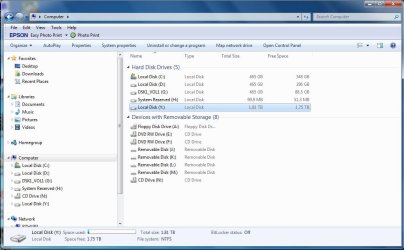
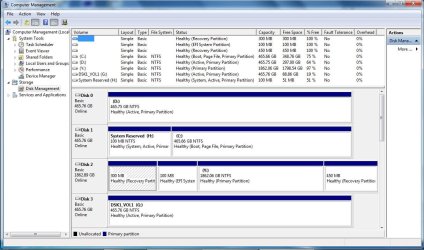
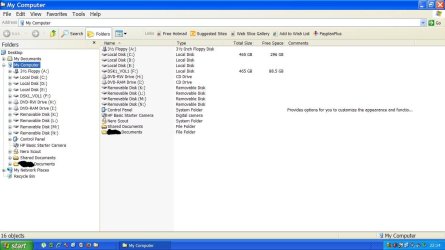
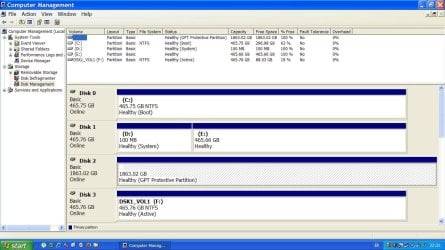
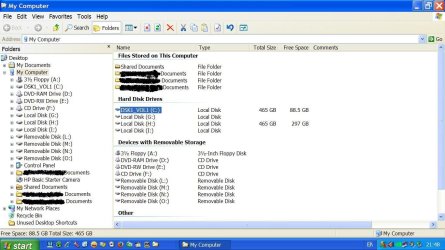
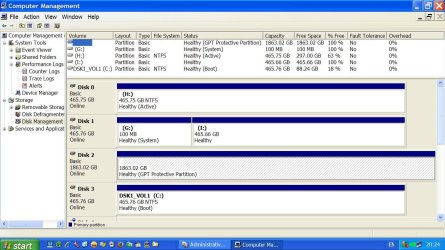
This is what I have currently and this isn't working, still deleting restore points. I have been expirementing with different settings and the names on the drives aren't necessarily correct.
I hope the jpg files are showing
Last edited: Oct 30, 2017
windows 7 64bit Home Premium Build 6.1.7600 I5 750 - 4GB - P55 4 GB XFX ATI Radeon 5870 1024MB GDD PC/Desktop windows 7 64bit Home Premium Build 6.1.7600 I5 750 - 4GB - P55 Asus P7P55D 4 GB XFX ATI Radeon 5870 1024MB GDD On Board IIYAMA GB2773MS HDMI connection to Graphics Card 2 x SATA drives (will check size etc) CORSAIR VS550 550W Antec 7" Top Fan, 5" side fan Logitech wireless Logitech wireless
New member
Member
Thread Starter
Did you remove W7`s drive letter from XP ?
see my last post
windows 7 64bit Home Premium Build 6.1.7600 I5 750 - 4GB - P55 4 GB XFX ATI Radeon 5870 1024MB GDD PC/Desktop windows 7 64bit Home Premium Build 6.1.7600 I5 750 - 4GB - P55 Asus P7P55D 4 GB XFX ATI Radeon 5870 1024MB GDD On Board IIYAMA GB2773MS HDMI connection to Graphics Card 2 x SATA drives (will check size etc) CORSAIR VS550 550W Antec 7" Top Fan, 5" side fan Logitech wireless Logitech wireless
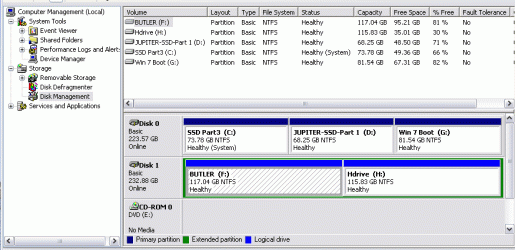
Here are screen shots from my quad boot PC.
DiscManagementFromW7MyComputer.JPG
85.9 KB
· Views: 0
DiscManagementFromW7.JPG
126.1 KB
· Views: 0
DiscManagementXPNewS.JPG
93.6 KB
· Views: 0
DiscManagementXPNew.JPG
133.8 KB
· Views: 0
DiscManagementFromXPOldMyComputerS.JPG
128.3 KB
· Views: 0
DiscManagementFromXPOld.JPG
145 KB
· Views: 0
Windows 7 Ultimate x64 intel i7 3610QM 8GB Nvidia 630 M 2GB PC/Desktop ASUS N56VM Windows 7 Ultimate x64 intel i7 3610QM 8GB Nvidia 630 M 2GB Realtek HD Audio Laptop Display 1920 x1080 Native Resolution Seagate ST500LM012 HN-M500MBB 500GB English UK Microsoft Trackball Explorer, Synaptics Touchpad 17 Meg Broadfband Chrome
New member
Member
Thread Starter
Thank you for posting those screen shots. It would also be helpful if you could post what you have in the registry sections so I can compare those to my registry settings.
Last edited: Oct 31, 2017
windows 7 64bit Home Premium Build 6.1.7600 I5 750 - 4GB - P55 4 GB XFX ATI Radeon 5870 1024MB GDD PC/Desktop windows 7 64bit Home Premium Build 6.1.7600 I5 750 - 4GB - P55 Asus P7P55D 4 GB XFX ATI Radeon 5870 1024MB GDD On Board IIYAMA GB2773MS HDMI connection to Graphics Card 2 x SATA drives (will check size etc) CORSAIR VS550 550W Antec 7" Top Fan, 5" side fan Logitech wireless Logitech wireless
post a screen shot of your disc management from XP, then i can see what you have got.
Windows 7 Ultimate x64 intel i7 3610QM 8GB Nvidia 630 M 2GB PC/Desktop ASUS N56VM Windows 7 Ultimate x64 intel i7 3610QM 8GB Nvidia 630 M 2GB Realtek HD Audio Laptop Display 1920 x1080 Native Resolution Seagate ST500LM012 HN-M500MBB 500GB English UK Microsoft Trackball Explorer, Synaptics Touchpad 17 Meg Broadfband Chrome
New member
Member
Thread Starter
windows 7 64bit Home Premium Build 6.1.7600 I5 750 - 4GB - P55 4 GB XFX ATI Radeon 5870 1024MB GDD PC/Desktop windows 7 64bit Home Premium Build 6.1.7600 I5 750 - 4GB - P55 Asus P7P55D 4 GB XFX ATI Radeon 5870 1024MB GDD On Board IIYAMA GB2773MS HDMI connection to Graphics Card 2 x SATA drives (will check size etc) CORSAIR VS550 550W Antec 7" Top Fan, 5" side fan Logitech wireless Logitech wireless
Well according to that screen shot all you need to hide is the W7 boot drive G: as it does not show the 100 Mb system boot partition which is strange because whenever I have installed W7 it has always created a 100 Mb boot drive and the Main C: drive.
Windows 7 Ultimate x64 intel i7 3610QM 8GB Nvidia 630 M 2GB PC/Desktop ASUS N56VM Windows 7 Ultimate x64 intel i7 3610QM 8GB Nvidia 630 M 2GB Realtek HD Audio Laptop Display 1920 x1080 Native Resolution Seagate ST500LM012 HN-M500MBB 500GB English UK Microsoft Trackball Explorer, Synaptics Touchpad 17 Meg Broadfband Chrome
New member
Member
Thread Starter
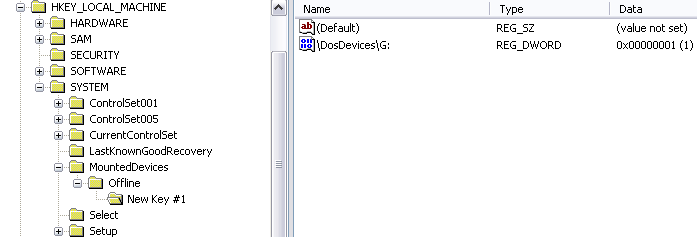
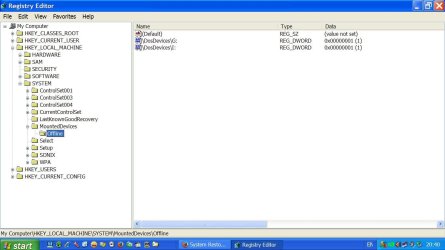
Thanks for your feedback. I have posted below what is in the Registry and this setting doesn't work. The Win 7 installation does have a small partition which was created at the time Win7 was installed. All the other partitions you mentioned are valid.
I will carry on experiementing and post back here if I find a fix for this.
Thank you very much for your help.
windows 7 64bit Home Premium Build 6.1.7600 I5 750 - 4GB - P55 4 GB XFX ATI Radeon 5870 1024MB GDD PC/Desktop windows 7 64bit Home Premium Build 6.1.7600 I5 750 - 4GB - P55 Asus P7P55D 4 GB XFX ATI Radeon 5870 1024MB GDD On Board IIYAMA GB2773MS HDMI connection to Graphics Card 2 x SATA drives (will check size etc) CORSAIR VS550 550W Antec 7" Top Fan, 5" side fan Logitech wireless Logitech wireless
New member
Member
Thread Starter
registry.gif
7.4 KB
· Views: 14
Last edited: Nov 1, 2017
windows 7 64bit Home Premium Build 6.1.7600 I5 750 - 4GB - P55 4 GB XFX ATI Radeon 5870 1024MB GDD PC/Desktop windows 7 64bit Home Premium Build 6.1.7600 I5 750 - 4GB - P55 Asus P7P55D 4 GB XFX ATI Radeon 5870 1024MB GDD On Board IIYAMA GB2773MS HDMI connection to Graphics Card 2 x SATA drives (will check size etc) CORSAIR VS550 550W Antec 7" Top Fan, 5" side fan Logitech wireless Logitech wireless
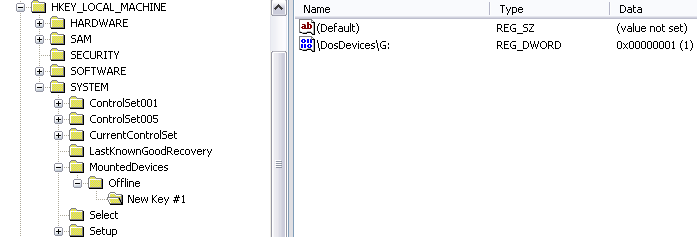
Read the instructions again, you should not have New key as a name!!!
Windows 7 Ultimate x64 intel i7 3610QM 8GB Nvidia 630 M 2GB PC/Desktop ASUS N56VM Windows 7 Ultimate x64 intel i7 3610QM 8GB Nvidia 630 M 2GB Realtek HD Audio Laptop Display 1920 x1080 Native Resolution Seagate ST500LM012 HN-M500MBB 500GB English UK Microsoft Trackball Explorer, Synaptics Touchpad 17 Meg Broadfband Chrome
A shot of My Registry with the correct entry!!!!
RegistryEntry.JPG
78.3 KB
· Views: 0
Windows 7 Ultimate x64 intel i7 3610QM 8GB Nvidia 630 M 2GB PC/Desktop ASUS N56VM Windows 7 Ultimate x64 intel i7 3610QM 8GB Nvidia 630 M 2GB Realtek HD Audio Laptop Display 1920 x1080 Native Resolution Seagate ST500LM012 HN-M500MBB 500GB English UK Microsoft Trackball Explorer, Synaptics Touchpad 17 Meg Broadfband Chrome
New member
Member
Thread Starter
Fixed and now working - thank you for all your help and advice.
windows 7 64bit Home Premium Build 6.1.7600 I5 750 - 4GB - P55 4 GB XFX ATI Radeon 5870 1024MB GDD PC/Desktop windows 7 64bit Home Premium Build 6.1.7600 I5 750 - 4GB - P55 Asus P7P55D 4 GB XFX ATI Radeon 5870 1024MB GDD On Board IIYAMA GB2773MS HDMI connection to Graphics Card 2 x SATA drives (will check size etc) CORSAIR VS550 550W Antec 7" Top Fan, 5" side fan Logitech wireless Logitech wireless
If all else fails, read the instructions twice!!!
Windows 7 Ultimate x64 intel i7 3610QM 8GB Nvidia 630 M 2GB PC/Desktop ASUS N56VM Windows 7 Ultimate x64 intel i7 3610QM 8GB Nvidia 630 M 2GB Realtek HD Audio Laptop Display 1920 x1080 Native Resolution Seagate ST500LM012 HN-M500MBB 500GB English UK Microsoft Trackball Explorer, Synaptics Touchpad 17 Meg Broadfband Chrome