Dual Boot Instal Problem

Shakeydog

New member
Local time
4:53 PM
Messages
13
I run windows 7 64 bit on my pc, I wanted to install windows xp. I made a 30gig partition and try to install windows xp.When xp is done with the first step of the insatall and wants to restart my computer gets stuck at verifying dmi pool data. I used the windows 7 dvd to repair the start. Now I start the pc with windows 7 and I can see the local T drive where I installed windows xp. I am not sure if xp finished installing and if it did how do I boot with xp ?
 

My Computer

OS
windows 7 ultimate x64
Hello Shakeydog, welcome to Seven Forums!


A quick question, do you have the BIOS set to AHCI or IDE mode?

Unless you want to go through the process of slipstreaming SATA drivers into the XP install disk XP has to be installed in IDE mode.
 

My Computer

Computer Manufacturer/Model Number
* BFK Customs *
OS
W 7 64-bit Ultimate
CPU
Intel Q9550 Yorkfield
Motherboard
ASUS P5Q Pro
Memory
8GB Dominator 8500C5D
Graphics Card(s)
ATI : XFX 5870
Sound Card
Realtek HD Audio 7-1
Monitor(s) Displays
1x 47" LCD HDMI & 3x 26" LCD HDMI
Screen Resolution
1920x1080P & 1920x1200
Hard Drives
1x 80GB Intel X25-M G2 SSD : 1x 500GB & 1x 640GB WD Caviar Black(s)
PSU
Corsair 620HX
Case
Cooler Master RC-690
Cooling
Tuniq Tower 120, 2x 140mm and 3x 120mm case fans
Keyboard
Microsoft 500
Mouse
Razer Diamondback 3G
Internet Speed
14 Mb/s
Other Info
1x Koutech 3Gb/s SATA HDD Hot Swap Rack
I have no idea. How would I check/adjust the settings ?
 

My Computer

OS
windows 7 ultimate x64
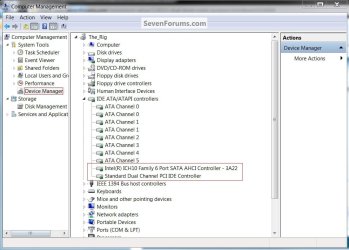
Look in device manager, in the Windows start menu right click the Computer button then manage.

click to enlarge
Device manager.jpg
 

My Computer

Computer Manufacturer/Model Number
* BFK Customs *
OS
W 7 64-bit Ultimate
CPU
Intel Q9550 Yorkfield
Motherboard
ASUS P5Q Pro
Memory
8GB Dominator 8500C5D
Graphics Card(s)
ATI : XFX 5870
Sound Card
Realtek HD Audio 7-1
Monitor(s) Displays
1x 47" LCD HDMI & 3x 26" LCD HDMI
Screen Resolution
1920x1080P & 1920x1200
Hard Drives
1x 80GB Intel X25-M G2 SSD : 1x 500GB & 1x 640GB WD Caviar Black(s)
PSU
Corsair 620HX
Case
Cooler Master RC-690
Cooling
Tuniq Tower 120, 2x 140mm and 3x 120mm case fans
Keyboard
Microsoft 500
Mouse
Razer Diamondback 3G
Internet Speed
14 Mb/s
Other Info
1x Koutech 3Gb/s SATA HDD Hot Swap Rack
Ok I have


ATA Channel0
ATA Channel0
ATA Channel1
ATA Channel1
Standard Dual Channel PCI IDE Controller
 

My Computer

OS
windows 7 ultimate x64
Hello again.


If the XP install disk is one you burned yourself it may be a bad burn and needs to be done again, if so this would be the first thing to try.

Use the free ISO burner at the link below to burn another at a speed of now more than 4x and select to let the program to verify the disk before it finishes.

ImgBurn Free ISO Burner
 

My Computer

Computer Manufacturer/Model Number
* BFK Customs *
OS
W 7 64-bit Ultimate
CPU
Intel Q9550 Yorkfield
Motherboard
ASUS P5Q Pro
Memory
8GB Dominator 8500C5D
Graphics Card(s)
ATI : XFX 5870
Sound Card
Realtek HD Audio 7-1
Monitor(s) Displays
1x 47" LCD HDMI & 3x 26" LCD HDMI
Screen Resolution
1920x1080P & 1920x1200
Hard Drives
1x 80GB Intel X25-M G2 SSD : 1x 500GB & 1x 640GB WD Caviar Black(s)
PSU
Corsair 620HX
Case
Cooler Master RC-690
Cooling
Tuniq Tower 120, 2x 140mm and 3x 120mm case fans
Keyboard
Microsoft 500
Mouse
Razer Diamondback 3G
Internet Speed
14 Mb/s
Other Info
1x Koutech 3Gb/s SATA HDD Hot Swap Rack
I used the same program you linked to burn the iso and burned at 4x. I have used this cd successfully before. I could try again if you think that's my problem.
 

My Computer

OS
windows 7 ultimate x64
Ok I burned a new copy of the xp iso and I get stuck at verifying dmi pool data when xp restarts my pc.
 

My Computer

OS
windows 7 ultimate x64
Have you made any changes to the BIOS default settings?
 

My Computer

Computer Manufacturer/Model Number
* BFK Customs *
OS
W 7 64-bit Ultimate
CPU
Intel Q9550 Yorkfield
Motherboard
ASUS P5Q Pro
Memory
8GB Dominator 8500C5D
Graphics Card(s)
ATI : XFX 5870
Sound Card
Realtek HD Audio 7-1
Monitor(s) Displays
1x 47" LCD HDMI & 3x 26" LCD HDMI
Screen Resolution
1920x1080P & 1920x1200
Hard Drives
1x 80GB Intel X25-M G2 SSD : 1x 500GB & 1x 640GB WD Caviar Black(s)
PSU
Corsair 620HX
Case
Cooler Master RC-690
Cooling
Tuniq Tower 120, 2x 140mm and 3x 120mm case fans
Keyboard
Microsoft 500
Mouse
Razer Diamondback 3G
Internet Speed
14 Mb/s
Other Info
1x Koutech 3Gb/s SATA HDD Hot Swap Rack
Back
Top