
Dual boot installation has moved drive letters

toolman59

New member
Local time
7:06 PM
Messages
26
Location
North Somerset
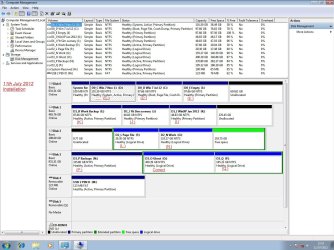
I have Windows 7 64 bit running on C: drive, today I decided to install a second copy onto D: drive to get ready for a fresh start in the near future. Once the installation was complete, I found that all but one of the drive letters had been re-allocated as noted in the attached screen shot of the new installation.
The latest install has allocated drive letter C: to the new installation and the original OS has been allocated to D: and other disks and partitions have had their drive letters altered.
I can still boot into the original OS and that disk manager shows everything as it should be.
Before I do anything that might totally wreck both OS's, how do I get all the drive letters lined up in the new OS to mirror what is in the original?
I have EasyBCD on the original OS.

Thanks in advance

toolman59
 

Attachments
  • Windows 7 2012.jpg
    Windows 7 2012.jpg
    185.1 KB · Views: 56

My Computer My Computer

Computer type
PC/Desktop
Computer Manufacturer/Model Number
Self build
OS
Windows 7 Ultimate 64 bit SP1
CPU
AMD FX-8350 Eight Core
Motherboard
Gigabyte GA-990FXA-UD3
Memory
Corsair Vengeance 16GB DDR3
Graphics Card(s)
XFX HD6870 1GB DDR5
Sound Card
None Onboard sound
Monitor(s) Displays
LG Flatron Wide 20"
Screen Resolution
1680x1050
Hard Drives
WD1002FAEX Caviar Black SATA3 1TB
Hitachi 500GB PATA
Hitachi 320GB PATA
M4-CT256M4SSD2 ATA Device SSD Sata 3 250GB
2 off Seagate 2TB ST2000DM 001-1ER164 SATA Disks
PSU
OCZ Modxstream Pro 600W Silent
Case
Fractal R3
Cooling
Artic Cooling Freezer 7 Pro Rev 2
Keyboard
Logitech K800
Mouse
Logitech Trackman Wheel
Internet Speed
12.5Mbits
Antivirus
AVG 2015 Free Edition
Browser
Google Chrome, Opera, Firefox
Other Info
Sky Hub router
That screen shot makes my head spin. I'm not sure why you installed a second copy to act as a clean copy, rather than just do a clean install, but that could have complicated things.

If it was my system, I'd cut down on all the unnecessary partitions and just use directories. Then, I'd unplug any drives that weren't going to be my primary, and do a clean, fresh install to just that drive. I'm a firm believer in the K.I.S.S. principal.
 

My Computer My Computer

OS
Windows 7 Ultimate x64 SP1
CPU
Intel Core i7-2600
Motherboard
Gigabyte GA-P67A-UD3P-B3
Memory
12 GB Patriot Extreme DDR3-1333
Graphics Card(s)
Nvidia GTX 470
Monitor(s) Displays
Dell UltraSharp 2209WA
Hard Drives
OCZ Agility3 240 GB, WD5001AALS, WD7501AALS
PSU
OCZ ModStream 700W
Case
CoolerMaster HAF 912 Advanced
Cooling
CoolerMaster Hyper 212 Plus
This is normal. The running system partition is always C:\ - and other partitions change letters too.. When you boot from your original system, the OS partition will be C:\ again. Nothing to worry about.

And yes - you have too many partitions.
 

My Computer My Computer

Computer Manufacturer/Model Number
HP, Dell, Gateway, Toshiba - 4 laptops and 2 desktops
OS
Vista, Windows7, Mint Mate, Zorin, Windows 8
CPU
from 1.6GHz Duo to i7
Monitor(s) Displays
2x HP w2207
Hard Drives
5x HDD, 7x SSD, 12x Externals
Keyboard
with trackball - no mices
Mouse
Trackball mice
Internet Speed
DSL 6000
Win7 correctly sees itself as C whenever correctly installed from booted DVD. It's smart.
 
You can't now.

You could have set new installed letter to D.

Easiest way is to run setup from within your first installation.

btw I have 18 partitions on two HD's
 

My Computers My Computers

System One System Two

  • Computer type
    PC/Desktop
    OS
    7 X64
    CPU
    i5 8400
    Motherboard
    gigabyte b365m ds3h
    Memory
    2x8gb 3200mhz
    Hard Drives
    various
    PSU
    pure power 11 400w cm
    Case
    Coolermaster
    Cooling
    cryorig m9i
  • Computer type
    PC/Desktop
    OS
    7x64
    CPU
    g5400
    Motherboard
    ga b365m ds3h
    Memory
    8gb ddr4 2400
    PSU
    xfx pro 450w
When you are running from the new Windows 7 partition, you can change the other drive letters to what the were using Disk Management.

Windows 7 will be C:, regardless of which you boot from, new or old.
 

My Computer My Computer

Computer type
PC/Desktop
Computer Manufacturer/Model Number
Custom Built
OS
Windows 10 Pro x64, Windows 8.1 Pro x64, Windows 7 Ultimate x64 SP1,
CPU
INTEL i9-7920X LGA 2066
Motherboard
Gigabyte X299-WU8 F3
Memory
64 GB (4 X 16 GB) G-Skill V Series DDR4 3200 Quad Channel
Graphics Card(s)
EVGA GTX 1060 SC 3 GB
Sound Card
Realtek Onboard ALC1220
Monitor(s) Displays
2 x Samsung S27E310
Screen Resolution
1920x1080
Hard Drives
Samsung 2 x 970 EVO Plus 500 GB NVMe
1 x 6TB WD 6003FZBX SATA
1 x 6TB WD 60EFRX SATA
12 x 3TB WD 30EFRX SATA
PSU
Seasonic X-1050
Case
Thermaltake Armor+
Cooling
Corsair H80i V2 Liquid AOI Cooler
Keyboard
Logitech G510s
Mouse
Logitech MX Master 2S
Internet Speed
200 Mb/s
Antivirus
ESET NOD32 13.1
Browser
EDGE (Dev, Canary, Beta), Chrome
Other Info
ASUS RT-AC68U router
Malwarebytes 4.0.4
You can't now.

You could have set new installed letter to D.

Easiest way is to run setup from within your first installation.

btw I have 18 partitions on two HD's

Thank you all for your replies.
I wiped the new installation and installed from within my existing installation, everything worked fine, all drive letters in their correct places.
I had forgotten that on my old computer I always had to install from within the existing OS because it would not boot from the windows DVD.
Over a period of time I will load the applications and set their default work folders etc. When I am happy with the setup, I will use the new installation for some weeks and then will format the original partition.
 

My Computer My Computer

Computer type
PC/Desktop
Computer Manufacturer/Model Number
Self build
OS
Windows 7 Ultimate 64 bit SP1
CPU
AMD FX-8350 Eight Core
Motherboard
Gigabyte GA-990FXA-UD3
Memory
Corsair Vengeance 16GB DDR3
Graphics Card(s)
XFX HD6870 1GB DDR5
Sound Card
None Onboard sound
Monitor(s) Displays
LG Flatron Wide 20"
Screen Resolution
1680x1050
Hard Drives
WD1002FAEX Caviar Black SATA3 1TB
Hitachi 500GB PATA
Hitachi 320GB PATA
M4-CT256M4SSD2 ATA Device SSD Sata 3 250GB
2 off Seagate 2TB ST2000DM 001-1ER164 SATA Disks
PSU
OCZ Modxstream Pro 600W Silent
Case
Fractal R3
Cooling
Artic Cooling Freezer 7 Pro Rev 2
Keyboard
Logitech K800
Mouse
Logitech Trackman Wheel
Internet Speed
12.5Mbits
Antivirus
AVG 2015 Free Edition
Browser
Google Chrome, Opera, Firefox
Other Info
Sky Hub router
Since you're the first user out of hundreds I've come across on this issue who actually wants the OS partition on another drive letter, may I ask why?

Win7 is advanced enough to always assume C when installed correctly from the booted installer. I've never met a user who wants it on D or any other letter due to possible complications with programs.

If it were a question of your data drives being thrown out of their letter on the new install, those can be corrected in Disk Mgmt.

Just askin. :geek:
 
Seems normal enough to me.

Much simpler to have all the letters the same whichever o/s you are booted into. Even more so if you have a lot of drives.

I do the same thing.

atm I have win8 C, win7 D and the other 16 drives on from that. The same wherever I am.

( The fact I hardly ever bother booting into win8 is beside the point.)

It is just the historical default practice that windows calls itself C (A and B being reserved for floppies)

I have only once had an amusing issue as a result.

I tried installing Macrium on an o/s I had assigned X.

Macrium thought it was in pe and loaded up the mounted devices from the first windows install it could find. Bit inconvenient.
 

My Computers My Computers

System One System Two

  • Computer type
    PC/Desktop
    OS
    7 X64
    CPU
    i5 8400
    Motherboard
    gigabyte b365m ds3h
    Memory
    2x8gb 3200mhz
    Hard Drives
    various
    PSU
    pure power 11 400w cm
    Case
    Coolermaster
    Cooling
    cryorig m9i
  • Computer type
    PC/Desktop
    OS
    7x64
    CPU
    g5400
    Motherboard
    ga b365m ds3h
    Memory
    8gb ddr4 2400
    PSU
    xfx pro 450w
You never have probs with OS on another letter than C, Si?

What do you think of Win8?
 
You never have probs with OS on another letter than C, Si?

No, never - apart from that macrium laugh. Nobody else is going to use X anyway.

Win8?

Don't get me started.

They could have made something good - with a few compromises that everybody would be ok with.

Instead, they have made a hash of it.

Unless the rtm turns out quite different - you never know, MS might have got the message.
 

My Computers My Computers

System One System Two

  • Computer type
    PC/Desktop
    OS
    7 X64
    CPU
    i5 8400
    Motherboard
    gigabyte b365m ds3h
    Memory
    2x8gb 3200mhz
    Hard Drives
    various
    PSU
    pure power 11 400w cm
    Case
    Coolermaster
    Cooling
    cryorig m9i
  • Computer type
    PC/Desktop
    OS
    7x64
    CPU
    g5400
    Motherboard
    ga b365m ds3h
    Memory
    8gb ddr4 2400
    PSU
    xfx pro 450w
I agree with ya, W8 is Horrible. JMO.
 

My Computer My Computer

Computer type
PC/Desktop
Computer Manufacturer/Model Number
Skylake Special #666
OS
Windows 10 Pro x64
CPU
Intel Core i7 6700K
Motherboard
Asus Sabertooth Z170 Mark 1
Memory
GSkill TridentZ RGB 16GB 3600 16-16-16-36
Graphics Card(s)
EVGA GTX 980 Ti SC x2
Sound Card
Realtek High Definition
Monitor(s) Displays
AOC G2460PG
Screen Resolution
1920 x 1080 144Hz
Hard Drives
Samsung 860 Pro 256GB, Seagate Barracuda 4TB x2
PSU
EVGA 1000 P2, EVGA White Custom Braided Cables
Case
Corsair Vengeance C70 Gunmetal Black
Cooling
Corsair H100i v2, Corsair ML120 x2, Thermal Grizzly Kryonaut
Keyboard
Logitech G910 Orion Spectrum
Mouse
Logitech G700s
Internet Speed
Verizon Fios Quantum Gateway 75/75
Antivirus
Windows Defender, Malwarebytes Free 3.8.3
Browser
Chrome
Other Info
Corsair SP120 x4, LG Blu-ray Drive, Durabrand HT-395 100 Watt Dolby Digital Amp, Corsair H2100 Wireless 7.1 Headset
Changed drive letters

Going back some years it was always recommended to install "Oldest OS" first and so on eg. W98, XP and W7. Never had a problem with this and all my data and backup partitions looked exactly the same in each OS without drive letter adjustments. It was only when I changed computers at the end of last year, which allowed me to boot from the Windows DVD that I saw a completely different result from a booted install .
Some day I may get bitten with my method, then I will be back here reviewing these posts.
Thanks again everyone.

toolmant9
 

My Computer My Computer

Computer type
PC/Desktop
Computer Manufacturer/Model Number
Self build
OS
Windows 7 Ultimate 64 bit SP1
CPU
AMD FX-8350 Eight Core
Motherboard
Gigabyte GA-990FXA-UD3
Memory
Corsair Vengeance 16GB DDR3
Graphics Card(s)
XFX HD6870 1GB DDR5
Sound Card
None Onboard sound
Monitor(s) Displays
LG Flatron Wide 20"
Screen Resolution
1680x1050
Hard Drives
WD1002FAEX Caviar Black SATA3 1TB
Hitachi 500GB PATA
Hitachi 320GB PATA
M4-CT256M4SSD2 ATA Device SSD Sata 3 250GB
2 off Seagate 2TB ST2000DM 001-1ER164 SATA Disks
PSU
OCZ Modxstream Pro 600W Silent
Case
Fractal R3
Cooling
Artic Cooling Freezer 7 Pro Rev 2
Keyboard
Logitech K800
Mouse
Logitech Trackman Wheel
Internet Speed
12.5Mbits
Antivirus
AVG 2015 Free Edition
Browser
Google Chrome, Opera, Firefox
Other Info
Sky Hub router
Back
Top