Dual boot issue - please help!

barneysmum

New member
Local time
4:26 PM
Messages
23
Hi,

This is my first post so bear with me, I have checked the forum but can't seem to find quite what I need.

I was running Vista, and not liking it too much so I downloaded and installed Windows 7 RC on another partition. Was happily dual booting into both of them until today when I decided to reinstall Vista (I lost my DVD drive when I added 7 and was resorting to reinstalling Vista).

Anyway, Vista reinstalled. Windows 7 sitting there happily on the D drive.

But I cannot get it to dual boot at all.

I have searched high and low and most solutions seem to be adding a legacy OS from Windows 7, not adding Windows 7 from Vista.

I have tried various commands in bcdedit and EasyBCD but not getting anywhere.

I really don't like Vista all that much and really want to get back into Windows 7.

Note, I downloaded the RC so don't have any discs.

Thanks in advance.
 

My Computer

Computer Manufacturer/Model Number
HP dv6000 / 6500
OS
Vista / Windows 7
CPU
AMD Athlon 64 X2 Dual-Core
Motherboard
Quanta 30CF
Memory
2GB DDR2
Graphics Card(s)
NVIDIA GeForce 7150M
Hi barneysmum and welcome to Seven Forums!

Since Windows 7 is still there on your other partition, we should be able to get this sorted out.

There are a couple of tutorials here:

http://www.sevenforums.com/tutorials/5166-dual-boot-installation-windows-7-vista.html

http://www.sevenforums.com/tutorials/2282-default-operating-system-change-default-boot-os.html

and here - http://www.sevenforums.com/installation-setup/7935-dual-boot-issue.html

And you can check out the Microsoft article on using the Bootrec tool - How to use the Bootrec.exe tool in the Windows Recovery Environment to troubleshoot and repair startup issues in Windows Vista

Let us know if this helps. If it doesn't we'll try some other stuff. :)
 
Last edited:

My Computer

Computer Manufacturer/Model Number
Gateway, Toshiba Laptop, and Home Brew
OS
Windows 7 x64 HP, Windows 7 HP, Windows 7 Ult
CPU
Intel I3, Cerelon, Pentium 4 @ 3Ghz
Motherboard
Intel, Intel, Asus
Memory
8G, 3G, 3G
Graphics Card(s)
On-board Intel, On-board nVidia, nVIDIA card
Sound Card
on-board, on-board, SoundBlaster
Monitor(s) Displays
Hannspree HF237, Toshiba, SyncMaster 931B
Screen Resolution
default (all)
Hard Drives
1T internal, 320G internal, 160G internal, 1T networked
PSU
300w, unk, 650w
Case
black, black, grey
Cooling
air (all)
Keyboard
standard wired (all)
Mouse
standard wired (all)
Internet Speed
6M down, 768K up
Other Info
Home LAN through Linksys hub to 4 port and wireless switch/router. Networked HP 2600n. Wife's computer running Windows 7, and spare laptop running Ubuntu "Karmic Kola" (9.10).
Barney, give EasyBCD a try. I find it to be quite easy to restore the dual boot with it.
 

My Computer

Computer Manufacturer/Model Number
Home Built
OS
Win 7 Ultimate x64 & x86
CPU
AMD Anthalon 64 XT 6000+ 3.0Ghz
Motherboard
Asus M2N-eE
Memory
4 GB
Graphics Card(s)
Nvidia GeForce 8500 GT
Hi,

I had tried EasyBCD and followed instructions but it doesn't seem to work very well in creating a Windows 7 entry. It set the path to /ntldr which doesn't exist for Windows 7.

I'm happy sticking with the command line bcdedit, but again, not getting anywhere with it.

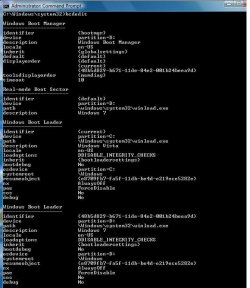
I have managed to get it to look like this:

bcd.jpg


(I have no idea what real-mode boot sector is or how I got that there)


But now at boot, if I select Windows 7 it says digital signatures cannot be verified.

I have no access whatsoever to CDs, even if I did I couldn't use them as the DVD drive stopped working after I put Windows 7 on (the whole reason for this issue now!!).

I must be able to sort this from the command line? But I have no idea how.
 

My Computer

Computer Manufacturer/Model Number
HP dv6000 / 6500
OS
Vista / Windows 7
CPU
AMD Athlon 64 X2 Dual-Core
Motherboard
Quanta 30CF
Memory
2GB DDR2
Graphics Card(s)
NVIDIA GeForce 7150M
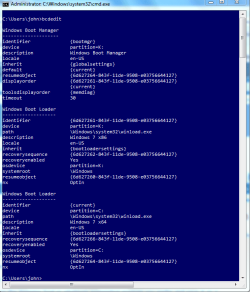
I didn't have a chance to really look at what you posted, but here is how mine reads. Not sure of anything will jump out at you, but maybe seeing an environment where the dual boot works will jog your memory on something.
 

Attachments

  • capture.PNG
    capture.PNG
    26.9 KB · Views: 23

My Computer

Computer Manufacturer/Model Number
Home Built
OS
Win 7 Ultimate x64 & x86
CPU
AMD Anthalon 64 XT 6000+ 3.0Ghz
Motherboard
Asus M2N-eE
Memory
4 GB
Graphics Card(s)
Nvidia GeForce 8500 GT
bcdedit /default {current}

bcdedit /delete {48b5etc.}

bcdedit /copy {current} /d "Windows 7"

Will return a {NewID}

bcdedit /set {NewID} device partition=d:

bcdedit /set {NewID} osdevice partition=d:


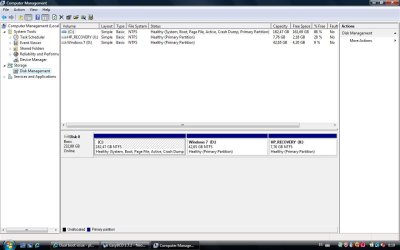
Check in Disk Management and see which is listed as System partition - better yet, post a screenie of Disk Management window.
 

My Computers

System One System Two

  • Computer type
    PC/Desktop
    OS
    7 X64
    CPU
    i5 8400
    Motherboard
    gigabyte b365m ds3h
    Memory
    2x8gb 3200mhz
    Hard Drives
    various
    PSU
    pure power 11 400w cm
    Case
    Coolermaster
    Cooling
    cryorig m9i
  • Computer type
    PC/Desktop
    OS
    7x64
    CPU
    g5400
    Motherboard
    ga b365m ds3h
    Memory
    8gb ddr4 2400
    PSU
    xfx pro 450w
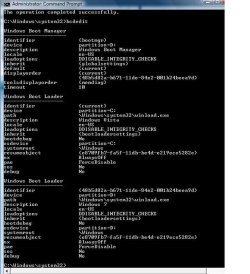
Thank you. I just followed all those commands and now I have this:

bcd.jpg

Just about to reboot and try it.

The only thing I'm not sure about is if the bootmgr partition should be showing as d: ??
 

My Computer

Computer Manufacturer/Model Number
HP dv6000 / 6500
OS
Vista / Windows 7
CPU
AMD Athlon 64 X2 Dual-Core
Motherboard
Quanta 30CF
Memory
2GB DDR2
Graphics Card(s)
NVIDIA GeForce 7150M
Still getting this on boot:

File: \Windows\System32\winload.exe

"Windows cannot verify the digital signature for this file"

It's not even meant to be checking!! It says to press F8 to continue booting anyway but if I press F8 it just comes back to the same message again and again.
 

My Computer

Computer Manufacturer/Model Number
HP dv6000 / 6500
OS
Vista / Windows 7
CPU
AMD Athlon 64 X2 Dual-Core
Motherboard
Quanta 30CF
Memory
2GB DDR2
Graphics Card(s)
NVIDIA GeForce 7150M
Woops, missed your last line.....

C is listed as system partition

diskman.jpg
 

My Computer

Computer Manufacturer/Model Number
HP dv6000 / 6500
OS
Vista / Windows 7
CPU
AMD Athlon 64 X2 Dual-Core
Motherboard
Quanta 30CF
Memory
2GB DDR2
Graphics Card(s)
NVIDIA GeForce 7150M
C:\Windows\system32>bcdedit /set {bootmgr} device boot

C:\Windows\system32>cd d:\Windows\system32

D:\Windows\system32>bcdboot d:\windows /s c:
 

My Computers

System One System Two

  • Computer type
    PC/Desktop
    OS
    7 X64
    CPU
    i5 8400
    Motherboard
    gigabyte b365m ds3h
    Memory
    2x8gb 3200mhz
    Hard Drives
    various
    PSU
    pure power 11 400w cm
    Case
    Coolermaster
    Cooling
    cryorig m9i
  • Computer type
    PC/Desktop
    OS
    7x64
    CPU
    g5400
    Motherboard
    ga b365m ds3h
    Memory
    8gb ddr4 2400
    PSU
    xfx pro 450w
You're a genius, thank you so much. I'm back into Windows 7. How did those last 3 commands make the digital signature issue go away?

Now, I don't suppose you know how to make a disappeared dvd drive come back? :o I've done the upper / lower filters registry fix but still no joy....anyway, I will make a post in a more appropriate forum.

Thanks again :)
 

My Computer

Computer Manufacturer/Model Number
HP dv6000 / 6500
OS
Vista / Windows 7
CPU
AMD Athlon 64 X2 Dual-Core
Motherboard
Quanta 30CF
Memory
2GB DDR2
Graphics Card(s)
NVIDIA GeForce 7150M
Hi,

Glad you're back in.

They did a similar thing to the boot critical files that installing 7 after Vista would do. I just invented it.


Not sure about the dvd drive problem.

What does it say in Device Manager?

You might check on the manufacturers site and see if there is a firmware update for your dvd drive.

Another thing you might try - assuming it is listed in devmgr is to rt click >update drivers. and browse to "C:\Windows\System32\DriverStore" on the Vista partition - see if it picks up the drivers from there.
 

My Computers

System One System Two

  • Computer type
    PC/Desktop
    OS
    7 X64
    CPU
    i5 8400
    Motherboard
    gigabyte b365m ds3h
    Memory
    2x8gb 3200mhz
    Hard Drives
    various
    PSU
    pure power 11 400w cm
    Case
    Coolermaster
    Cooling
    cryorig m9i
  • Computer type
    PC/Desktop
    OS
    7x64
    CPU
    g5400
    Motherboard
    ga b365m ds3h
    Memory
    8gb ddr4 2400
    PSU
    xfx pro 450w
Yeah tried all that, but options limited as it isn't in device manager or disk management. Anyway, I am currently clogging up the forum with a thread for that!

Thanks again.
 

My Computer

Computer Manufacturer/Model Number
HP dv6000 / 6500
OS
Vista / Windows 7
CPU
AMD Athlon 64 X2 Dual-Core
Motherboard
Quanta 30CF
Memory
2GB DDR2
Graphics Card(s)
NVIDIA GeForce 7150M
Can someone please help me out? I had xp and 7 working properly with the option of which OS to start with, but then i deleted xp and decided to reinstall it again after a while. After I did, I found out that you cant install an older version with 7 because it will not give you the option of which OS to start with and it will go with xp automatically. So then i deleted 7 and reinstalled it, but still I'm not getting the option and it's going straight to the newly installed 7. I see a lot of links to threads with similar issues but can someone guide me to one that's best for me cuz i'm really starting to get confused.
 

My Computer

OS
Windows 7
Back
Top