
dual boot issue

couchcommando

New member
Local time
1:52 AM
Messages
6
ok so im having a weird problem thats probably very easy to fix.

background info: before my win7 install i had 3 partitions
vista 64
xp 32
empty (soon to be linux)

when i downloaded the newest win 7 build i deleted my xp 32 partition and installed win7 on that partition. because win7 creates that "reserve partition" or what ever, it extended my EMPTY partition with my vista partion. which cause it to become a "logical drive" rather than a "boot" drive. aka i cannot figure out how to access my vista OS.. rather annoying since im just toying with win7 atm.
 

Attachments
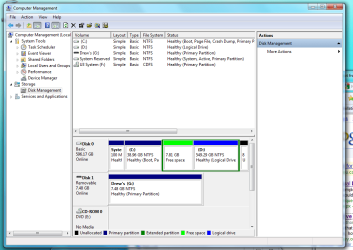
  • drive partition.png
    drive partition.png
    45.2 KB · Views: 61

My Computer

OS
w7 x86
CPU
phen 2 940
Motherboard
790x
Memory
8GB crucial
Graphics Card(s)
ATI sapphire 4870 1GB!
Monitor(s) Displays
26" Asus
Mouse
cyba snipa
Internet Speed
TWC : (
Hi,

Open an elevated command prompt, type: (press enter after each command)

bcdedit /copy {current} /d "Windows Vista"

It will return a number in brackets - the GUID or identifier

Use that GUID , including the brackets in these commands:

bcdedit /set {the-Guid-you-got} device partition=D:

bcdedit /set {the-Guid-you-got} osdevice partition=D:

Close command prompt.

Hope it helps
 

My Computers

System One System Two

  • Computer type
    PC/Desktop
    OS
    7 X64
    CPU
    i5 8400
    Motherboard
    gigabyte b365m ds3h
    Memory
    2x8gb 3200mhz
    Hard Drives
    various
    PSU
    pure power 11 400w cm
    Case
    Coolermaster
    Cooling
    cryorig m9i
  • Computer type
    PC/Desktop
    OS
    7x64
    CPU
    g5400
    Motherboard
    ga b365m ds3h
    Memory
    8gb ddr4 2400
    PSU
    xfx pro 450w
ya worked perfectly! thanks, just for clarification. what did that do? just map the boot.ini to the memory location on my vista partition?
 

My Computer

OS
w7 x86
CPU
phen 2 940
Motherboard
790x
Memory
8GB crucial
Graphics Card(s)
ATI sapphire 4870 1GB!
Monitor(s) Displays
26" Asus
Mouse
cyba snipa
Internet Speed
TWC : (
Hi,

You're welcome , couch.

When you install Windows, it looks to see if there is a partition marked Active.

If there is, it places it's boot files on the Active partition and includes in boot management any previous versions of Windows already installed.

The rest of the o/s installs on whatever partition you pointed it at.

When you installed Vista - you already had XP on the first partition, which was Active. Therefore Vista's bootfiles went on the XP partition.

When you deleted that, there was no XP, no Vista bootfiles, no Active partition.

You then installed 7 - it did not see an active partition - so made it's own little one and put it's bootfiles on there.

7 did not see the Vista boot files as they were no longer there, so did not add Vista to boot management.

The commands add the entry for Vista to the 7 boot management system.

XP used ntldr and boot.ini.

These do not exist on Vista and 7. They use bootmgr and bcd.

Glad it worked for you :D

Hope it helps.
 

My Computers

System One System Two

  • Computer type
    PC/Desktop
    OS
    7 X64
    CPU
    i5 8400
    Motherboard
    gigabyte b365m ds3h
    Memory
    2x8gb 3200mhz
    Hard Drives
    various
    PSU
    pure power 11 400w cm
    Case
    Coolermaster
    Cooling
    cryorig m9i
  • Computer type
    PC/Desktop
    OS
    7x64
    CPU
    g5400
    Motherboard
    ga b365m ds3h
    Memory
    8gb ddr4 2400
    PSU
    xfx pro 450w
i am having a similar issue- as the original poster did, i must have wiped my vista boot record from the drive when i installed win7, i used a prog called EasyBCD to recover the boot info for vista, i was able to run it in win 7... problem is, now the boot info for win7 is gone, will your method work the other direction? im in the vista os now... since o restored my proper boot log for vista to this drive ( or did i?) if i just reinstall win7 on another partition should i then have the dual boot option?
 

My Computer

OS
Vista 64 & Windows 7 64
i am having a similar issue- as the original poster did, i must have wiped my vista boot record from the drive when i installed win7, i used a prog called EasyBCD to recover the boot info for vista, i was able to run it in win 7... problem is, now the boot info for win7 is gone, will your method work the other direction? im in the vista os now... since o restored my proper boot log for vista to this drive ( or did i?) if i just reinstall win7 on another partition should i then have the dual boot option?

http://www.sevenforums.com/tutorials/681-startup-repair.html
 

My Computer

OS
Win 7
this will write the boot info for win 7 to the active drive (vista) and allow dual boot screen?
 

My Computer

OS
Vista 64 & Windows 7 64
now i am getting an error on bootup when i try to select win 7..
"reports an unsigned driver in d:/windows\system32\winload.exe tells me to either put the disk in and run a "last known good..." or press F8 when os is selected to use recovery option "last known good...", but when i press F8 i just get the same error screen... think ima just try to reinstall, if i lose my boot option for vista- at least with this topic i know how to fix it from :the other side
 

My Computer

OS
Vista 64 & Windows 7 64
ok decided to dump win 7, i reinstalled the xp64 i was using, but alas... same problem, no more dual boot... i go straight into xp now, will the above instructions work to add the boot record for vista so i can choose between this xp64 and vista 64?
 

My Computer

OS
Vista 64 & Windows 7 64
ok decided to dump win 7, i reinstalled the xp64 i was using, but alas... same problem, no more dual boot... i go straight into xp now, will the above instructions work to add the boot record for vista so i can choose between this xp64 and vista 64?

Whenever you install an older OS after a more current one you will loose the dual boot option, if you have a choice install in order of age old to new. See the later part of method 2 to correct your problem http://www.sevenforums.com/tutorials/8057-dual-boot-installation-windows-7-xp.html
 

My Computer

OS
Win 7
Hi Coldsteele,

You're keen to use those commands.

Those particular ones won't work in this case.

It is possible to boot the Vista dvd to get to the command prompt, and use that to recreate a Vista compatible MBR and bootsector, and add XP to the Vista bootmenu.

However, you will probably find it easier to use Easybcd as per the tutorial Yup Yup linked to.

Hope it helps
 

My Computers

System One System Two

  • Computer type
    PC/Desktop
    OS
    7 X64
    CPU
    i5 8400
    Motherboard
    gigabyte b365m ds3h
    Memory
    2x8gb 3200mhz
    Hard Drives
    various
    PSU
    pure power 11 400w cm
    Case
    Coolermaster
    Cooling
    cryorig m9i
  • Computer type
    PC/Desktop
    OS
    7x64
    CPU
    g5400
    Motherboard
    ga b365m ds3h
    Memory
    8gb ddr4 2400
    PSU
    xfx pro 450w
Back
Top