Solved Dual Boot issues.. Win7 64 bit & Win7 64bit

Tuaca

New member
Local time
7:27 PM
Messages
6
OEM SSD Win7 64 bit on C: I installed a new SSD with Win7 64bit to use as a test drive, but I can't boot to it. I can see the new SSD drive when I am in C:. It is labeled as E: I never gave it a drive letter. Does Win7 issue drive letter sutomatically? When I go into the BIOS at boot up I can't see it. I can boot to it if I remove the power to the C: so it can only boot to the new SSD.
 

My Computer My Computer

Computer Manufacturer/Model Number
iBUYPOWER Computers (custom)
OS
Windows 7 Ultimate x64
CPU
3.33 gigahertz Intel Core i7 X 980
Motherboard
Board: ASUSTeK Computer INC. P6X58D PREMIUM Rev 1.xx
Memory
24568 Megabytes Usable Installed Memory
Graphics Card(s)
NVIDIA GeForce GTX 480 [Display adapter] (2x)
Sound Card
NVIDIA High Definition Audio (8x)
Monitor(s) Displays
Samsung 24"
Hard Drives
INTEL SSDSA2M080G2GC [Hard drive] (80.03 GB)

Hitachi HDS721010CLA332 [Hard drive] (1000.20 GB)
PSU
1200W Thermalake
Case
Zalman GS1000 Plus
Cooling
Cool Master V8
Post a snapshot of a full screen Disk Management:

To open Disk Management, press Windows key+r, type diskmgmt.msc and press Enter or click GO. Make it full screen.

See here: How to Use the Snipping Tool in Vista - Vista Forums (says it's for Vista but also works with Win 7).

Once you have the image saved, click on the Paperclip Icon next to the Smiley Icon.
In the Manage Attachments window, click Browse and navigate to where you saved the image and select it.
Click the Upload button.
Close the Manage Attachments window.
Click on the Paperclip Icon again and select the image you uploaded. It will be placed in your post.
 

My Computer My Computer

Computer type
PC/Desktop
Computer Manufacturer/Model Number
Lenovo IdeaCenter 450
OS
Windows 10 Pro X64
CPU
Intel Quad Core i7-4770 @ 3.4Ghz
Memory
16.0GB PC3-12800 DDR3 SDRAM 1600 MHz
Graphics Card(s)
Intel Integrated HD Graphics
Sound Card
Realtek HD Audio
Monitor(s) Displays
HP 22" LCD
Screen Resolution
1680 x 1050
Hard Drives
250GB Samsung EVO SATA-3 SSD
2TB Seagate ST2000DM001 SATA-2
1.5TB Seagate ST3150041AS SATA
Keyboard
Dell USB
Mouse
Lenovo USB
Internet Speed
Cable via Road Runner 3MB Upload, 30MB Download
Antivirus
Windows Defender, MBAM Pro, MBAE
Browser
Seamonkey
Other Info
UEFI/GPT
PLDS DVD-RW DH16AERSH
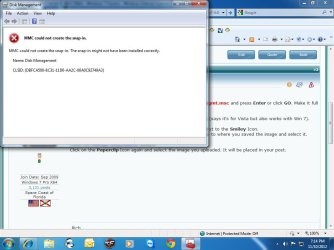
Untitled.jpg

I have no idea what this is.
 

My Computer My Computer

Computer Manufacturer/Model Number
iBUYPOWER Computers (custom)
OS
Windows 7 Ultimate x64
CPU
3.33 gigahertz Intel Core i7 X 980
Motherboard
Board: ASUSTeK Computer INC. P6X58D PREMIUM Rev 1.xx
Memory
24568 Megabytes Usable Installed Memory
Graphics Card(s)
NVIDIA GeForce GTX 480 [Display adapter] (2x)
Sound Card
NVIDIA High Definition Audio (8x)
Monitor(s) Displays
Samsung 24"
Hard Drives
INTEL SSDSA2M080G2GC [Hard drive] (80.03 GB)

Hitachi HDS721010CLA332 [Hard drive] (1000.20 GB)
PSU
1200W Thermalake
Case
Zalman GS1000 Plus
Cooling
Cool Master V8
When you installed Windows 7 on the SSD did you use the same product key to activate it? If so, Windows 7 may be taking your SSD offline, when the HDD is hooked up to the system.
 

My Computer My Computer

Computer Manufacturer/Model Number
Customized build from CyberPower
OS
Windows 7 Home Premium 64bit SP 1
CPU
Intel i5 2500k
Motherboard
Asus P8P67 Deluxe
Memory
8 gigabytes Corsair PC3-12800 DDR3
Graphics Card(s)
EVGA GeForce GTX 460 superclocked
Sound Card
Integrated
Monitor(s) Displays
ViewSonic 23" LCD
Screen Resolution
1980 x 1080
Hard Drives
120 Gb Samsung 840 Pro SSD
120 Gb Kingston Hyper X SSD
1 Tb WD Caviar Black HDD
PSU
Coolermaster 1000 watt modular
Case
Coolermaster HAF X full tower
Cooling
Coolermaster Hyper 212 plus
Keyboard
Logitech USB
Mouse
Microsoft 3 button
Internet Speed
download 1.5 Mb/sec upload 300Kb/sec
I did use the same product key that came with the computer. If they took it off line wouldn't it disable both drives (SSD)?

I read something in this forum about needing to assign the New SSD a drive letter. I was not able to do that.

Am I not able to reuse Win7 if it on the OEM computer?
 

My Computer My Computer

Computer Manufacturer/Model Number
iBUYPOWER Computers (custom)
OS
Windows 7 Ultimate x64
CPU
3.33 gigahertz Intel Core i7 X 980
Motherboard
Board: ASUSTeK Computer INC. P6X58D PREMIUM Rev 1.xx
Memory
24568 Megabytes Usable Installed Memory
Graphics Card(s)
NVIDIA GeForce GTX 480 [Display adapter] (2x)
Sound Card
NVIDIA High Definition Audio (8x)
Monitor(s) Displays
Samsung 24"
Hard Drives
INTEL SSDSA2M080G2GC [Hard drive] (80.03 GB)

Hitachi HDS721010CLA332 [Hard drive] (1000.20 GB)
PSU
1200W Thermalake
Case
Zalman GS1000 Plus
Cooling
Cool Master V8
No, it wouldn't take both drives offline. If you plan to use the SSD as your main drive then you could try using the diskpart command line to set the HDD as inactive. That might allow you to access it while leaving Windows in tact. If both drives don't show up when both are hooked up you may have to unhook the SSD and then run diskpart after booting up from your windows repair disk.
 

My Computer My Computer

Computer Manufacturer/Model Number
Customized build from CyberPower
OS
Windows 7 Home Premium 64bit SP 1
CPU
Intel i5 2500k
Motherboard
Asus P8P67 Deluxe
Memory
8 gigabytes Corsair PC3-12800 DDR3
Graphics Card(s)
EVGA GeForce GTX 460 superclocked
Sound Card
Integrated
Monitor(s) Displays
ViewSonic 23" LCD
Screen Resolution
1980 x 1080
Hard Drives
120 Gb Samsung 840 Pro SSD
120 Gb Kingston Hyper X SSD
1 Tb WD Caviar Black HDD
PSU
Coolermaster 1000 watt modular
Case
Coolermaster HAF X full tower
Cooling
Coolermaster Hyper 212 plus
Keyboard
Logitech USB
Mouse
Microsoft 3 button
Internet Speed
download 1.5 Mb/sec upload 300Kb/sec
My computer came with 2 drives, 1 SSD with Win7, 1 HDD for storage. I have added 1 additional SSD and put Win7 on it from my Reinstallation DVD. I read on this forum, somewhere, at boot up it will give you the option of what system to boot. In that same thread it said something about assigning the new SSD a drive letter. If it isn't assigned a drive letter the computer will boot from the OEM drive which is normally C:

Sorry if I am not making any since. I am new at this stuff.
 

My Computer My Computer

Computer Manufacturer/Model Number
iBUYPOWER Computers (custom)
OS
Windows 7 Ultimate x64
CPU
3.33 gigahertz Intel Core i7 X 980
Motherboard
Board: ASUSTeK Computer INC. P6X58D PREMIUM Rev 1.xx
Memory
24568 Megabytes Usable Installed Memory
Graphics Card(s)
NVIDIA GeForce GTX 480 [Display adapter] (2x)
Sound Card
NVIDIA High Definition Audio (8x)
Monitor(s) Displays
Samsung 24"
Hard Drives
INTEL SSDSA2M080G2GC [Hard drive] (80.03 GB)

Hitachi HDS721010CLA332 [Hard drive] (1000.20 GB)
PSU
1200W Thermalake
Case
Zalman GS1000 Plus
Cooling
Cool Master V8
When you installed Win 7 on the SSD, you should have unplugged all other drives from your motherboard. This way the SSD would become drive C: and the old HDD with Win 7 would be labeled something else. About the easiest way is to do another install on the SSD. Be sure and unplug all drives from the motherboard. I would advise before you do this to post a shot of your expanded Disk Management so we can read all print that is on it. You did post something but that was not it. Go to your Start button and click. You will see a space about it. Type DISK MANAGEMENT and hit enter, it will popup. Expand the columns so we can read all print.
 

My Computer My Computer

Computer type
PC/Desktop
Computer Manufacturer/Model Number
Custom Build
OS
Windows 7 Home Premium 32-Bit - Build 7600 SP1
CPU
Intel Core i3-2120 3.30Ghz
Motherboard
Asus P8Z68-V LX Intel Z68 Socket H2 ATX
Memory
Kingston 4 GB DDR3 1333 mhz
Graphics Card(s)
AMD Radeon HD6670
Sound Card
Sound Blaster Audigy SE 24-Bit
Monitor(s) Displays
Asus VE228
Screen Resolution
1440 X 900
Hard Drives
OCZ Vertex 3 120 GB Sata 3 SSD ==
Kingston SH103/S3 120 G Hyper X 120 GB SSD ==
Western Digital 500 GB Caviar Green 7200 RPM ==
PSU
Corsair CX600M == 600 Watt
Case
NZXT Apollo - Silver with Clear Side Panel
Cooling
Three 120 mm Fans
Keyboard
Microsoft Natural 4000
Mouse
Microsoft Custom Optical 3000
Internet Speed
AT&T Fiber Optic Wireless Network
Antivirus
Microsoft Security Essentials
Browser
Chrome
Other Info
120 mm Blue LED Fan -- Three Blue LED Lazer Light Sticks
If that's all you get when you open Disk Mgmt then you have serious problems. Install and run a full Malwarebytes scan, followed by SFC -SCANNOW Command. If that fails you may need to run a Repair Install because it cannot be left that way, a level of corruption I've not even seen before.

Then post back the Disk Mgmt screenshot requested.

As stated unplug all other drives and peripherals when you do a booted install to the new SSD. Afterwards plug back in the other drives, set preferred OS HD first to boot in BIOS setup, boot the other using one time BIOS Boot Menu key given on first screen.
 

My Computer My Computer

Computer Manufacturer/Model Number
iBUYPOWER Computers (custom)
OS
Windows 7 Ultimate x64
CPU
3.33 gigahertz Intel Core i7 X 980
Motherboard
Board: ASUSTeK Computer INC. P6X58D PREMIUM Rev 1.xx
Memory
24568 Megabytes Usable Installed Memory
Graphics Card(s)
NVIDIA GeForce GTX 480 [Display adapter] (2x)
Sound Card
NVIDIA High Definition Audio (8x)
Monitor(s) Displays
Samsung 24"
Hard Drives
INTEL SSDSA2M080G2GC [Hard drive] (80.03 GB)

Hitachi HDS721010CLA332 [Hard drive] (1000.20 GB)
PSU
1200W Thermalake
Case
Zalman GS1000 Plus
Cooling
Cool Master V8
Try installing and running Malwarebytes in Safe Mode.

What were the results of SFC?

If necessary run WDO offline from CD or stick, do SFC from Command Line at boot as shown in Troubleshooting Windows 7 Failure to Start . Once it's disinfected, if System Files won't repair or problems persist you may need to do a Repair Install

Another option is to back up your files to get a perfect Clean Reinstall - Factory OEM Windows 7 sticking with the tools and methods which work best with Win7 so it doesn't become grossly corrupted again.
 
Back
Top