Dual Boot... loading the other os?

Iforgotart

New member
Local time
10:24 PM
Messages
26
alrighty.... well, i made my self a dual boot today, and well, emm. when i turn my computer on it only boots as windows xp (the dual boots between xp and seven].... as i said before, it only boots as xp when i turn it on... but i know i still have the 7 partition because i can access the files of it... so my question is.... How do i boot as windows 7...

keep in mind i have a asus motherboard and bios... if that makes any difference.. help please?

thanks in advance, i forgot
 

My Computer

OS
windows 7
alrighty.... well, i made my self a dual boot today, and well, emm. when i turn my computer on it only boots as windows xp (the dual boots between xp and seven].... as i said before, it only boots as xp when i turn it on... but i know i still have the 7 partition because i can access the files of it... so my question is.... How do i boot as windows 7...

keep in mind i have a asus motherboard and bios... if that makes any difference.. help please?

thanks in advance, i forgot

Forgot

I suspect you put win 7 on first then XP, right? In either case you are going to have to do some editing with BCDedit. its built in to win 7. First you should probably read about dual booting here http://www.sevenforums.com/tutorials/8057-dual-boot-installation-windows-7-xp.html

then when you are ready to do the editing you can read about bcdedit here http://www.sevenforums.com/tutorials/2676-bcdedit-how-use.html

hope this helps and feel free to ask if you need help with any of it

Ken
 

My Computer

Computer Manufacturer/Model Number
HP Pavillion dv-7 1005 Tx
OS
Win 8 Release candidate 8400
CPU
[email protected]
Memory
4 gigs
Graphics Card(s)
Nvidia 9600M
Sound Card
HD built-in
Monitor(s) Displays
17" Wxga
Screen Resolution
1440x900
Cooling
none
Internet Speed
45Mb down 5Mb up
ye, i put 7 in first then xp... and this sounds like a good way to spend the rest of my night...

**edit

Mehh, i read those two things.. im still lost as hell
 

My Computer

OS
windows 7
Run startup repair from the 7 dvd 3 times.

Boot into 7. Open an elevated cmd prompt - type: ( press enter after each command ):


bcdedit /create {ntldr} /d “XP”
bcdedit /set {ntldr} device boot
bcdedit /set {ntldr} path ntldr
bcdedit /displayorder {ntldr} /addlast
 

My Computers

System One System Two

  • Computer type
    PC/Desktop
    OS
    7 X64
    CPU
    i5 8400
    Motherboard
    gigabyte b365m ds3h
    Memory
    2x8gb 3200mhz
    Hard Drives
    various
    PSU
    pure power 11 400w cm
    Case
    Coolermaster
    Cooling
    cryorig m9i
  • Computer type
    PC/Desktop
    OS
    7x64
    CPU
    g5400
    Motherboard
    ga b365m ds3h
    Memory
    8gb ddr4 2400
    PSU
    xfx pro 450w
^ Thanks, ill give this a try later.... also, is there an easier way if im willing to delete XP all together?

thanks, iforgot
 

My Computer

OS
windows 7
^ Thanks, ill give this a try later.... also, is there an easier way if im willing to delete XP all together?

thanks, iforgot


Sure ... format the drive, erasing all the partitions, and reinstall .. easy peasy...
 

My Computer

Computer type
PC/Desktop
Computer Manufacturer/Model Number
LENOVO K450 @3.0GHZ
OS
64-bit Windows 8.1 Pro
CPU
Core(TM) i5 CPU 4330 Haswell @ 3.20GHz
Motherboard
LENOVO
Memory
12.00 GB
Graphics Card(s)
Intel(R) HD Graphics
Sound Card
Intel HD integtrated
Monitor(s) Displays
HP 25' ISP Monitor
Screen Resolution
1900/1020
Hard Drives
(1) ST1000DM003-1CH162 (2) Generic STORAGE DEVICE USB Device (3) Generic STORAGE DEVICE USB Device
Internet Speed
100mb down/10mb up
Run startup repair from the 7 dvd 3 times.

Boot into 7. Open an elevated cmd prompt - type: ( press enter after each command ):


bcdedit /create {ntldr} /d “XP”
bcdedit /set {ntldr} device boot
bcdedit /set {ntldr} path ntldr
bcdedit /displayorder {ntldr} /addlast

^ Thanks, ill give this a try later.... also, is there an easier way if im willing to delete XP all together?

thanks, iforgot

Is that difficult? If the commands are alarming:

Run startup repair from 7 dvd 3 times. Boot into 7. Download the free Easybcd - use that to add the XP entry - it will do the commands for you.

Download EasyBCD 1.7.2 - NeoSmart Technologies
 

My Computers

System One System Two

  • Computer type
    PC/Desktop
    OS
    7 X64
    CPU
    i5 8400
    Motherboard
    gigabyte b365m ds3h
    Memory
    2x8gb 3200mhz
    Hard Drives
    various
    PSU
    pure power 11 400w cm
    Case
    Coolermaster
    Cooling
    cryorig m9i
  • Computer type
    PC/Desktop
    OS
    7x64
    CPU
    g5400
    Motherboard
    ga b365m ds3h
    Memory
    8gb ddr4 2400
    PSU
    xfx pro 450w
well, i was hoping to fix it from Xp, but i guess i cannot..
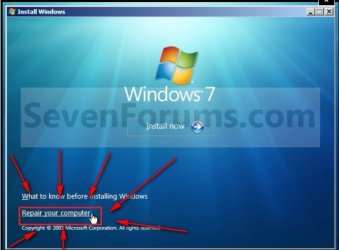
i just dont know how to run the startup repair
 

My Computer

OS
windows 7

My Computers

System One System Two

  • Computer type
    PC/Desktop
    OS
    7 X64
    CPU
    i5 8400
    Motherboard
    gigabyte b365m ds3h
    Memory
    2x8gb 3200mhz
    Hard Drives
    various
    PSU
    pure power 11 400w cm
    Case
    Coolermaster
    Cooling
    cryorig m9i
  • Computer type
    PC/Desktop
    OS
    7x64
    CPU
    g5400
    Motherboard
    ga b365m ds3h
    Memory
    8gb ddr4 2400
    PSU
    xfx pro 450w
If you have a second hard drive you are trying to install your second os onto I would suggest completely disconnecting the Windows 7 Hard drive installing the new os onto the other ,then installing Acronis Disk Director. ( Do NOT install acronnis onto the Win 7 drive due to current incompatibilities.) reconnect the Windows 7 Hard drive, and ensure that the drive that has Acronis is set as the primary boot drive. It should scan all the hard drives and pick up Windows 7 as an unknown OS. Rename it windows 7 and give it the windows logo and you should be set.
 

My Computer

Computer Manufacturer/Model Number
SMN-Productions
OS
Windows 7 x86/x64, Server 2008r2, Web Server 2008
CPU
i7 v2 3930K Steping stone 2
Motherboard
ASUS Rampage IV Extreme
Memory
G.SKILL Ripjaws Z Series 32GB
Graphics Card(s)
AMD HD 5770
Monitor(s) Displays
Acer 21" and Samsung 20"
Hard Drives
Patriot Pyro 80GB
PSU
1000 Watt
Case
HAF-X
Cooling
4 Fans
Keyboard
Black Widow Ultimate
alright, well i shutdown, popped windows 7 disk in, and it booted, i selected my language, but then.... OH NO!

IT BROUGHT ME TO PARTITION MANAGER!!!!!!!

yea, so it brought me to partition manager!!! i got no selection of windows 7 repair, and when i choose a partition it just starts instalation... HELP PLEASE!!!!!
 

My Computer

OS
windows 7
alright, well i shutdown, popped windows 7 disk in, and it booted, i selected my language, but then.... OH NO!

IT BROUGHT ME TO PARTITION MANAGER!!!!!!!

yea, so it brought me to partition manager!!! i got no selection of windows 7 repair, and when i choose a partition it just starts instalation... HELP PLEASE!!!!!
 

My Computer

OS
windows 7
alright, well i shutdown, popped windows 7 disk in, and it booted, i selected my language, but then.... OH NO!

IT BROUGHT ME TO PARTITION MANAGER!!!!!!!

yea, so it brought me to partition manager!!! i got no selection of windows 7 repair, and when i choose a partition it just starts instalation... HELP PLEASE!!!!!

get a third party disk manager like parigon disk suite 2009. delete every stinking partition. also if you want to break the partition manager it is in the root of c:\ and is called boot
 

My Computer

Computer Manufacturer/Model Number
HP Pavillion dv-7 1005 Tx
OS
Win 8 Release candidate 8400
CPU
[email protected]
Memory
4 gigs
Graphics Card(s)
Nvidia 9600M
Sound Card
HD built-in
Monitor(s) Displays
17" Wxga
Screen Resolution
1440x900
Cooling
none
Internet Speed
45Mb down 5Mb up
If i just delete the XP partition with the windows 7 boot manager, should windows 7 boot? keep in mind i installed windows 7 BEFORE xp
 

My Computer

OS
windows 7

My Computers

System One System Two

  • Computer type
    PC/Desktop
    OS
    7 X64
    CPU
    i5 8400
    Motherboard
    gigabyte b365m ds3h
    Memory
    2x8gb 3200mhz
    Hard Drives
    various
    PSU
    pure power 11 400w cm
    Case
    Coolermaster
    Cooling
    cryorig m9i
  • Computer type
    PC/Desktop
    OS
    7x64
    CPU
    g5400
    Motherboard
    ga b365m ds3h
    Memory
    8gb ddr4 2400
    PSU
    xfx pro 450w
screw it, ill just do a clean install, none of the tutorials on this site give any sort of direct answer.
 

My Computer

OS
windows 7
REPAIR YOUR COMP-2009-09-26_235514.jpg
 

My Computers

System One System Two

  • Computer type
    PC/Desktop
    OS
    7 X64
    CPU
    i5 8400
    Motherboard
    gigabyte b365m ds3h
    Memory
    2x8gb 3200mhz
    Hard Drives
    various
    PSU
    pure power 11 400w cm
    Case
    Coolermaster
    Cooling
    cryorig m9i
  • Computer type
    PC/Desktop
    OS
    7x64
    CPU
    g5400
    Motherboard
    ga b365m ds3h
    Memory
    8gb ddr4 2400
    PSU
    xfx pro 450w
Back
Top