Dual Boot new Advent 2102 w/Win7 and old Cdrive from dead XP machine

ItSaidWhat

New member
Local time
1:29 PM
Messages
6
Hi,

I have looked through previous posts and some come very close to answering my query but as an unforced error at my end is not acceptable I think it best I ask the experts.

Scenario:

My old (very old) machine running XP snuffed it (MB burnt out). As it wasn't cost effective to get a new MB/CPU combo vs a new machine I opted for the new Advent 2102. Cheap and cheerful and it works well.

I also bought a Dynamode caddy so I could transfer all data via usb from the 'old' Cdrive to a folder on the new machine. This worked reasonably well although for some reason some files were deemed outside of current permissions (seemed to be the odd zip file and modelsupport folders in Delphi projects. I can live with that but I would like to find out why)

So, I have a new Win7 machine and have not lost any data. However what I am now faced with a reinstall of Delphi 2005, Indy and whatever 3rd party components I had and all the updates upgrades etc since the original install.

This can be a pain to get right.

Objective:

Therefore I want to find out how to Dual Boot into either the current new Win7 drive or the old XP drive (which I can connect via the usb caddy or internally using the unused IDE port of the G31MX-K MB in the Advent)

What steps do you recommend I take?

Thanks.
 

My Computer My Computer

At a glance

Windows 7
OS
Windows 7

My Computer My Computer

At a glance

win 7 ultimate32bit, Win8.1pro wmc 32bitamd phenom x4 9600corsair twinxs 2x2gb2x nvidia 1gb 8500gt
Computer type
PC/Desktop
Computer Manufacturer/Model Number
self build
OS
win 7 ultimate32bit, Win8.1pro wmc 32bit
CPU
amd phenom x4 9600
Motherboard
asus m2n32-sli deluxe
Memory
corsair twinxs 2x2gb
Graphics Card(s)
2x nvidia 1gb 8500gt
Sound Card
onboard
Monitor(s) Displays
23" PB Viseo 233d
Screen Resolution
1920x1080
Hard Drives
maxtor sata 500gb
maxtor sata 320gb
fujitsu sata200gb
PSU
oryxx tornado 750w
Case
thermaltake xaser lll
Cooling
artic freezer64 pro + 7 case fans
you're too fast for me theog :roflmao:
 

My Computer My Computer

At a glance

win 7 ultimate32bit, Win8.1pro wmc 32bitamd phenom x4 9600corsair twinxs 2x2gb2x nvidia 1gb 8500gt
Computer type
PC/Desktop
Computer Manufacturer/Model Number
self build
OS
win 7 ultimate32bit, Win8.1pro wmc 32bit
CPU
amd phenom x4 9600
Motherboard
asus m2n32-sli deluxe
Memory
corsair twinxs 2x2gb
Graphics Card(s)
2x nvidia 1gb 8500gt
Sound Card
onboard
Monitor(s) Displays
23" PB Viseo 233d
Screen Resolution
1920x1080
Hard Drives
maxtor sata 500gb
maxtor sata 320gb
fujitsu sata200gb
PSU
oryxx tornado 750w
Case
thermaltake xaser lll
Cooling
artic freezer64 pro + 7 case fans
Hi theog and pebbly.

Looking at "Dual Boot Installation with Windows 7 and XP" I may be missing something but it seems to be addressimg a requirement to clean install xp on a separate drive. Whereas what I have is a drive with xp (and my stuff) on it that I want to install in the new Advent machine.

If I clean install xp I am back to square one with my istalled programmes.

I also need some guidance as to some of the more basic apsects, such as - should my old xp drive be set to Master (as it currently is) or Slave? and then if possible to select which one to boot from.
 

My Computer My Computer

At a glance

Windows 7
OS
Windows 7

My Computer My Computer

At a glance

ME/XP/Vista/Win7
OS
ME/XP/Vista/Win7
You will need to run a Repair Install before XP will start up on new hardware. Repair Windows XP - How to Perform a Repair Installation of Windows XP - Part 1 of 2

The cleanest way to Dual Boot with OS's on separate HD's is to use the BIOS: set the preferred HD as first HD to boot in BIOS setup, then if you want to boot the other HD tap the key given on first boot screen for Boot Menu to trigger it instead. This keeps the HD's independent to come and go as you please.

In order to accomplish this, unplug the WIn7 HD before running the XP Repair install, set XP HD as first to boot in BIOS, after DVD drive. After Repair, plug Win7 HD back in and attempt to start it up by using the key given on first boot screen for one-time BIOS boot menu.

If you decide you want a Windows-managed Dual Boot instead, install EasyBCD 2.0 beta to XP after first installing Net Framework 2.0 so it will run. Then Add Win7 on Add/Remove tab. Sometimes you'll need to start up Win7 first to run EasyBCD from there since it works better. To do this, mark WIn7 active in XP Disk Mgmt, boot the WIn7 DVD Repair console or Repair CD, click through to Recov Tools list to run Startup Repair up to 3 separate times with reboots until 7 starts.
 
Last edited:
Hi gregrocker,

I'll double check I have all the data off the old drive and then proceed as suggested.

I will report back once completed and detail any problems/solutions if I encounter any, this may help others attempting the same procedure.

thanks
 

My Computer My Computer

At a glance

Windows 7
OS
Windows 7
After the weekend I set about sorting this out. I made doubly sure I have the stuff I absolutley need from the old drive. Downloaded and installed EasyBCD 2.0 beta to the current Win7 Drive and also copied it to a usb drive so I have it handy to install on the xp drive if needed.

I disconnected the current win7 drive, made the old xpDrive a Master and installed that in the machine. I had the xpHome disk at hand and the XP professional upgrade disk in the DVD.

I selected the CDRom from the boot options at powerup and off it went. All was well until the xp repair asked for the Administrator password. I gave it what I thought it was but it failed 3 times and put an end to that excersize.

So I dug out an old copy of Winternals ERD 2005 and fired that up. Using that I selected the only Windows ( c:\windows ) as the one to log onto. I then changed the Admin password, which ERD accepted, and then closed down the machine.

Changed back to the XP professional disk and tried another repair. Again the admin password failed, even with the 'new' password I had just set.

Now I have disconnected the XP drive and reconnected the Win7 drive and am back to square one.

Any suggestions/ideas?
 
Last edited:

My Computer My Computer

At a glance

Windows 7
OS
Windows 7
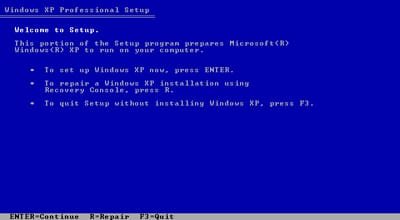
There shouldn't be a password asked for if you proceed as if to install until it finds the installation and then press R for Repair.
 
Last edited:
Hi theog,

That might be it. I did press 'R' at that screen.

Hi gregrocker, Yep I had set a password. Shortly after I found out how anyone could easily get access as Admin if I left it as set by default.

Thanks guys I'll have another crack at it later this evening or in the morning after I have done a little work.
 

My Computer My Computer

At a glance

Windows 7
OS
Windows 7
Hi Folks,

Well I set about it and followed the instructions and this time the installation/repair started off as expected.

After an age of deleting and reinstalling files, setting up drivers etc etc it got pretty far along and then --- BSOD.

It was seemingly caused by vdiskbus.sys and related to:
DRIVER_UNLOADED_WITHOUT_CANCELLING_PENDING_OPERATIONS

I took a pic of the BSOD with my phone and I have it to refer to. But it is basically suggesting I disable any new hardware (which is all of it) and have another go, each time tinkering with the BIOS.

I am a bit loathe to do this as I may end up with a machine that won't work with the original W7 drive or the old XP antique.

I tried a restart (with the XP disk) after the memory dump finished and it failed to boot and advised starting with the CD and going for a repair 'R' at the first option.

I am not prepared to do this at this point as I foresee a perpetual loop with nothing but a headache at the end if I mess up a tiny bit.

I have disconnect the XP drive and reconnected the W7 drive and now all is back to square one - but it does still work. (pheww!!!)

I can bite the bullet and attempt to reinstall the original Delphi programmes and updates... but I know this will be a pain, especially given the change of ownership and support of the product. But it is doable.

As it may be easy (for you guys) to recover from this failed 'Repair' attempt I ask your advice before 'biting the bullet'

thanks
 

My Computer My Computer

At a glance

Windows 7
OS
Windows 7
Do you have Alcohol installed, or anything from Winternals or Systernals?

Can you start XP to Uninstall them, or browse from CD Repair Command Line to vdiskbus.sys located in the folder C:\Windows\System32\drivers to remove or rename it?
 
Back
Top