Dual boot Overwrite

JRockZ

New member
Member
VIP
Local time
6:38 PM
Messages
176
Maybe you guys can tell me what to expect before i screw my system up. I have 2 drives installed in my desktop one is an 80gb drive with windows 7 32bit installed on it, this one i use for my every day use.
I also have a 250Gb drive with Vista 64 home premium. The Vista install was my everyday drive untill i got W7U32b when i got W7U32b i bought the 80gb drive specifically to install the W7U32b to so i wouldnt loose what i had on my vista drive,,, needless to say ive never even gone back to use the vista drive since then except to copy files over to the W7U32b drive .
I want to now install W7U 64 bit over the vista drive. Right now when my system boots i have the option of starting in win 7 and or vista. If install w7u64 over the vista install will i then have the option to boot in either w7u32b or w7u64 bit? i DO NOT want to loose the W7U32b drive data!!!
Ive done some searching around but didnt find anything similar to this. Any info would be much appreciated!!
Thanks
JRockZ
 

My Computer

Computer type
PC/Desktop
Computer Manufacturer/Model Number
JRockZ
OS
Win 7 64 Ultimate
CPU
AMD 8350 Bulldozer 4ghz
Motherboard
Asus M5a97 R2
Memory
6gb
Graphics Card(s)
ATI Radeon HD 5770 X 2
Sound Card
Board
Monitor(s) Displays
Dual Gateway 19" and 32" TV 3 displays at once :D
Screen Resolution
1440X900
Hard Drives
OCZ Agility SSD Patriot Blaze 120
PSU
750 Watt Thermaltake Tough Power
Case
Diablotek EVO Mid Tower Case CPA-6170 - 8X 120mm case fans
Cooling
Corsair Liquid Cooled
Antivirus
NAV
Browser
Always IE
To answer your question specifically, I'm not sure how windows boot manager works for same versions of windows. In the past, you install the older os followed by the new one. In this case it's the same. But, someone will come by with a detailed answer soon i'm sure.

In the meantime, have you considered formating the vista drive, and using it to host a virtual machine from? I suspect you want to play around with application compatibility, driver support, etc. and virtual machines make it so convenient.
 

My Computer

Computer Manufacturer/Model Number
Custom
OS
Windows 7 Ultimate x64
CPU
Intel i5-2500k
Motherboard
ASUS P8Z68-V Pro/GEN3
Memory
16GB
Graphics Card(s)
2x Radeon HD7970 Crossfire
Sound Card
On-Board / Logitech G930
Monitor(s) Displays
3x Dell u2412m
Screen Resolution
5760x1200
Hard Drives
Toshiba thns064gg2bbaa SSD
Seagate Barracuda 7200.12 ST31000528AS 1TB
Intel RST SSD caching enabled
PSU
Corsair AX850
Case
Corsair Obsidian 650D
Cooling
Corsair H100
Keyboard
Logitech Illuminated
Mouse
Logitech M510 Wireless
Internet Speed
1Mb/s
Hello JRockZ, welcome to Seven Forums!


As you have separate Hard Disk Drives, the best way would be a BIOS managed dual boot, using the BIOS one-time boot menu specific to your motherboard to manage the dual boot.

But before we make any specific recommendations will you please post a snip/screen-shot of the entire disk management drive map with a full description as to which drive/partition is which, so we can see what you have going on.

In the Windows start menu right click computer and click manage, in the left pane of the "Computer Management" window that opens click disk management and post a snip of that.


How to Upload and Post a Screenshot and File in Seven Forums
 

My Computer

Computer Manufacturer/Model Number
* BFK Customs *
OS
W 7 64-bit Ultimate
CPU
Intel Q9550 Yorkfield
Motherboard
ASUS P5Q Pro
Memory
8GB Dominator 8500C5D
Graphics Card(s)
ATI : XFX 5870
Sound Card
Realtek HD Audio 7-1
Monitor(s) Displays
1x 47" LCD HDMI & 3x 26" LCD HDMI
Screen Resolution
1920x1080P & 1920x1200
Hard Drives
1x 80GB Intel X25-M G2 SSD : 1x 500GB & 1x 640GB WD Caviar Black(s)
PSU
Corsair 620HX
Case
Cooler Master RC-690
Cooling
Tuniq Tower 120, 2x 140mm and 3x 120mm case fans
Keyboard
Microsoft 500
Mouse
Razer Diamondback 3G
Internet Speed
14 Mb/s
Other Info
1x Koutech 3Gb/s SATA HDD Hot Swap Rack
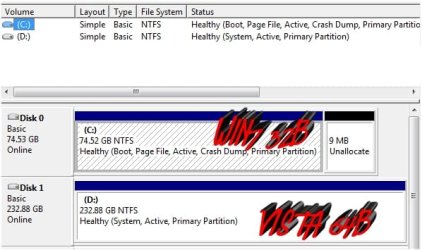
Thanks guys, to anser "Bare Foot Kid" heres a clip of my drives layout
C: Drive Windows 7 Ultimate 32 Bit
D: Vista Home Premium 64bit
 

Attachments

  • Image4.jpg
    Image4.jpg
    36.7 KB · Views: 10

My Computer

Computer type
PC/Desktop
Computer Manufacturer/Model Number
JRockZ
OS
Win 7 64 Ultimate
CPU
AMD 8350 Bulldozer 4ghz
Motherboard
Asus M5a97 R2
Memory
6gb
Graphics Card(s)
ATI Radeon HD 5770 X 2
Sound Card
Board
Monitor(s) Displays
Dual Gateway 19" and 32" TV 3 displays at once :D
Screen Resolution
1440X900
Hard Drives
OCZ Agility SSD Patriot Blaze 120
PSU
750 Watt Thermaltake Tough Power
Case
Diablotek EVO Mid Tower Case CPA-6170 - 8X 120mm case fans
Cooling
Corsair Liquid Cooled
Antivirus
NAV
Browser
Always IE
I'm walking out the door to go to work.


Here's how to get started.

Disconnect the "Disk 1 Vista" HDD from the mobo; set the "Disk 0" HDD as second in the boot order in the BIOS after the CD-ROM, boot the Windows 7 disk and do the startup repairs discussed in this tutorial at the link below.

Startup Repair - Run 3 Separate Times


That will remove the Windows managed dual boot and make the HDDs independent.

Then power-down and reconnect the "Disk 1" HDD and use the BIOS one-time boot menu to select the HDD/OS to boot.


One-time Boot Menu
  • Asus - F8
  • HP/Compaq - Esc
  • Sony - F2
  • Acer - F2
  • Gateway - F10
  • eMachnes - F10
  • Toshiba - F12
  • Dell - F12
  • IBM/Lenovo - the blue Thinkvantage button
 

My Computer

Computer Manufacturer/Model Number
* BFK Customs *
OS
W 7 64-bit Ultimate
CPU
Intel Q9550 Yorkfield
Motherboard
ASUS P5Q Pro
Memory
8GB Dominator 8500C5D
Graphics Card(s)
ATI : XFX 5870
Sound Card
Realtek HD Audio 7-1
Monitor(s) Displays
1x 47" LCD HDMI & 3x 26" LCD HDMI
Screen Resolution
1920x1080P & 1920x1200
Hard Drives
1x 80GB Intel X25-M G2 SSD : 1x 500GB & 1x 640GB WD Caviar Black(s)
PSU
Corsair 620HX
Case
Cooler Master RC-690
Cooling
Tuniq Tower 120, 2x 140mm and 3x 120mm case fans
Keyboard
Microsoft 500
Mouse
Razer Diamondback 3G
Internet Speed
14 Mb/s
Other Info
1x Koutech 3Gb/s SATA HDD Hot Swap Rack
Bare Foot Kid Thanks thats exactly what i thought you would say ;) Hahahaaa! The start up repairs part is what scares me but i'll get it!! will report back when i get around to doing it and let ya know how it went.
Thanks
JRockZ
 

My Computer

Computer type
PC/Desktop
Computer Manufacturer/Model Number
JRockZ
OS
Win 7 64 Ultimate
CPU
AMD 8350 Bulldozer 4ghz
Motherboard
Asus M5a97 R2
Memory
6gb
Graphics Card(s)
ATI Radeon HD 5770 X 2
Sound Card
Board
Monitor(s) Displays
Dual Gateway 19" and 32" TV 3 displays at once :D
Screen Resolution
1440X900
Hard Drives
OCZ Agility SSD Patriot Blaze 120
PSU
750 Watt Thermaltake Tough Power
Case
Diablotek EVO Mid Tower Case CPA-6170 - 8X 120mm case fans
Cooling
Corsair Liquid Cooled
Antivirus
NAV
Browser
Always IE
OK, be sure to post bacl to keep us informed.


I've done more startup repairs than I could begin to count, both in Vista and Windows 7 and they're nothing to be concerned over. ;)

Using a BIOS managed dual boot as opposed to a Windows managed is the way to go as you are able to remove a single HDD/OS at will and the other will still boot.
 

My Computer

Computer Manufacturer/Model Number
* BFK Customs *
OS
W 7 64-bit Ultimate
CPU
Intel Q9550 Yorkfield
Motherboard
ASUS P5Q Pro
Memory
8GB Dominator 8500C5D
Graphics Card(s)
ATI : XFX 5870
Sound Card
Realtek HD Audio 7-1
Monitor(s) Displays
1x 47" LCD HDMI & 3x 26" LCD HDMI
Screen Resolution
1920x1080P & 1920x1200
Hard Drives
1x 80GB Intel X25-M G2 SSD : 1x 500GB & 1x 640GB WD Caviar Black(s)
PSU
Corsair 620HX
Case
Cooler Master RC-690
Cooling
Tuniq Tower 120, 2x 140mm and 3x 120mm case fans
Keyboard
Microsoft 500
Mouse
Razer Diamondback 3G
Internet Speed
14 Mb/s
Other Info
1x Koutech 3Gb/s SATA HDD Hot Swap Rack
Have you now confirmed that the one-time BIOS Boot menu works to boot the OS HD not set to boot first in BIOS setup?

If so when you install Win7 64 bit on DISK1 unplug DISK0 so that the installer doesn't configure a Windows-managed Dual Boot with Win7 32 bit which would place the System boot files on DISK0.

Be sure to set DISK1 as first HD to boot in BIOS setup.

After 64 bit install, plug back in DISK0, set preferred OS HD as first to boot in BIOS setup, boot the other OS HD using the one-time BIOS Boot Menu key. This keeps the HD's independent to come and go as you please.

If you have a rare mobo which doesn't have the one-time BIOS Boot Menu key, or prefer not to Dual Boot using the BIOS, then keep DISK0 plugged in when you install Win7 64 bit to DISK1 so it configures a Windows-managed Dual Boot.
 
Hey All,, rathe rthan unplugging my sata drives and dealing with a big mess inside my pc i just went into my vista install and did an in place upgrade worked perfect and been using it a week or two now, i did have to go in and BCD edit so that i could name my two installs one as 32 bit and the other as 64 bit.
Thanks for all the help.
JRockZ
 

My Computer

Computer type
PC/Desktop
Computer Manufacturer/Model Number
JRockZ
OS
Win 7 64 Ultimate
CPU
AMD 8350 Bulldozer 4ghz
Motherboard
Asus M5a97 R2
Memory
6gb
Graphics Card(s)
ATI Radeon HD 5770 X 2
Sound Card
Board
Monitor(s) Displays
Dual Gateway 19" and 32" TV 3 displays at once :D
Screen Resolution
1440X900
Hard Drives
OCZ Agility SSD Patriot Blaze 120
PSU
750 Watt Thermaltake Tough Power
Case
Diablotek EVO Mid Tower Case CPA-6170 - 8X 120mm case fans
Cooling
Corsair Liquid Cooled
Antivirus
NAV
Browser
Always IE
Since you already have a WIndows-managed Dual Boot and apparently don't want to change that, you can also clean install Win7 directly to DISK1 if you have any issues with the in-place Upgrade from Vista. http://www.sevenforums.com/tutorials/1649-clean-install-windows-7-a.html

Sometimes an in-place Upgrade can suffer from importing corrupt settings from Vista. I wouldn't settle for less than instantaneous performance.

Win7 installer will configure the Dual Boot menu with the other Win7.
 
Back
Top