Dual Boot Problem with windows 8

pillyg

New member
Local time
3:36 PM
Messages
17
Hello all,

This could go here or in the eightforums but anyway, my computer came with windows 7 Home Premium pre-installed. I just installed the Windows 8 preview in a 2nd partition. I am not able to boot back into Windows 7 even though all the files are there. When I go do msconfig or when I go to set the default OS in control panel, Windows 7 does not show up. All I see is windows 8.

I have tried advanced start up, but I don't get the option to set the default OS.

Thanks

William
 

My Computer

OS
Windows 7 64bit
Are you sure you installed Win 8 to the 2nd partition and didn't accidentally overlay the Win 7 partition? Post a screen shot of an full screen Disk Management window please.

To open Disk Management, press Windows key+r, type diskmgmt.msc and press Enter or click GO. Make it full screen.

How to Use the Snipping Tool in Vista - Vista Forums (says it's for Vista but also works with Win 7).

Once you have the image saved, click on the Paperclip Icon next to the Smiley Icon. In the Manage Attachments window, click Browse and navigate to where you saved the image and select it.
Click the Upload button.
Close the Manage Attachments window.
Click on the Paperclip Icon again and select the image you uploaded. It will be placed in your post.
 

My Computer

Computer type
PC/Desktop
Computer Manufacturer/Model Number
Lenovo IdeaCenter 450
OS
Windows 10 Pro X64
CPU
Intel Quad Core i7-4770 @ 3.4Ghz
Memory
16.0GB PC3-12800 DDR3 SDRAM 1600 MHz
Graphics Card(s)
Intel Integrated HD Graphics
Sound Card
Realtek HD Audio
Monitor(s) Displays
HP 22" LCD
Screen Resolution
1680 x 1050
Hard Drives
250GB Samsung EVO SATA-3 SSD
2TB Seagate ST2000DM001 SATA-2
1.5TB Seagate ST3150041AS SATA
Keyboard
Dell USB
Mouse
Lenovo USB
Internet Speed
Cable via Road Runner 3MB Upload, 30MB Download
Antivirus
Windows Defender, MBAM Pro, MBAE
Browser
Seamonkey
Other Info
UEFI/GPT
PLDS DVD-RW DH16AERSH
Disk.PNG

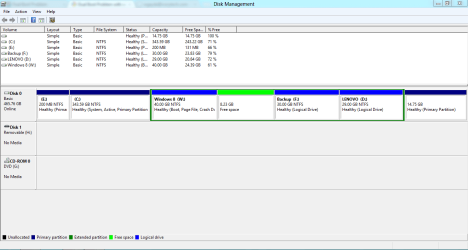
Here it is

I am 99% sure I didn't over ride because I named the partition windows 8 and selected that partition when I install W8.

All of the W7 files are still on the C drive
 

My Computer

OS
Windows 7 64bit
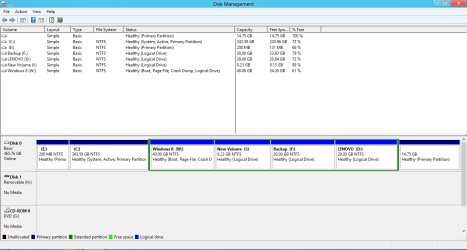
Can you expand the 'Status' column so that one can see what is going on. Like this:
 

Attachments

  • 2012-07-08_2139.png
    2012-07-08_2139.png
    20.6 KB · Views: 15

My Computer

Computer Manufacturer/Model Number
HP, Dell, Gateway, Toshiba - 4 laptops and 2 desktops
OS
Vista, Windows7, Mint Mate, Zorin, Windows 8
CPU
from 1.6GHz Duo to i7
Monitor(s) Displays
2x HP w2207
Hard Drives
5x HDD, 7x SSD, 12x Externals
Keyboard
with trackball - no mices
Mouse
Trackball mice
Internet Speed
DSL 6000
This is an interesting and unusual scenario.

1. You have a system partition (E) and judging by the amount of data it contains it seems to contain a bootmgr (probably that of Win7). But that partition is not 'active' and thus this bootmgr cannot function.

2. On the other hand you have an active C partition which seems to contain the Windows8 bootmgr (I assume that because I assume that your Windows8 does boot).

As a first test I would deactivate the C partition and activate the E partition. For that you need to download the bootable CD of Partition Wizard (last entry on the webpage). Burn that to CD and load from the CD. Highlight the partition you want to manipulate and the controls are in the Partition tab > Modify.

If my theory is right, your Windows7 should now boot - but most likely Win8 will no more boot. If that is the case, we'll see what we can do about that.
 

My Computer

Computer Manufacturer/Model Number
HP, Dell, Gateway, Toshiba - 4 laptops and 2 desktops
OS
Vista, Windows7, Mint Mate, Zorin, Windows 8
CPU
from 1.6GHz Duo to i7
Monitor(s) Displays
2x HP w2207
Hard Drives
5x HDD, 7x SSD, 12x Externals
Keyboard
with trackball - no mices
Mouse
Trackball mice
Internet Speed
DSL 6000
I will try that but I would like to choose what OS I boot into so both would have to be active for that. From what I have read, I should get a place to choose W7 or W8.

The C drive contains windows 7 and W drive contains windows 8
 

My Computer

OS
Windows 7 64bit
I understand that. But the whole setup got mucked up and we'll have to go step by step to try to fix it.

Your other option is to restart with a new Win8 installation and hope it will work. But that also would require that you first activate E.
 

My Computer

Computer Manufacturer/Model Number
HP, Dell, Gateway, Toshiba - 4 laptops and 2 desktops
OS
Vista, Windows7, Mint Mate, Zorin, Windows 8
CPU
from 1.6GHz Duo to i7
Monitor(s) Displays
2x HP w2207
Hard Drives
5x HDD, 7x SSD, 12x Externals
Keyboard
with trackball - no mices
Mouse
Trackball mice
Internet Speed
DSL 6000
Alright, thanks WHS. That booted me into Windows 7. Is there a way to keep both partitions active or inactive so I can choose which OS to boot into?


If I select which partitions are on and off I can select what OS to boot into. That shows both installs are complete
 
Last edited:

My Computer

OS
Windows 7 64bit
You can try this ( Windows 7 - EasyBCD - NeoSmart Technologies Wiki ). Note that Windows8 is supported and that's what you want to add.

I have never used that function of EasyBCD but it looks promising for your case.

PS: I have to sign off now because it is late in my neck of the woods (Germany).
 

My Computer

Computer Manufacturer/Model Number
HP, Dell, Gateway, Toshiba - 4 laptops and 2 desktops
OS
Vista, Windows7, Mint Mate, Zorin, Windows 8
CPU
from 1.6GHz Duo to i7
Monitor(s) Displays
2x HP w2207
Hard Drives
5x HDD, 7x SSD, 12x Externals
Keyboard
with trackball - no mices
Mouse
Trackball mice
Internet Speed
DSL 6000
If you correctly booted the Windows 8 installer to install to the chosen partition then it should have configured a Dual Boot. It updated the boot files on C which is Win7 partition. Those boot files would normally be on the 200mb System Reserved partition but somehow were moved to C. However this should not affect Win8 installer normally configuring a Dual Boot when it is correctly installed last from boot.

It's best to keep the boot files on Win7 (or System Reserved partition) so you can easily delete Win8 in Disk management without having to recover the boot files back to Win7.

What I would do now is boot the Win8 installer to run Startup Repair to sort out the Dual Boot.

Incidentally it's likely the Lenovo Recovery partition at the right end of your HD will no longer run after these changes have been made with the System Reserved partition losing the boot files to C and Win8 being installed. So I would make my Recovery Disks if you need a path back to factory condition. Then you can test the Recovery to see if it will cue up from boot and if not delete it.
 
Alright I will try the BCD program. Thanks so much for your help it works now!!

Gregrocker,

I have recovery disks just in case. If I uninstall win8 what exactly will happen to by HDD and the partitions? I am also a bit confused about the lenovo recovery partition. What is up with it?
 
Last edited:

My Computer

OS
Windows 7 64bit
I'd also recommend using Easy BCD to try to fix your problem.
 

My Computer

Computer type
PC/Desktop
Computer Manufacturer/Model Number
Custom Build
OS
Windows 7 Home Premium 64-Bit
CPU
Intel Core i5-4670K
Motherboard
Gigabyte GA-Z87MX-D3H
Memory
8GB HyperX BLU
Graphics Card(s)
Intel HD 4600 Graphics
Monitor(s) Displays
Vizta V24Lmh
Screen Resolution
1920x1080x32 @60Hz
Hard Drives
Toshiba 1TB
PSU
Dynex 650W
Case
Antec GX700
Keyboard
Logitech mk270
Mouse
Logitech mk270
Internet Speed
50 mbps down/5 mbps up
Antivirus
MSE
Browser
Chrome
Other Info
First custom build, saving up for a GTX770!
Thank you all!!

I can now boot into W7 or W8. After I turn on the computer, there is a BIOS type screen that lets me choose W7 W7 or W8.

Yes that is right. There are 2 options for W7. The first works, the second one crashes instantly but then boots good like the first. When I boot into either W7 option, checkdisk is always started. Do you know why? I can choose to skip it, but then I have to be paying attention to the boot and it is kinda annoying.
 

My Computer

OS
Windows 7 64bit
You likely have disk problems stemming from the Lenovo System Reserved partition boot files being somehow moved into C, then the Win8 install from boot which did not configure the Dual Boot as it should.

It's too bad you didn't run Automatic Repair - Run in Windows 8 which would have repaired the nice Metro GUI style Dual Boot menu instead of sticking you with the ugly black Win7 boot menu which running EasyBCD did. That's why I suggested it and would still do it if you plan to keep the Dual Boot you have.

Since it's doubtful your Lenovo Recovery partition will run now either, I would strongly consider backing up your files to wipe the HD with Diskpart Clean Command then follow these steps to get a superior Clean Reinstall - Factory OEM Windows 7. Once it's set up you can avoid the problems which arose by following these steps to Dual Boot Installation - Windows 8 and Windows 7 or Vista.

If you want to keep what you have then be aware the 200mb Lenovo former boot partition is useless, and it's likely the 15gb Recovery partition is also useless although you can try running it from boot using the Fkey given on the first boot screen to see if it will cue up. How do I recover my factory installed programs and files? - Desktops and Workstations
How do I recover my system using ThinkVantage Rescue and Recovery

You can also try making your Recovery disks if you haven't. If not you have nothing to lose deleting those partitions to recover the space. You can check your file system at the same time using Partition Wizard to Move/Resize Partition - Video Help.

Feel free to ask back any questions so you can decide what you want and then I'll provide exact steps.
 
When I try to run the automatic repair it crashes instantly giving the error code 80070490.

What I would ultimately like is Windows 7 Home premium and Windows 8 to both work. I would like to choose what OS to boot using the Windows 8 metro style menu. I would also like to be able to uninstall Windows 8 without ruining my Windows 7 files. I would also like the Lenovo recovery stuff to work because I have had to use it in the past.

Also, I have recovery and restore disks that both work. I assume that means I don't need to worry about the built in recovery partitions?

Sorry I know that is a lot :)
 

My Computer

OS
Windows 7 64bit
That error code is only known to be an Updates issue in Vista. Are you running it from the booted Win8 DVD?

Where did you get the Win8 installer? Download the latest ISO and burn to DVD using Windows Image Burner.

If you're happy with your Win7 installation then how about reinstalling Win8 using the latest ISO burned to DVD and booted. Choose Custom install and then use Drive Options to delete the Win8 partition, create and format a new one to install. Dual Boot Installation - Windows 8 and Windows 7 or Vista.

This should configure the Dual Boot if it's done correctly. If not then you may have boot code that's interfering which is why I'd want to wipe the HD using Diskpart Clean Command and do it all over. But you can wait to see.

I'd still test the Lenovo Recov partition at boot to see if it cues up. With useless System Reserved and Recovery partitions it is begging for a reinstall if there is any stronger suggestion that you have conflicting boot code keeping Win8 from config'ing a Dual Boot.
 
I got the ISO from the microsoft site and no I wasn't booting from the DVD.

Everything works now except in the choose OS menu and in msconfig, windows 7 shows up 2 times.
 

My Computer

OS
Windows 7 64bit
It was not correctly installed if you ran the DVD from Win7 and didn't boot the disk. In that case Win8 doesn't even claim C as it should if correctly installed from boot.

Reinstall it from boot which is the most fundamental thing to get right when installing/reinstalling/repairing.
 
Everything works perfectly now!! I uninstalled W8 then reinstalled. I first tried with a dvd but that didn't work. The next 2 dvds I tried didn't work either. I eventually installed by extracting the ISO, going to sources, then setup.exe . That worked. I now had the metro style OS menu. I selected W7 and nothing happened and then it crashed. I went into easyBCD and moved the bootloader path from the C drive to a drive named BOOT (?) and it worked. The only problem was checkdisk would run everything. I fixed that with the admin CMD command "fsutil dirty query C (drive letter): " and found out that the C, W, and D drives were all dirty. I then used " chkdsk c (drive letter) /f/x) and it worked.
 

My Computer

OS
Windows 7 64bit
Back
Top