
Dual Boot Problem

Punked Boyz

New member
Member
Local time
4:24 AM
Messages
84
hii guyz,i had installed win 7 but later on i nstall win xp on other drive.
but now i am unable to boot to win 7.it just boots to win xp..
and doesnt show any dual boot menu on startup..
what shud i do to hv dual boot menu???
now my local disk c is system reserved, win 7 is on d and xp is on f..
pls help me out to hv dual boot menu:eek:
 

My Computer

Computer Manufacturer/Model Number
Assembled pc
OS
MS Windows 7 Ultimate 32-bit SP1
CPU
Intel Core i3 530 @ 2.93GHz
Motherboard
Intel Corporation DH55PJ (XU1)
Memory
2.0GB Single-Channel DDR3 @ 665MHz (9-9-9-24)
Graphics Card(s)
MSI Radeon HD 5770
Sound Card
Realtek High Definition Audio
Screen Resolution
1600*900
Hard Drives
313GB Western Digital WDC WD3200AAJS-00L7A0 ATA Device (SATA)
Could you post a picture of your Disk Management. That will make it easier to understand your problem.
 

My Computer

Computer Manufacturer/Model Number
HP, Dell, Gateway, Toshiba - 4 laptops and 2 desktops
OS
Vista, Windows7, Mint Mate, Zorin, Windows 8
CPU
from 1.6GHz Duo to i7
Monitor(s) Displays
2x HP w2207
Hard Drives
5x HDD, 7x SSD, 12x Externals
Keyboard
with trackball - no mices
Mouse
Trackball mice
Internet Speed
DSL 6000
it looks like the xp install broke your windows 7 boot files.

you'll need to restore them within xp by using a program called EasyBCD - you'll also need to have .Net Framework 2 to make it work.

have a look through this tutorial. it contains full instructions and links to software needed. scroll down the page until you reach method two, part 7.

it's pretty simple, and once you've done it, you'll get a boot menu every time you start your computer.
 

My Computer

Computer Manufacturer/Model Number
mickey megabyte 1234
OS
ultimate 64 sp1
CPU
i5 2500K [email protected]
Motherboard
MSI P67A-GD53
Memory
8 gigs GSkill Ripjaws 1600
Graphics Card(s)
amd hd6950
Sound Card
creative x-fi gamer
Monitor(s) Displays
samsung 24"
Screen Resolution
1920x1080
Hard Drives
ocz vertex 2e 60 gig, samsung f3 1tb, buffalo 2tb ext
PSU
antec 550
Case
antec three hundred
Cooling
i'm a cooling fan
Keyboard
saitek eclipse ii
Mouse
logitech g3
Internet Speed
about 4 Mbps
Other Info
i love win7
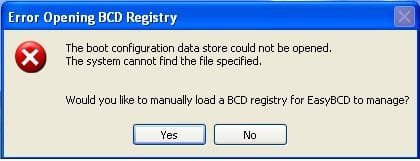
while opening easy bcd m getting this error
 

Attachments

  • er.JPEG
    er.JPEG
    12.5 KB · Views: 1
  • ok.JPEG
    ok.JPEG
    46 KB · Views: 6

My Computer

Computer Manufacturer/Model Number
Assembled pc
OS
MS Windows 7 Ultimate 32-bit SP1
CPU
Intel Core i3 530 @ 2.93GHz
Motherboard
Intel Corporation DH55PJ (XU1)
Memory
2.0GB Single-Channel DDR3 @ 665MHz (9-9-9-24)
Graphics Card(s)
MSI Radeon HD 5770
Sound Card
Realtek High Definition Audio
Screen Resolution
1600*900
Hard Drives
313GB Western Digital WDC WD3200AAJS-00L7A0 ATA Device (SATA)
Unfortunately your Disk Management screenshot does not show the active partitions. My guess would be that the MBR for Win7 is on the small 100MB partition and the XP MBR is on the F partition. But since XP was installed later, it apparently superseded the Win7 MBR. For a test, I suggest you activate the 100MB partition and inactivate F. Then we'll see.
A convenient tool for those types of operation is BEST FREE Partition Manager Software for Windows supports all 32-bit & 64 bit Windows No-server OS.
 

My Computer

Computer Manufacturer/Model Number
HP, Dell, Gateway, Toshiba - 4 laptops and 2 desktops
OS
Vista, Windows7, Mint Mate, Zorin, Windows 8
CPU
from 1.6GHz Duo to i7
Monitor(s) Displays
2x HP w2207
Hard Drives
5x HDD, 7x SSD, 12x Externals
Keyboard
with trackball - no mices
Mouse
Trackball mice
Internet Speed
DSL 6000

My Computer

Computer Manufacturer/Model Number
packard bell IXTREME M5722
OS
Operating System : Windows 7 Home Premium Edition 6.01.7600 SP1 (x64)
CPU
Processor : Intel Core 2 Quad Q8300 @ 2500 MHz
Motherboard
Mainboard : Packard Bell (Acer EG43M )
Memory
Physical Memory :8GB Corsair4x 2GB 800MHz C5 DDR2
Graphics Card(s)
Video Card : XFX 6700 AMD
Monitor(s) Displays
Maestro 234DL - BenQ V2220 - BenQ VW2420H
Screen Resolution
Current Display :1920x1080p pixels at 60 Hz in HD LED
Hard Drives
Hard Disks : WDC (1000 GB)
Drive C: (Hard Disk) : 428 GB available on 491 GB
Drive D: (Hard Disk) : 426 GB available on 492 GB
SAMSUNG spinpoint HD103SJ 1000.2 GB
(X 2) KINGSTON SSD NOW V 30GB
PSU
XFX ProSeries 550W PSU
Case
PACKARD BELL IXTREME
Cooling
System Blower Current: 150mA Air Flow16CFM ;Akasa 90mm rear
Keyboard
Gigabyte Aivia K8100
Mouse
TRUST-Wireless Laser Mouse - Carbon edition MI-7770C
Internet Speed
TP-LINK > TL-WN951N / AV500 Gigabit Powerline Adapters
Browser
chrome dev
Other Info
EXTRA COOLING>(FAN CONTROLLER) PC Bay Cooler 3 x 40mm fans; Akasa AK-HD-BL Blue hard drive cooler 2 x 40 mm fan 4500 rpm 29.7 dBA
Bios> American Megatrends Inc.
Version : P01-A1
Date : 08/31/2009
win xp f is marked as active partition
 

My Computer

Computer Manufacturer/Model Number
Assembled pc
OS
MS Windows 7 Ultimate 32-bit SP1
CPU
Intel Core i3 530 @ 2.93GHz
Motherboard
Intel Corporation DH55PJ (XU1)
Memory
2.0GB Single-Channel DDR3 @ 665MHz (9-9-9-24)
Graphics Card(s)
MSI Radeon HD 5770
Sound Card
Realtek High Definition Audio
Screen Resolution
1600*900
Hard Drives
313GB Western Digital WDC WD3200AAJS-00L7A0 ATA Device (SATA)
win xp f is marked as active partition
 

My Computer

Computer Manufacturer/Model Number
Assembled pc
OS
MS Windows 7 Ultimate 32-bit SP1
CPU
Intel Core i3 530 @ 2.93GHz
Motherboard
Intel Corporation DH55PJ (XU1)
Memory
2.0GB Single-Channel DDR3 @ 665MHz (9-9-9-24)
Graphics Card(s)
MSI Radeon HD 5770
Sound Card
Realtek High Definition Audio
Screen Resolution
1600*900
Hard Drives
313GB Western Digital WDC WD3200AAJS-00L7A0 ATA Device (SATA)
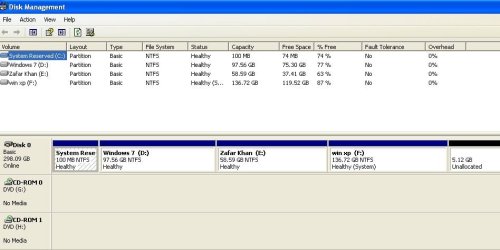
Here you have the problem. The BIOS only knows the XP. You can manipulate it as I said above, but that does not really give you a true dual boot. For that I suggest you follow brianzion's link.
 

My Computer

Computer Manufacturer/Model Number
HP, Dell, Gateway, Toshiba - 4 laptops and 2 desktops
OS
Vista, Windows7, Mint Mate, Zorin, Windows 8
CPU
from 1.6GHz Duo to i7
Monitor(s) Displays
2x HP w2207
Hard Drives
5x HDD, 7x SSD, 12x Externals
Keyboard
with trackball - no mices
Mouse
Trackball mice
Internet Speed
DSL 6000
Back
Top