Dual Boot Problems

dazzlenet

New member
Member
Local time
5:12 PM
Messages
76
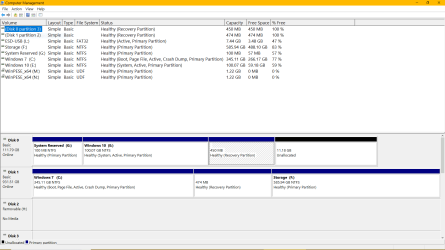
I was dual booting Win 7 & Win 10. Something went wrong as no drives show an operating system.
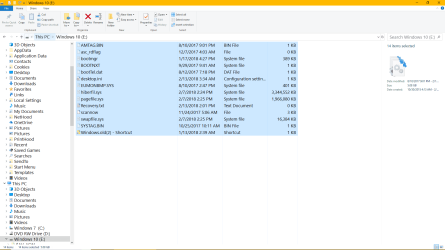
Just bootmgr and other various files.:
 

My Computer

Computer type
PC/Desktop
Computer Manufacturer/Model Number
Custom Build
OS
Windows 7 Home Premium 64bit
CPU
AMD A8-3850
Motherboard
MSI A75MA-G55 (MS-7696
Memory
Type: DDR3 Size: 8192 MBytes
Graphics Card(s)
ATI AMD Radeon HD 6550D & ATI AMD Radeon HD 6670
Hard Drives
932GB Seagate ST310005 24AS SATA Disk Device (SATA)
Antivirus
Microsoft Security Essentials
Browser
Chrome
Do you mean partitions have gone or all the files gone?
 

My Computer

Computer type
PC/Desktop
OS
win 8 32 bit
The regular files are missing. Win 7 & Win 10 have files such as shown in attachment.
 

Attachments

  • Capture.PNG
    Capture.PNG
    88.2 KB · Views: 5
  • Capture2.PNG
    Capture2.PNG
    146.3 KB · Views: 3

My Computer

Computer type
PC/Desktop
Computer Manufacturer/Model Number
Custom Build
OS
Windows 7 Home Premium 64bit
CPU
AMD A8-3850
Motherboard
MSI A75MA-G55 (MS-7696
Memory
Type: DDR3 Size: 8192 MBytes
Graphics Card(s)
ATI AMD Radeon HD 6550D & ATI AMD Radeon HD 6670
Hard Drives
932GB Seagate ST310005 24AS SATA Disk Device (SATA)
Antivirus
Microsoft Security Essentials
Browser
Chrome
Update

Do you mean partitions have gone or all the files gone?

I found the Microsoft Software Repair Tool & it restored all the correct files with C: E: etc. Can't believe I had never heard of this tool. As for dual booting, I need help.
 

My Computer

Computer type
PC/Desktop
Computer Manufacturer/Model Number
Custom Build
OS
Windows 7 Home Premium 64bit
CPU
AMD A8-3850
Motherboard
MSI A75MA-G55 (MS-7696
Memory
Type: DDR3 Size: 8192 MBytes
Graphics Card(s)
ATI AMD Radeon HD 6550D & ATI AMD Radeon HD 6670
Hard Drives
932GB Seagate ST310005 24AS SATA Disk Device (SATA)
Antivirus
Microsoft Security Essentials
Browser
Chrome
You have 11 gig of unused space you can move recovery to the right the grow the partition by 11 gig. Is it booting ok now? The simplest is to use virtual box which is free and run 7 as a virtual PC it's a lot simpler and safer
 

My Computer

Computer type
PC/Desktop
OS
win 8 32 bit
Let me tell you how I do dual booting, and I never have an issue, I install each OS on 2 separate drives, while the other drives power cable is unplugged, or I`ve discovered that you can simply go into the Bios and disable the other drive. Once you have both installs done, you simply go into the Bios and set the drive you want to boot from as Boot Option #1 and disable everything else. Save changes and exit, When you want to boot into the other drive, simply set the drive as Boot Option #1 and the others will already be disabled, save and exit. Now you can boot to that drive.

I also remove the letter from the other OS I`m not using when I`m in either particular OS. I just did this setup on the X299 and it works perfectly.

I ordered a Samsung 860 Pro 256GB to image the FCU onto from the spare 850 Pro I used, and W10 FCU will be my default OS on the X299. W7 Pro is on a Samsung 960 Evo 250GB M.2, for now.

But if things go well with the FCU, I may very well just image that to the 960 Evo.

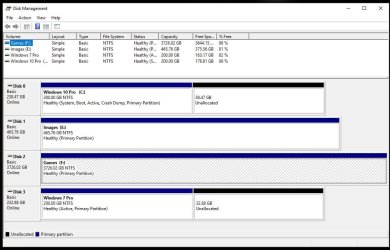
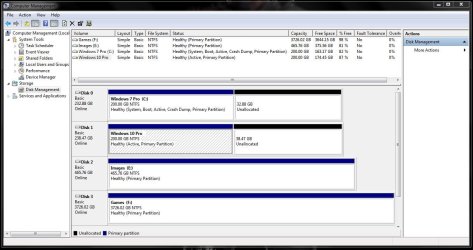
Here is a Disk Management shot from each OS. And I still have to reconnect another 500GB Barracuda.

In about a minute or less I can go from 7 to 10 or 10 to 7 and the OS`s never see each other and I never have any issues with any of my storage drives.

I don`t know if setting W10 to Boot Option #1 and W7 to Boot Option #2 and leaving it like that, then just using the boot menu to choose the non default OS would have any complications. I will test that out when the mood strikes me.

 

Attachments

  • DM10.JPG
    DM10.JPG
    135.3 KB · Views: 2
  • DM7.JPG
    DM7.JPG
    162.1 KB · Views: 1
Last edited:

My Computer

Computer type
PC/Desktop
Computer Manufacturer/Model Number
Skylake Special #666
OS
Windows 10 Pro x64
CPU
Intel Core i7 6700K
Motherboard
Asus Sabertooth Z170 Mark 1
Memory
GSkill TridentZ RGB 16GB 3600 16-16-16-36
Graphics Card(s)
EVGA GTX 980 Ti SC x2
Sound Card
Realtek High Definition
Monitor(s) Displays
AOC G2460PG
Screen Resolution
1920 x 1080 144Hz
Hard Drives
Samsung 860 Pro 256GB, Seagate Barracuda 4TB x2
PSU
EVGA 1000 P2, EVGA White Custom Braided Cables
Case
Corsair Vengeance C70 Gunmetal Black
Cooling
Corsair H100i v2, Corsair ML120 x2, Thermal Grizzly Kryonaut
Keyboard
Logitech G910 Orion Spectrum
Mouse
Logitech G700s
Internet Speed
Verizon Fios Quantum Gateway 75/75
Antivirus
Windows Defender, Malwarebytes Free 3.8.3
Browser
Chrome
Other Info
Corsair SP120 x4, LG Blu-ray Drive, Durabrand HT-395 100 Watt Dolby Digital Amp, Corsair H2100 Wireless 7.1 Headset
Back
Top