Let me tell you how I do dual booting, and I never have an issue, I install each OS on 2 separate drives, while the other drives power cable is unplugged, or I`ve discovered that you can simply go into the Bios and disable the other drive. Once you have both installs done, you simply go into the Bios and set the drive you want to boot from as Boot Option #1 and disable everything else. Save changes and exit, When you want to boot into the other drive, simply set the drive as Boot Option #1 and the others will already be disabled, save and exit. Now you can boot to that drive.
I also remove the letter from the other OS I`m not using when I`m in either particular OS. I just did this setup on the X299 and it works perfectly.
I ordered a Samsung 860 Pro 256GB to image the FCU onto from the spare 850 Pro I used, and W10 FCU will be my default OS on the X299. W7 Pro is on a Samsung 960 Evo 250GB M.2, for now.
But if things go well with the FCU, I may very well just image that to the 960 Evo.
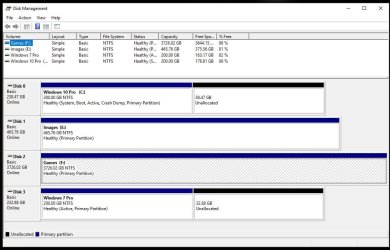
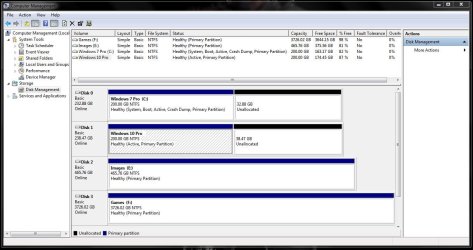
Here is a Disk Management shot from each OS. And I still have to reconnect another 500GB Barracuda.
In about a minute or less I can go from 7 to 10 or 10 to 7 and the OS`s never see each other and I never have any issues with any of my storage drives.
I don`t know if setting W10 to Boot Option #1 and W7 to Boot Option #2 and leaving it like that, then just using the boot menu to choose the non default OS would have any complications. I will test that out when the mood strikes me.