dual boot question

papaSmurph

New member
Local time
12:08 AM
Messages
35
Location
Spring Hill, TN
I have a Vista Ultimate / Windows 7 dual boot set up and I'm wondering if i can make Vista the default OS on restart? This is my first time doing a dual boot and it was easy enough to do. I just created a separate partition and installed 7 on that. Of course now during reboot you have to choose an OS, and since it was the last installed (i suppose) 7 is the default.

Can I make Vista the default?

Many thanks,
Murph
 

My Computer

Computer Manufacturer/Model Number
Dell Optiplex 745
OS
Windows 7 HP x64
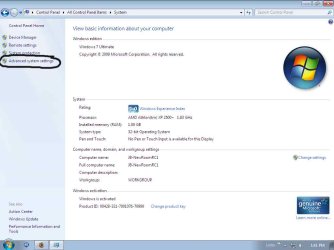
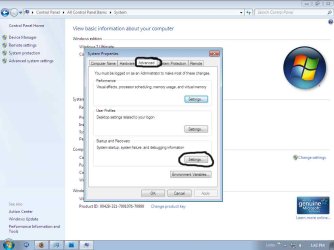
I seem to recall there being a way to do this using the bcdedit command, but there is another way as well. The easiest way is to click on your start menu icon, then click on control panel. From there make sure the view is set to small icons. Click on System. From within System, click on the left pane on Advanced System Settings. Go to the advanced tab, and select Settings under the Start Up and Recovery Section. From there you can change both the default OS and the amount of time to show the list of OS's in Boot Manager.

http://www.sevenforums.com/tutorials/2282-default-operating-system-change-default-boot-os.html

I've attached some pictures to help you out.

1.jpg
2.jpg
3.jpg


In addition, you could also download a great free program known as EasyBCD. (Find it here.) It's very easy to use, and will help you set the default OS, as well as add new entries to Boot Manager and change their names. I found it very useful when I was using different Linux distros as I would launch through Windows Boot Manager and select the correct OS. Grub was just too ugly for me. :p
 
Last edited by a moderator:

My Computer

Computer Manufacturer/Model Number
Dell Studio XPS 1640
OS
Windows 7 Professional x64 / Ubuntu 9.10
CPU
Intel Core 2 Duo P8700 @ 2.53 GHz (2 CPUs)
Motherboard
Intel Pentium III Xeon, 2533 MHz
Memory
4096MB DDR3 RAM
Graphics Card(s)
ATI Mobility Radeon HD 3670 (512 MB)
Sound Card
IDT High Definition Audio
Monitor(s) Displays
Generic PnP Monitor
Screen Resolution
1366 x 768 px
Hard Drives
320 GB 7200 RPM SATA / Internal HDD
Fantom Drive G-Force GF1000EU 1TB USB 2.0 & eSATA / External HDD
Western Digital My Book 320 GB 7200 RPM USB 2.0 / External HDD
Cooling
External USB Attached Mounted 2-Fan Unit
Mouse
Logitech USB Trackball
Internet Speed
120
AH, i knew there had to be SOMETHING baked in ... thanks! I needed to make sure that if it rebooted during the day that my wife wouldn't be "stuck" in 7 with no "obvious" way back to Vista for her. I'll check out that EasyBCD as well.
 

My Computer

Computer Manufacturer/Model Number
Dell Optiplex 745
OS
Windows 7 HP x64
You're very welcome. I was in a similar scenario as my main desktop is a "family PC" and nobody else in the house would know how to launch Vista after it started into Windows 7.
 

My Computer

Computer Manufacturer/Model Number
Dell Studio XPS 1640
OS
Windows 7 Professional x64 / Ubuntu 9.10
CPU
Intel Core 2 Duo P8700 @ 2.53 GHz (2 CPUs)
Motherboard
Intel Pentium III Xeon, 2533 MHz
Memory
4096MB DDR3 RAM
Graphics Card(s)
ATI Mobility Radeon HD 3670 (512 MB)
Sound Card
IDT High Definition Audio
Monitor(s) Displays
Generic PnP Monitor
Screen Resolution
1366 x 768 px
Hard Drives
320 GB 7200 RPM SATA / Internal HDD
Fantom Drive G-Force GF1000EU 1TB USB 2.0 & eSATA / External HDD
Western Digital My Book 320 GB 7200 RPM USB 2.0 / External HDD
Cooling
External USB Attached Mounted 2-Fan Unit
Mouse
Logitech USB Trackball
Internet Speed
120
Back
Top