
You are using an out of date browser. It may not display this or other websites correctly.
You should upgrade or use an alternative browser.
You should upgrade or use an alternative browser.
dual boot question
- Thread starter slick8
- Start date

- Local time
- 4:56 AM
- Messages
- 7,146
My Computer
- Computer Manufacturer/Model Number
- mickey megabyte 1234
- OS
- ultimate 64 sp1
- CPU
- i5 2500K [email protected]
- Motherboard
- MSI P67A-GD53
- Memory
- 8 gigs GSkill Ripjaws 1600
- Graphics Card(s)
- amd hd6950
- Sound Card
- creative x-fi gamer
- Monitor(s) Displays
- samsung 24"
- Screen Resolution
- 1920x1080
- Hard Drives
- ocz vertex 2e 60 gig, samsung f3 1tb, buffalo 2tb ext
- PSU
- antec 550
- Case
- antec three hundred
- Cooling
- i'm a cooling fan
- Keyboard
- saitek eclipse ii
- Mouse
- logitech g3
- Internet Speed
- about 4 Mbps
- Other Info
- i love win7

My Computer
- Computer Manufacturer/Model Number
- 24c Built
- OS
- Win7 x64 Ult
- CPU
- Intel i7-950
- Motherboard
- ASUS PT6
- Memory
- 12 GB DDR3
- Graphics Card(s)
- NVIDIA 9800GT+
- Sound Card
- none
- Monitor(s) Displays
- 2 Samsung SyncMaster 2343bwx
- Screen Resolution
- 2048X1152
- Hard Drives
- 1st-4 OCZ Vertex Turbos 32GB RAID 0
2nd-2 WD 640GB RAID 1
- PSU
- Thermaltake Toughpower XT W0229RU 750W
- Case
- Antec 900
- Cooling
- case fans
- Keyboard
- Logitech cordless
- Mouse
- Logitech cordless
- Internet Speed
- up to 15 MB/s

Hello slick8.
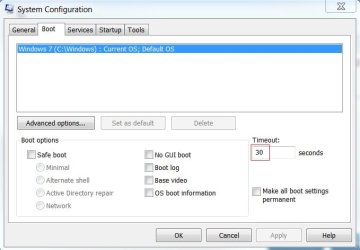
In the Windows start menu type msconfig to set the timeout, you can also set the default OS to auto-boot here; regarding changing the boot menu entry name, if you want to learn something have a look at this tutorial at the link below; be sure to post back with any further questions you may have and to keep us informed.
BCDEDIT - How to Use
In the Windows start menu type msconfig to set the timeout, you can also set the default OS to auto-boot here; regarding changing the boot menu entry name, if you want to learn something have a look at this tutorial at the link below; be sure to post back with any further questions you may have and to keep us informed.
BCDEDIT - How to Use
click to enlarge
My Computer
- Computer Manufacturer/Model Number
- * BFK Customs *
- OS
- W 7 64-bit Ultimate
- CPU
- Intel Q9550 Yorkfield
- Motherboard
- ASUS P5Q Pro
- Memory
- 8GB Dominator 8500C5D
- Graphics Card(s)
- ATI : XFX 5870
- Sound Card
- Realtek HD Audio 7-1
- Monitor(s) Displays
- 1x 47" LCD HDMI & 3x 26" LCD HDMI
- Screen Resolution
- 1920x1080P & 1920x1200
- Hard Drives
- 1x 80GB Intel X25-M G2 SSD : 1x 500GB & 1x 640GB WD Caviar Black(s)
- PSU
- Corsair 620HX
- Case
- Cooler Master RC-690
- Cooling
- Tuniq Tower 120, 2x 140mm and 3x 120mm case fans
- Keyboard
- Microsoft 500
- Mouse
- Razer Diamondback 3G
- Internet Speed
- 14 Mb/s
- Other Info
- 1x Koutech 3Gb/s SATA HDD Hot Swap Rack