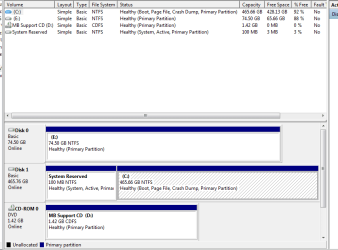
dual boot reformat questions

devan5

New member
Local time
10:00 AM
Messages
15
So i have a dual boot system win7/xp set up now and want to reformat the c drive which has win 7

do i reformat this drive like any other drive and will i lose my dual boot settings?

thanks
 

My Computer

OS
Windows 7/XP Dual Boot
CPU
Intel Core i5 750
Motherboard
ASUS P7P55D-E
Memory
4GB G.SKILL
Graphics Card(s)
XFX HD 5770
Hard Drives
1 x Samung F3 SpinPoint 500GB
1X WD Caviar 80GB
PSU
Antec TruePower Modular 550w
Case
Coolermaster Storm Scout

My Computer

Computer Manufacturer/Model Number
* BFK Customs *
OS
W 7 64-bit Ultimate
CPU
Intel Q9550 Yorkfield
Motherboard
ASUS P5Q Pro
Memory
8GB Dominator 8500C5D
Graphics Card(s)
ATI : XFX 5870
Sound Card
Realtek HD Audio 7-1
Monitor(s) Displays
1x 47" LCD HDMI & 3x 26" LCD HDMI
Screen Resolution
1920x1080P & 1920x1200
Hard Drives
1x 80GB Intel X25-M G2 SSD : 1x 500GB & 1x 640GB WD Caviar Black(s)
PSU
Corsair 620HX
Case
Cooler Master RC-690
Cooling
Tuniq Tower 120, 2x 140mm and 3x 120mm case fans
Keyboard
Microsoft 500
Mouse
Razer Diamondback 3G
Internet Speed
14 Mb/s
Other Info
1x Koutech 3Gb/s SATA HDD Hot Swap Rack

Attachments

  • Capture.PNG
    Capture.PNG
    14.9 KB · Views: 16

My Computer

OS
Windows 7/XP Dual Boot
CPU
Intel Core i5 750
Motherboard
ASUS P7P55D-E
Memory
4GB G.SKILL
Graphics Card(s)
XFX HD 5770
Hard Drives
1 x Samung F3 SpinPoint 500GB
1X WD Caviar 80GB
PSU
Antec TruePower Modular 550w
Case
Coolermaster Storm Scout
So you have XP on E: and W 7 on C:?
 

My Computer

Computer Manufacturer/Model Number
* BFK Customs *
OS
W 7 64-bit Ultimate
CPU
Intel Q9550 Yorkfield
Motherboard
ASUS P5Q Pro
Memory
8GB Dominator 8500C5D
Graphics Card(s)
ATI : XFX 5870
Sound Card
Realtek HD Audio 7-1
Monitor(s) Displays
1x 47" LCD HDMI & 3x 26" LCD HDMI
Screen Resolution
1920x1080P & 1920x1200
Hard Drives
1x 80GB Intel X25-M G2 SSD : 1x 500GB & 1x 640GB WD Caviar Black(s)
PSU
Corsair 620HX
Case
Cooler Master RC-690
Cooling
Tuniq Tower 120, 2x 140mm and 3x 120mm case fans
Keyboard
Microsoft 500
Mouse
Razer Diamondback 3G
Internet Speed
14 Mb/s
Other Info
1x Koutech 3Gb/s SATA HDD Hot Swap Rack

My Computer

OS
Windows 7/XP Dual Boot
CPU
Intel Core i5 750
Motherboard
ASUS P7P55D-E
Memory
4GB G.SKILL
Graphics Card(s)
XFX HD 5770
Hard Drives
1 x Samung F3 SpinPoint 500GB
1X WD Caviar 80GB
PSU
Antec TruePower Modular 550w
Case
Coolermaster Storm Scout

My Computer

Computer Manufacturer/Model Number
* BFK Customs *
OS
W 7 64-bit Ultimate
CPU
Intel Q9550 Yorkfield
Motherboard
ASUS P5Q Pro
Memory
8GB Dominator 8500C5D
Graphics Card(s)
ATI : XFX 5870
Sound Card
Realtek HD Audio 7-1
Monitor(s) Displays
1x 47" LCD HDMI & 3x 26" LCD HDMI
Screen Resolution
1920x1080P & 1920x1200
Hard Drives
1x 80GB Intel X25-M G2 SSD : 1x 500GB & 1x 640GB WD Caviar Black(s)
PSU
Corsair 620HX
Case
Cooler Master RC-690
Cooling
Tuniq Tower 120, 2x 140mm and 3x 120mm case fans
Keyboard
Microsoft 500
Mouse
Razer Diamondback 3G
Internet Speed
14 Mb/s
Other Info
1x Koutech 3Gb/s SATA HDD Hot Swap Rack

My Computer

OS
Windows 7/XP Dual Boot
CPU
Intel Core i5 750
Motherboard
ASUS P7P55D-E
Memory
4GB G.SKILL
Graphics Card(s)
XFX HD 5770
Hard Drives
1 x Samung F3 SpinPoint 500GB
1X WD Caviar 80GB
PSU
Antec TruePower Modular 550w
Case
Coolermaster Storm Scout
Well do this, unplug the HDD with Windows 7 on it and see if XP will start up with it unplugged.
 

My Computer

Computer Manufacturer/Model Number
* BFK Customs *
OS
W 7 64-bit Ultimate
CPU
Intel Q9550 Yorkfield
Motherboard
ASUS P5Q Pro
Memory
8GB Dominator 8500C5D
Graphics Card(s)
ATI : XFX 5870
Sound Card
Realtek HD Audio 7-1
Monitor(s) Displays
1x 47" LCD HDMI & 3x 26" LCD HDMI
Screen Resolution
1920x1080P & 1920x1200
Hard Drives
1x 80GB Intel X25-M G2 SSD : 1x 500GB & 1x 640GB WD Caviar Black(s)
PSU
Corsair 620HX
Case
Cooler Master RC-690
Cooling
Tuniq Tower 120, 2x 140mm and 3x 120mm case fans
Keyboard
Microsoft 500
Mouse
Razer Diamondback 3G
Internet Speed
14 Mb/s
Other Info
1x Koutech 3Gb/s SATA HDD Hot Swap Rack

My Computer

OS
Windows 7/XP Dual Boot
CPU
Intel Core i5 750
Motherboard
ASUS P7P55D-E
Memory
4GB G.SKILL
Graphics Card(s)
XFX HD 5770
Hard Drives
1 x Samung F3 SpinPoint 500GB
1X WD Caviar 80GB
PSU
Antec TruePower Modular 550w
Case
Coolermaster Storm Scout
Don't forget to post back the with outcome. ;)
 

My Computer

Computer Manufacturer/Model Number
* BFK Customs *
OS
W 7 64-bit Ultimate
CPU
Intel Q9550 Yorkfield
Motherboard
ASUS P5Q Pro
Memory
8GB Dominator 8500C5D
Graphics Card(s)
ATI : XFX 5870
Sound Card
Realtek HD Audio 7-1
Monitor(s) Displays
1x 47" LCD HDMI & 3x 26" LCD HDMI
Screen Resolution
1920x1080P & 1920x1200
Hard Drives
1x 80GB Intel X25-M G2 SSD : 1x 500GB & 1x 640GB WD Caviar Black(s)
PSU
Corsair 620HX
Case
Cooler Master RC-690
Cooling
Tuniq Tower 120, 2x 140mm and 3x 120mm case fans
Keyboard
Microsoft 500
Mouse
Razer Diamondback 3G
Internet Speed
14 Mb/s
Other Info
1x Koutech 3Gb/s SATA HDD Hot Swap Rack
Don't forget to post back the with outcome. ;)

ok so i did that and it did not boot into xp but rather it came up something about making a dos disk and had options about AHCI and stuff.
 

My Computer

OS
Windows 7/XP Dual Boot
CPU
Intel Core i5 750
Motherboard
ASUS P7P55D-E
Memory
4GB G.SKILL
Graphics Card(s)
XFX HD 5770
Hard Drives
1 x Samung F3 SpinPoint 500GB
1X WD Caviar 80GB
PSU
Antec TruePower Modular 550w
Case
Coolermaster Storm Scout
Don't forget to post back the with outcome. ;)

ok so i did that and it did not boot into xp but rather it came up something about making a dos disk and had options about AHCI and stuff.


That's why I suggested that, if you remove W7 XP won't boot; let me look for that link on running a 'repair' on XP; I'll be back.
 

My Computer

Computer Manufacturer/Model Number
* BFK Customs *
OS
W 7 64-bit Ultimate
CPU
Intel Q9550 Yorkfield
Motherboard
ASUS P5Q Pro
Memory
8GB Dominator 8500C5D
Graphics Card(s)
ATI : XFX 5870
Sound Card
Realtek HD Audio 7-1
Monitor(s) Displays
1x 47" LCD HDMI & 3x 26" LCD HDMI
Screen Resolution
1920x1080P & 1920x1200
Hard Drives
1x 80GB Intel X25-M G2 SSD : 1x 500GB & 1x 640GB WD Caviar Black(s)
PSU
Corsair 620HX
Case
Cooler Master RC-690
Cooling
Tuniq Tower 120, 2x 140mm and 3x 120mm case fans
Keyboard
Microsoft 500
Mouse
Razer Diamondback 3G
Internet Speed
14 Mb/s
Other Info
1x Koutech 3Gb/s SATA HDD Hot Swap Rack
Do you want to reinstall Win7? Or just format and use it's HD for something else?


To recover the System MBR into XP, you need to unplug the Win7 HD, boot into XP CD to run a Repair Install: http://pcsupport.about.com/od/operatingsystems/ss/instxprepair1.htm

After XP starts up, plug back in Win7 HD which can now be booted separately via the BIOS one-time Boot Menu key, or you can format it in XP Disk Management or using this method: http://www.sevenforums.com/tutorials/91339-ssd-hdd-optimize-windows-reinstallation.html
 
Thanks Greg, I saved that link I couldn't find the one I thought I had.
 

My Computer

Computer Manufacturer/Model Number
* BFK Customs *
OS
W 7 64-bit Ultimate
CPU
Intel Q9550 Yorkfield
Motherboard
ASUS P5Q Pro
Memory
8GB Dominator 8500C5D
Graphics Card(s)
ATI : XFX 5870
Sound Card
Realtek HD Audio 7-1
Monitor(s) Displays
1x 47" LCD HDMI & 3x 26" LCD HDMI
Screen Resolution
1920x1080P & 1920x1200
Hard Drives
1x 80GB Intel X25-M G2 SSD : 1x 500GB & 1x 640GB WD Caviar Black(s)
PSU
Corsair 620HX
Case
Cooler Master RC-690
Cooling
Tuniq Tower 120, 2x 140mm and 3x 120mm case fans
Keyboard
Microsoft 500
Mouse
Razer Diamondback 3G
Internet Speed
14 Mb/s
Other Info
1x Koutech 3Gb/s SATA HDD Hot Swap Rack
Do you want to reinstall Win7? Or just format and use it's HD for something else?


To recover the System MBR into XP, you need to unplug the Win7 HD, boot into XP CD to run a Repair Install: Repair Windows XP - How to Perform a Repair Installation of Windows XP - Part 1 of 2

After XP starts up, plug back in Win7 HD which can now be booted separately via the BIOS one-time Boot Menu key, or you can format it in XP Disk Management or using this method: http://www.sevenforums.com/tutorials/91339-ssd-hdd-optimize-windows-reinstallation.html

If possible i need to reformat the drive with just win 7 on it and re install win 7 back on it.

thanks
 

My Computer

OS
Windows 7/XP Dual Boot
CPU
Intel Core i5 750
Motherboard
ASUS P7P55D-E
Memory
4GB G.SKILL
Graphics Card(s)
XFX HD 5770
Hard Drives
1 x Samung F3 SpinPoint 500GB
1X WD Caviar 80GB
PSU
Antec TruePower Modular 550w
Case
Coolermaster Storm Scout
Thanks Greg, I saved that link I couldn't find the one I thought I had.

This is the more popular one but it tends to confuse people with all of it's side warnings: How to Perform a Windows XP Repair Install. Kept me up all night first time I did one.

Compare them and tell me which one you find easiest to understand. They both have their weaknesses. Nothing close to a SevenForums tutorial is available that I can find.
 
If possible i need to reformat the drive with just win 7 on it and re install win 7 back on it.

thanks

In that case, you can try doing a formatted clean reinstall of Win7 while XP is still plugged in as it should auto-configure the Windows Dual Boot again.

You should only need to Repair Install XP if you want it to boot independently via the BIOS boot order or one-time Boot Menu key accessed by tapping the key given on the first boot screen or in your mobo Manual.
 
Thanks Greg, I saved that link I couldn't find the one I thought I had.

This is the more popular one but it tends to confuse people with all of it's side warnings: How to Perform a Windows XP Repair Install. Kept me up all night first time I did one.

Compare them and tell me which one you find easiest to understand. They both have their weaknesses. Nothing close to a SevenForums tutorial is available that I can find.


Yes, that's the one I had before and it does 'look scarier' at first glance than the other one.
 

My Computer

Computer Manufacturer/Model Number
* BFK Customs *
OS
W 7 64-bit Ultimate
CPU
Intel Q9550 Yorkfield
Motherboard
ASUS P5Q Pro
Memory
8GB Dominator 8500C5D
Graphics Card(s)
ATI : XFX 5870
Sound Card
Realtek HD Audio 7-1
Monitor(s) Displays
1x 47" LCD HDMI & 3x 26" LCD HDMI
Screen Resolution
1920x1080P & 1920x1200
Hard Drives
1x 80GB Intel X25-M G2 SSD : 1x 500GB & 1x 640GB WD Caviar Black(s)
PSU
Corsair 620HX
Case
Cooler Master RC-690
Cooling
Tuniq Tower 120, 2x 140mm and 3x 120mm case fans
Keyboard
Microsoft 500
Mouse
Razer Diamondback 3G
Internet Speed
14 Mb/s
Other Info
1x Koutech 3Gb/s SATA HDD Hot Swap Rack
Back
Top