
Hi all,
I have a dual installation windows 7 - xp in a single hard drive, 2 partitions. (there was xp installed first, then i created the dual boot to add w7)
Now I dont use xp anymore and I want to completely delete that partition, but Im really confused after reading a lot of other similar posts.
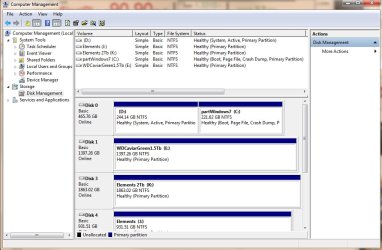
apparently, w7 partition is marked as boot, but xp partition is marked as system...
this is a screenshot of my disk management tool:

any help?
I have a dual installation windows 7 - xp in a single hard drive, 2 partitions. (there was xp installed first, then i created the dual boot to add w7)
Now I dont use xp anymore and I want to completely delete that partition, but Im really confused after reading a lot of other similar posts.
apparently, w7 partition is marked as boot, but xp partition is marked as system...
this is a screenshot of my disk management tool:
any help?
Attachments
My Computer
- Computer type
- PC/Desktop
- OS
- windows 7 Ultimate x64


