Solved Dual boot setup by adding image to partition

juansavage

New member
Local time
1:18 AM
Messages
10
I have a work computer. Right now, I switch between my work hard drive and my personal hard drive. They're both Windows 7. I have a Dell e6410.

My home hard drive is 750GB and my work one is 250GB, 50 of which is used. My home hard drive has three partitions.

Option 1: Stay with swithing out hard drives, which is the least convenient, but most safe.

Option 2: I could image the work hard drive onto one of the partitions and dual boot using easyBCD or something. This is my preference.

Option 3: I can buy a hard drive caddy and dual boot that way.

What problems should I expect? Any advice? Which options are possible.
 

My Computer

OS
Windows 7 64 bit
What do you mean "switching out HDs?" There should be a one-time BIOS boot menu key on the PC to choose which HD to boot which is the best way to do this. Do you have them both plugged in?

If you want to create a Win7 boot menu install EasyBCD (click Download - no Name or Email required)
to the primary OS to add the other one on Add OS Entry menu.

Thanks for responding. By "switching out HD's," I mean that right now I take out one hard drive and replace it with the work one when I need to do work. I've used easyBCD, but with a new install, not an image. I was wondering if I can expect problems.
 

My Computer

OS
Windows 7 64 bit
You can't attach both disks to the system the same time?

Option 2: I could image the work hard drive onto one of the partitions and dual boot using easyBCD or something. This is my preference.

So you want to clone (sort of) work hard drive to some free space on home harddrive? If so.... post disk management screenhot of home harddrive and work harddrive. Needed because I want to know free space, number of partitions etc.
 

My Computer

Computer type
Laptop
Computer Manufacturer/Model Number
ACER ASPIRE 5742G
OS
Microsoft Windows 7 Home Premium 64-bits 7601 Multiprocessor Free Service Pack 1
CPU
Intel(R) Core(TM) i3 CPU M 370 @ 2.40GHz
Motherboard
Acer Aspire 5742G
Memory
4,00 GB
Graphics Card(s)
ATI Mobility Radeon HD 5400 Series
Sound Card
(1) AMD High Definition Audio Device (2) Realtek High Defi
Screen Resolution
1366 x 768 x 32 bits (4294967296 colors) @ 60 Hz
Hard Drives
WDC WD5000BEVT-22ZAT0
On HOME harddrive you have 3 partitions... correct (check disk management)? One is called OEM and very small. One is a recovery partition, size about 15GB, correct? And a very large partition for all win7 stuff. All are PRIMARY partitions? Which one is marked ACTIVE?

Describe WORK harddrive as well.

Even better.... post screenshots
 

My Computer

Computer type
Laptop
Computer Manufacturer/Model Number
ACER ASPIRE 5742G
OS
Microsoft Windows 7 Home Premium 64-bits 7601 Multiprocessor Free Service Pack 1
CPU
Intel(R) Core(TM) i3 CPU M 370 @ 2.40GHz
Motherboard
Acer Aspire 5742G
Memory
4,00 GB
Graphics Card(s)
ATI Mobility Radeon HD 5400 Series
Sound Card
(1) AMD High Definition Audio Device (2) Realtek High Defi
Screen Resolution
1366 x 768 x 32 bits (4294967296 colors) @ 60 Hz
Hard Drives
WDC WD5000BEVT-22ZAT0
On HOME harddrive you have 3 partitions... correct (check disk management)? One is called OEM and very small. One is a recovery partition, size about 15GB, correct? And a very large partition for all win7 stuff. All are PRIMARY partitions? Which one is marked ACTIVE?

Describe WORK harddrive as well.

Even better.... post screenshots

Here is the screenshot of my current home-use hard drive. I want to expand and place the work image on F:. I would then like to be able to choose that partition or my home one upon boot.
 

Attachments

  • Untitled-1.gif
    Untitled-1.gif
    46.2 KB · Views: 11

My Computer

OS
Windows 7 64 bit
What's on F now? We need to create free space for new win7 OS. Post screenshot of disk management WORK drive as well
 

My Computer

Computer type
Laptop
Computer Manufacturer/Model Number
ACER ASPIRE 5742G
OS
Microsoft Windows 7 Home Premium 64-bits 7601 Multiprocessor Free Service Pack 1
CPU
Intel(R) Core(TM) i3 CPU M 370 @ 2.40GHz
Motherboard
Acer Aspire 5742G
Memory
4,00 GB
Graphics Card(s)
ATI Mobility Radeon HD 5400 Series
Sound Card
(1) AMD High Definition Audio Device (2) Realtek High Defi
Screen Resolution
1366 x 768 x 32 bits (4294967296 colors) @ 60 Hz
Hard Drives
WDC WD5000BEVT-22ZAT0
We can shrink C a little bit and extend F. So new win7 OS (work) fits there. But first all files from F have to be moved or deleted. So what kind of files are now on F?
 

My Computer

Computer type
Laptop
Computer Manufacturer/Model Number
ACER ASPIRE 5742G
OS
Microsoft Windows 7 Home Premium 64-bits 7601 Multiprocessor Free Service Pack 1
CPU
Intel(R) Core(TM) i3 CPU M 370 @ 2.40GHz
Motherboard
Acer Aspire 5742G
Memory
4,00 GB
Graphics Card(s)
ATI Mobility Radeon HD 5400 Series
Sound Card
(1) AMD High Definition Audio Device (2) Realtek High Defi
Screen Resolution
1366 x 768 x 32 bits (4294967296 colors) @ 60 Hz
Hard Drives
WDC WD5000BEVT-22ZAT0
We can shrink C a little bit and extend F. So new win7 OS (work) fits there. But first all files from F have to be moved or deleted. So what kind of files are now on F?

F used to be an XP installation. I'm going to shrink H and increase F to about 80GB. Right now, the work drive has 50 gigs on it. I'll post a shot of it when I get home.
 

My Computer

OS
Windows 7 64 bit
We can shrink C a little bit and extend F. So new win7 OS (work) fits there. But first all files from F have to be moved or deleted. So what kind of files are now on F?

F used to be an XP installation. I'm going to shrink H and increase F to about 80GB. Right now, the work drive has 50 gigs on it. I'll post a shot of it when I get home.
You can't add space from H to F, they are not adjacent to each other. Best way to do it is use Partition Wizard Free download Magic Partition Manager Software, partition magic alternative, free partition magic, partition magic Windows 7 and server partition software - Partition Wizard Online use the HOME edition... it's free. Right click on F and select "Extend". Select to get the new space from H. And select how much space to extend. If result is what you want... press apply.
 

My Computer

Computer type
Laptop
Computer Manufacturer/Model Number
ACER ASPIRE 5742G
OS
Microsoft Windows 7 Home Premium 64-bits 7601 Multiprocessor Free Service Pack 1
CPU
Intel(R) Core(TM) i3 CPU M 370 @ 2.40GHz
Motherboard
Acer Aspire 5742G
Memory
4,00 GB
Graphics Card(s)
ATI Mobility Radeon HD 5400 Series
Sound Card
(1) AMD High Definition Audio Device (2) Realtek High Defi
Screen Resolution
1366 x 768 x 32 bits (4294967296 colors) @ 60 Hz
Hard Drives
WDC WD5000BEVT-22ZAT0
WORK drive has only 1 partition and used size is about 50GB?
 

My Computer

Computer type
Laptop
Computer Manufacturer/Model Number
ACER ASPIRE 5742G
OS
Microsoft Windows 7 Home Premium 64-bits 7601 Multiprocessor Free Service Pack 1
CPU
Intel(R) Core(TM) i3 CPU M 370 @ 2.40GHz
Motherboard
Acer Aspire 5742G
Memory
4,00 GB
Graphics Card(s)
ATI Mobility Radeon HD 5400 Series
Sound Card
(1) AMD High Definition Audio Device (2) Realtek High Defi
Screen Resolution
1366 x 768 x 32 bits (4294967296 colors) @ 60 Hz
Hard Drives
WDC WD5000BEVT-22ZAT0
You can save a backup image using Macrium or Acronis premium imaging app which comes free with any WD or Seagate HD in the mix, then apply it to Unallocated space you've freed up. Choose auto drive letter, do not include MBR or track 0 during imaging when the options are chosen, then after imaging install EasyBCD to add the newly imaged OS by name, drive letter and type. Report back results.
 
Last edited:
Why won't you answer the question why you can't plug in both HD's and choose which to boot from the one-time BIOS Boot menu key?

You can save a backup image using Macrium or Acronis premium imaging app which comes free with any WD or Seagate HD in the mix, then apply it to Unallocated space you've freed up. Choose auto drive letter, do not include MBR or track 0 during imaging when the options are chosen, then after imaging install EasyBCD to add the newly imaged OS by name, drive letter and type. Report back results.


I can do that, but I'd have to buy a caddy and it might impact battery life. I'd lose the DVD as well. It's not a bad option, however. I might end up doing that if the partition option causes problems.
 

My Computer

OS
Windows 7 64 bit
#1 says it's "I have a Dell e6410"
That's a laptop. So no space for 2 harddisks
 

My Computer

Computer type
Laptop
Computer Manufacturer/Model Number
ACER ASPIRE 5742G
OS
Microsoft Windows 7 Home Premium 64-bits 7601 Multiprocessor Free Service Pack 1
CPU
Intel(R) Core(TM) i3 CPU M 370 @ 2.40GHz
Motherboard
Acer Aspire 5742G
Memory
4,00 GB
Graphics Card(s)
ATI Mobility Radeon HD 5400 Series
Sound Card
(1) AMD High Definition Audio Device (2) Realtek High Defi
Screen Resolution
1366 x 768 x 32 bits (4294967296 colors) @ 60 Hz
Hard Drives
WDC WD5000BEVT-22ZAT0
Why would you have to buy a caddy? Is this a laptop? Still waiting for your system specs.

If it's a desktop then you should be able to plug the HD in to an internal SATA port.

It's a Dell e6410. That's a laptop. I mentioned it in the OP. I can buy a caddy, if the other way is tougher.
 

My Computer

OS
Windows 7 64 bit
Not tough at all!! Just a matter of backup to external, restore to unallocated space. Adjust bootmenu. Do what greg told you (and I would tell you after seeing WORK drive screenshot)
 

My Computer

Computer type
Laptop
Computer Manufacturer/Model Number
ACER ASPIRE 5742G
OS
Microsoft Windows 7 Home Premium 64-bits 7601 Multiprocessor Free Service Pack 1
CPU
Intel(R) Core(TM) i3 CPU M 370 @ 2.40GHz
Motherboard
Acer Aspire 5742G
Memory
4,00 GB
Graphics Card(s)
ATI Mobility Radeon HD 5400 Series
Sound Card
(1) AMD High Definition Audio Device (2) Realtek High Defi
Screen Resolution
1366 x 768 x 32 bits (4294967296 colors) @ 60 Hz
Hard Drives
WDC WD5000BEVT-22ZAT0
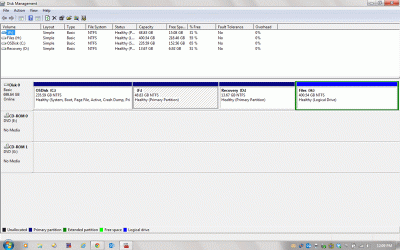
Thanks, gentlemen (I assume). The disk on the bottom is the work disk. I have the following tools at my disposal:

Acronis True Image.

Acronis Disk Director.

Easeus To Do Backup

Easeus Partition Master.

Our collective brains.
 

Attachments

  • Untitled-2.gif
    Untitled-2.gif
    55.9 KB · Views: 4

My Computer

OS
Windows 7 64 bit
I realized that there's only about 30GB of date on the work disk. I probably don't have to change the partitions.
 

My Computer

OS
Windows 7 64 bit
Thanks, gentlemen (I assume). The disk on the bottom is the work disk. I have the following tools at my disposal:

Acronis True Image.

Acronis Disk Director.

Easeus To Do Backup

Easeus Partition Master.

Our collective brains.
You didn't do what I asked you in http://www.sevenforums.com/2291719-post9.html
Maybe it's better to just make H a little bit smaller. Or do you prefer to use F?

What's on J (system) [except boot manager and boot menu])?

How did you manage to create the screenshot with 2 disks? Are both disks installed in laptop now?
 

My Computer

Computer type
Laptop
Computer Manufacturer/Model Number
ACER ASPIRE 5742G
OS
Microsoft Windows 7 Home Premium 64-bits 7601 Multiprocessor Free Service Pack 1
CPU
Intel(R) Core(TM) i3 CPU M 370 @ 2.40GHz
Motherboard
Acer Aspire 5742G
Memory
4,00 GB
Graphics Card(s)
ATI Mobility Radeon HD 5400 Series
Sound Card
(1) AMD High Definition Audio Device (2) Realtek High Defi
Screen Resolution
1366 x 768 x 32 bits (4294967296 colors) @ 60 Hz
Hard Drives
WDC WD5000BEVT-22ZAT0
Back
Top