
Dual boot setup help

gap30

New member
Local time
9:58 AM
Messages
2
I bought a used laptop about 3 years ago that had dual boot with Windows 7 (F: drive) and Windows 8.1 (C: drive). I decided to use Windows 7 as my main OS and proceeded to install all programs there, which has worked fine.

I would now like to remove Windows 8.1 completely as I don't use it. Can I just right click on the C: volume in Disk Manager and remove it? Will I have any issues by not having a C: drive?

I attached a screenshot of how my the volumes look at the moment in DM
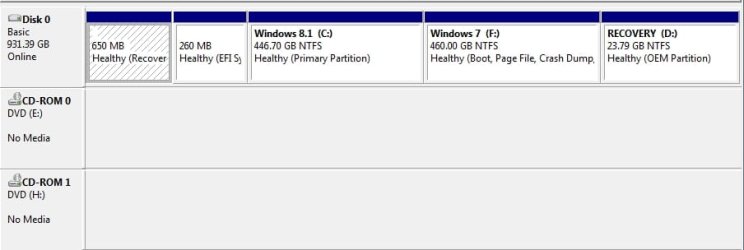
68E5645.jpg
 

My Computer

Computer type
Laptop
OS
windows 7
Welcome to the forum when your in 7 is the drive c or f. We need a screen shot showing all th details of the drives at the top. It depends if the boot files for 7 are on f or the second parition
 

My Computer

Computer type
PC/Desktop
OS
win 8 32 bit
Hi thanks for the welcome

The drive is F when in Windows 7

Sure here you go

15094324563.jpg
 

My Computer

Computer type
Laptop
OS
windows 7
Not being able to see files etc and the fact 7 is drive f I would think c is the boot drive for 7 and 8 so it couldnt simply be removed the problem being all the links will be for drive f so you need a c drive to boot from you could uninstall a lot of things from 8 shrink the parition move 7 left and grow it to give you more space
 

My Computer

Computer type
PC/Desktop
OS
win 8 32 bit

My Computers

System One System Two

  • Computer type
    PC/Desktop
    OS
    7 X64
    CPU
    i5 8400
    Motherboard
    gigabyte b365m ds3h
    Memory
    2x8gb 3200mhz
    Hard Drives
    various
    PSU
    pure power 11 400w cm
    Case
    Coolermaster
    Cooling
    cryorig m9i
  • Computer type
    PC/Desktop
    OS
    7x64
    CPU
    g5400
    Motherboard
    ga b365m ds3h
    Memory
    8gb ddr4 2400
    PSU
    xfx pro 450w
Seems that the laptop came with Win 8 and then someone installed win 7
C: is assigned to the OS partition you're booting from. If you boot from Win 8, Win 8 partition will be C:. If you boot from Win 7, Win 7 partition will be C:

To erase or delete Win 8 partition you must boot from Win 7.
To erase the Win 8 boot option you have to run msconfig under win 7 and on Boot tab delete the Win 8 option.
 

My Computers

System One System Two

  • Computer type
    PC/Desktop
    Computer Manufacturer/Model Number
    custom build
    OS
    Windows 7 HP 64
    CPU
    i5 6600K - 800MHz to 4200MHz
    Motherboard
    GA-Z170-HD3P
    Memory
    4+4G GSkill DDR4 3000
    Graphics Card(s)
    IG - Intel 530
    Monitor(s) Displays
    Samsung 226BW
    Screen Resolution
    1680x1050
    Hard Drives
    (1) -1 SM951 – 128GB M.2 AHCI PCIe SSD drive for Windows 7 and Lubuntu
    (2) -1 WD SATA 3 - 1T for Data
    (3) -1 WD SATA 3 - 1T for backup
    PSU
    Thermaltake 450W TR2 gold
    Keyboard
    Old and good Chicony mechanical keyboard
    Mouse
    Logitech mX performance - 9 buttons (had to disable some)
    Internet Speed
    500Mb/s
    Browser
    Firefox 64
    Other Info
    TinyWall firewall
  • Computer type
    Laptop
    System Manufacturer/Model Number
    Asus Q550LF
    OS
    Windows 7 Pro
    CPU
    i7-4500U 800MHz to 3.0GHz
    Motherboard
    Asus Q550LF
    Memory
    (4+4)G DDR3 1600
    Graphics Card(s)
    IG intel 4400 + NVIDIA GeForce GT 745M
    Sound Card
    Realtek
    Monitor(s) Displays
    LG Display LP156WF4-SPH1
    Screen Resolution
    1920 x 1080
    Hard Drives
    BX500 120G SSD for Windows and programs +
    1T HDD for data
    Internet Speed
    500 Mb/s
    Browser
    Firefox
    Other Info
    TinyWall firewall
But he saying when he boots 7 its drive f not c which means its not booting from the 7 partition so it likley boot files for 7 are on 8 parition
 

My Computer

Computer type
PC/Desktop
OS
win 8 32 bit

My Computers

System One System Two

  • Computer type
    PC/Desktop
    OS
    7 X64
    CPU
    i5 8400
    Motherboard
    gigabyte b365m ds3h
    Memory
    2x8gb 3200mhz
    Hard Drives
    various
    PSU
    pure power 11 400w cm
    Case
    Coolermaster
    Cooling
    cryorig m9i
  • Computer type
    PC/Desktop
    OS
    7x64
    CPU
    g5400
    Motherboard
    ga b365m ds3h
    Memory
    8gb ddr4 2400
    PSU
    xfx pro 450w
Back
Top