Dual boot something gone wrong

AloGuru

New member
Local time
2:41 PM
Messages
30
Hello. something has gone wrong from my dual boot. i have win 7 and i made partition to 2nd drive. 2nd drive has XP. i used EasyBCD for it.
dualboot.jpg

Problem is in entry 2 bootloader path. if i try to restart my pc and i get to choose 7 or xp,then i choose xp and it says wrong destination or smth. help please!
 

My Computer

OS
Windows 7, XP in partition
CPU
Amd Sempron 2800+
Motherboard
Asus k8v-xe
Memory
DDR1 1,5gb 400-600MHZ
Graphics Card(s)
Sapphire AGP Ati Radeon x1650PRO 256MB
Monitor(s) Displays
Faltron W1934S 19 inch monitor
Screen Resolution
1440x900
Hard Drives
samsung 84 gig ata drive
Western Digital 320GB Sata 2 drive
PSU
400w super silent
Case
unknow
Cooling
2x revoltec cold cathode fans
Keyboard
microsoft keyboard 200
Mouse
Defender
Internet Speed
2-12Mbit's
Other Info
computer is mid-speed.
Does it say ntldr is missing or something like that? I had to change the drive to C from D and it worked like a charm.
 

My Computer

Computer Manufacturer/Model Number
Started out as an AST180
OS
Windows 7 Ultimate x64 | Windows XP Pro x86 | Windows Vista Ultimate x86
CPU
AMD Athlon 64 X2 Dual Core 5200 2.7 GHz
Motherboard
Acer EM61SM/EM61PM
Memory
3G RAM
Graphics Card(s)
ATI HD Radeon 4670
Screen Resolution
1280x1024
Hard Drives
Western Digital Caviar Black WD1001FALS 1TB 7200 RPM 32MB Cache, 160 GB Seagate
PSU
Corsair 450VX 450W
Keyboard
Microsoft Media Pro 3000
Mouse
Logitech MX310
Hi Aloguru,

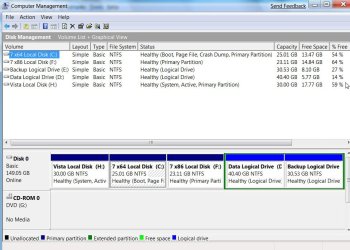
Can you post a screenshot of Disk Management, like this:

DISKMANAGEMENT2009-02-04_031947.jpg
 

My Computers

System One System Two

  • Computer type
    PC/Desktop
    OS
    7 X64
    CPU
    i5 8400
    Motherboard
    gigabyte b365m ds3h
    Memory
    2x8gb 3200mhz
    Hard Drives
    various
    PSU
    pure power 11 400w cm
    Case
    Coolermaster
    Cooling
    cryorig m9i
  • Computer type
    PC/Desktop
    OS
    7x64
    CPU
    g5400
    Motherboard
    ga b365m ds3h
    Memory
    8gb ddr4 2400
    PSU
    xfx pro 450w
nikolay how to do it? yes i got that error
 

My Computer

OS
Windows 7, XP in partition
CPU
Amd Sempron 2800+
Motherboard
Asus k8v-xe
Memory
DDR1 1,5gb 400-600MHZ
Graphics Card(s)
Sapphire AGP Ati Radeon x1650PRO 256MB
Monitor(s) Displays
Faltron W1934S 19 inch monitor
Screen Resolution
1440x900
Hard Drives
samsung 84 gig ata drive
Western Digital 320GB Sata 2 drive
PSU
400w super silent
Case
unknow
Cooling
2x revoltec cold cathode fans
Keyboard
microsoft keyboard 200
Mouse
Defender
Internet Speed
2-12Mbit's
Other Info
computer is mid-speed.
nikolay how to do it? yes i got that error

Go into EasyBCD and change Windows XP's drive to the one you installed Windows Vista/Seven on, which in your case, is C.

I had to same problem.
 

My Computer

Computer Manufacturer/Model Number
Started out as an AST180
OS
Windows 7 Ultimate x64 | Windows XP Pro x86 | Windows Vista Ultimate x86
CPU
AMD Athlon 64 X2 Dual Core 5200 2.7 GHz
Motherboard
Acer EM61SM/EM61PM
Memory
3G RAM
Graphics Card(s)
ATI HD Radeon 4670
Screen Resolution
1280x1024
Hard Drives
Western Digital Caviar Black WD1001FALS 1TB 7200 RPM 32MB Cache, 160 GB Seagate
PSU
Corsair 450VX 450W
Keyboard
Microsoft Media Pro 3000
Mouse
Logitech MX310
one thing, i tried but i noticed that win7 is on C alrdy. and win7 is really on c and xp on d. and it gives me an error when i try to put xp on c too
 

My Computer

OS
Windows 7, XP in partition
CPU
Amd Sempron 2800+
Motherboard
Asus k8v-xe
Memory
DDR1 1,5gb 400-600MHZ
Graphics Card(s)
Sapphire AGP Ati Radeon x1650PRO 256MB
Monitor(s) Displays
Faltron W1934S 19 inch monitor
Screen Resolution
1440x900
Hard Drives
samsung 84 gig ata drive
Western Digital 320GB Sata 2 drive
PSU
400w super silent
Case
unknow
Cooling
2x revoltec cold cathode fans
Keyboard
microsoft keyboard 200
Mouse
Defender
Internet Speed
2-12Mbit's
Other Info
computer is mid-speed.
Screenshot of Disk Management?
 

My Computers

System One System Two

  • Computer type
    PC/Desktop
    OS
    7 X64
    CPU
    i5 8400
    Motherboard
    gigabyte b365m ds3h
    Memory
    2x8gb 3200mhz
    Hard Drives
    various
    PSU
    pure power 11 400w cm
    Case
    Coolermaster
    Cooling
    cryorig m9i
  • Computer type
    PC/Desktop
    OS
    7x64
    CPU
    g5400
    Motherboard
    ga b365m ds3h
    Memory
    8gb ddr4 2400
    PSU
    xfx pro 450w
the screenshot of problem is in first post..
EDIT: i think i got it fixed now. going to restart and try.
EDIT2: hehe works fine fellas!thanks guys!
 

My Computer

OS
Windows 7, XP in partition
CPU
Amd Sempron 2800+
Motherboard
Asus k8v-xe
Memory
DDR1 1,5gb 400-600MHZ
Graphics Card(s)
Sapphire AGP Ati Radeon x1650PRO 256MB
Monitor(s) Displays
Faltron W1934S 19 inch monitor
Screen Resolution
1440x900
Hard Drives
samsung 84 gig ata drive
Western Digital 320GB Sata 2 drive
PSU
400w super silent
Case
unknow
Cooling
2x revoltec cold cathode fans
Keyboard
microsoft keyboard 200
Mouse
Defender
Internet Speed
2-12Mbit's
Other Info
computer is mid-speed.
What did you do to fix it?

The bcd entry must relate to the partition containing XP bootfiles, this is not necessarily the same as the partition containing the XP operating system files.

Your first post does not include a screenshot of Disk Management as requested.

I am glad you got it fixed this time, but in future if you want people to help you, it is best to give the information they ask for.
 

My Computers

System One System Two

  • Computer type
    PC/Desktop
    OS
    7 X64
    CPU
    i5 8400
    Motherboard
    gigabyte b365m ds3h
    Memory
    2x8gb 3200mhz
    Hard Drives
    various
    PSU
    pure power 11 400w cm
    Case
    Coolermaster
    Cooling
    cryorig m9i
  • Computer type
    PC/Desktop
    OS
    7x64
    CPU
    g5400
    Motherboard
    ga b365m ds3h
    Memory
    8gb ddr4 2400
    PSU
    xfx pro 450w
got the thing working. i mean both ones to C:
 

My Computer

OS
Windows 7, XP in partition
CPU
Amd Sempron 2800+
Motherboard
Asus k8v-xe
Memory
DDR1 1,5gb 400-600MHZ
Graphics Card(s)
Sapphire AGP Ati Radeon x1650PRO 256MB
Monitor(s) Displays
Faltron W1934S 19 inch monitor
Screen Resolution
1440x900
Hard Drives
samsung 84 gig ata drive
Western Digital 320GB Sata 2 drive
PSU
400w super silent
Case
unknow
Cooling
2x revoltec cold cathode fans
Keyboard
microsoft keyboard 200
Mouse
Defender
Internet Speed
2-12Mbit's
Other Info
computer is mid-speed.
Back
Top