Dual Boot Ubuntu cant remove loader

cclloyd9785

Master of Technology
Power User
Local time
4:26 PM
Messages
662
Location
Boston, MA
I recently installed ubuntu 10.04 LTS on my system, and now, even when the windows partition is active, it boots into the ubuntu loader, then the windows bootloader. How can I remove the ubuntu bootloader?
 

My Computer

Computer Manufacturer/Model Number
Toshiba Satellite L505D-S9565
OS
Windows 7 Home Premium x64, Mac OS X 10.6.2 x64
CPU
AMD Athlon X2 Dual-Core 2.1 GHz
Motherboard
Toshiba Built-In with Insyde H20 BIOS 1.40
Memory
4 GB DDR2 800 MHz
Graphics Card(s)
ATI Radeon HD Mobility 3100 Graphics 256MB to 1468 MB Shared
Sound Card
Realtek Mobile ALC272 HD Audio
Monitor(s) Displays
15.6" TFT LCD with TruBrite, Samsung 1080p HDTV
Screen Resolution
1366x768, 1920x1080
Hard Drives
❶:Main: Toshiba 250 GB SATA 5400 RPM
PSU
N/A
Case
N/A
Cooling
Built-in/Open window in winter :P
Keyboard
Built-in
Mouse
Build-in Symantics SmartTouch Pad
Internet Speed
55 MB/sec Down, 9 MB/sec Up
Other Info
❷:Backup: Seagate FreeAgent Desk USB 2.0 5400 RPM
❸:Media: Toshiba 640 GB USB 2.0 5400 RPM Portable Edition
Boot into Win 7 , D/l this View attachment bootsect.zip .

Copy bootsect.exe file into win 7 c:\windows\system32.

Open an elevated command prompt and type ( assuming win7 partition sees itself as C )

bootsect /nt60 C: /mbr

press enter.

That's it
 

My Computers

System One System Two

  • Computer type
    PC/Desktop
    OS
    7 X64
    CPU
    i5 8400
    Motherboard
    gigabyte b365m ds3h
    Memory
    2x8gb 3200mhz
    Hard Drives
    various
    PSU
    pure power 11 400w cm
    Case
    Coolermaster
    Cooling
    cryorig m9i
  • Computer type
    PC/Desktop
    OS
    7x64
    CPU
    g5400
    Motherboard
    ga b365m ds3h
    Memory
    8gb ddr4 2400
    PSU
    xfx pro 450w
View attachment 73878

That was the result. And iv been getting that I/O message ever since i had the message

boot0:
boot0:
boot0: success

at startup. Any ideas?
 

My Computer

Computer Manufacturer/Model Number
Toshiba Satellite L505D-S9565
OS
Windows 7 Home Premium x64, Mac OS X 10.6.2 x64
CPU
AMD Athlon X2 Dual-Core 2.1 GHz
Motherboard
Toshiba Built-In with Insyde H20 BIOS 1.40
Memory
4 GB DDR2 800 MHz
Graphics Card(s)
ATI Radeon HD Mobility 3100 Graphics 256MB to 1468 MB Shared
Sound Card
Realtek Mobile ALC272 HD Audio
Monitor(s) Displays
15.6" TFT LCD with TruBrite, Samsung 1080p HDTV
Screen Resolution
1366x768, 1920x1080
Hard Drives
❶:Main: Toshiba 250 GB SATA 5400 RPM
PSU
N/A
Case
N/A
Cooling
Built-in/Open window in winter :P
Keyboard
Built-in
Mouse
Build-in Symantics SmartTouch Pad
Internet Speed
55 MB/sec Down, 9 MB/sec Up
Other Info
❷:Backup: Seagate FreeAgent Desk USB 2.0 5400 RPM
❸:Media: Toshiba 640 GB USB 2.0 5400 RPM Portable Edition
View attachment 73878

That was the result. And iv been getting that I/O message ever since i had the message

boot0:
boot0:
boot0: success

at startup. Any ideas?

So it would be helpful if you explained what your trying to do. Do you want the MS bootloader to load Lucid when you want it? Or have you removed Lucid and just want to run MS. I am surprised you were given a command to remove grub without any questions. As a open source user my self mainly, and also using XP and W7 I would never rely on the MS bootloader it is problematic in reading other operating systems and will only read a MS system automatically. If you had a dualboot working with W7 and Lucid, then you probably should have just left it alone, there is a program called startup manager in Ubuntu that will adjust the countdown boot time and what you want to be the default boot.

If you just want to reload the MS boot loader do this.

You will need to boot with your Windows 7 installation disk. Hit Enter at the language selection prompt then hit "R" to get to the repair section. You can then select the automatic boot repair tool, but it often will not do any good. Then select the command prompt (console) and type in the following commands:
BootRec.exe /fixmbr
chkdsk /r
BootRec.exe /FixBoot
BootRec.exe /ScanOs
BootRec.exe /RebuildBcd
 

My Computer

Computer Manufacturer/Model Number
ACER aspire one
OS
XP/W7/Lucid/Arch
Memory
2 gigs
thank you that fixed both my problems. +1
 

My Computer

Computer Manufacturer/Model Number
Toshiba Satellite L505D-S9565
OS
Windows 7 Home Premium x64, Mac OS X 10.6.2 x64
CPU
AMD Athlon X2 Dual-Core 2.1 GHz
Motherboard
Toshiba Built-In with Insyde H20 BIOS 1.40
Memory
4 GB DDR2 800 MHz
Graphics Card(s)
ATI Radeon HD Mobility 3100 Graphics 256MB to 1468 MB Shared
Sound Card
Realtek Mobile ALC272 HD Audio
Monitor(s) Displays
15.6" TFT LCD with TruBrite, Samsung 1080p HDTV
Screen Resolution
1366x768, 1920x1080
Hard Drives
❶:Main: Toshiba 250 GB SATA 5400 RPM
PSU
N/A
Case
N/A
Cooling
Built-in/Open window in winter :P
Keyboard
Built-in
Mouse
Build-in Symantics SmartTouch Pad
Internet Speed
55 MB/sec Down, 9 MB/sec Up
Other Info
❷:Backup: Seagate FreeAgent Desk USB 2.0 5400 RPM
❸:Media: Toshiba 640 GB USB 2.0 5400 RPM Portable Edition
When going to install ubuntu onto a flash drive I ended up trashing the 7 mbr on one occasion where I simply booted from the 7 dvd itself to use the startup repair tool in the repair tools. Once that was done and the restart was seen the dual boot at the time showed "Windows 7 Ultimate(recovered)".
 

My Computers

System One System Two

  • Computer type
    PC/Desktop
    Computer Manufacturer/Model Number
    Custom builds = 2
    OS
    W7 Ultimate x64/W10 Pro x64/W11 Pro Triple Boot - Main PC W7 Remote PC Micro ATX W7 Pro x64/W11 Pro
    CPU
    AMD Phenom II X4 975 Deneb 3.6ghz - 965 2nd remote pc
    Motherboard
    Gigabyte GA-790XTA-UD4-Gigabyte GA-880GM-D2H remote pc
    Memory
    Kingston Hyper X DDR3 1600 1.5v 16gb - Hyper X Fury 8gb 2nd
    Graphics Card(s)
    MSI HD Radeon 5750 1gb - MSI HD Radeon 6450 on mini tower
    Sound Card
    Creative Labs X-Fi Xtreme Audio P - Realtek onooard 2nd case
    Monitor(s) Displays
    ASUS VW199T-P 19" HP 2082a Main-HP 2082a 20" remote pc
    Screen Resolution
    Asus 1440x900 - HP 1600x900
    Hard Drives
    WD Black 1TB HD per OS W7, W10, and pending W11 presently on 500gb OS Drive - Pending Triple 1TB HDs for Spanned Storage/backup volume
    Single 2TB external USB enclosure, single 1TB System 7 Host/Boot drive, Pending 8TB external HD for system image b
    PSU
    Corsair 750TX - primary / Corsair CX600 - second
    Case
    Antec 900-2 - SSD compatible / NZXT Vulcan mini tower
    Cooling
    Zalman CNPS9900A
    Keyboard
    AZIO L70 Backlit Letters Gaming - ONN Cordless/USB
    Mouse
    MSI DS200 Programmable, Logitech Cordless
    Internet Speed
    30mbps upgrade - primary hard wired - mini tower usb WiFi
    Antivirus
    GFI VIPRE Internet Security 2014 on W7 2016 beta on W10,
    Browser
    Cyberfox, WaterFox 64bit FF variants, FireFox x64, Pale Moon
    Other Info
    Accomdata fan cooled usb 2.0 PIDE/Sata II, III external enclosure.
    Sambient usb/eSata PATA/Sata II, III external enclosure.
  • Computer type
    PC/Desktop
    System Manufacturer/Model Number
    CUSTOM ASSEMBLY
    OS
    W7 Pro x64/W11 Pro
    CPU
    AMD Deneb 3.6ghz - 965
    Motherboard
    Gigabyte GA-880GM-D2H remote pc
    Memory
    Kingston Hyper X Fury 8gb
    Graphics Card(s)
    MSI HD Radeon 6450 DVI Output
    Sound Card
    Realtek onooard Creative or Other separate PENDING
    Monitor(s) Displays
    VIZIO 32" LCD TV Separate LCD Pending
    Screen Resolution
    1600x1080
    Hard Drives
    WD 500GB OS Host/Boot WD Green 1TB Storage/Backup
    PSU
    Corsair 600W - THERMALTAKE 600W spare case
    Case
    NZXT Vulcan mini tower
    Cooling
    Twin 120mm Top Fans - 240mm Side Cover
    Keyboard
    ONN Cordless/USB Logitech Cordless
    Mouse
    ONN USB/Cordless - Logitech Cordless
    Internet Speed
    DSL 5G
    Browser
    MS Edge, FireFox, WaterFox x64, FireFox Nightly
    Other Info
    OS Testing-Remote Access to Main TeamViewer
When going to install ubuntu onto a flash drive I ended up trashing the 7 mbr on one occasion where I simply booted from the 7 dvd itself to use the startup repair tool in the repair tools. Once that was done and the restart was seen the dual boot at the time showed "Windows 7 Ultimate(recovered)".

Your lucky the auto-repair worked, but if you had just checked the advanced button in the last gui of the install you would have seen that grub was defaulting to the hard drive rather then the thumbs mbr.
 

My Computer

Computer Manufacturer/Model Number
ACER aspire one
OS
XP/W7/Lucid/Arch
Memory
2 gigs
The only thing I would like to add here is that I like a auto-system fix and a shiny gui, I'm not a code writer or a big command line user, but sometimes that is what you have to do if you have mixed MS with open source. I think this is basically MS's fault since to them open source is a very small part of the desktop market. But open source is used on over 50% of the severs on the web, and in Governments, and the fastest super computers run a Linux variant, with about 70% running a Linux setup. Unix and Linux are usually behind the MS desktop in many situations it is more stable and safer.

Really if you are just cruising the web and not gaming a open source or even apple is a better setup out of the box, and most open source is free. Don't be brainwashed into running just MS, it is now quite better with W7, but any on line banking or using a credit card should never be run on a MS setup. The operating system was never designed for safety and has to be seriously locked down and cleaned regularly. And because it has the market share of the desktop market, it has a huge bulls-eye on it for the crackers. Don't get me wrong here it is a inter mixture of problems that make using a MS system only that makes it problematic.

Personally though I don't like the key set up for verification, I have a upgrade from XP to W7 that had to be a fresh install to run. And every-time I reinstall it I either have to do the Paul T method or call MS as I don't get the activate it by phone line unless I reset it before trying. This is ridiculous, it is easy for me but I have a bit of a clue as to what to due, I shudder when I see the problems of those that don't.
 

My Computer

Computer Manufacturer/Model Number
ACER aspire one
OS
XP/W7/Lucid/Arch
Memory
2 gigs
When going to install ubuntu onto a flash drive I ended up trashing the 7 mbr on one occasion where I simply booted from the 7 dvd itself to use the startup repair tool in the repair tools. Once that was done and the restart was seen the dual boot at the time showed "Windows 7 Ultimate(recovered)".

Your lucky the auto-repair worked, but if you had just checked the advanced button in the last gui of the install you would have seen that grub was defaulting to the hard drive rather then the thumbs mbr.

The repair also worked well for seeing a second install of 7(stand alone) on another drive added into the BCD store on the host drive. It doesn't take much for Grub to trash the 7 mbr while it doesn't that much to restore it either fortunately! :D
 

My Computers

System One System Two

  • Computer type
    PC/Desktop
    Computer Manufacturer/Model Number
    Custom builds = 2
    OS
    W7 Ultimate x64/W10 Pro x64/W11 Pro Triple Boot - Main PC W7 Remote PC Micro ATX W7 Pro x64/W11 Pro
    CPU
    AMD Phenom II X4 975 Deneb 3.6ghz - 965 2nd remote pc
    Motherboard
    Gigabyte GA-790XTA-UD4-Gigabyte GA-880GM-D2H remote pc
    Memory
    Kingston Hyper X DDR3 1600 1.5v 16gb - Hyper X Fury 8gb 2nd
    Graphics Card(s)
    MSI HD Radeon 5750 1gb - MSI HD Radeon 6450 on mini tower
    Sound Card
    Creative Labs X-Fi Xtreme Audio P - Realtek onooard 2nd case
    Monitor(s) Displays
    ASUS VW199T-P 19" HP 2082a Main-HP 2082a 20" remote pc
    Screen Resolution
    Asus 1440x900 - HP 1600x900
    Hard Drives
    WD Black 1TB HD per OS W7, W10, and pending W11 presently on 500gb OS Drive - Pending Triple 1TB HDs for Spanned Storage/backup volume
    Single 2TB external USB enclosure, single 1TB System 7 Host/Boot drive, Pending 8TB external HD for system image b
    PSU
    Corsair 750TX - primary / Corsair CX600 - second
    Case
    Antec 900-2 - SSD compatible / NZXT Vulcan mini tower
    Cooling
    Zalman CNPS9900A
    Keyboard
    AZIO L70 Backlit Letters Gaming - ONN Cordless/USB
    Mouse
    MSI DS200 Programmable, Logitech Cordless
    Internet Speed
    30mbps upgrade - primary hard wired - mini tower usb WiFi
    Antivirus
    GFI VIPRE Internet Security 2014 on W7 2016 beta on W10,
    Browser
    Cyberfox, WaterFox 64bit FF variants, FireFox x64, Pale Moon
    Other Info
    Accomdata fan cooled usb 2.0 PIDE/Sata II, III external enclosure.
    Sambient usb/eSata PATA/Sata II, III external enclosure.
  • Computer type
    PC/Desktop
    System Manufacturer/Model Number
    CUSTOM ASSEMBLY
    OS
    W7 Pro x64/W11 Pro
    CPU
    AMD Deneb 3.6ghz - 965
    Motherboard
    Gigabyte GA-880GM-D2H remote pc
    Memory
    Kingston Hyper X Fury 8gb
    Graphics Card(s)
    MSI HD Radeon 6450 DVI Output
    Sound Card
    Realtek onooard Creative or Other separate PENDING
    Monitor(s) Displays
    VIZIO 32" LCD TV Separate LCD Pending
    Screen Resolution
    1600x1080
    Hard Drives
    WD 500GB OS Host/Boot WD Green 1TB Storage/Backup
    PSU
    Corsair 600W - THERMALTAKE 600W spare case
    Case
    NZXT Vulcan mini tower
    Cooling
    Twin 120mm Top Fans - 240mm Side Cover
    Keyboard
    ONN Cordless/USB Logitech Cordless
    Mouse
    ONN USB/Cordless - Logitech Cordless
    Internet Speed
    DSL 5G
    Browser
    MS Edge, FireFox, WaterFox x64, FireFox Nightly
    Other Info
    OS Testing-Remote Access to Main TeamViewer
When going to install ubuntu onto a flash drive I ended up trashing the 7 mbr on one occasion where I simply booted from the 7 dvd itself to use the startup repair tool in the repair tools. Once that was done and the restart was seen the dual boot at the time showed "Windows 7 Ultimate(recovered)".

Your lucky the auto-repair worked, but if you had just checked the advanced button in the last gui of the install you would have seen that grub was defaulting to the hard drive rather then the thumbs mbr.

The repair also worked well for seeing a second install of 7(stand alone) on another drive added into the BCD store on the host drive. It doesn't take much for Grub to trash the 7 mbr while it doesn't that much to restore it either fortunately! :D

I would agree with the easy fix but grub will not trash anything unless directed to do so. That is the problem we see at the Ubuntu Forums is that people see the install gui that asks where should grub go, and if your not sure put it everywhere. That is a bug of a gui, for the in-experienced user, not knowing that the bootloader goes to the mbr most of the time only.

Another thing is that the chkdsk /r options in the command set is a very good tool for checking the file system and fixing any anomalies, every user should run that at least once from a install or recovery disc so that they know how to do it, it will fix a lot of stuff. Here is another link to what is used often for messed up grub installs when grub has been loaded into the windows partition.

SourceForge.net: Boot Problems:Boot Sector - bootinfoscript

I guess since grub never messes up my installs unless I mess up, I am biased to it being user error, but hey anything is possible in the end. ;)
 

My Computer

Computer Manufacturer/Model Number
ACER aspire one
OS
XP/W7/Lucid/Arch
Memory
2 gigs
When first going to set up ubuntu on one drive with EasyBCD back in 2008 one thing I learned about the ubuntu version of GParted that comes up is to select the manual option and make the root partition the mount point "/" using the edit partition option plus check off the "Grub isn't installed in bootsector" box to prevent the Windows mbr from being changed.

How Grub ended up on the mbr when installing ubuntu onto a flash drive is still kind of a mystery following previous steps proved successful. But the startup repair still did it's job in restoring the mbr entries for 7 when performed more recently with 7. It never hurts to schedule the checkdisk tool either in case any bad sectors or misplaced boot information needs correction.

Typically when Grub is installed the option to boot any Windows installation is seen there to select however. Even with Grub however there still should be an option to make 7 the default OS when following the wiki for that. Here however I solve the accidental Grub in mbr problems by seeing any distro go onto a vhd in the Oracle Virtual Box since each one often ends up being a temp install to start with.
 

My Computers

System One System Two

  • Computer type
    PC/Desktop
    Computer Manufacturer/Model Number
    Custom builds = 2
    OS
    W7 Ultimate x64/W10 Pro x64/W11 Pro Triple Boot - Main PC W7 Remote PC Micro ATX W7 Pro x64/W11 Pro
    CPU
    AMD Phenom II X4 975 Deneb 3.6ghz - 965 2nd remote pc
    Motherboard
    Gigabyte GA-790XTA-UD4-Gigabyte GA-880GM-D2H remote pc
    Memory
    Kingston Hyper X DDR3 1600 1.5v 16gb - Hyper X Fury 8gb 2nd
    Graphics Card(s)
    MSI HD Radeon 5750 1gb - MSI HD Radeon 6450 on mini tower
    Sound Card
    Creative Labs X-Fi Xtreme Audio P - Realtek onooard 2nd case
    Monitor(s) Displays
    ASUS VW199T-P 19" HP 2082a Main-HP 2082a 20" remote pc
    Screen Resolution
    Asus 1440x900 - HP 1600x900
    Hard Drives
    WD Black 1TB HD per OS W7, W10, and pending W11 presently on 500gb OS Drive - Pending Triple 1TB HDs for Spanned Storage/backup volume
    Single 2TB external USB enclosure, single 1TB System 7 Host/Boot drive, Pending 8TB external HD for system image b
    PSU
    Corsair 750TX - primary / Corsair CX600 - second
    Case
    Antec 900-2 - SSD compatible / NZXT Vulcan mini tower
    Cooling
    Zalman CNPS9900A
    Keyboard
    AZIO L70 Backlit Letters Gaming - ONN Cordless/USB
    Mouse
    MSI DS200 Programmable, Logitech Cordless
    Internet Speed
    30mbps upgrade - primary hard wired - mini tower usb WiFi
    Antivirus
    GFI VIPRE Internet Security 2014 on W7 2016 beta on W10,
    Browser
    Cyberfox, WaterFox 64bit FF variants, FireFox x64, Pale Moon
    Other Info
    Accomdata fan cooled usb 2.0 PIDE/Sata II, III external enclosure.
    Sambient usb/eSata PATA/Sata II, III external enclosure.
  • Computer type
    PC/Desktop
    System Manufacturer/Model Number
    CUSTOM ASSEMBLY
    OS
    W7 Pro x64/W11 Pro
    CPU
    AMD Deneb 3.6ghz - 965
    Motherboard
    Gigabyte GA-880GM-D2H remote pc
    Memory
    Kingston Hyper X Fury 8gb
    Graphics Card(s)
    MSI HD Radeon 6450 DVI Output
    Sound Card
    Realtek onooard Creative or Other separate PENDING
    Monitor(s) Displays
    VIZIO 32" LCD TV Separate LCD Pending
    Screen Resolution
    1600x1080
    Hard Drives
    WD 500GB OS Host/Boot WD Green 1TB Storage/Backup
    PSU
    Corsair 600W - THERMALTAKE 600W spare case
    Case
    NZXT Vulcan mini tower
    Cooling
    Twin 120mm Top Fans - 240mm Side Cover
    Keyboard
    ONN Cordless/USB Logitech Cordless
    Mouse
    ONN USB/Cordless - Logitech Cordless
    Internet Speed
    DSL 5G
    Browser
    MS Edge, FireFox, WaterFox x64, FireFox Nightly
    Other Info
    OS Testing-Remote Access to Main TeamViewer
When first going to set up ubuntu on one drive with EasyBCD back in 2008 one thing I learned about the ubuntu version of GParted that comes up is to select the manual option and make the root partition the mount point "/" using the edit partition option plus check off the "Grub isn't installed in bootsector" box to prevent the Windows mbr from being changed.<br />
<br />
How Grub ended up on the mbr when installing ubuntu onto a flash drive is still kind of a mystery following previous steps proved successful. But the startup repair still did it's job in restoring the mbr entries for 7 when performed more recently with 7. It never hurts to schedule the checkdisk tool either in case any bad sectors or misplaced boot information needs correction.<br />
<br />
Typically when Grub is installed the option to boot any Windows installation is seen there to select however. Even with Grub however there still should be an option to make 7 the default OS when following the wiki for that. Here however I solve the accidental Grub in mbr problems by seeing any distro go onto a vhd in the Oracle Virtual Box since each one often ends up being a temp install to start with.


Yes the manual partition is the way to go, in 2008 it was grub legacy now it is grub2 and ext4 since Karmic. Easybcd 2 beta can read those and work fine or so I've heard, but as you suggest you have to keep grub out of the mix for sure. In Ubuntu though if a person installs grub and everything is booting there is a program called startup manager that will rewrite grub to what you want for a default boot, and also adjust the countdown to boot.

In the end what I see are people just not realizing that 1st they should have a legit install dvd/thumb of W7 to make repairs if needed and the disc or thumb of any other install. These tools alone will allow you to recover anything you need especially a Linux ISO and reinstall if needed. Also everybody should have a hirens disc as well to find the keys and all the other killer programs on those discs.

I primarily use gparted but I have discs for about 3 or 4 other partitioners, supergrub, and grub, and a stack of Linux ISO's, and the .exe install, ISO and 2 DVD's for W7. I have yet had to ask anybody for help at the UF or post any thread other then a p2p reminder of a release.

I am a re-installer at heart, if it takes longer to fix it then reinstall I don't hesitate to install, I have all my important data on a external so I can reinstall within about 5 minutes if needed.
 

My Computer

Computer Manufacturer/Model Number
ACER aspire one
OS
XP/W7/Lucid/Arch
Memory
2 gigs
I was just remembering passing by one reference on using a live ubuntu cd in order to repair the Windows mbr info as a thought to pass along here. How to fix your Windows MBR with an Ubuntu liveCD | ArsGeek

That's actually one of several seen on this option. As far as the Startup manager that should be quite handy for those who run dual boots on the physical drives with any distor actually.

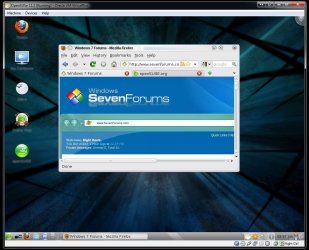
I still haven't gone for a Hiren's disk but also have to say the freeware tools there are mainly those originally written for XP. As for some distros they won't see any demo option but instead want to replace any Windows installation automatically if not using the manual options. The screen here shows how to avoid two problems real fast for simply wanting to try one out! :D Virtual Box for the less experienced or simply saving time!

With 7 the simple solution here for backing up literally "everything" on the host drive is simple. Create a system image of the entire drive for any need to restore later! As you can see 7 has a lot more going for it then ever seen with previous editions. VBox allows you to sample other OSs without running into problems with any present installation in that sense there.

Now we have to see how far cclloyd9785 has come with the mbr problem he is having however. The only problems of that type I've seen with Grub would be having run into the Grub 22 error and a fast repair with the startup repair tool as well as even going into the command prompt for use of the commands there if that didn't work for some reason.
 

Attachments

  • OpenSUSe11_2 on VBox.jpg
    OpenSUSe11_2 on VBox.jpg
    104.9 KB · Views: 5

My Computers

System One System Two

  • Computer type
    PC/Desktop
    Computer Manufacturer/Model Number
    Custom builds = 2
    OS
    W7 Ultimate x64/W10 Pro x64/W11 Pro Triple Boot - Main PC W7 Remote PC Micro ATX W7 Pro x64/W11 Pro
    CPU
    AMD Phenom II X4 975 Deneb 3.6ghz - 965 2nd remote pc
    Motherboard
    Gigabyte GA-790XTA-UD4-Gigabyte GA-880GM-D2H remote pc
    Memory
    Kingston Hyper X DDR3 1600 1.5v 16gb - Hyper X Fury 8gb 2nd
    Graphics Card(s)
    MSI HD Radeon 5750 1gb - MSI HD Radeon 6450 on mini tower
    Sound Card
    Creative Labs X-Fi Xtreme Audio P - Realtek onooard 2nd case
    Monitor(s) Displays
    ASUS VW199T-P 19" HP 2082a Main-HP 2082a 20" remote pc
    Screen Resolution
    Asus 1440x900 - HP 1600x900
    Hard Drives
    WD Black 1TB HD per OS W7, W10, and pending W11 presently on 500gb OS Drive - Pending Triple 1TB HDs for Spanned Storage/backup volume
    Single 2TB external USB enclosure, single 1TB System 7 Host/Boot drive, Pending 8TB external HD for system image b
    PSU
    Corsair 750TX - primary / Corsair CX600 - second
    Case
    Antec 900-2 - SSD compatible / NZXT Vulcan mini tower
    Cooling
    Zalman CNPS9900A
    Keyboard
    AZIO L70 Backlit Letters Gaming - ONN Cordless/USB
    Mouse
    MSI DS200 Programmable, Logitech Cordless
    Internet Speed
    30mbps upgrade - primary hard wired - mini tower usb WiFi
    Antivirus
    GFI VIPRE Internet Security 2014 on W7 2016 beta on W10,
    Browser
    Cyberfox, WaterFox 64bit FF variants, FireFox x64, Pale Moon
    Other Info
    Accomdata fan cooled usb 2.0 PIDE/Sata II, III external enclosure.
    Sambient usb/eSata PATA/Sata II, III external enclosure.
  • Computer type
    PC/Desktop
    System Manufacturer/Model Number
    CUSTOM ASSEMBLY
    OS
    W7 Pro x64/W11 Pro
    CPU
    AMD Deneb 3.6ghz - 965
    Motherboard
    Gigabyte GA-880GM-D2H remote pc
    Memory
    Kingston Hyper X Fury 8gb
    Graphics Card(s)
    MSI HD Radeon 6450 DVI Output
    Sound Card
    Realtek onooard Creative or Other separate PENDING
    Monitor(s) Displays
    VIZIO 32" LCD TV Separate LCD Pending
    Screen Resolution
    1600x1080
    Hard Drives
    WD 500GB OS Host/Boot WD Green 1TB Storage/Backup
    PSU
    Corsair 600W - THERMALTAKE 600W spare case
    Case
    NZXT Vulcan mini tower
    Cooling
    Twin 120mm Top Fans - 240mm Side Cover
    Keyboard
    ONN Cordless/USB Logitech Cordless
    Mouse
    ONN USB/Cordless - Logitech Cordless
    Internet Speed
    DSL 5G
    Browser
    MS Edge, FireFox, WaterFox x64, FireFox Nightly
    Other Info
    OS Testing-Remote Access to Main TeamViewer
actually ms-sys isn't in the repo's anymore but I have seen people use lilo. Good job in knowing this stuff it can be a challenge to get this stuff fixed at times. ;)
 

My Computer

Computer Manufacturer/Model Number
ACER aspire one
OS
XP/W7/Lucid/Arch
Memory
2 gigs
Part of finding out some of the problems people would have setting up dual boots, triple boots, and other things was to go through a great deal of this even prior to the 7 betas! Since Vista is practically identical as far as having a BCD store and same type of boot loader in general the task learning in 7 was self explanatory in most cases.

The one thing seen with the two over previous versions is having a repair tools section on the installation disk and now with 7 100mb is taken for those when using the drve tools included on the 7 disk. The 7 installer then will create the 100mb partition that proceeds C or the main OS primary.

7 also sees this as a boot option in the F8 start menu if the 100mb partition is present. If you use a 3rd party drive tool however you may still the option for running the Startup repair only when already having a problem. You can tell the present here wasn't the first retail install! :D
 

My Computers

System One System Two

  • Computer type
    PC/Desktop
    Computer Manufacturer/Model Number
    Custom builds = 2
    OS
    W7 Ultimate x64/W10 Pro x64/W11 Pro Triple Boot - Main PC W7 Remote PC Micro ATX W7 Pro x64/W11 Pro
    CPU
    AMD Phenom II X4 975 Deneb 3.6ghz - 965 2nd remote pc
    Motherboard
    Gigabyte GA-790XTA-UD4-Gigabyte GA-880GM-D2H remote pc
    Memory
    Kingston Hyper X DDR3 1600 1.5v 16gb - Hyper X Fury 8gb 2nd
    Graphics Card(s)
    MSI HD Radeon 5750 1gb - MSI HD Radeon 6450 on mini tower
    Sound Card
    Creative Labs X-Fi Xtreme Audio P - Realtek onooard 2nd case
    Monitor(s) Displays
    ASUS VW199T-P 19" HP 2082a Main-HP 2082a 20" remote pc
    Screen Resolution
    Asus 1440x900 - HP 1600x900
    Hard Drives
    WD Black 1TB HD per OS W7, W10, and pending W11 presently on 500gb OS Drive - Pending Triple 1TB HDs for Spanned Storage/backup volume
    Single 2TB external USB enclosure, single 1TB System 7 Host/Boot drive, Pending 8TB external HD for system image b
    PSU
    Corsair 750TX - primary / Corsair CX600 - second
    Case
    Antec 900-2 - SSD compatible / NZXT Vulcan mini tower
    Cooling
    Zalman CNPS9900A
    Keyboard
    AZIO L70 Backlit Letters Gaming - ONN Cordless/USB
    Mouse
    MSI DS200 Programmable, Logitech Cordless
    Internet Speed
    30mbps upgrade - primary hard wired - mini tower usb WiFi
    Antivirus
    GFI VIPRE Internet Security 2014 on W7 2016 beta on W10,
    Browser
    Cyberfox, WaterFox 64bit FF variants, FireFox x64, Pale Moon
    Other Info
    Accomdata fan cooled usb 2.0 PIDE/Sata II, III external enclosure.
    Sambient usb/eSata PATA/Sata II, III external enclosure.
  • Computer type
    PC/Desktop
    System Manufacturer/Model Number
    CUSTOM ASSEMBLY
    OS
    W7 Pro x64/W11 Pro
    CPU
    AMD Deneb 3.6ghz - 965
    Motherboard
    Gigabyte GA-880GM-D2H remote pc
    Memory
    Kingston Hyper X Fury 8gb
    Graphics Card(s)
    MSI HD Radeon 6450 DVI Output
    Sound Card
    Realtek onooard Creative or Other separate PENDING
    Monitor(s) Displays
    VIZIO 32" LCD TV Separate LCD Pending
    Screen Resolution
    1600x1080
    Hard Drives
    WD 500GB OS Host/Boot WD Green 1TB Storage/Backup
    PSU
    Corsair 600W - THERMALTAKE 600W spare case
    Case
    NZXT Vulcan mini tower
    Cooling
    Twin 120mm Top Fans - 240mm Side Cover
    Keyboard
    ONN Cordless/USB Logitech Cordless
    Mouse
    ONN USB/Cordless - Logitech Cordless
    Internet Speed
    DSL 5G
    Browser
    MS Edge, FireFox, WaterFox x64, FireFox Nightly
    Other Info
    OS Testing-Remote Access to Main TeamViewer
I know this is old, but it's where google sent me

Nighthawk, i like your approach.

Through a series of mishaps, i find myself with Ubuntu 10.10 and XP on the same machine. I also have the Windows 7 loader which obscures the presence of XP from Grub. There is a long series of things that i did to get to this point, but suffice it to say, Seven could not be made to do what XP now does for me, so it was installed, tried for a week and discarded.

I ultimately downloaded a very nice ECDeditor package from the same wonderful folks who make the Win 7 64 repair disk image available and now i have a quasi dual boot machine which gives me the choice of going either directly to XP, or to Grub where I can pick one of the several editions of 10.10 or Windows seven which of course won't work.

the advice from some places is to do a low-level reformat. My guess is that whoever wrote that has no idea in the world what a low-level format actually is and only means a sector by sector reformat instead of the usual quick directory destruction.

in any case, is there some way to get rid of the windows seven loader altogther that doesn't involve so much violence?
 

My Computer

OS
XP 32 home
Hi jf,

I am sure you know more about Linux than I do.

What exactly do you mean by win 7 loader - I assume you mean bootmgr?

Normally running

bootsect.exe /nt52 driveletter:

will do

You can run that command from easybcd powerconsole.
 

My Computers

System One System Two

  • Computer type
    PC/Desktop
    OS
    7 X64
    CPU
    i5 8400
    Motherboard
    gigabyte b365m ds3h
    Memory
    2x8gb 3200mhz
    Hard Drives
    various
    PSU
    pure power 11 400w cm
    Case
    Coolermaster
    Cooling
    cryorig m9i
  • Computer type
    PC/Desktop
    OS
    7x64
    CPU
    g5400
    Motherboard
    ga b365m ds3h
    Memory
    8gb ddr4 2400
    PSU
    xfx pro 450w
Windows 7 loader is the name Grub, the multiple boot system, gives it. From touring the web, it also looks like Grub isn't alone on this. it appears to be a more elaborate MBR system than XP used. it also appears that this is what ECD editors edit.


my favorite choice would be to totally remove it, replace the XP MBR, rerun grub and go back to the simple system i had originally, or possibly get a good enough grip on the ECD edit to use that with an either/or choice without a path to grub. maybe what i should be thinking of is keeping ecd or the windows 7 loader or whatever it is an get rid of grub. but then I'm familiar with grub and not the other thing.

thanks for your thoughts, john
 

My Computer

OS
XP 32 home

My Computers

System One System Two

  • Computer type
    PC/Desktop
    OS
    7 X64
    CPU
    i5 8400
    Motherboard
    gigabyte b365m ds3h
    Memory
    2x8gb 3200mhz
    Hard Drives
    various
    PSU
    pure power 11 400w cm
    Case
    Coolermaster
    Cooling
    cryorig m9i
  • Computer type
    PC/Desktop
    OS
    7x64
    CPU
    g5400
    Motherboard
    ga b365m ds3h
    Memory
    8gb ddr4 2400
    PSU
    xfx pro 450w
might work. i guess ebcd is the right acronym. I knew the vista scheme was the same setup as seven now has, but.......

thanks

john
 

My Computer

OS
XP 32 home
Back
Top