Dual boot using W7 Upgrade disc?

tcomo

New member
Local time
6:59 PM
Messages
14
Hi folks..
I screwed up and ordered W7 Pro before I realized I couldn't do an upgrade from Vista Home Premium. I really don't want to resintall all my programs. So I'm thinking about installing a new drive, and doing a dual boot setup with W7 on the new "D" drive. Question is, can I do this with an upgrade version of W7, or do I need the full version?

Thanks...
Ted
 

My Computer

OS
Vista Home Premium
Hi folks..
I screwed up and ordered W7 Pro before I realized I couldn't do an upgrade from Vista Home Premium. I really don't want to resintall all my programs. So I'm thinking about installing a new drive, and doing a dual boot setup with W7 on the new "D" drive. Question is, can I do this with an upgrade version of W7, or do I need the full version?

Thanks...
Ted
Yes you can CLEAN INSTALL, when ask DO NOT INSERT THE KEY.
READ THE POPUP CAREFULLY, AND YES YOU ARE SURE.
--------------------------------------------------------
After your dual booting is working FINE. then use the EASY TRANSFER.
move all Home Premium to Pro.
 
doing a dual boot setup with W7 on the new "D" drive. Question is, can I do this with an upgrade version of W7

That might violate the license agreement. You're not supposed to use the previous operating system anymore once you've used it as a basis for upgrade.

I don't see any reason you couldn't use Easy Transfer before and after you upgrade to the Pro version. However, it will not carry over your programs. They'll need to be reinstalled.
 

My Computer

Computer Manufacturer/Model Number
Too many to list.
OS
XP, Seven, 2008R2
CPU
AMD, Intel, VIA
Motherboard
Various
Memory
Corsair, Kingston, etc.
Graphics Card(s)
ATI, NVIDIA
Monitor(s) Displays
Samsung
Hard Drives
Maxtor, Western Digital
Keyboard
qwerty
Internet Speed
22 Mb/s @ home, 1 Gb/s @ server
Other Info
All of my systems still run fastest on XP 32-bit for the most part. Win7 is fun to play with, but I still prefer XP for raw speed, security, and functionality.
doing a dual boot setup with W7 on the new "D" drive. Question is, can I do this with an upgrade version of W7

That might violate the license agreement. You're not supposed to use the previous operating system anymore once you've used it as a basis for upgrade.

I don't see any reason you couldn't use Easy Transfer before and after you upgrade to the Pro version. However, it will not carry over your programs. They'll need to be reinstalled.

If he does not do the upgrade from Vista, but uses the CLean Install, he will not be in Violation. Since he can not UPGRADE then he has to CLEAN INSTALL.
I have a A. Working verison of XP Corp (clean install) B. Vista SP2 Ultimate (clean install) and C. Windows 7 Ultimate (clean install).
So unless Microsoft changes , It does not violate the install unless you "perform the UPGRADE" method which Win 7 would overwrite then he would loose his rights to use Vista again, and since you can not PERFORM "UPGRADE" from XP, Clean install is REQUIRED and he will retain the rights to use XP.
 
If he does not do the upgrade from Vista, but uses the CLean Install, he will not be in Violation.

So you don't consider moving from Vista to 7 as an UPGRADE? Even when using the UPGRADE media??

I don't think that Microsoft would agree with you there.

Microsoft Windows XP EULA said:
9. UPGRADES. To use Software identified as an upgrade, you must first be licensed for the software identified by Microsoft as eligible for the upgrade. After upgrading, you may no longer use the software that formed the basis for your upgrade eligibility.

Microsoft Windows Vista EULA said:
13. UPGRADES. To use upgrade software, you must first be licensed for the software that is eligible for the upgrade. Upon upgrade, this agreement takes the place of the agreement for the software you upgraded from. After you upgrade, you may no longer use the software you upgraded from.
 

My Computer

Computer Manufacturer/Model Number
Too many to list.
OS
XP, Seven, 2008R2
CPU
AMD, Intel, VIA
Motherboard
Various
Memory
Corsair, Kingston, etc.
Graphics Card(s)
ATI, NVIDIA
Monitor(s) Displays
Samsung
Hard Drives
Maxtor, Western Digital
Keyboard
qwerty
Internet Speed
22 Mb/s @ home, 1 Gb/s @ server
Other Info
All of my systems still run fastest on XP 32-bit for the most part. Win7 is fun to play with, but I still prefer XP for raw speed, security, and functionality.
Once you launch the Upgrade disk from a qualifying OS and either Upgrade (if it is Vista), or do a Custom clean install over XP/Vista/RC, to a second partition, or to a second HDD, then the underlying qualifying OS is by terms of the EULA not useable except to reinstall the upgrade.

From the Windows 7 License Agreement:

15. Upgrades. To use upgrade software, you must first be licenced for the software that is eligible for the upgrade. Upon upgrade, this agreement takes the place of the agreement for the software you upgraded from. After you upgrade, you may no longer use the software you upgraded from.

That said, there is no mechanism by which MS disables or deactivates the qualifying OS, or at least there hasn't been until now and no indication there will be.

Unless you really want your XP dual boot, I suggest you use it to launch the Upgrade, clean install to a second plugged active primary formatted HDD. After install unplug the XP drive and plug the cable to the Win7 drive (or change the BIOS boot order), run startup repair, and you will have a clean formatted install in the first disk position. But be sure to back up your files ahead since there will be no windows.old folder unless you install over the XP.

Be sure to use the new Win7 Imaging Backup to make an image of the finished install so you never have to reinstall both OS again.
 
My concern was whether W7 Pro would actually proceed with the install on a second hard drive from within Vista Home Premium, or not. Since I purchased the upgrade disc instead of the full version, I wasn't sure if it would install cleanly on an open drive, or, whether it would only upgrade a Vista installation drive.
Looks like I'll be able to proceed with this plan.
Thanks all for your comments.
Ted
 

My Computer

OS
Vista Home Premium
"The custom install can be directed to a different partition or drive than the one the qualifying install is located on. This functionality has always been possible when using Windows Upgrade packs."

--The Microsoft Developer Network

Upgrade to win7 using a new hard drive
 
If he does not do the upgrade from Vista, but uses the CLean Install, he will not be in Violation.

So you don't consider moving from Vista to 7 as an UPGRADE? Even when using the UPGRADE media?? If he does not install via upgrade from within Vista, No I do not consider that an UPGRADE.

I don't think that Microsoft would agree with you there.

Microsoft Windows XP EULA said:
9. UPGRADES. To use Software identified as an upgrade, you must first be licensed for the software identified by Microsoft as eligible for the upgrade. After upgrading, you may no longer use the software that formed the basis for your upgrade eligibility.

Microsoft Windows Vista EULA said:
13. UPGRADES. To use upgrade software, you must first be licensed for the software that is eligible for the upgrade. Upon upgrade, this agreement takes the place of the agreement for the software you upgraded from. After you upgrade, you may no longer use the software you upgraded from.
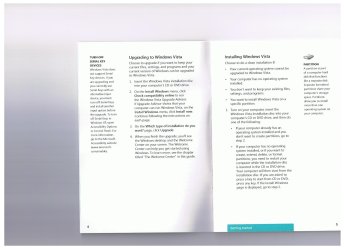
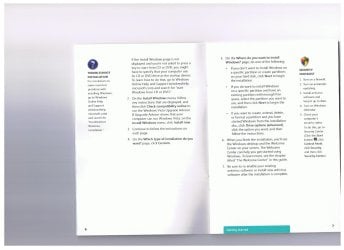
No where in the Vista Upgrade manual nor the XP Upgrade manual sent with the UPGRADE Version(s), does it say that... I still have my Official UPGRADE Vista Manual.

And since Win7 Upgrade disc with manual have not been received. Notice on Page 5... NO OS.
here is from my version of Win 7.
14. UPGRADES.</B> To use upgrade software, you must first be licensed for the software that is eligible for the upgrade. Upon upgrade, this agreement takes the place of the agreement for the software you upgraded from. After you upgrade, you may no longer use the software you upgraded from.
This statement clearly contradicts the fact that MS says you can clean install. Now if I clean install (follow the instructions) NO KEY gives you 30 days... now while booted into Win 7 (any version)
and you do the "upgrade" that means I can no longer use Windows 7. refer to Para 14.
 

Attachments

  • pg 4-5.jpeg
    pg 4-5.jpeg
    248.6 KB · Views: 49
  • pg 6-7.jpeg
    pg 6-7.jpeg
    243 KB · Views: 45
Once you launch the Upgrade disk from a qualifying OS and either Upgrade (if it is Vista), or do a Custom clean install over XP/Vista/RC, to a second partition, or to a second HDD, then the underlying qualifying OS is by terms of the EULA not useable except to reinstall the upgrade.

From the Windows 7 License Agreement:

15. Upgrades. To use upgrade software, you must first be licenced for the software that is eligible for the upgrade. Upon upgrade, this agreement takes the place of the agreement for the software you upgraded from. After you upgrade, you may no longer use the software you upgraded from.

That said, there is no mechanism by which MS disables or deactivates the qualifying OS, or at least there hasn't been until now and no indication there will be.

Unless you really want your XP dual boot, I suggest you use it to launch the Upgrade, clean install to a second plugged active primary formatted HDD. After install unplug the XP drive and plug the cable to the Win7 drive (or change the BIOS boot order), run startup repair, and you will have a clean formatted install in the first disk position. But be sure to back up your files ahead since there will be no windows.old folder unless you install over the XP.

Be sure to use the new Win7 Imaging Backup to make an image of the finished install so you never have to reinstall both OS again.

Does that passage of para 15 of the EUALA really mean what it says? That if I uninstall Windows 7, I cannot re-install the qualifying product? Of if I use the upgrade media to do the instllation and overwrite, say Vista, that I cannot re-install Vista (the qualifying product) as a dual boot system? Does it mean that you cannot use the qualifying poduct forever and ever?
 

My Computer

Computer Manufacturer/Model Number
Dell E520 & My Build
OS
Windows 7 (retail) both
CPU
E6300 and AMD X2 5200
Motherboard
Intel 965G and Asus M3A78-CM
Memory
2 GB & 4 GB
Graphics Card(s)
on board video for both

My Computer

Computer Manufacturer/Model Number
* BFK Customs *
OS
W 7 64-bit Ultimate
CPU
Intel Q9550 Yorkfield
Motherboard
ASUS P5Q Pro
Memory
8GB Dominator 8500C5D
Graphics Card(s)
ATI : XFX 5870
Sound Card
Realtek HD Audio 7-1
Monitor(s) Displays
1x 47" LCD HDMI & 3x 26" LCD HDMI
Screen Resolution
1920x1080P & 1920x1200
Hard Drives
1x 80GB Intel X25-M G2 SSD : 1x 500GB & 1x 640GB WD Caviar Black(s)
PSU
Corsair 620HX
Case
Cooler Master RC-690
Cooling
Tuniq Tower 120, 2x 140mm and 3x 120mm case fans
Keyboard
Microsoft 500
Mouse
Razer Diamondback 3G
Internet Speed
14 Mb/s
Other Info
1x Koutech 3Gb/s SATA HDD Hot Swap Rack
Does that passage of para 15 of the EUALA really mean what it says? That if I uninstall Windows 7, I cannot re-install the qualifying product? Of if I use the upgrade media to do the instllation and overwrite, say Vista, that I cannot re-install Vista (the qualifying product) as a dual boot system? Does it mean that you cannot use the qualifying poduct forever and ever?

Many users dual booted with the qualifying Vista to transition to Win7 and had no problems. You are not supposed to use the qualifying OS again after installing Win7 unless you want to go back to it alone. However this is on the honor system and not enforced by any current mechanism.
 
Well, here's the deal. I have activated images saved on another drive. I can simply replace Windows 7 with XP or Vista and go back to 7 anytime. It takes 20 minutes. So if that is allowed, why not a dual boot system since you can only use one operating systm at a time? Even though the signatures in track zero are copied, Microsoft thinks some of my "installations" are now counterfeit. What a huge irritation if I have to phone India to explain. Wish ther were a resonable alternative to Microsoft.
 

My Computer

Computer Manufacturer/Model Number
Dell E520 & My Build
OS
Windows 7 (retail) both
CPU
E6300 and AMD X2 5200
Motherboard
Intel 965G and Asus M3A78-CM
Memory
2 GB & 4 GB
Graphics Card(s)
on board video for both
The non-genuine you may be receiving is not related to using Vista, but more likely a qualm with reimaging.

What is the exact error message and how does it present? Blue screen non-gen lockout is slipped drive letter.
 
The non-genuine you may be receiving is not related to using Vista, but more likely a qualm with reimaging.

What is the exact error message and how does it present? Blue screen non-gen lockout is slipped drive letter.

There is no error message. Just an ominous notice that the software may be not legal or if I try to do a re-install from my retail upgrade DVD, that I “ cannot use that activation code on this computer”, buy another number, contact Microsoft, etc. This is what is so infuriating since I own the license and it is legal. I presume they want me to contact Microsoft (a representative in India) to assure them it is legal. Cannot Microsoft control the activation code numbers out there and who has them? Seems simple to me. Other companies do that. If a particular number is valid but not released by the company you don’t get to register it! Period!
 

My Computer

Computer Manufacturer/Model Number
Dell E520 & My Build
OS
Windows 7 (retail) both
CPU
E6300 and AMD X2 5200
Motherboard
Intel 965G and Asus M3A78-CM
Memory
2 GB & 4 GB
Graphics Card(s)
on board video for both
Hello.


Try a robo-call to MS first, if there's no issues you won't even speak to a person, have a look at the link below and be sure to post back to keep us informed.


Activate Windows 7 by Phone
 

My Computer

Computer Manufacturer/Model Number
* BFK Customs *
OS
W 7 64-bit Ultimate
CPU
Intel Q9550 Yorkfield
Motherboard
ASUS P5Q Pro
Memory
8GB Dominator 8500C5D
Graphics Card(s)
ATI : XFX 5870
Sound Card
Realtek HD Audio 7-1
Monitor(s) Displays
1x 47" LCD HDMI & 3x 26" LCD HDMI
Screen Resolution
1920x1080P & 1920x1200
Hard Drives
1x 80GB Intel X25-M G2 SSD : 1x 500GB & 1x 640GB WD Caviar Black(s)
PSU
Corsair 620HX
Case
Cooler Master RC-690
Cooling
Tuniq Tower 120, 2x 140mm and 3x 120mm case fans
Keyboard
Microsoft 500
Mouse
Razer Diamondback 3G
Internet Speed
14 Mb/s
Other Info
1x Koutech 3Gb/s SATA HDD Hot Swap Rack
Sorry about the rants. I do not seem to have a problem now unless I do an install from my DVD. I simply uninstalled KB971033.
 

My Computer

Computer Manufacturer/Model Number
Dell E520 & My Build
OS
Windows 7 (retail) both
CPU
E6300 and AMD X2 5200
Motherboard
Intel 965G and Asus M3A78-CM
Memory
2 GB & 4 GB
Graphics Card(s)
on board video for both
Back
Top