dual boot VISTA/Win 7 does not work

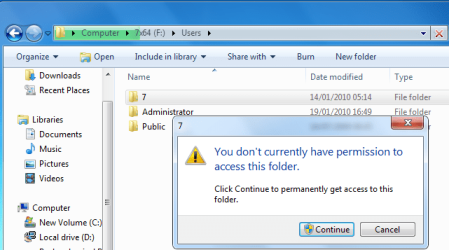
If you try and open E from within 7, so you can copy to the E drive, explore the user folder, etc - do you have permission to do that ? If you get a message click here to get permission, do so.
 

My Computers My Computers

System One System Two

  • Computer type
    PC/Desktop
    OS
    7 X64
    CPU
    i5 8400
    Motherboard
    gigabyte b365m ds3h
    Memory
    2x8gb 3200mhz
    Hard Drives
    various
    PSU
    pure power 11 400w cm
    Case
    Coolermaster
    Cooling
    cryorig m9i
  • Computer type
    PC/Desktop
    OS
    7x64
    CPU
    g5400
    Motherboard
    ga b365m ds3h
    Memory
    8gb ddr4 2400
    PSU
    xfx pro 450w
Boot into Win7 DVD, select Repair my Computer on the second screen, then click through to Recovery Tools list to run Startup Repair up to 3 separate times with reboots until Win7 starts.

Then install Easy BCD 2.0 and attempt to add Vista by name, type and drive letter.

If this fails post back a screenshot of your full Disk Management drive map, using Snipping Tool in Start Menu attaching file using paper clip in reply box.
 
That will probably work. It doesn't answer the question of why the command didn't complete. Would like to find out why that was. It works perfectly every time for me.
 

My Computers My Computers

System One System Two

  • Computer type
    PC/Desktop
    OS
    7 X64
    CPU
    i5 8400
    Motherboard
    gigabyte b365m ds3h
    Memory
    2x8gb 3200mhz
    Hard Drives
    various
    PSU
    pure power 11 400w cm
    Case
    Coolermaster
    Cooling
    cryorig m9i
  • Computer type
    PC/Desktop
    OS
    7x64
    CPU
    g5400
    Motherboard
    ga b365m ds3h
    Memory
    8gb ddr4 2400
    PSU
    xfx pro 450w
If you try and open E from within 7, so you can copy to the E drive, explore the user folder, etc - do you have permission to do that ? If you get a message click here to get permission, do so.


I can browse the public folders but not the account name folders.

I have resolved my issue by changing the way I boot and where easyBCD is installed.

I installed EasyBCD on the WIn 7 drive and made that the first boot device then set EasyBCD to make the VISTA OS the default OS.

Works just fine that way
 
Last edited:

My Computer My Computer

OS
WIndows 7 Professional and Vista Home Premium x64
CPU
E8400
Motherboard
GA-EP35-DS3R
Memory
2 x 2G Kingston HyperX PC6400
Graphics Card(s)
HD4850 512M GA
Monitor(s) Displays
BenQ 24 WS
Screen Resolution
1980 x 1080
Hard Drives
WD 1T, WD 500G
PSU
Enermax ELT620AWT PSU
Case
CoolerMaster Elite 333
Cooling
CPU Arctic 92mm, VGA Zalman VF770
Keyboard
Saitek Eclipse II
Mouse
MX518
Internet Speed
ADSL2+ (typically 8M)
Yes, it always works fine that way round.

I can browse the public folders but not the account name folders.

Sounds like the destination was blocked.

Don't you get a message like this?

ACCESS-2010-01-20_190808.png

If so, just click continue.

Then do the bcdboot command - see if it completes now ( don't worry , it won't do any harm )
 

My Computers My Computers

System One System Two

  • Computer type
    PC/Desktop
    OS
    7 X64
    CPU
    i5 8400
    Motherboard
    gigabyte b365m ds3h
    Memory
    2x8gb 3200mhz
    Hard Drives
    various
    PSU
    pure power 11 400w cm
    Case
    Coolermaster
    Cooling
    cryorig m9i
  • Computer type
    PC/Desktop
    OS
    7x64
    CPU
    g5400
    Motherboard
    ga b365m ds3h
    Memory
    8gb ddr4 2400
    PSU
    xfx pro 450w
Don't you get a message like this?

yeah I did get something like that...

Happy to continue testing in the interest of learning however I want to be able to stop the user files being browsed by other users and/or from the other OS for privacy reasons.

Also would like to know exactly what the command does. I prolly should have asked before attempting first time but better late than never...
 

My Computer My Computer

OS
WIndows 7 Professional and Vista Home Premium x64
CPU
E8400
Motherboard
GA-EP35-DS3R
Memory
2 x 2G Kingston HyperX PC6400
Graphics Card(s)
HD4850 512M GA
Monitor(s) Displays
BenQ 24 WS
Screen Resolution
1980 x 1080
Hard Drives
WD 1T, WD 500G
PSU
Enermax ELT620AWT PSU
Case
CoolerMaster Elite 333
Cooling
CPU Arctic 92mm, VGA Zalman VF770
Keyboard
Saitek Eclipse II
Mouse
MX518
Internet Speed
ADSL2+ (typically 8M)
Back
Top