
Dual Boot Win 7 & Win XP

JQCoburn

New member
Local time
12:57 AM
Messages
2
Okay guys I'm totally baffled my this one. My computer was tri booting Linux, Win 7, and Win XP. When it booted, it first booted GRUB and gave the option of Linux or Windows (or some utilities). If I picked Windows, it then gave me the choice of Win 7 or Win XP.

Anyway my Win 7 install was getting bloated, and I didn't need my Linux install anymore so I decided to just clean install Win 7 on my old Win 7 partition and totally wipe my Linux install. I didn't touch my XP partition during this process.

After a clean install and getting Win 7 up to date, I tried using EasyBCD (per the instructions on this site) to set-up a dual boot since my Win 7 didn't set it up by default. Anyway I add the XP entry & and write the MBR, then reboot, but it just boots straight into Win 7 without giving me the option to choose XP. When I fire up EasyBCD it only shows the Win 7 entry, no sign of a Win XP entry. So I tried adding it again, this time I even checked the BCD via an elevated Command prompt using bcdedit, and it showed the new entry. Reboot, again no option, and again the entry is gone. Not sure what is going on but something appears to messing with my boot data.

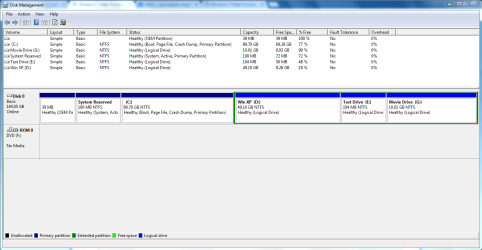
Also it seems that in solving these sorts of problems a screen cap of the dsk manager is typically requested.

Thanks for the help!
 

Attachments
  • DskManagement.PNG
    DskManagement.PNG
    30.8 KB · Views: 2

My Computer My Computer

At a glance

Win 7 Pro 32bit
Computer type
Laptop
OS
Win 7 Pro 32bit
I would have deleted the System Reserved and C and recreated them during install. I'm assuming you kept the OEM partition because it still boots Diagnostics for a Dell or HP.

Otherwise be sure to delete the old XP listing before adding it again using EasyBCD. Will it autocomplete the correct drive letter?

If it won't add XP then this could be due to old boot code left on the drive, and may not correct until the drive is wiped with at least Diskpart Clean Command to clear both the partition table and boot code including Linux code.
If you decide to try this then take the opportunity to get the best possible Clean Reinstall Windows 7 following the steps in the tutorial which are based on what works best in tens of thousands of installs we've helped with here.
 
I actually have no idea what is in that OEM parition. My computer is a Dell.

As far as deleting the system reserved partition, I deleted all the partitions except that OEM partition, the XP Partition, and the Test Drive partition.

I removed my old Win 7 partition, the old System reserved partition, and the 10GB factory restore partition, and all that became my new Win 7 partition. It created the system reserved partition during the Win 7 Install.

All of the old linux partions became my G:\ drive.

As far as Easy BCD goes, when I open it up there is no prior Win XP entry. It seems to totally disappear every time I reboot. Is there another place to I need to go to delete it? When I add the new entry, I'm not sure what drive letter it should be auto-completing with. It auto-completes with C:\ but Windows XP is on the D:\ drive. I tried manually setting it to the D:\ too one time and same thing it booted straight into Win 7 and showed no record of the Win XP boot entry.
 

My Computer My Computer

At a glance

Win 7 Pro 32bit
Computer type
Laptop
OS
Win 7 Pro 32bit
If you followed Clean Reinstall Windows 7 it explains how to test the Dell Diagnostics from F12 at boot to see if they run, a reason to keep the OEM partition. Otherwise I would delete it because it sits on the boot sector.

The main complication here is GRUB, which until GRUB2 ruined Win7 requiring the disk to be wiped. It may still be interfering even after deletion. Otherwise this is a very rare anomaly.

You might run a few Startup Repairs to see if it finds anything to repair, then run EasyBCD again to delete and recreate the XP entry.

You can also delete the last two Logical partitions to extend XP, then use Partition Wizard to set partition as Primary or Logical with Partition Wizard.
You're allowed to have only four Primary Partitions but this may make XP more visible to Easy and Win7 to add it.

To attempt to have Win7 add it at this point, it is doubtful that Startup Repair would do that but if setting Primary makes it more visible then a Repair Install might, or a Clean Reinstall Windows 7.
 
@GREG If you do bootrec/fixmbr , bootsect /nt60 c: /force / mbr or "startup repair" or install win7.... the MBR (sector 0 bootcode) will be overwritten with WIN7 bootcode. GRUB will be overwritten totally. correct me if I'm wrong
 

My Computer My Computer

At a glance

Microsoft Windows 7 Home Premium 64-bits 7601...Intel(R) Core(TM) i3 CPU M 370 @ 2.40GHz4,00 GBATI Mobility Radeon HD 5400 Series
Computer type
Laptop
Computer Manufacturer/Model Number
ACER ASPIRE 5742G
OS
Microsoft Windows 7 Home Premium 64-bits 7601 Multiprocessor Free Service Pack 1
CPU
Intel(R) Core(TM) i3 CPU M 370 @ 2.40GHz
Motherboard
Acer Aspire 5742G
Memory
4,00 GB
Graphics Card(s)
ATI Mobility Radeon HD 5400 Series
Sound Card
(1) AMD High Definition Audio Device (2) Realtek High Defi
Screen Resolution
1366 x 768 x 32 bits (4294967296 colors) @ 60 Hz
Hard Drives
WDC WD5000BEVT-22ZAT0
If you change other things in easybcd.... are those changes lost as well? Try to change a timeout value for example
 

My Computer My Computer

At a glance

Microsoft Windows 7 Home Premium 64-bits 7601...Intel(R) Core(TM) i3 CPU M 370 @ 2.40GHz4,00 GBATI Mobility Radeon HD 5400 Series
Computer type
Laptop
Computer Manufacturer/Model Number
ACER ASPIRE 5742G
OS
Microsoft Windows 7 Home Premium 64-bits 7601 Multiprocessor Free Service Pack 1
CPU
Intel(R) Core(TM) i3 CPU M 370 @ 2.40GHz
Motherboard
Acer Aspire 5742G
Memory
4,00 GB
Graphics Card(s)
ATI Mobility Radeon HD 5400 Series
Sound Card
(1) AMD High Definition Audio Device (2) Realtek High Defi
Screen Resolution
1366 x 768 x 32 bits (4294967296 colors) @ 60 Hz
Hard Drives
WDC WD5000BEVT-22ZAT0
Ideally but GRUB1 caused problems beyond what reasserting Win7 boot manager could overcome. So I am always wary of it even though GRUB2 seemed to stop this. But there could be other corruption at work.

Please proceed.
 
Back
Top