Dual-boot Win XP + Win 7, picking the right partition

Rubick

New member
Local time
9:54 PM
Messages
10
Hello,
I used "Partition Wizard" to create a third partition "F" by splitting D; so now I have C: (primary), D: (logical drive) and F: (logical drive).

My plan is to install Windows7 on F: and keep WindowsXp on C: to be able to dual-boot.

Do I need to convert F: from logical drive to primary partition (ending with 2 primary + 1 logical) before installing Win7 on it? There's an option to simply convert to "primary" in the partition wizard program.

Also, I read about a possible conflict between IDE and AHCI modes when dual-booting. Care to explain what to look for?

Please help me to avoid mistakes. :)

PS. I'd rather avoid messing with C: if possible as it's the smallest and fullest partition and also the place where Windows XP is installed.
 

My Computer My Computer

Computer type
PC/Desktop
OS
Windows XP 32bit
Normally Win7 when installed second to XP will establish a Dual Boot placing its boot files on the XP partition, so it can be installed to a Logical partition.

But one should always boot the installer so you'll have access to the Drive Options pictured in Steps 7/8 of http://www.sevenforums.com/tutorials/1649-clean-install-windows-7-a.html and can delete the intended Win7 partition to create it again letting the installer decide how to format it.

If Win7 boots with no Dual Boot menu then simply install EasyBCD (click Download - no Name or Email required) to Win7 to add XP to a Dual Boot menu.

Best to let us see Disk Mgmt first.
 
Thank you very much for the response.

I attached the screenshot.

I wonder if it will let me select F: (i.e. if it will be offered in the "Where do you want to install Windows" screen).
 

Attachments

  • compdiskmanagm.jpg
    compdiskmanagm.jpg
    94.6 KB · Views: 9

My Computer My Computer

Computer type
PC/Desktop
OS
Windows XP 32bit
It should allow you to install to F but again I would use the booted Win7 installer's Drive Options to delete F to create and format a New partition there because the XP partition table is slightly different.

Let us know how this goes.
 
Thanks. So I should click drive options, click on F: and then or delete?

Maybe for the first time I won't complicate and simply try to install it on F: as it is? If it fails I can simply delete Win 7 and try again without compromising my current Windows XP system, yes?

Also, what about AHCI and IDE? I have a HDD and I believe it's IDE with Windows XP.
Don't know if it will affect performance for gaming if Windows 7 64 bit is also IDE?

PS. Do I need to format F: before doing this? I've never installed anything on it. It's empty.
 

My Computer My Computer

Computer type
PC/Desktop
OS
Windows XP 32bit
Yes, click on F to highlight it, Delete the F partition, create it New again and Format it using the Win7 installer Drive Options. Make sure the highlighted space never changes from that third partition space.

This is the window during http://www.sevenforums.com/tutorials/1649-clean-install-windows-7-a.html where you'll do this:

2440d1379261910t-clean-install-windows-7-step7.jpg


Click on the Drive Options to use them:

2441d1379261910t-clean-install-windows-7-step8.jpg


Stay away from the other partitions and you'll be fine.

Don't change the SATA controller setting from what it is or XP won't start.
 
So I do all these 3 actions within this installation menu, in this order: delete, new, format?
When I delete F and press "new" after that it will make a new F? And then when I format it, I click next?

Also, could it cause problems if I simply install it on F: straight away?

Sorry for asking about details, but I've never done it so I don't want to accidentally format and delete something I shouldn't..
 

My Computer My Computer

Computer type
PC/Desktop
OS
Windows XP 32bit
You should always have your data backed up at all times since the hard drive could die at any time, and especially during an install or repair.

If you want you can try using the same F partition you made for the install, but I would at least Format it with Win7 formatting first.

To do this you would click on F to highlight it, select Drive Options to choose Format, then click Next. Make sure only F remains highlighted during each of these steps.
 
Hello, thank you for the help. I installed win 7. I have not yet entered win xp (but it shows in the boot options as previous version of windows) because I'm installing drivers on win 7.

One more quick question. :)

I installed those Intel drivers for the motherboard (on a dvd) and the only thing that failed to installed is "Intel graphics media accelerator"? Do I need that at all since I have a 560 GTX Nvidia GPU? Or should I go to Intel's page and try to install something similar?
Don't know what to install, there are 41 drivers available for Win 7 64bit:
https://downloadcenter.intel.com/SearchResult.aspx?lang=&ProductID=3280&ProdId=3280
 

My Computer My Computer

Computer type
PC/Desktop
OS
Windows XP 32bit
Go to nvidia.com to install the 560 drivers.

Run all rounds of windows update, then check device manager to see if you need any more drivers.
 

My Computer My Computer

Computer type
PC/Desktop
Computer Manufacturer/Model Number
Skylake Special #666
OS
Windows 10 Pro x64
CPU
Intel Core i7 6700K
Motherboard
Asus Sabertooth Z170 Mark 1
Memory
GSkill TridentZ RGB 16GB 3600 16-16-16-36
Graphics Card(s)
EVGA GTX 980 Ti SC x2
Sound Card
Realtek High Definition
Monitor(s) Displays
AOC G2460PG
Screen Resolution
1920 x 1080 144Hz
Hard Drives
Samsung 860 Pro 256GB, Seagate Barracuda 4TB x2
PSU
EVGA 1000 P2, EVGA White Custom Braided Cables
Case
Corsair Vengeance C70 Gunmetal Black
Cooling
Corsair H100i v2, Corsair ML120 x2, Thermal Grizzly Kryonaut
Keyboard
Logitech G910 Orion Spectrum
Mouse
Logitech G700s
Internet Speed
Verizon Fios Quantum Gateway 75/75
Antivirus
Windows Defender, Malwarebytes Free 3.8.3
Browser
Chrome
Other Info
Corsair SP120 x4, LG Blu-ray Drive, Durabrand HT-395 100 Watt Dolby Digital Amp, Corsair H2100 Wireless 7.1 Headset
Ok, I did it. The system runs fine and everything.. but one problem that I have with Windows XP persists in Win 7 too.

In brief, when I play (most) modern games, at a certain random point the computer just shuts down and restarts. I've been researching this a bit and it turns out it's probably the PSU? (500 W chieftec) It started happening after 2 years.

But now that it failed installing this Intel graphics media accelerator, I was wondering if that's perhaps the cause and not the PSU? Note that this same "PC shuts down when gaming" happens in XP as well.

What do you think?
 

My Computer My Computer

Computer type
PC/Desktop
OS
Windows XP 32bit
It's better if you let Win7 provide the drivers it wants first, and only import those that are missing after all Updates are done or show performance problems.

First enable Automatically deliver drivers via Windows Update (Step 3), then Check for Updates, install all Important and Optional except Bing, with reboots, until no more are offered when you Check for Updates.

This provides not only the drivers Win7 wants but also important patches to make Win7 and your hardware run better.

It seems you might have gotten ahead of Win7 by forcing some drivers in. Are there any drivers missing or in error in Device Manager right now? Run all Windows Updates as specified now to see what else it delivers.

Do you have any overheating? Install Core Temp (carefully avoiding any adware it offers to include) to place in your System Tray to monitor temps, then if necessary clean the dust out of your PC as shown in http://www.sevenforums.com/tutorials/220165-troubleshooting-steps-windows-7-a.html.

You can also see how your PSU measures up by running the eXtreme Power Supply Calculator
 
It's better if you let Win7 provide the drivers it wants first, and only import those that are missing after all Updates are done or show performance problems.

First enable Automatically deliver drivers via Windows Update (Step 3), then Check for Updates, install all Important and Optional except Bing, with reboots, until no more are offered when you Check for Updates.

This provides not only the drivers Win7 wants but also important patches to make Win7 and your hardware run better.

It seems you might have gotten ahead of Win7 by forcing some drivers in. Are there any drivers missing or in error in Device Manager right now? Run all Windows Updates as specified now to see what else it delivers.

Do you have any overheating? Install Core Temp (carefully avoiding any adware it offers to include) to place in your System Tray to monitor temps, then if necessary clean the dust out of your PC as shown in http://www.sevenforums.com/tutorials/220165-troubleshooting-steps-windows-7-a.html.

You can also see how your PSU measures up by running the eXtreme Power Supply Calculator


It's strange, for instance, I'm able to play an entire Dota 2 game, but some other games, especially those made with Unity, make my computer restart. Although, when watching a Dota 2 replay, in-game, it also crashes the PC after a while. Of course, it's not the games, but something related to what the game demands from the PSU/system?

I believe temp. are normal. I already have two temp. measuring. CPU goes up to 63-64 C, I believe, during gaming, i3-2100 Intel. GPU is even lower.

I think there are no devices in error/missing in device manager, but I'll check out again.
Anyway, this is not a BSOD type of crash, the computer simply restarts.
 

My Computer My Computer

Computer type
PC/Desktop
OS
Windows XP 32bit
It usually means the cpu is getting too hot.

64C is 147F, too hot for my liking ;)
 

My Computer My Computer

Computer type
PC/Desktop
Computer Manufacturer/Model Number
Skylake Special #666
OS
Windows 10 Pro x64
CPU
Intel Core i7 6700K
Motherboard
Asus Sabertooth Z170 Mark 1
Memory
GSkill TridentZ RGB 16GB 3600 16-16-16-36
Graphics Card(s)
EVGA GTX 980 Ti SC x2
Sound Card
Realtek High Definition
Monitor(s) Displays
AOC G2460PG
Screen Resolution
1920 x 1080 144Hz
Hard Drives
Samsung 860 Pro 256GB, Seagate Barracuda 4TB x2
PSU
EVGA 1000 P2, EVGA White Custom Braided Cables
Case
Corsair Vengeance C70 Gunmetal Black
Cooling
Corsair H100i v2, Corsair ML120 x2, Thermal Grizzly Kryonaut
Keyboard
Logitech G910 Orion Spectrum
Mouse
Logitech G700s
Internet Speed
Verizon Fios Quantum Gateway 75/75
Antivirus
Windows Defender, Malwarebytes Free 3.8.3
Browser
Chrome
Other Info
Corsair SP120 x4, LG Blu-ray Drive, Durabrand HT-395 100 Watt Dolby Digital Amp, Corsair H2100 Wireless 7.1 Headset
It usually means the cpu is getting too hot.

64C is 147F, too hot for my liking ;)


I thought that too at first, but I don't think this is the cause as the restarts sometimes happen even when I just begin playing; the CPU literally has no time to get hot.

Oh, at the 5th game of Dota, the PC finally shut down/restarted and then when the computer restarted and I reconnected back, it immediately shut down again... :(
 

My Computer My Computer

Computer type
PC/Desktop
OS
Windows XP 32bit
Hey, found this page:

My Intel GMA Driver Is Missing on the Control Panel | eHow

It says:
"The Intel Graphics Media Accelerator driver is responsible for improving your graphic card's performance. It allows the Intel GMA graphics processor built into the motherboard to communicate with the computer's firmware to enhance image display. Depending on the version, it also may include features that improve video playback for videos in aspect ratio, such as 16:9 widescreen."

So this Intel driver actually enhances my Nvidia GPU?
Maybe this is the problem, I'll run the driver update for Intel. I believe this driver isn't installed neither on my Win XP.
First the windows 7 updates or do I update Intel drivers first?

PS. But still, it worked for 2 years without it no problem. Maybe it's the monitor.. the problems started shortly after I upgraded to a larger monitor.. blah, dunno.
 

My Computer My Computer

Computer type
PC/Desktop
OS
Windows XP 32bit
Try installing the driver for XP to see if it improves. If not roll it back in Device Manager.

For WIndows 7 use the drivers Windows Update delivers first to see how they perform.
 
Hello, I'd like to share an update about the comp. shutdown/restarting when gaming.

I went to a computer service store and explained the problem, pointing at the PSU as the cause. The guy tested another PSU and things ran smoothly.
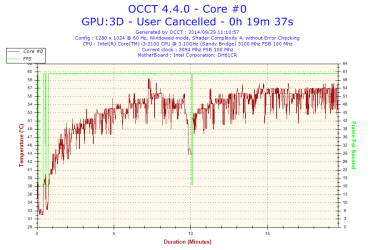
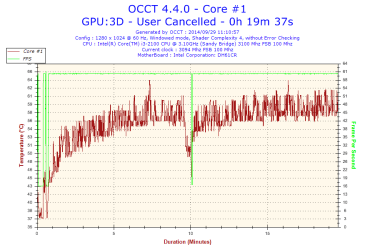
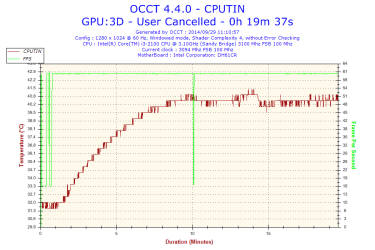
I told him to try an installed game, but he (also) installed OCCT; I can't find uninstall.exe and the program isn't listed inside "uninstall or change a program"! I'm not happy that he used a program that brings the GPU to its limits.

I'll attach 3 temperature graphs, but I'm not sure if those are temperatures for the GPU or the CPU cores (because it lists core #0 and core #1 even though he apparently ran a GPU3D test).
Can this damage the GPU? He ran it for 20 min..


Also, since they didn't have a suitable PSU they ordered one and he'll install it tomorrow (I took the PC back home with the old PSU).
Just for the sake of it, I tried to ran a game that would *always* immediately make the PC restart upon loading... and it ran no problem for several minutes. Then, all happy, I proceeded to test another one; same. Then the third one... ran for about 1 hour and the dreaded restart happened. Then I tested again the first 2 games, and the first one rans fine, but the other one retarts the PC again. So it seems I definitely need another PSU, hm.
 

Attachments

  • 2014-09-29-11h10-Temperature-Core #0.png
    2014-09-29-11h10-Temperature-Core #0.png
    16.5 KB · Views: 1
  • 2014-09-29-11h10-Temperature-Core #1.png
    2014-09-29-11h10-Temperature-Core #1.png
    16.7 KB · Views: 0
  • 2014-09-29-11h10-Temperature-CPUTIN.png
    2014-09-29-11h10-Temperature-CPUTIN.png
    15.1 KB · Views: 0

My Computer My Computer

Computer type
PC/Desktop
OS
Windows XP 32bit
Back
Top