Dual Boot Win7 and XP - 2 HD's

ccarizzzo

New member
Local time
8:37 PM
Messages
3
Hey all,
I was reading the posts about and sorry to post the same thing, but I really really don't get what is happening with my computer.

(p.s: at first I want to sorry 'bout my english, i'm from brazil and not so good as i want in english.. :P)

so,

I have 2 SATA HD in my machine. One with XP and another with Seven: here.
Of course I can enter both systems but only if I select the HD on motherboard boot screen (pressing F8).

I tried change the bcdedit and got it, but when i select windows xp on boot manager screen it goes black and restart.

So I use bcdedit /delet {ntldr} /f to erase the entry

Tried to use EasyBCD to to repair the Windows 7 boot file and add XP to the Windows Boot Manager list.

fail! :mad:


someone please could help with this?
 

My Computer My Computer

OS
Windows 7 Ultimate x64
Motherboard
Asus P5SD2-VM
Memory
2GB
no one? =/
 

My Computer My Computer

OS
Windows 7 Ultimate x64
Motherboard
Asus P5SD2-VM
Memory
2GB
Can you boot into either now?

Actually, having the ability to boot either OS from the BIOS Boot Menu F-Key (given on first bootup screen) may be best since the two OS's remain independent and can come and go as you please. You can set Win7 to be the first boot, after DVD drive, as a default.

Creating a dual-boot menu (which is done by Win7 when installed last) makes the two OS's interdependent and harder to extricate as you are finding out.

How would you like this to be set up, Carol?
 
I just wish I could have the both system on my Boot manager black screen.
when I instaled the Seven i thought that would appear

- older version windows
- windows seven

for me to choose.

But if I want to enter Xp I have to select the other hard drive o my motherboard menu.
 

My Computer My Computer

OS
Windows 7 Ultimate x64
Motherboard
Asus P5SD2-VM
Memory
2GB
This dual boot you desire is correctly configured by installing Windows 7 last. It can be repaired by doing a repair install run from the Win 7 desktop. The repair install saves all programs, files and settings in place but reinstalls the OS and reconfigures the boot correctly. You only need to reactivate afterward at Computer>Properties.


A Win7 repair install is an Upgrade over itself, running the installer from the Desktop. Select "COnnect to Internet during install" to have the latest drivers and Updates added during install, then get others afterward at Windows Updates. http://www.sevenforums.com/tutorials/3413-repair-install.html?ltr=R

I suggest unplugging all drives except the two you wish to dual boot as the installer can become confused by any 3rd drives marked active.

If you are currently unable to boot into Win7 then boot into the Win7 DVD Repair console Recovery Tools, select Startup Repair and run up to 3 separate times as there may be multiple issues to repair. This might reconfigure the dual boot, but more likely will only start Win7 so you can run the Repair install to reconfigure dual boot correctly.
 
Last edited:
I'm having this exact same problem.

I've had XP for years and just recently installed 7 on a separate drive. As far as I can tell this should automatically give me the option to boot into either OS on startup. I don't get this option but can choose my OS by changing the drive boot order in the bios. I ran bootcfg /rebuild from the XP Repair option but it didn't find Windows 7. Then I installed EasyBCD in Windows & but it doesn't see XP.

Don't get it.
 

My Computer My Computer

OS
Windows 7
I'm having this exact same problem.

I've had XP for years and just recently installed 7 on a separate drive. As far as I can tell this should automatically give me the option to boot into either OS on startup. I don't get this option but can choose my OS by changing the drive boot order in the bios. I ran bootcfg /rebuild from the XP Repair option but it didn't find Windows 7. Then I installed EasyBCD in Windows & but it doesn't see XP.

Don't get it.

Go back to EasyBCD and under Add/Remove tab add XP by name, type, and Drive letter.

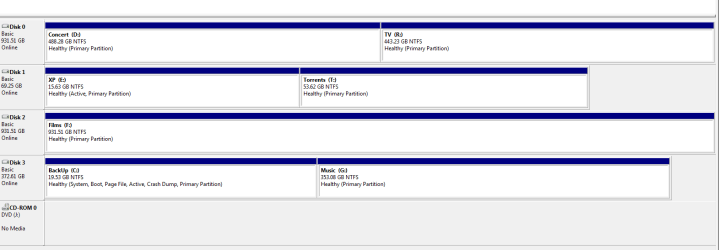
If this fails, post back here a screenshot of your full Disk Management map, using Snipping Tool in Start Menu, attach file using paper clip in reply box.
 
Hadn't got very far with EasyBCD because when I tried to add an entry it greyed out the option to change drive letter when I selected an XP type OS. When I changed the drive letter first (just )nowI could then add a new XP entry. Now on restarting I get the two OS shown as options but if I choose XP the PC just restarts.

The volume labelled Back-Up is actually my Windows 7 installation.
 

Attachments

  • drives.PNG
    drives.PNG
    12.2 KB · Views: 67

My Computer My Computer

OS
Windows 7
Are you running 64 bit Win7? It needs to be in the first partition of the first drive slot if so.

If so, move Win7 into DISK0 slot and be sure it is set first HD to boot (after DVD) in BIOS.

Either way, you need to run a repair install for Win7 to correctly reconfigure the Dual Boot menu you want. http://www.sevenforums.com/tutorials/3413-repair-install.html?ltr=R

I suggest you unplug all drives except XP and Win7 while doing this so there is less chance for boot to be derailed again.
 
No, it's 32 bit.

Thanks, I'll try the repair thing.
 

My Computer My Computer

OS
Windows 7
Back
Top