Dual-Boot Win7/Win10 on seprt HDD's - Both HDD's detected, 7 wont boot

Jmarc

New member
Local time
11:33 AM
Messages
6
I have a dual-boot setup on a Dell XPS 8900 that I've had since Feb/March. The dual boot setup has been working fine, with zero issues since then, then this week I just booted into Win7 a couple days ago and it ran chkdsk automatically, erased some files, restarted, and booted into Win7 fine. I used my OS with no issues and shutdown. But this morning I tried to boot into Win7 and my system can't find the operating system.

I bought the computer from Dell with Win10 installed on their standard 1TB HDD and added a WDC 2TB HDD and installed Win7 in Legacy. I can still boot into Win10 with no problem in UEFI, and while using the OS I can see my other Win7 HDD, all the files are still there and I can access them. My system can even detect Win7 in UEFI mode and will begin to boot to that OS (but of course, freezes at the logo screen because Win7 won't run on UEFI). The BIOS detects both HDD's and diagnostics says that everything's fine with both, but when I try to boot into Win7 in Legacy mode I get a no boot device error.

I've run the Windows7 install CD to try to run diagnostics and repair startup files, but all the diagnostics, including chkdsk, come back with zero issues, except 0x01f and 0x495 which only says that something was changed, but nothing specific...

I can't tell if the problem is with my startup files, MBR, or BIOS...

I've already backed up my Win7 HDD, but I'd rather not have to reinstall Windows cuz all my gaming stuff is on that HDD...

Can anyone help?
 

My Computer My Computer

At a glance

Win7 / Win10 dual bootIntel(R) Core(TM) i7-6700 CPU @ 3.40GHz, 3408...16 GBNVIDIA GeForce GTX 745
Computer type
PC/Desktop
Computer Manufacturer/Model Number
Dell
OS
Win7 / Win10 dual boot
CPU
Intel(R) Core(TM) i7-6700 CPU @ 3.40GHz, 3408 Mhz,
Motherboard
Dell, Inc.
Memory
16 GB
Graphics Card(s)
NVIDIA GeForce GTX 745
Hard Drives
Standard Dell 1TB

WDC 2TB
Antivirus
McAfee on Win10; AVG on Win7
Browser
Chrome
Hi and welcome to SevenForums,
Dual booting with all hdd's connected can be problematic
I personally use one of these to simplify the task after many mishaps dual booting on the same disk.... I never found a better/ more reliable way other than this,
Amazon.com: Vantec 2.5-Inch Dual Bay Trayless SATA III - 6G Mobile Rack (MRK-225S6-BK): Computers & Accessories

Installing each os you'd want to remove the other disk completely so each os would have it's own boot loader.
Even though 10 can access win-7 I would not do it this will often trigger check disk to run in win-7.
Not to mention Fast start in win-10 will trigger it too
Fast Startup - Turn On or Off in Windows 10 - Windows 10 Forums

So yes disable fast start in win-10 is a must do.
Also for good measure disable fast or quick start in your bios too.
I would not share data disks either.
 

My Computer My Computer

At a glance

Win-7-Pro64bit 7-H-Prem-64biti7-5930K 2nd i9-9940x both water blocked VRM'...Trident-z 3200C14 2nd Trident-z 3600C16EVGA 1080ti ftw3 2nd Titan Xp both water blocked
Computer type
PC/Desktop
Computer Manufacturer/Model Number
Custom assembled by me :}
OS
Win-7-Pro64bit 7-H-Prem-64bit
CPU
i7-5930K 2nd i9-9940x both water blocked VRM's too
Motherboard
ASUS SABERTOOTH X99 2nd ASUS x299 Apex
Memory
Trident-z 3200C14 2nd Trident-z 3600C16
Graphics Card(s)
EVGA 1080ti ftw3 2nd Titan Xp both water blocked
Sound Card
Built-in Realtek
Monitor(s) Displays
1-AOC G2460PG 24"G-Sync 144Hz/ 2nd 1-ASUS VG248QE 24" 144Hz
Screen Resolution
1920 x 1080 144Hz
Hard Drives
2-Samsung M.2 Evo & Evo Plus
2-Samsung 850 EVO 500GB SSD's/ 3-2.5 W.D. Black 1tb-&3-1tb/3-3.5 WD Black 1tb hdd's
PSU
EVGA SuperNOVA 1000-P2 2nd 1200-P2
Case
2-Corsair Obsidian Series 450D Black ATX Mid Tower
Cooling
Custom water loops
Keyboard
Logitech G710+/ 2nd Logitech G910
Mouse
2-RedDragon M901 Perdition 16400 dpi Gaming mouse = wired
Internet Speed
Comcast Ping 19ms 89.31mbps download speed 6.12mbps upload
Antivirus
Malwarebytes Pro/ Superantispyware Pro
Browser
FireFox & Pale moon
Other Info
2nd ASUS X299 Apex/Intel i9-9940x with Custom water loop/7H-Prem-x64/Corsair 450D case/Ram Trident-z 3600C16 4x8gb / Samsung970Evo plus 500gb SSD/Dual ssd EZ swap evo/PSU EVGA SuperNova 1200w-P2 80+Platinum/GPU Titan Xp /8-ML-140 on push-pull on 2-280GTX rads
Thanks Thrash, I've never enabled fast start since I setup the dual boot system. And I've never shared files from one disk to another or accessed them that way, other than backing up my files on Win7 to an external HDD from Win10 today.

Either way, could you tell me a little more about the mobile rack you suggested?

And Thanks
 

My Computer My Computer

At a glance

Win7 / Win10 dual bootIntel(R) Core(TM) i7-6700 CPU @ 3.40GHz, 3408...16 GBNVIDIA GeForce GTX 745
Computer type
PC/Desktop
Computer Manufacturer/Model Number
Dell
OS
Win7 / Win10 dual boot
CPU
Intel(R) Core(TM) i7-6700 CPU @ 3.40GHz, 3408 Mhz,
Motherboard
Dell, Inc.
Memory
16 GB
Graphics Card(s)
NVIDIA GeForce GTX 745
Hard Drives
Standard Dell 1TB

WDC 2TB
Antivirus
McAfee on Win10; AVG on Win7
Browser
Chrome
Hi,
Best description is sweet :)

One slot for the os and one slot for backups so simple even a caveman like my self can't get in trouble
If I want to boot into something else I simply shut down and swap out the ssd's
It will also work with 2.5" hdd's

Well built little device
Not all that pretty but is so functional it hurts :D
Not sure how I lived this long without it :confused:

In win-10 I often accidentally accessed other disks
This PC ? I don't know about that term man it should be that pc not this pc :p
 

My Computer My Computer

At a glance

Win-7-Pro64bit 7-H-Prem-64biti7-5930K 2nd i9-9940x both water blocked VRM'...Trident-z 3200C14 2nd Trident-z 3600C16EVGA 1080ti ftw3 2nd Titan Xp both water blocked
Computer type
PC/Desktop
Computer Manufacturer/Model Number
Custom assembled by me :}
OS
Win-7-Pro64bit 7-H-Prem-64bit
CPU
i7-5930K 2nd i9-9940x both water blocked VRM's too
Motherboard
ASUS SABERTOOTH X99 2nd ASUS x299 Apex
Memory
Trident-z 3200C14 2nd Trident-z 3600C16
Graphics Card(s)
EVGA 1080ti ftw3 2nd Titan Xp both water blocked
Sound Card
Built-in Realtek
Monitor(s) Displays
1-AOC G2460PG 24"G-Sync 144Hz/ 2nd 1-ASUS VG248QE 24" 144Hz
Screen Resolution
1920 x 1080 144Hz
Hard Drives
2-Samsung M.2 Evo & Evo Plus
2-Samsung 850 EVO 500GB SSD's/ 3-2.5 W.D. Black 1tb-&3-1tb/3-3.5 WD Black 1tb hdd's
PSU
EVGA SuperNOVA 1000-P2 2nd 1200-P2
Case
2-Corsair Obsidian Series 450D Black ATX Mid Tower
Cooling
Custom water loops
Keyboard
Logitech G710+/ 2nd Logitech G910
Mouse
2-RedDragon M901 Perdition 16400 dpi Gaming mouse = wired
Internet Speed
Comcast Ping 19ms 89.31mbps download speed 6.12mbps upload
Antivirus
Malwarebytes Pro/ Superantispyware Pro
Browser
FireFox & Pale moon
Other Info
2nd ASUS X299 Apex/Intel i9-9940x with Custom water loop/7H-Prem-x64/Corsair 450D case/Ram Trident-z 3600C16 4x8gb / Samsung970Evo plus 500gb SSD/Dual ssd EZ swap evo/PSU EVGA SuperNova 1200w-P2 80+Platinum/GPU Titan Xp /8-ML-140 on push-pull on 2-280GTX rads
Hi and welcome to SevenForums,
Dual booting with all hdd's connected can be problematic
I personally use one of these to simplify the task after many mishaps dual booting on the same disk.... I never found a better/ more reliable way other than this,
Amazon.com: Vantec 2.5-Inch Dual Bay Trayless SATA III - 6G Mobile Rack (MRK-225S6-BK): Computers & Accessories

Installing each os you'd want to remove the other disk completely so each os would have it's own boot loader.
Even though 10 can access win-7 I would not do it this will often trigger check disk to run in win-7.
Not to mention Fast start in win-10 will trigger it too
Fast Startup - Turn On or Off in Windows 10 - Windows 10 Forums

So yes disable fast start in win-10 is a must do.
Also for good measure disable fast or quick start in your bios too.
I would not share data disks either.


So i see. Someone is using this method to dual boot.
I agree that this is the most safe way, i use it when i am using Desktop without problem.
But for laptop, i do may have a similar way then this.
 

My Computer My Computer

At a glance

Windows 7 x64
Computer type
Laptop
Computer Manufacturer/Model Number
Toshiba L630 and L735
OS
Windows 7 x64
Hard Drives
240 GB SSD
Hi,
A laptop I would convert the dvd tray into a ssd holder :)
Just about everything is going usb anyway I barely ever use the dvd/cd drive anymore.

If you ever played with Linux you might know the grub is a biotch to deal with and or get rid of :)
 

My Computer My Computer

At a glance

Win-7-Pro64bit 7-H-Prem-64biti7-5930K 2nd i9-9940x both water blocked VRM'...Trident-z 3200C14 2nd Trident-z 3600C16EVGA 1080ti ftw3 2nd Titan Xp both water blocked
Computer type
PC/Desktop
Computer Manufacturer/Model Number
Custom assembled by me :}
OS
Win-7-Pro64bit 7-H-Prem-64bit
CPU
i7-5930K 2nd i9-9940x both water blocked VRM's too
Motherboard
ASUS SABERTOOTH X99 2nd ASUS x299 Apex
Memory
Trident-z 3200C14 2nd Trident-z 3600C16
Graphics Card(s)
EVGA 1080ti ftw3 2nd Titan Xp both water blocked
Sound Card
Built-in Realtek
Monitor(s) Displays
1-AOC G2460PG 24"G-Sync 144Hz/ 2nd 1-ASUS VG248QE 24" 144Hz
Screen Resolution
1920 x 1080 144Hz
Hard Drives
2-Samsung M.2 Evo & Evo Plus
2-Samsung 850 EVO 500GB SSD's/ 3-2.5 W.D. Black 1tb-&3-1tb/3-3.5 WD Black 1tb hdd's
PSU
EVGA SuperNOVA 1000-P2 2nd 1200-P2
Case
2-Corsair Obsidian Series 450D Black ATX Mid Tower
Cooling
Custom water loops
Keyboard
Logitech G710+/ 2nd Logitech G910
Mouse
2-RedDragon M901 Perdition 16400 dpi Gaming mouse = wired
Internet Speed
Comcast Ping 19ms 89.31mbps download speed 6.12mbps upload
Antivirus
Malwarebytes Pro/ Superantispyware Pro
Browser
FireFox & Pale moon
Other Info
2nd ASUS X299 Apex/Intel i9-9940x with Custom water loop/7H-Prem-x64/Corsair 450D case/Ram Trident-z 3600C16 4x8gb / Samsung970Evo plus 500gb SSD/Dual ssd EZ swap evo/PSU EVGA SuperNova 1200w-P2 80+Platinum/GPU Titan Xp /8-ML-140 on push-pull on 2-280GTX rads
Hi,
A laptop I would convert the dvd tray into a ssd holder :)
Just about everything is going usb anyway I barely ever use the dvd/cd drive anymore.

If you ever played with Linux you might know the grub is a biotch to deal with and or get rid of :)


Thanks.
Already bought this DVD tray for SSD holder.
Already having too many external cases and internal HDD and Ext HDD (more than 10+ HDD for both)
Later may have to get USB DVD, as i usually do run other program outside, although seldom use optical drive.
Such as Mini Tools Partittion Wizard, and another similar program O&O DiskImage 4.

Only on Windows, but never on others such as Linux.
Wanted to try, after all too many HDD, but not too sure, which required further reading.
 

My Computer My Computer

At a glance

Windows 7 x64
Computer type
Laptop
Computer Manufacturer/Model Number
Toshiba L630 and L735
OS
Windows 7 x64
Hard Drives
240 GB SSD
I have a dual-boot setup on a Dell XPS 8900 that I've had since Feb/March. The dual boot setup has been working fine, with zero issues since then, then this week I just booted into Win7 a couple days ago and it ran chkdsk automatically, erased some files, restarted, and booted into Win7 fine. I used my OS with no issues and shutdown. But this morning I tried to boot into Win7 and my system can't find the operating system.


The problem may lies in what chkdsk do and which files were deleted, i assumed you let chkdsk to do that.

Never trust chkdsk to do things for you, or any program to handle it without you knowing.
You may know, but anything could happen, as computer use LOGIC, and you may assumed everything is in order.

This failure to boot did happened to me.
I was using Mini Tools Partition Wizard CD bookable and do the cloning.
When finished cloning, restart the laptop, the system Failure happened.
Then i remember something, which this MTPW did more than cloning.
It remove the Boot option from the 1st partition 100MB.

There is another option for dual boot.
Any OS partition indicated "Active" & with boot & system files, will and may boot from that partition.
This too happened to me, which is very long ago.
A program add another partition as "Active" partition which also have the boot & system files.

So, you need a program that can do as other OS do, but to not to run in Windows mode, do check these Active, Boot, System, etc which able to boot.

You can try to use MTPW CD (&or other similar) to boot up, which i did reset the boot.
 

My Computer My Computer

At a glance

Windows 7 x64
Computer type
Laptop
Computer Manufacturer/Model Number
Toshiba L630 and L735
OS
Windows 7 x64
Hard Drives
240 GB SSD
If chkdsk ran automatically and the problem began after, it can mean your drive is failing. Back up your data.
I think the main problem was the Win 7 installation. Is it 32 or 64 bits?
Did you detached the 1T Win 10 disk while you installed Win 7?
How do you choose witch OS to boot? By BIOS (F12) or by boot loader?
 
Last edited:

My Computers My Computers

  • At a glance

    Windows 7 HP 64i5 6600K - 800MHz to 4200MHz4+4G GSkill DDR4 3000IG - Intel 530
    Computer type
    PC/Desktop
    Computer Manufacturer/Model Number
    custom build
    OS
    Windows 7 HP 64
    CPU
    i5 6600K - 800MHz to 4200MHz
    Motherboard
    GA-Z170-HD3P
    Memory
    4+4G GSkill DDR4 3000
    Graphics Card(s)
    IG - Intel 530
    Monitor(s) Displays
    Samsung 226BW
    Screen Resolution
    1680x1050
    Hard Drives
    (1) -1 SM951 – 128GB M.2 AHCI PCIe SSD drive for Windows 7 and Lubuntu
    (2) -1 WD SATA 3 - 1T for Data
    (3) -1 WD SATA 3 - 1T for backup
    PSU
    Thermaltake 450W TR2 gold
    Keyboard
    Old and good Chicony mechanical keyboard
    Mouse
    Logitech mX performance - 9 buttons (had to disable some)
    Internet Speed
    500Mb/s
    Browser
    Firefox 64
    Other Info
    TinyWall firewall
  • At a glance

    Windows 7 Proi7-4500U 800MHz to 3.0GHz(4+4)G DDR3 1600IG intel 4400 + NVIDIA GeForce GT 745M
    Computer type
    Laptop
    System Manufacturer/Model Number
    Asus Q550LF
    OS
    Windows 7 Pro
    CPU
    i7-4500U 800MHz to 3.0GHz
    Motherboard
    Asus Q550LF
    Memory
    (4+4)G DDR3 1600
    Graphics Card(s)
    IG intel 4400 + NVIDIA GeForce GT 745M
    Sound Card
    Realtek
    Monitor(s) Displays
    LG Display LP156WF4-SPH1
    Screen Resolution
    1920 x 1080
    Hard Drives
    BX500 120G SSD for Windows and programs +
    1T HDD for data
    Internet Speed
    500 Mb/s
    Browser
    Firefox
    Other Info
    TinyWall firewall
It was a brand new drive, it shouldn't have been failing, well not brand new but close.
Yes, I did back up the data and I'm going to reinstall (it's Win7 64bit, btw).
I did not detach the Win10 disk before I installed, maybe that's what caused the problem...
I switched UEFI to Legacy mode in BIOS and on startup, after POST I got the option of Windows 7 or 10 from the Boot Manager...
((ex. http://winsupersite.com/content/content/128147/showcase/winvista_install_dual_038.jpg))
This was automatic, I did not have to go into BIOS to choose OS.

Do I need to clear the old boot record from my computer before I reinstall?
 

My Computer My Computer

At a glance

Win7 / Win10 dual bootIntel(R) Core(TM) i7-6700 CPU @ 3.40GHz, 3408...16 GBNVIDIA GeForce GTX 745
Computer type
PC/Desktop
Computer Manufacturer/Model Number
Dell
OS
Win7 / Win10 dual boot
CPU
Intel(R) Core(TM) i7-6700 CPU @ 3.40GHz, 3408 Mhz,
Motherboard
Dell, Inc.
Memory
16 GB
Graphics Card(s)
NVIDIA GeForce GTX 745
Hard Drives
Standard Dell 1TB

WDC 2TB
Antivirus
McAfee on Win10; AVG on Win7
Browser
Chrome
As your original Win 10 was installed as UEFI, you should have installed Win 7 also as UEFI, changing only BIOS settings to CSM (Compatible System Mode) and detaching the Win 10 1T drive before installing Win 7 on the other drive.
What happened is that Win 7 was installed on the second drive but the boot loader was installed on the Win 10 drive.
Try this:
- Backup your data on an external drive.
- From Win 10 disk manager, make the Win 7 drive, that is MBR, active.
- Shut down and detach Win 10 drive.
- Boot from the Win 7 installation disk and make a boot repair. See if you can boot from Win 7 HDD.
- Attach the Win 10 drive.
- On BIOS set the main win to boot from, Win 10 or Win 7.
- To boot from the other HDD, press F12 and select from the list.
 

My Computers My Computers

  • At a glance

    Windows 7 HP 64i5 6600K - 800MHz to 4200MHz4+4G GSkill DDR4 3000IG - Intel 530
    Computer type
    PC/Desktop
    Computer Manufacturer/Model Number
    custom build
    OS
    Windows 7 HP 64
    CPU
    i5 6600K - 800MHz to 4200MHz
    Motherboard
    GA-Z170-HD3P
    Memory
    4+4G GSkill DDR4 3000
    Graphics Card(s)
    IG - Intel 530
    Monitor(s) Displays
    Samsung 226BW
    Screen Resolution
    1680x1050
    Hard Drives
    (1) -1 SM951 – 128GB M.2 AHCI PCIe SSD drive for Windows 7 and Lubuntu
    (2) -1 WD SATA 3 - 1T for Data
    (3) -1 WD SATA 3 - 1T for backup
    PSU
    Thermaltake 450W TR2 gold
    Keyboard
    Old and good Chicony mechanical keyboard
    Mouse
    Logitech mX performance - 9 buttons (had to disable some)
    Internet Speed
    500Mb/s
    Browser
    Firefox 64
    Other Info
    TinyWall firewall
  • At a glance

    Windows 7 Proi7-4500U 800MHz to 3.0GHz(4+4)G DDR3 1600IG intel 4400 + NVIDIA GeForce GT 745M
    Computer type
    Laptop
    System Manufacturer/Model Number
    Asus Q550LF
    OS
    Windows 7 Pro
    CPU
    i7-4500U 800MHz to 3.0GHz
    Motherboard
    Asus Q550LF
    Memory
    (4+4)G DDR3 1600
    Graphics Card(s)
    IG intel 4400 + NVIDIA GeForce GT 745M
    Sound Card
    Realtek
    Monitor(s) Displays
    LG Display LP156WF4-SPH1
    Screen Resolution
    1920 x 1080
    Hard Drives
    BX500 120G SSD for Windows and programs +
    1T HDD for data
    Internet Speed
    500 Mb/s
    Browser
    Firefox
    Other Info
    TinyWall firewall
Hi,

It's a lot easier to clean install these days with the unofficial sp2
There are essentially 3 updates needed for a clean install of windows that will get you updated through April of 2016

KB3020369 & KB3172605 & KB3125574 all can be downloaded from the M$ catalog using internet explorer
Microsoft Update Catalog

https://blogs.technet.microsoft.com...17/simplifying-updates-for-windows-7-and-8-1/
When manually installing updates you need to switch your update settings to Never check for updates and restart the machine first.

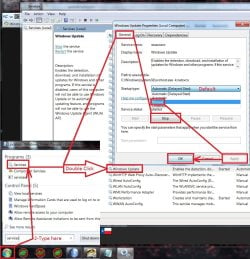
After restart you will need to ensure the built in windows update service is stopped and set to manual first too or it will conflict with the stand alone installer.
service stop windows update.jpg
Afterwards reset the windows updates service to what it was before and update settings to your preference and check for updates
Should be only 50 or so updates left to install.

I also have all three updates on my OneDrive too if you prefer it instead of the catalog
https://1drv.ms/f/s!AsjD7o6P3KLKj2TjShn8-SumV1rr
 

My Computer My Computer

At a glance

Win-7-Pro64bit 7-H-Prem-64biti7-5930K 2nd i9-9940x both water blocked VRM'...Trident-z 3200C14 2nd Trident-z 3600C16EVGA 1080ti ftw3 2nd Titan Xp both water blocked
Computer type
PC/Desktop
Computer Manufacturer/Model Number
Custom assembled by me :}
OS
Win-7-Pro64bit 7-H-Prem-64bit
CPU
i7-5930K 2nd i9-9940x both water blocked VRM's too
Motherboard
ASUS SABERTOOTH X99 2nd ASUS x299 Apex
Memory
Trident-z 3200C14 2nd Trident-z 3600C16
Graphics Card(s)
EVGA 1080ti ftw3 2nd Titan Xp both water blocked
Sound Card
Built-in Realtek
Monitor(s) Displays
1-AOC G2460PG 24"G-Sync 144Hz/ 2nd 1-ASUS VG248QE 24" 144Hz
Screen Resolution
1920 x 1080 144Hz
Hard Drives
2-Samsung M.2 Evo & Evo Plus
2-Samsung 850 EVO 500GB SSD's/ 3-2.5 W.D. Black 1tb-&3-1tb/3-3.5 WD Black 1tb hdd's
PSU
EVGA SuperNOVA 1000-P2 2nd 1200-P2
Case
2-Corsair Obsidian Series 450D Black ATX Mid Tower
Cooling
Custom water loops
Keyboard
Logitech G710+/ 2nd Logitech G910
Mouse
2-RedDragon M901 Perdition 16400 dpi Gaming mouse = wired
Internet Speed
Comcast Ping 19ms 89.31mbps download speed 6.12mbps upload
Antivirus
Malwarebytes Pro/ Superantispyware Pro
Browser
FireFox & Pale moon
Other Info
2nd ASUS X299 Apex/Intel i9-9940x with Custom water loop/7H-Prem-x64/Corsair 450D case/Ram Trident-z 3600C16 4x8gb / Samsung970Evo plus 500gb SSD/Dual ssd EZ swap evo/PSU EVGA SuperNova 1200w-P2 80+Platinum/GPU Titan Xp /8-ML-140 on push-pull on 2-280GTX rads
As your original Win 10 was installed as UEFI, you should have installed Win 7 also as UEFI, changing only BIOS settings to CSM (Compatible System Mode) and detaching the Win 10 1T drive before installing Win 7 on the other drive.
What happened is that Win 7 was installed on the second drive but the boot loader was installed on the Win 10 drive.
Try this:
- Backup your data on an external drive.
- From Win 10 disk manager, make the Win 7 drive, that is MBR, active.
- Shut down and detach Win 10 drive.
- Boot from the Win 7 installation disk and make a boot repair. See if you can boot from Win 7 HDD.
- Attach the Win 10 drive.
- On BIOS set the main win to boot from, Win 10 or Win 7.
- To boot from the other HDD, press F12 and select from the list.


Thanks guys.

Megahertz07, I have a Dell XPS8900, I can't install Win7 UEFI, I've tried.

My only options in BIOS for installation are UEFI or Legacy mode. Win 7 installed in UEFI will freeze at the logo screen

https://msdnshared.blob.core.window...5/metablogapi/7360.clip_image002_5FBD7F32.jpg
 

My Computer My Computer

At a glance

Win7 / Win10 dual bootIntel(R) Core(TM) i7-6700 CPU @ 3.40GHz, 3408...16 GBNVIDIA GeForce GTX 745
Computer type
PC/Desktop
Computer Manufacturer/Model Number
Dell
OS
Win7 / Win10 dual boot
CPU
Intel(R) Core(TM) i7-6700 CPU @ 3.40GHz, 3408 Mhz,
Motherboard
Dell, Inc.
Memory
16 GB
Graphics Card(s)
NVIDIA GeForce GTX 745
Hard Drives
Standard Dell 1TB

WDC 2TB
Antivirus
McAfee on Win10; AVG on Win7
Browser
Chrome
Is your Win 7 32 or 64 bits?
Win 7 32 can only boot on Legacy.
On BIOS, Under UEFI, don't you have an option CSM (Compatible System Mode)?
 

My Computers My Computers

  • At a glance

    Windows 7 HP 64i5 6600K - 800MHz to 4200MHz4+4G GSkill DDR4 3000IG - Intel 530
    Computer type
    PC/Desktop
    Computer Manufacturer/Model Number
    custom build
    OS
    Windows 7 HP 64
    CPU
    i5 6600K - 800MHz to 4200MHz
    Motherboard
    GA-Z170-HD3P
    Memory
    4+4G GSkill DDR4 3000
    Graphics Card(s)
    IG - Intel 530
    Monitor(s) Displays
    Samsung 226BW
    Screen Resolution
    1680x1050
    Hard Drives
    (1) -1 SM951 – 128GB M.2 AHCI PCIe SSD drive for Windows 7 and Lubuntu
    (2) -1 WD SATA 3 - 1T for Data
    (3) -1 WD SATA 3 - 1T for backup
    PSU
    Thermaltake 450W TR2 gold
    Keyboard
    Old and good Chicony mechanical keyboard
    Mouse
    Logitech mX performance - 9 buttons (had to disable some)
    Internet Speed
    500Mb/s
    Browser
    Firefox 64
    Other Info
    TinyWall firewall
  • At a glance

    Windows 7 Proi7-4500U 800MHz to 3.0GHz(4+4)G DDR3 1600IG intel 4400 + NVIDIA GeForce GT 745M
    Computer type
    Laptop
    System Manufacturer/Model Number
    Asus Q550LF
    OS
    Windows 7 Pro
    CPU
    i7-4500U 800MHz to 3.0GHz
    Motherboard
    Asus Q550LF
    Memory
    (4+4)G DDR3 1600
    Graphics Card(s)
    IG intel 4400 + NVIDIA GeForce GT 745M
    Sound Card
    Realtek
    Monitor(s) Displays
    LG Display LP156WF4-SPH1
    Screen Resolution
    1920 x 1080
    Hard Drives
    BX500 120G SSD for Windows and programs +
    1T HDD for data
    Internet Speed
    500 Mb/s
    Browser
    Firefox
    Other Info
    TinyWall firewall
My Win 7 is 64b, but when I installed and tried to run it in UEFI it freezes at the logo screen.

In my BIOS, if I choose UEFI, no I do not have a CSM option, but maybe it's time to flash it.
 

My Computer My Computer

At a glance

Win7 / Win10 dual bootIntel(R) Core(TM) i7-6700 CPU @ 3.40GHz, 3408...16 GBNVIDIA GeForce GTX 745
Computer type
PC/Desktop
Computer Manufacturer/Model Number
Dell
OS
Win7 / Win10 dual boot
CPU
Intel(R) Core(TM) i7-6700 CPU @ 3.40GHz, 3408 Mhz,
Motherboard
Dell, Inc.
Memory
16 GB
Graphics Card(s)
NVIDIA GeForce GTX 745
Hard Drives
Standard Dell 1TB

WDC 2TB
Antivirus
McAfee on Win10; AVG on Win7
Browser
Chrome
Hi,
Just use the upload image option in the reply editor or paperclip symbol.

You might also take some images of the bios settings.
 

My Computer My Computer

At a glance

Win-7-Pro64bit 7-H-Prem-64biti7-5930K 2nd i9-9940x both water blocked VRM'...Trident-z 3200C14 2nd Trident-z 3600C16EVGA 1080ti ftw3 2nd Titan Xp both water blocked
Computer type
PC/Desktop
Computer Manufacturer/Model Number
Custom assembled by me :}
OS
Win-7-Pro64bit 7-H-Prem-64bit
CPU
i7-5930K 2nd i9-9940x both water blocked VRM's too
Motherboard
ASUS SABERTOOTH X99 2nd ASUS x299 Apex
Memory
Trident-z 3200C14 2nd Trident-z 3600C16
Graphics Card(s)
EVGA 1080ti ftw3 2nd Titan Xp both water blocked
Sound Card
Built-in Realtek
Monitor(s) Displays
1-AOC G2460PG 24"G-Sync 144Hz/ 2nd 1-ASUS VG248QE 24" 144Hz
Screen Resolution
1920 x 1080 144Hz
Hard Drives
2-Samsung M.2 Evo & Evo Plus
2-Samsung 850 EVO 500GB SSD's/ 3-2.5 W.D. Black 1tb-&3-1tb/3-3.5 WD Black 1tb hdd's
PSU
EVGA SuperNOVA 1000-P2 2nd 1200-P2
Case
2-Corsair Obsidian Series 450D Black ATX Mid Tower
Cooling
Custom water loops
Keyboard
Logitech G710+/ 2nd Logitech G910
Mouse
2-RedDragon M901 Perdition 16400 dpi Gaming mouse = wired
Internet Speed
Comcast Ping 19ms 89.31mbps download speed 6.12mbps upload
Antivirus
Malwarebytes Pro/ Superantispyware Pro
Browser
FireFox & Pale moon
Other Info
2nd ASUS X299 Apex/Intel i9-9940x with Custom water loop/7H-Prem-x64/Corsair 450D case/Ram Trident-z 3600C16 4x8gb / Samsung970Evo plus 500gb SSD/Dual ssd EZ swap evo/PSU EVGA SuperNova 1200w-P2 80+Platinum/GPU Titan Xp /8-ML-140 on push-pull on 2-280GTX rads
Oh ok. :o

So, if I am able to run Win7 in UEFI why does it freeze at logo screen?

Do I need to change video settings, or am I only able to run Win7 in UEFI with the CSM option (which I don't have)?
 

My Computer My Computer

At a glance

Win7 / Win10 dual bootIntel(R) Core(TM) i7-6700 CPU @ 3.40GHz, 3408...16 GBNVIDIA GeForce GTX 745
Computer type
PC/Desktop
Computer Manufacturer/Model Number
Dell
OS
Win7 / Win10 dual boot
CPU
Intel(R) Core(TM) i7-6700 CPU @ 3.40GHz, 3408 Mhz,
Motherboard
Dell, Inc.
Memory
16 GB
Graphics Card(s)
NVIDIA GeForce GTX 745
Hard Drives
Standard Dell 1TB

WDC 2TB
Antivirus
McAfee on Win10; AVG on Win7
Browser
Chrome
Hi,
Bad media/ Boot device not formatted properly/ hdd not formatted properly/ win-7 is blocked in bios by the manufacture/.... :)
 

My Computer My Computer

At a glance

Win-7-Pro64bit 7-H-Prem-64biti7-5930K 2nd i9-9940x both water blocked VRM'...Trident-z 3200C14 2nd Trident-z 3600C16EVGA 1080ti ftw3 2nd Titan Xp both water blocked
Computer type
PC/Desktop
Computer Manufacturer/Model Number
Custom assembled by me :}
OS
Win-7-Pro64bit 7-H-Prem-64bit
CPU
i7-5930K 2nd i9-9940x both water blocked VRM's too
Motherboard
ASUS SABERTOOTH X99 2nd ASUS x299 Apex
Memory
Trident-z 3200C14 2nd Trident-z 3600C16
Graphics Card(s)
EVGA 1080ti ftw3 2nd Titan Xp both water blocked
Sound Card
Built-in Realtek
Monitor(s) Displays
1-AOC G2460PG 24"G-Sync 144Hz/ 2nd 1-ASUS VG248QE 24" 144Hz
Screen Resolution
1920 x 1080 144Hz
Hard Drives
2-Samsung M.2 Evo & Evo Plus
2-Samsung 850 EVO 500GB SSD's/ 3-2.5 W.D. Black 1tb-&3-1tb/3-3.5 WD Black 1tb hdd's
PSU
EVGA SuperNOVA 1000-P2 2nd 1200-P2
Case
2-Corsair Obsidian Series 450D Black ATX Mid Tower
Cooling
Custom water loops
Keyboard
Logitech G710+/ 2nd Logitech G910
Mouse
2-RedDragon M901 Perdition 16400 dpi Gaming mouse = wired
Internet Speed
Comcast Ping 19ms 89.31mbps download speed 6.12mbps upload
Antivirus
Malwarebytes Pro/ Superantispyware Pro
Browser
FireFox & Pale moon
Other Info
2nd ASUS X299 Apex/Intel i9-9940x with Custom water loop/7H-Prem-x64/Corsair 450D case/Ram Trident-z 3600C16 4x8gb / Samsung970Evo plus 500gb SSD/Dual ssd EZ swap evo/PSU EVGA SuperNova 1200w-P2 80+Platinum/GPU Titan Xp /8-ML-140 on push-pull on 2-280GTX rads
Jmark, if win 7 was installed as Legacy it will only boot with BIOS set as Legacy. Also if win 7 was installed as UEFI it will only boot with BIOS set as UEFI.
You said on first post that you had Win 7 (installed as legacy) and Win 10 (suppose it was installed as UEFI).
My questions are: To run Win 7 how was the BIOS (Legacy or UEFI) and to run Win 10 how was the BIOS (Legacy or UEFI)?
On post 13 you wrote "Win 7 installed in UEFI will freeze at the logo screen".
- You mean that you have tried and did installed with UEFI and then it freezes when booting at the logo screen, or,
- You booted from the installation disk and it freezes at the logo screen?
You have also attached a link with the boot options. Can you take another picture with a higher resolution with UEFI selected? There is a kind of a label on each line and a kind of button (view?). Is it a button? What shows if you press it?
I suppose you disabled secure boot. Did you?
 

My Computers My Computers

  • At a glance

    Windows 7 HP 64i5 6600K - 800MHz to 4200MHz4+4G GSkill DDR4 3000IG - Intel 530
    Computer type
    PC/Desktop
    Computer Manufacturer/Model Number
    custom build
    OS
    Windows 7 HP 64
    CPU
    i5 6600K - 800MHz to 4200MHz
    Motherboard
    GA-Z170-HD3P
    Memory
    4+4G GSkill DDR4 3000
    Graphics Card(s)
    IG - Intel 530
    Monitor(s) Displays
    Samsung 226BW
    Screen Resolution
    1680x1050
    Hard Drives
    (1) -1 SM951 – 128GB M.2 AHCI PCIe SSD drive for Windows 7 and Lubuntu
    (2) -1 WD SATA 3 - 1T for Data
    (3) -1 WD SATA 3 - 1T for backup
    PSU
    Thermaltake 450W TR2 gold
    Keyboard
    Old and good Chicony mechanical keyboard
    Mouse
    Logitech mX performance - 9 buttons (had to disable some)
    Internet Speed
    500Mb/s
    Browser
    Firefox 64
    Other Info
    TinyWall firewall
  • At a glance

    Windows 7 Proi7-4500U 800MHz to 3.0GHz(4+4)G DDR3 1600IG intel 4400 + NVIDIA GeForce GT 745M
    Computer type
    Laptop
    System Manufacturer/Model Number
    Asus Q550LF
    OS
    Windows 7 Pro
    CPU
    i7-4500U 800MHz to 3.0GHz
    Motherboard
    Asus Q550LF
    Memory
    (4+4)G DDR3 1600
    Graphics Card(s)
    IG intel 4400 + NVIDIA GeForce GT 745M
    Sound Card
    Realtek
    Monitor(s) Displays
    LG Display LP156WF4-SPH1
    Screen Resolution
    1920 x 1080
    Hard Drives
    BX500 120G SSD for Windows and programs +
    1T HDD for data
    Internet Speed
    500 Mb/s
    Browser
    Firefox
    Other Info
    TinyWall firewall
Back
Top