
Dual Boot Windows 7 and XP SP3

ListerMint

New member
Local time
11:43 PM
Messages
8
I have a Gateway 4831-01e that has Windows7. I also have a hybrid that has XP Home Edition with SP3. The Gateway has a 1TB HDD and the other has two HDDs. One is 80GB and the other is 250GB. I would like to partition the 1TB and put the 80 on the partition. I will mount the 250 as a second drive. Plan A is to be able to the boot up the XP partition and to access the 250 from it. Is this even possible? Is there a plan B?

"As improbable as it seems there is always a possibility of the unachievable." :confused:
 

My Computer

Computer Manufacturer/Model Number
Gateway 4831-01e, iMac, Dell Latitude C600
OS
Windows 7 64bit, Mac OS X 10.5.8, XP Pro
CPU
i3-2.93GHz, Intel Core 2 Duo- 2.4GHz, unknown
Motherboard
Gateway, ?, ?
Memory
6 GB, 2GB, 512MB
Graphics Card(s)
onBoard, onBoard, geForce 8800, ?
Sound Card
Realtek, ?, Realtek, ?
Monitor(s) Displays
Dell U2311H and Dell 2309, Mac, Laptop
Hard Drives
1 TB, 250GB, 80GB & 250GB, 80GB
Case
midtower, All-in-one, ATX full tower, laptop
Keyboard
Logitech ex110 wireless, stock, ex110, n/a
You can try making a backup image of the 80gb XP drive, then reimaging it to 80gb+ unallocated space you create on the Gateway's 1tb HD. I would use free Macrium Reflect which will make you a Linux boot disk to do the reimage.

When you move XP to different hardware it requires a Repair Install before you even try to start it up. This is easy with XP because the Repair Install is done from the booted CD. It is not the first "R" given for Repair (that's a Recovery console) but proceed as if to install until it locates the installation and then choose "R" for Repair if offered. If not offered, it is not reparable and will not start on the new hardware.

Once you run a successful Repair Install it will take over the bootloader from Win7. You then need to add Win7 to Dual Boot using EasyBCD 2.0 beta, which will require Net Framework 2.0 to be installed to run in XP. Just add Win7 by type and correct drive letter on the Add/Remove tab.

If this fails, check back on how to restart Win7 so that you can add XP from Win7 which works better. Add the 250gb HD (giving it a letter in Disk mgmt) after you complete all steps.

Your backup plan is to clean install XP to the new partition you create using this tutorial: http://www.sevenforums.com/tutorials/8057-dual-boot-installation-windows-7-xp.html
 
Thanks. GregRocker, I will try your suggestions.
 

My Computer

Computer Manufacturer/Model Number
Gateway 4831-01e, iMac, Dell Latitude C600
OS
Windows 7 64bit, Mac OS X 10.5.8, XP Pro
CPU
i3-2.93GHz, Intel Core 2 Duo- 2.4GHz, unknown
Motherboard
Gateway, ?, ?
Memory
6 GB, 2GB, 512MB
Graphics Card(s)
onBoard, onBoard, geForce 8800, ?
Sound Card
Realtek, ?, Realtek, ?
Monitor(s) Displays
Dell U2311H and Dell 2309, Mac, Laptop
Hard Drives
1 TB, 250GB, 80GB & 250GB, 80GB
Case
midtower, All-in-one, ATX full tower, laptop
Keyboard
Logitech ex110 wireless, stock, ex110, n/a
Plan B - Instead of setting up partitions, could I use the HDDs of the XP as external by using an IDE to SATA converter cable? I have seen something about this concept, but I have no idea what I need to make it work. It seems that this would be simpler to do than partitons. I have no IDE ports in the Gateway. They are all SATA. My HDDs on the XP have no SATA connections.
 

My Computer

Computer Manufacturer/Model Number
Gateway 4831-01e, iMac, Dell Latitude C600
OS
Windows 7 64bit, Mac OS X 10.5.8, XP Pro
CPU
i3-2.93GHz, Intel Core 2 Duo- 2.4GHz, unknown
Motherboard
Gateway, ?, ?
Memory
6 GB, 2GB, 512MB
Graphics Card(s)
onBoard, onBoard, geForce 8800, ?
Sound Card
Realtek, ?, Realtek, ?
Monitor(s) Displays
Dell U2311H and Dell 2309, Mac, Laptop
Hard Drives
1 TB, 250GB, 80GB & 250GB, 80GB
Case
midtower, All-in-one, ATX full tower, laptop
Keyboard
Logitech ex110 wireless, stock, ex110, n/a
You may need to load the SATA controller drivers in during the XP CD's initial loading driver phase. The prob is that it requires a floppy drive to do this.

Find your SATA controller in the chipset of your Gateway, unzip to floppy and browse from F6 prompt given during loading phase until it picks up SATA driver.

You may also have to change BIOS SATA settings to IDE-emulation, if it is not already set there. This could keep Win7 from booting until IDE drivers are loaded into it first via Device Manager IDE/SATA HD controller. They may already be listed in "Choose my driver from list" choice or locate, unzip and browse to them to install, shut down, change BIOS setting to IDE.
 
Thanks for all your input, GregRocker. I know that I am all over the map, but I am trying to find a way that I can understand easily.

I am in way over my head here. I remember that the 250GB HDD was originally an external mount. I used for a second drive instead. I found all the stuff to reassemble it. It interfaces with the computer via USB. So, what I am going to try now is to assemble the two HDDs in a master/slave configuration using the external HDD case. I used the IDE cable from the XP computer and I need to get a splitter for the power. Do I need to do something different the jumpers on the HDDs?

It seems to me that I have strayed from the intent of this forum. Should I begin a new thread elsewhere?

ListerMint
 

My Computer

Computer Manufacturer/Model Number
Gateway 4831-01e, iMac, Dell Latitude C600
OS
Windows 7 64bit, Mac OS X 10.5.8, XP Pro
CPU
i3-2.93GHz, Intel Core 2 Duo- 2.4GHz, unknown
Motherboard
Gateway, ?, ?
Memory
6 GB, 2GB, 512MB
Graphics Card(s)
onBoard, onBoard, geForce 8800, ?
Sound Card
Realtek, ?, Realtek, ?
Monitor(s) Displays
Dell U2311H and Dell 2309, Mac, Laptop
Hard Drives
1 TB, 250GB, 80GB & 250GB, 80GB
Case
midtower, All-in-one, ATX full tower, laptop
Keyboard
Logitech ex110 wireless, stock, ex110, n/a
Plan B - Instead of setting up partitions, could I use the HDDs of the XP as external by using an IDE to SATA converter cable? I have seen something about this concept, but I have no idea what I need to make it work. It seems that this would be simpler to do than partitons. I have no IDE ports in the Gateway. They are all SATA. My HDDs on the XP have no SATA connections.

XP will not boot from external drive.
 

My Computer

OS
ME/XP/Vista/Win7
Thanks for all your input, GregRocker. I know that I am all over the map, but I am trying to find a way that I can understand easily.

I am in way over my head here. I remember that the 250GB HDD was originally an external mount. I used for a second drive instead. I found all the stuff to reassemble it. It interfaces with the computer via USB. So, what I am going to try now is to assemble the two HDDs in a master/slave configuration using the external HDD case. I used the IDE cable from the XP computer and I need to get a splitter for the power. Do I need to do something different the jumpers on the HDDs?

It seems to me that I have strayed from the intent of this forum. Should I begin a new thread elsewhere?

ListerMint

Are you now trying to put 2 HD in 1 external drive case?
 

My Computer

OS
ME/XP/Vista/Win7
I have a Gateway 4831-01e that has Windows7. I also have a hybrid that has XP Home Edition with SP3. The Gateway has a 1TB HDD and the other has two HDDs. One is 80GB and the other is 250GB. I would like to partition the 1TB and put the 80 on the partition. I will mount the 250 as a second drive. Plan A is to be able to the boot up the XP partition and to access the 250 from it. Is this even possible? Is there a plan B?

As Theog says you cannot boot XP from external.

A better method for you than copying XP to a partition on 1tb is to install the XP 80gb HD internally to the Gateway, then dual boot it using the BIOS one-time Boot Menu key given on first bootup screen. This is a cleaner method than Windows-managed dual boot because it leaves the drives independent to come and go as you please. Keep Win7 set as first HD to boot in BIOS setup.

Then you can either also install the 250g HD internally to use as a Logical data drive, or plug it externally via USB to use as a backup data drive.
 
I am going to have to come back to this later. I have too many things going on right now. BTW, theog, I am trying to get two HDDs to work from one external case. The gateway will read the master, but not the slave. The problem I have is when I installed most of my programs on the XP I actually installed them on the 250GB (f drive). The 80GB drive contains the "brains" of program but the 250GB has all databases, graphics, etc. So, I need to be able to read the drives as they are in order to recover the programs. I realize I have made a huge mess out of this. It might not be possible to recover this mess.
 

My Computer

Computer Manufacturer/Model Number
Gateway 4831-01e, iMac, Dell Latitude C600
OS
Windows 7 64bit, Mac OS X 10.5.8, XP Pro
CPU
i3-2.93GHz, Intel Core 2 Duo- 2.4GHz, unknown
Motherboard
Gateway, ?, ?
Memory
6 GB, 2GB, 512MB
Graphics Card(s)
onBoard, onBoard, geForce 8800, ?
Sound Card
Realtek, ?, Realtek, ?
Monitor(s) Displays
Dell U2311H and Dell 2309, Mac, Laptop
Hard Drives
1 TB, 250GB, 80GB & 250GB, 80GB
Case
midtower, All-in-one, ATX full tower, laptop
Keyboard
Logitech ex110 wireless, stock, ex110, n/a
Can you post a web link to the external case you are using.

You can reinstall all your program in Win7.

Your databases etc HD as one external.
 

My Computer

OS
ME/XP/Vista/Win7
How do I post a weblink to the external case?
 

My Computer

Computer Manufacturer/Model Number
Gateway 4831-01e, iMac, Dell Latitude C600
OS
Windows 7 64bit, Mac OS X 10.5.8, XP Pro
CPU
i3-2.93GHz, Intel Core 2 Duo- 2.4GHz, unknown
Motherboard
Gateway, ?, ?
Memory
6 GB, 2GB, 512MB
Graphics Card(s)
onBoard, onBoard, geForce 8800, ?
Sound Card
Realtek, ?, Realtek, ?
Monitor(s) Displays
Dell U2311H and Dell 2309, Mac, Laptop
Hard Drives
1 TB, 250GB, 80GB & 250GB, 80GB
Case
midtower, All-in-one, ATX full tower, laptop
Keyboard
Logitech ex110 wireless, stock, ex110, n/a
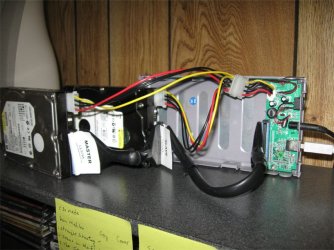
I am going to have to come back to this later. I have too many things going on right now. BTW, theog, I am trying to get two HDDs to work from one external case. The gateway will read the master, but not the slave. The problem I have is when I installed most of my programs on the XP I actually installed them on the 250GB (f drive). The 80GB drive contains the "brains" of program but the 250GB has all databases, graphics, etc. So, I need to be able to read the drives as they are in order to recover the programs. I realize I have made a huge mess out of this. It might not be possible to recover this mess.

Is your extereral case like this?

001.jpg
 

My Computer

OS
ME/XP/Vista/Win7
Here is what it looks like:
 

Attachments

  • external_drives.jpg
    external_drives.jpg
    75.8 KB · Views: 1

My Computer

Computer Manufacturer/Model Number
Gateway 4831-01e, iMac, Dell Latitude C600
OS
Windows 7 64bit, Mac OS X 10.5.8, XP Pro
CPU
i3-2.93GHz, Intel Core 2 Duo- 2.4GHz, unknown
Motherboard
Gateway, ?, ?
Memory
6 GB, 2GB, 512MB
Graphics Card(s)
onBoard, onBoard, geForce 8800, ?
Sound Card
Realtek, ?, Realtek, ?
Monitor(s) Displays
Dell U2311H and Dell 2309, Mac, Laptop
Hard Drives
1 TB, 250GB, 80GB & 250GB, 80GB
Case
midtower, All-in-one, ATX full tower, laptop
Keyboard
Logitech ex110 wireless, stock, ex110, n/a
Now that's what I call a bare bones system... :roflmao:
 

My Computer

Computer type
PC/Desktop
Computer Manufacturer/Model Number
LENOVO K450 @3.0GHZ
OS
64-bit Windows 8.1 Pro
CPU
Core(TM) i5 CPU 4330 Haswell @ 3.20GHz
Motherboard
LENOVO
Memory
12.00 GB
Graphics Card(s)
Intel(R) HD Graphics
Sound Card
Intel HD integtrated
Monitor(s) Displays
HP 25' ISP Monitor
Screen Resolution
1900/1020
Hard Drives
(1) ST1000DM003-1CH162 (2) Generic STORAGE DEVICE USB Device (3) Generic STORAGE DEVICE USB Device
Internet Speed
100mb down/10mb up
I finally got the Gateway to recognize the 80GB HDD. I bought a IDE/SATA to USB converter kit and 4 pin power splitter. I could not get the SATA to work. The HDD would not spin up. What it did was recognize the 80GB as a mass storage device through the USB port. This will allow me to recover the data, but it will not allow me to dual boot. I still need to figure that out. I am going over all the helpful advice given here again and see if I can get that to work. Be back when I can.

Thanks for all the help.


Remember: " if you don't make mistakes, it means you're not trying hard enough."
 

My Computer

Computer Manufacturer/Model Number
Gateway 4831-01e, iMac, Dell Latitude C600
OS
Windows 7 64bit, Mac OS X 10.5.8, XP Pro
CPU
i3-2.93GHz, Intel Core 2 Duo- 2.4GHz, unknown
Motherboard
Gateway, ?, ?
Memory
6 GB, 2GB, 512MB
Graphics Card(s)
onBoard, onBoard, geForce 8800, ?
Sound Card
Realtek, ?, Realtek, ?
Monitor(s) Displays
Dell U2311H and Dell 2309, Mac, Laptop
Hard Drives
1 TB, 250GB, 80GB & 250GB, 80GB
Case
midtower, All-in-one, ATX full tower, laptop
Keyboard
Logitech ex110 wireless, stock, ex110, n/a
Back
Top