Dual boot windows 7/linux (Fedora)

drows

New member
Local time
6:35 AM
Messages
11
So I'm trying Fedora. It's installed on a separate hard drive then my XP and 7, but I would like to know the way to get Fedora in my Dual boot screen while keeping Windows in control. Could anyone help ? All I could find was way to let fedora handle it.

I don't want fedora in control. And no, I won't run it in virtual before anyone propose it.
 

My Computer

Computer Manufacturer/Model Number
Myself
OS
Windows xp, Windows 7, Fedora
CPU
Amd ahtlon dual core 5600+
Motherboard
M2N SLi Deluxe
Memory
4 Gb
Graphics Card(s)
8600gt (x2)
Sound Card
Integrate
Hard Drives
1x 1 Tb (Int.)
1x 320 Gb (Int.)
1x 200 Gb (Int.)
1x 320 Gb (Ext.)
PSU
450w
Keyboard
Cheap
Mouse
Cheap
I notice EasyBCD 2.0 beta has a Linux tab on its Add/Remove tab.

It works wonders with Windows dual boots, so I'd give it a try.

You have to do a quick registration to use the beta.

Post back for more help or with results so others can benefit.
 
I'm not sure about Fedora, but I used this method with Ubuntu 9.10.

I opened software manager and typed "Startup". Ubuntu then offered to install "Startup Manager".

I opened startup manager which then gave me the option of which OS would be the default when using Grub. I chose Win7 so that the machine automatically boots to it instead of Ubuntu. You can also change the wait time for the default OS to boot.
 

My Computer

Computer Manufacturer/Model Number
Mesh 955 XGS
OS
Windows 7 64 bit
CPU
Athlon X4 955 Black edition
Motherboard
ASUS M4A78 Pro
Memory
8GB DDR2
Graphics Card(s)
1x Radeon 4890
Monitor(s) Displays
IIyama ProLite E2208HDS
Screen Resolution
1920X1080p
Hard Drives
2x 1TB Samsung SATA2
1x 320GB IDE
PSU
600 watt
Cooling
Standard
Keyboard
MS wireless 6000
Mouse
MS wireless laser 7000
Internet Speed
Not as fast as it should be......
When I was using Ubuntu, the EasyBCD neogrub option seemed to work for me, but Fedora might be a little different.
 

My Computer

Computer Manufacturer/Model Number
Homebuilt
OS
Windows 7 x64
CPU
i7-2600K
Motherboard
Asus P8Z77-v Pro
Memory
8 G
Graphics Card(s)
GTX 480
Sound Card
Onboard
Monitor(s) Displays
LG W2753V
Screen Resolution
1920x1080
Hard Drives
Crucial M4 128 G SSD
Thx everyone.
Tried with easybcd and it somewhat doesn't work.
I'll try to work on that and come back with more information (At work now)
 

My Computer

Computer Manufacturer/Model Number
Myself
OS
Windows xp, Windows 7, Fedora
CPU
Amd ahtlon dual core 5600+
Motherboard
M2N SLi Deluxe
Memory
4 Gb
Graphics Card(s)
8600gt (x2)
Sound Card
Integrate
Hard Drives
1x 1 Tb (Int.)
1x 320 Gb (Int.)
1x 200 Gb (Int.)
1x 320 Gb (Ext.)
PSU
450w
Keyboard
Cheap
Mouse
Cheap
Well, somewhat it seem to work.

It bring me to a "dos like" screen with a "Grub>" and a few line to tell me that I can use "tab" to bring the help (Which I can do).

But then I'm not able to do much. On some command it seem the kernel is not installed. On other it told me that the filesystem type was NTFS (Which it shouldnt right ?) and partition type 0x07 (No idea what that mean). I tried to reinstall Fedora, but same problem.

When using EasyBCD, I choose linux/BSD, but then what "type" do I choose ? I tried "grub legacy" and Grub 2 and even with "grub isn't installed to MBR".

My entry number 3 look like that:

"Entry #3
Name: NeoSmart Linux
BCD ID: {31584c4f-d6b0-11de-aece-b0461ca71f93}
Drive: C:\
Bootloader Path: \NST\AutoNeoGrub0.mbr "

It's probably normal, but the Drive of Fedora isn't the C:\.
 

My Computer

Computer Manufacturer/Model Number
Myself
OS
Windows xp, Windows 7, Fedora
CPU
Amd ahtlon dual core 5600+
Motherboard
M2N SLi Deluxe
Memory
4 Gb
Graphics Card(s)
8600gt (x2)
Sound Card
Integrate
Hard Drives
1x 1 Tb (Int.)
1x 320 Gb (Int.)
1x 200 Gb (Int.)
1x 320 Gb (Ext.)
PSU
450w
Keyboard
Cheap
Mouse
Cheap
If you look for hidden system files, you will probably see the files mentioned the the root directory of C:, which probably shows as the system partition.

I wish I could give more definite information, but I do not currently have a Linux install. Maybe you need to switch over to a Linux forum for more info.
 

My Computer

Computer Manufacturer/Model Number
Homebuilt
OS
Windows 7 x64
CPU
i7-2600K
Motherboard
Asus P8Z77-v Pro
Memory
8 G
Graphics Card(s)
GTX 480
Sound Card
Onboard
Monitor(s) Displays
LG W2753V
Screen Resolution
1920x1080
Hard Drives
Crucial M4 128 G SSD
It really should be a cruise through, when your setting the partition for Linux, make sure you choose the correct one.

And could you please post the summary page with all the entries on it, it will help us see whats going on.
 

My Computer

Computer Manufacturer/Model Number
Custom Build
OS
W7 RTM Ultimate x64
CPU
Intel Q8400 @ 2.66GHZ
Motherboard
Gigabyte GA-EG45M-UD2H
Memory
4GB DDR2-800
Graphics Card(s)
Gainward GTS 450 GLH 1GB Edition
Sound Card
Integrated 8 Channel
Monitor(s) Displays
AOC 23.6 Inch Widescreen LCD
Screen Resolution
1920x1080
Hard Drives
Seagate 500GB Internal
Western Digital 1TB Internal

Hitachi 1TB External
PSU
Apevia Java Power 500W
Case
Cooler Master HAF 922 Black
Cooling
Stock Intel CPU Fan
Keyboard
HP SK-2960 Multimedia Keyboard
Mouse
Logitech M350 Wireless Gaming Mouse
Internet Speed
1.5MB

My Computer

Computer Manufacturer/Model Number
HP, Dell, Gateway, Toshiba - 4 laptops and 2 desktops
OS
Vista, Windows7, Mint Mate, Zorin, Windows 8
CPU
from 1.6GHz Duo to i7
Monitor(s) Displays
2x HP w2207
Hard Drives
5x HDD, 7x SSD, 12x Externals
Keyboard
with trackball - no mices
Mouse
Trackball mice
Internet Speed
DSL 6000
It really should be a cruise through, when your setting the partition for Linux, make sure you choose the correct one.

And could you please post the summary page with all the entries on it, it will help us see whats going on.

There are a total of 3 entries listed in the bootloader.
Default: Version ant‚rieure de Windows
Timeout: 30 seconds.
Boot Drive: C:\

Entry #1
Name: Version ant‚rieure de Windows
BCD ID: {ntldr}
Drive: C:\
Bootloader Path: \ntldr

Entry #2
Name: Windows 7
BCD ID: {31584c49-d6b0-11de-aece-b0461ca71f93}
Drive: G:\
Bootloader Path: \Windows\system32\winload.exe

Entry #3
Name: NeoSmart Linux
BCD ID: {31584c4f-d6b0-11de-aece-b0461ca71f93}
Drive: C:\
Bootloader Path: \NST\AutoNeoGrub0.mbr
 

My Computer

Computer Manufacturer/Model Number
Myself
OS
Windows xp, Windows 7, Fedora
CPU
Amd ahtlon dual core 5600+
Motherboard
M2N SLi Deluxe
Memory
4 Gb
Graphics Card(s)
8600gt (x2)
Sound Card
Integrate
Hard Drives
1x 1 Tb (Int.)
1x 320 Gb (Int.)
1x 200 Gb (Int.)
1x 320 Gb (Ext.)
PSU
450w
Keyboard
Cheap
Mouse
Cheap
That entry 3 is defiantly wrong, not sure why it's saying the drive is C.
 

My Computer

Computer Manufacturer/Model Number
Custom Build
OS
W7 RTM Ultimate x64
CPU
Intel Q8400 @ 2.66GHZ
Motherboard
Gigabyte GA-EG45M-UD2H
Memory
4GB DDR2-800
Graphics Card(s)
Gainward GTS 450 GLH 1GB Edition
Sound Card
Integrated 8 Channel
Monitor(s) Displays
AOC 23.6 Inch Widescreen LCD
Screen Resolution
1920x1080
Hard Drives
Seagate 500GB Internal
Western Digital 1TB Internal

Hitachi 1TB External
PSU
Apevia Java Power 500W
Case
Cooler Master HAF 922 Black
Cooling
Stock Intel CPU Fan
Keyboard
HP SK-2960 Multimedia Keyboard
Mouse
Logitech M350 Wireless Gaming Mouse
Internet Speed
1.5MB
Still not fixed, anyone as an idea ?
 

My Computer

Computer Manufacturer/Model Number
Myself
OS
Windows xp, Windows 7, Fedora
CPU
Amd ahtlon dual core 5600+
Motherboard
M2N SLi Deluxe
Memory
4 Gb
Graphics Card(s)
8600gt (x2)
Sound Card
Integrate
Hard Drives
1x 1 Tb (Int.)
1x 320 Gb (Int.)
1x 200 Gb (Int.)
1x 320 Gb (Ext.)
PSU
450w
Keyboard
Cheap
Mouse
Cheap
I can tell you right now to delete the 3rd entry, but i haven't used the new EasyBCD before, so i cant say what to do next.
 

My Computer

Computer Manufacturer/Model Number
Custom Build
OS
W7 RTM Ultimate x64
CPU
Intel Q8400 @ 2.66GHZ
Motherboard
Gigabyte GA-EG45M-UD2H
Memory
4GB DDR2-800
Graphics Card(s)
Gainward GTS 450 GLH 1GB Edition
Sound Card
Integrated 8 Channel
Monitor(s) Displays
AOC 23.6 Inch Widescreen LCD
Screen Resolution
1920x1080
Hard Drives
Seagate 500GB Internal
Western Digital 1TB Internal

Hitachi 1TB External
PSU
Apevia Java Power 500W
Case
Cooler Master HAF 922 Black
Cooling
Stock Intel CPU Fan
Keyboard
HP SK-2960 Multimedia Keyboard
Mouse
Logitech M350 Wireless Gaming Mouse
Internet Speed
1.5MB
You might try this:

Linux - NeoSmart Technologies Wiki

The BCD store says C:\ for linux because that is where the boot files are. If you check, you will see two files/folders, one is NST and the other one I think is AO or something like that.

If there is a place I can download the same fedora you have, let me know and I will try it. As long as it doesn't cost anything, I am willing to try.

I will also need a picture of your disk management setup so I can duplicate yours.
 

My Computer

Computer Manufacturer/Model Number
Homebuilt
OS
Windows 7 x64
CPU
i7-2600K
Motherboard
Asus P8Z77-v Pro
Memory
8 G
Graphics Card(s)
GTX 480
Sound Card
Onboard
Monitor(s) Displays
LG W2753V
Screen Resolution
1920x1080
Hard Drives
Crucial M4 128 G SSD
You might try this:

Linux - NeoSmart Technologies Wiki

The BCD store says C:\ for linux because that is where the boot files are. If you check, you will see two files/folders, one is NST and the other one I think is AO or something like that.

If there is a place I can download the same fedora you have, let me know and I will try it. As long as it doesn't cost anything, I am willing to try.

I will also need a picture of your disk management setup so I can duplicate yours.
The link you gave me doesn't work.
I'm using a Fedora 9. Someone burned it for me.

Quick google search gave me:
Download of the day: Fedora 9 CD / DVD ISO

Dont know if its any good but well.
 

My Computer

Computer Manufacturer/Model Number
Myself
OS
Windows xp, Windows 7, Fedora
CPU
Amd ahtlon dual core 5600+
Motherboard
M2N SLi Deluxe
Memory
4 Gb
Graphics Card(s)
8600gt (x2)
Sound Card
Integrate
Hard Drives
1x 1 Tb (Int.)
1x 320 Gb (Int.)
1x 200 Gb (Int.)
1x 320 Gb (Ext.)
PSU
450w
Keyboard
Cheap
Mouse
Cheap
Well, got it to work...

Since you did not give me your install instructions, I will tell you what I did.

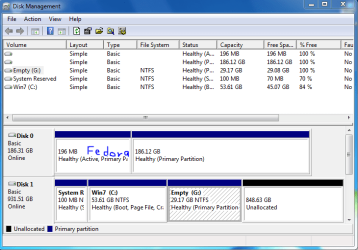
Installed Fedora on a separate hard drive without the Win 7 drive connected. This made the install self-contained and nothing was put on the Win 7 drive. By doing this, the menu.lst in the Fedora boot folder showed (hd0,0), which I had to change to (hd1,0) after I added back the Win 7 drive as primary drive.

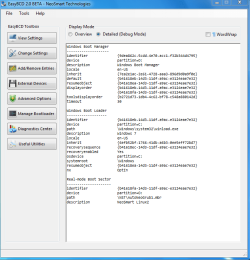
I then booted into Win 7, started EasyBCD 2.0 build 79 and selected the Linux tab. Used GRUB (legacy) and checked the box for GRUB not on the MRB. Added Entry and closed EasyBCD.

The folder NST and the file ANG0 were put in the system partition. Fedora now boots fine.

In my case, I had the System Reserved Partition so I had to give it a drive letter of O: and the resulting pictures are below. I still have to experiment to see if I can remove the letter and still get it to work.

I am not a Linux person, so there may be variations to this or a better way, but that is part of the joy of Linux. You can learn so much. ;)
 

Attachments

  • Fedora 1.PNG
    Fedora 1.PNG
    21.5 KB · Views: 153
  • Fedora 2.PNG
    Fedora 2.PNG
    28.5 KB · Views: 179

My Computer

Computer Manufacturer/Model Number
Homebuilt
OS
Windows 7 x64
CPU
i7-2600K
Motherboard
Asus P8Z77-v Pro
Memory
8 G
Graphics Card(s)
GTX 480
Sound Card
Onboard
Monitor(s) Displays
LG W2753V
Screen Resolution
1920x1080
Hard Drives
Crucial M4 128 G SSD
Thx, I'll see what I can do with that.
 

My Computer

Computer Manufacturer/Model Number
Myself
OS
Windows xp, Windows 7, Fedora
CPU
Amd ahtlon dual core 5600+
Motherboard
M2N SLi Deluxe
Memory
4 Gb
Graphics Card(s)
8600gt (x2)
Sound Card
Integrate
Hard Drives
1x 1 Tb (Int.)
1x 320 Gb (Int.)
1x 200 Gb (Int.)
1x 320 Gb (Ext.)
PSU
450w
Keyboard
Cheap
Mouse
Cheap
Hello,
I'm a complete linux noob.
I'm trying to get both windows 7 and fedora 12 to dual boot. Each OS is installed in a different hard drive.
I was following Saltgrass' post and need help editing the menu.lst and putting the folders NST and ANG0 into the system partition.

It would be greatly appreciated if you could provide any more information on how to do this or point me to the right direction.

Thank you.
 

My Computer

OS
windows 7
Back
Top