
Goal: Dual boot Windows 7 and Linux and have an NTFS partition for both OS.
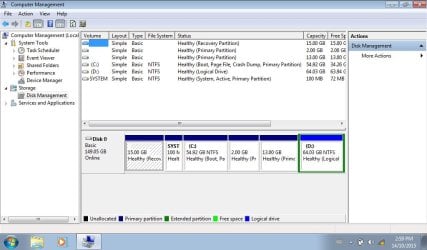
Problem: When creating Logical Partitions with any Linux partition tool(Gparted, cfdisk) the Linux swap and ext 4 partitions shows up on Windows 7 as primary partitions outside of the Extended partition while the NTFS partition shows up inside the Extended partition as logical drive. Disk management shows 5 primary partitions and 1 logical drive inside an extended partition.(As seen in Disk1.jpg attachment) I'm using MBR.(not UEFI)
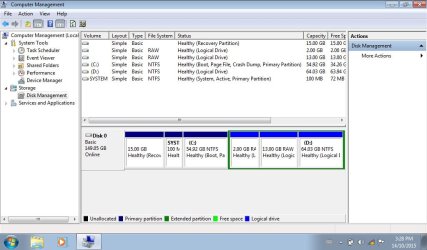
I can create the partitions in Windows 7 disk management and choose not to format the two logical partitions used for Linux. I can then use the mkswap and mkfs.ext4 command to format the partitions.(See Disk2.jpg attachment)
Questions:
Why is Windows 7 disk management not showing my partitions correctly when I use a Linux tool to partition the disk? Will this cause any problems with Windows 7? I'm afraid of making Windows 7 unbootable.(although it booted just fine I do plan on using EasyBCD to add an entry to load the grub bootloader for Linux)
If I partition my disk with Windows 7 disk management(as seen in Disk2.jpg) will that cause any problems for Linux?
What is the recommended way to handle this? What are the downsides to each way?
Note: I'm a bit of a linux noob.
Problem: When creating Logical Partitions with any Linux partition tool(Gparted, cfdisk) the Linux swap and ext 4 partitions shows up on Windows 7 as primary partitions outside of the Extended partition while the NTFS partition shows up inside the Extended partition as logical drive. Disk management shows 5 primary partitions and 1 logical drive inside an extended partition.(As seen in Disk1.jpg attachment) I'm using MBR.(not UEFI)
I can create the partitions in Windows 7 disk management and choose not to format the two logical partitions used for Linux. I can then use the mkswap and mkfs.ext4 command to format the partitions.(See Disk2.jpg attachment)
Questions:
Why is Windows 7 disk management not showing my partitions correctly when I use a Linux tool to partition the disk? Will this cause any problems with Windows 7? I'm afraid of making Windows 7 unbootable.(although it booted just fine I do plan on using EasyBCD to add an entry to load the grub bootloader for Linux)
If I partition my disk with Windows 7 disk management(as seen in Disk2.jpg) will that cause any problems for Linux?
What is the recommended way to handle this? What are the downsides to each way?
Note: I'm a bit of a linux noob.
Attachments
My Computer
At a glance
Windows 7 Starter 32 bitIntel atom N4501 GB DDR2 667 mhz SODIMMIntel GMA 3150
- Computer type
- Laptop
- Computer Manufacturer/Model Number
- Samsung N150
- OS
- Windows 7 Starter 32 bit
- CPU
- Intel atom N450
- Motherboard
- Intel NM10 Express chipset
- Memory
- 1 GB DDR2 667 mhz SODIMM
- Graphics Card(s)
- Intel GMA 3150
- Sound Card
- Realtek
- Screen Resolution
- 1024x600
- Hard Drives
- 9.5mm SATA 160 GB HDD


