Solved Dual Boot Windows 7 Linux: Partitioning with Linux disk tools problem

Wheelman

New member
Local time
2:46 AM
Messages
4
Goal: Dual boot Windows 7 and Linux and have an NTFS partition for both OS.

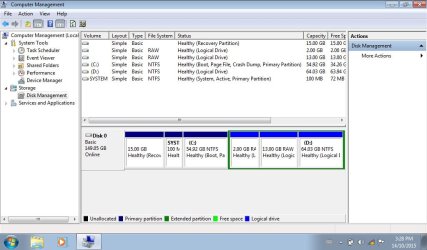
Problem: When creating Logical Partitions with any Linux partition tool(Gparted, cfdisk) the Linux swap and ext 4 partitions shows up on Windows 7 as primary partitions outside of the Extended partition while the NTFS partition shows up inside the Extended partition as logical drive. Disk management shows 5 primary partitions and 1 logical drive inside an extended partition.(As seen in Disk1.jpg attachment) I'm using MBR.(not UEFI)

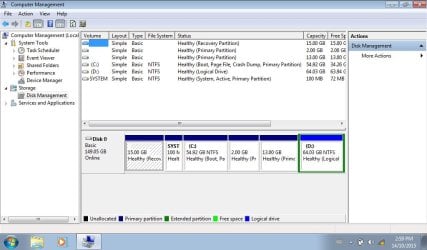
I can create the partitions in Windows 7 disk management and choose not to format the two logical partitions used for Linux. I can then use the mkswap and mkfs.ext4 command to format the partitions.(See Disk2.jpg attachment)

Questions:
Why is Windows 7 disk management not showing my partitions correctly when I use a Linux tool to partition the disk? Will this cause any problems with Windows 7? I'm afraid of making Windows 7 unbootable.(although it booted just fine I do plan on using EasyBCD to add an entry to load the grub bootloader for Linux)

If I partition my disk with Windows 7 disk management(as seen in Disk2.jpg) will that cause any problems for Linux?

What is the recommended way to handle this? What are the downsides to each way?

Note: I'm a bit of a linux noob.
 

Attachments
  • Disk1.jpg
    Disk1.jpg
    164.8 KB · Views: 1
  • Disk2.jpg
    Disk2.jpg
    164.1 KB · Views: 0

My Computer

Computer type
Laptop
Computer Manufacturer/Model Number
Samsung N150
OS
Windows 7 Starter 32 bit
CPU
Intel atom N450
Motherboard
Intel NM10 Express chipset
Memory
1 GB DDR2 667 mhz SODIMM
Graphics Card(s)
Intel GMA 3150
Sound Card
Realtek
Screen Resolution
1024x600
Hard Drives
9.5mm SATA 160 GB HDD
Hi and welcome to SevenForums,
I never had luck installing Linux in dual boot win-7 when have the 100mb system reserved partition
Seems Linux can not take control of the boot loader unless it's on the C drive with windows

Another problem is you have a 15gb partition in front of the 100mb partition too :/

Personally if you really want to do a dual boot you'll need to integrate the 100mb partition onto C drive
http://www.sevenforums.com/tutorials/71363-system-reserved-partition-delete.html
Easier to do with a clean install just don't create any install partitions to install win-7 on and also do not have any partitions at all until after 7 is installed.

http://www.sevenforums.com/tutorials/257048-dual-boot-windows-7-linux.html
 

My Computer

Computer type
PC/Desktop
Computer Manufacturer/Model Number
Custom assembled by me :}
OS
Win-7-Pro64bit 7-H-Prem-64bit
CPU
i7-5930K 2nd i9-9940x both water blocked VRM's too
Motherboard
ASUS SABERTOOTH X99 2nd ASUS x299 Apex
Memory
Trident-z 3200C14 2nd Trident-z 3600C16
Graphics Card(s)
EVGA 1080ti ftw3 2nd Titan Xp both water blocked
Sound Card
Built-in Realtek
Monitor(s) Displays
1-AOC G2460PG 24"G-Sync 144Hz/ 2nd 1-ASUS VG248QE 24" 144Hz
Screen Resolution
1920 x 1080 144Hz
Hard Drives
2-Samsung M.2 Evo & Evo Plus
2-Samsung 850 EVO 500GB SSD's/ 3-2.5 W.D. Black 1tb-&3-1tb/3-3.5 WD Black 1tb hdd's
PSU
EVGA SuperNOVA 1000-P2 2nd 1200-P2
Case
2-Corsair Obsidian Series 450D Black ATX Mid Tower
Cooling
Custom water loops
Keyboard
Logitech G710+/ 2nd Logitech G910
Mouse
2-RedDragon M901 Perdition 16400 dpi Gaming mouse = wired
Internet Speed
Comcast Ping 19ms 89.31mbps download speed 6.12mbps upload
Antivirus
Malwarebytes Pro/ Superantispyware Pro
Browser
FireFox & Pale moon
Other Info
2nd ASUS X299 Apex/Intel i9-9940x with Custom water loop/7H-Prem-x64/Corsair 450D case/Ram Trident-z 3600C16 4x8gb / Samsung970Evo plus 500gb SSD/Dual ssd EZ swap evo/PSU EVGA SuperNova 1200w-P2 80+Platinum/GPU Titan Xp /8-ML-140 on push-pull on 2-280GTX rads
Thank you for your reply. :)

The 15 GB partition at the front is the Samsung Recovery partition for my N150 netbook.

Reading that guide it says I need to delete the System Reserved partition while also stating it's not recommended if I want to hold on to OEM recovery solutions which I do.

Where do you encounter problems if trying to dualboot with 100 MB partition? Is it something to do with EasyBCD? I want to give it a go anyways and see what happens as long as I don't break the current Samsung recovery/Win 7 configuration. I want to use the Win 7 bootloader and chainload into grub2 for Linux.

What is your opinion of Disk management showing 5 primary partitions despite any linux partitioning tool showing the correct configuration of 3 primary partitions and an extended partition(with 3 logical partitions). Will that cause problems for Windows?
 

My Computer

Computer type
Laptop
Computer Manufacturer/Model Number
Samsung N150
OS
Windows 7 Starter 32 bit
CPU
Intel atom N450
Motherboard
Intel NM10 Express chipset
Memory
1 GB DDR2 667 mhz SODIMM
Graphics Card(s)
Intel GMA 3150
Sound Card
Realtek
Screen Resolution
1024x600
Hard Drives
9.5mm SATA 160 GB HDD
Hi,
Well the problem I had was it just didn't work
The only option Linux gave was install along side of 7
Not at all the same thing
And I thought that was just too freaking cozy of a relationship with windows seeing viruses..... might not effect Linux but do indeed effect windows and there isn't even a separating partition for the two :/

So ultimately what I did was use a dual ssd ez swap instead and installed Linux on it's own ssd
Now I just shutdown and swap out ssd's
7 on it's own and Linux on it's own ;)
This is the best thing I have ever bought :party:
Amazon.com: Vantec 2.5-Inch Dual Bay Trayless SATA III - 6G Mobile Rack (MRK-225S6-BK): Computers & Accessories
 

My Computer

Computer type
PC/Desktop
Computer Manufacturer/Model Number
Custom assembled by me :}
OS
Win-7-Pro64bit 7-H-Prem-64bit
CPU
i7-5930K 2nd i9-9940x both water blocked VRM's too
Motherboard
ASUS SABERTOOTH X99 2nd ASUS x299 Apex
Memory
Trident-z 3200C14 2nd Trident-z 3600C16
Graphics Card(s)
EVGA 1080ti ftw3 2nd Titan Xp both water blocked
Sound Card
Built-in Realtek
Monitor(s) Displays
1-AOC G2460PG 24"G-Sync 144Hz/ 2nd 1-ASUS VG248QE 24" 144Hz
Screen Resolution
1920 x 1080 144Hz
Hard Drives
2-Samsung M.2 Evo & Evo Plus
2-Samsung 850 EVO 500GB SSD's/ 3-2.5 W.D. Black 1tb-&3-1tb/3-3.5 WD Black 1tb hdd's
PSU
EVGA SuperNOVA 1000-P2 2nd 1200-P2
Case
2-Corsair Obsidian Series 450D Black ATX Mid Tower
Cooling
Custom water loops
Keyboard
Logitech G710+/ 2nd Logitech G910
Mouse
2-RedDragon M901 Perdition 16400 dpi Gaming mouse = wired
Internet Speed
Comcast Ping 19ms 89.31mbps download speed 6.12mbps upload
Antivirus
Malwarebytes Pro/ Superantispyware Pro
Browser
FireFox & Pale moon
Other Info
2nd ASUS X299 Apex/Intel i9-9940x with Custom water loop/7H-Prem-x64/Corsair 450D case/Ram Trident-z 3600C16 4x8gb / Samsung970Evo plus 500gb SSD/Dual ssd EZ swap evo/PSU EVGA SuperNova 1200w-P2 80+Platinum/GPU Titan Xp /8-ML-140 on push-pull on 2-280GTX rads
Just wanted to give an update.

Even though Disk management shows the disks incorrectly(disk1.jpg) if you go into cmd.exe and run the diskpart utility and enter the command:

Code:
list partition

It will show the disks correctly.

I managed to dual boot Linux and windows 7 successfully while keeping the partitions as shown in disk1.jpg. I just installed grub onto the Linux partition instead of the MBR. I then used EasyBCD to add an entry for the Linux partition. So basically I chainload into grub. System recovery partition from Samsung works too.

I did not use an automated installer. I installed from commandline. I'm running Arch Linux. I hope this helps someone!
 

My Computer

Computer type
Laptop
Computer Manufacturer/Model Number
Samsung N150
OS
Windows 7 Starter 32 bit
CPU
Intel atom N450
Motherboard
Intel NM10 Express chipset
Memory
1 GB DDR2 667 mhz SODIMM
Graphics Card(s)
Intel GMA 3150
Sound Card
Realtek
Screen Resolution
1024x600
Hard Drives
9.5mm SATA 160 GB HDD
Hi,
Thanks for the update :)
Yea grub well from what I've read grub is very difficult to get rid of = I don't know that for sure but I have not dual booted on the same drive again since installing along side as I describe earlier
I very much prefer on separate drives for each os they play with each other so much nicer :D
Cheers.
 

My Computer

Computer type
PC/Desktop
Computer Manufacturer/Model Number
Custom assembled by me :}
OS
Win-7-Pro64bit 7-H-Prem-64bit
CPU
i7-5930K 2nd i9-9940x both water blocked VRM's too
Motherboard
ASUS SABERTOOTH X99 2nd ASUS x299 Apex
Memory
Trident-z 3200C14 2nd Trident-z 3600C16
Graphics Card(s)
EVGA 1080ti ftw3 2nd Titan Xp both water blocked
Sound Card
Built-in Realtek
Monitor(s) Displays
1-AOC G2460PG 24"G-Sync 144Hz/ 2nd 1-ASUS VG248QE 24" 144Hz
Screen Resolution
1920 x 1080 144Hz
Hard Drives
2-Samsung M.2 Evo & Evo Plus
2-Samsung 850 EVO 500GB SSD's/ 3-2.5 W.D. Black 1tb-&3-1tb/3-3.5 WD Black 1tb hdd's
PSU
EVGA SuperNOVA 1000-P2 2nd 1200-P2
Case
2-Corsair Obsidian Series 450D Black ATX Mid Tower
Cooling
Custom water loops
Keyboard
Logitech G710+/ 2nd Logitech G910
Mouse
2-RedDragon M901 Perdition 16400 dpi Gaming mouse = wired
Internet Speed
Comcast Ping 19ms 89.31mbps download speed 6.12mbps upload
Antivirus
Malwarebytes Pro/ Superantispyware Pro
Browser
FireFox & Pale moon
Other Info
2nd ASUS X299 Apex/Intel i9-9940x with Custom water loop/7H-Prem-x64/Corsair 450D case/Ram Trident-z 3600C16 4x8gb / Samsung970Evo plus 500gb SSD/Dual ssd EZ swap evo/PSU EVGA SuperNova 1200w-P2 80+Platinum/GPU Titan Xp /8-ML-140 on push-pull on 2-280GTX rads
Back
Top