
Dual Boot windows 7

dino13

New member
Member
Local time
11:58 PM
Messages
71
Location
New York, USA
Can I dual boot windows 7 ultimate and windows 7 professional or home premium and if yes, HOW ?
 

My Computer

Computer Manufacturer/Model Number
Custom bulit
OS
Windows 7 Ultimate x64 SP1
CPU
Intel Core 2 Duo E7400 @ 2.81 GHz Socket 775 LGA
Motherboard
MSI 7519 P43 Neo
Memory
Kingston (3x2GB) 6GB DDR2 @ 600 MHz
Graphics Card(s)
Nvidia GeFoce 9800 GT (512 MB)
Sound Card
Realtek HD audio
Monitor(s) Displays
Samusng SyncMaster 2043NW
Screen Resolution
1680 x 1050
Hard Drives
3.5'' 320GB ST3320613A SATA II 3.0 Gb/s
PSU
Standard (details N/A)
Case
Vento A8 ASUS chassis
Cooling
Cooler Mater Standard Series Case Fan
Keyboard
Standard PS/2 Keyboard Turbo Spero
Mouse
Logitech Laser RX 1000
Internet Speed
4096 Kb/s
Other Info
High Speed USB 2.0 integrated memory card reader,LG HL-DT-ST DVD-RAM GH22NS30 ATA Drive, TP-LINK TD-8901GB rADSL 2+ router, Sony MegaBass SRS-A37 Stereo Speakers, Realtek PCIe GBE Family Controller.

My Computer

Computer Manufacturer/Model Number
* BFK Customs *
OS
W 7 64-bit Ultimate
CPU
Intel Q9550 Yorkfield
Motherboard
ASUS P5Q Pro
Memory
8GB Dominator 8500C5D
Graphics Card(s)
ATI : XFX 5870
Sound Card
Realtek HD Audio 7-1
Monitor(s) Displays
1x 47" LCD HDMI & 3x 26" LCD HDMI
Screen Resolution
1920x1080P & 1920x1200
Hard Drives
1x 80GB Intel X25-M G2 SSD : 1x 500GB & 1x 640GB WD Caviar Black(s)
PSU
Corsair 620HX
Case
Cooler Master RC-690
Cooling
Tuniq Tower 120, 2x 140mm and 3x 120mm case fans
Keyboard
Microsoft 500
Mouse
Razer Diamondback 3G
Internet Speed
14 Mb/s
Other Info
1x Koutech 3Gb/s SATA HDD Hot Swap Rack
Thx for the links.
Everything I read there was nothing new for me.
In fact a thought that I will need a program to dual boot, but the only thing I need to know is how ta crate a new patition. (I know that since my first PC)....

However, Thx you for your help.


I have only one question I need to ask.
How can i set the windows boot manager so that it automaticaly boots one of the operating systems without asking. The boot menu should display only when I pres the hotkey (i think its F8) so that I can choose the other OS ?
 

My Computer

Computer Manufacturer/Model Number
Custom bulit
OS
Windows 7 Ultimate x64 SP1
CPU
Intel Core 2 Duo E7400 @ 2.81 GHz Socket 775 LGA
Motherboard
MSI 7519 P43 Neo
Memory
Kingston (3x2GB) 6GB DDR2 @ 600 MHz
Graphics Card(s)
Nvidia GeFoce 9800 GT (512 MB)
Sound Card
Realtek HD audio
Monitor(s) Displays
Samusng SyncMaster 2043NW
Screen Resolution
1680 x 1050
Hard Drives
3.5'' 320GB ST3320613A SATA II 3.0 Gb/s
PSU
Standard (details N/A)
Case
Vento A8 ASUS chassis
Cooling
Cooler Mater Standard Series Case Fan
Keyboard
Standard PS/2 Keyboard Turbo Spero
Mouse
Logitech Laser RX 1000
Internet Speed
4096 Kb/s
Other Info
High Speed USB 2.0 integrated memory card reader,LG HL-DT-ST DVD-RAM GH22NS30 ATA Drive, TP-LINK TD-8901GB rADSL 2+ router, Sony MegaBass SRS-A37 Stereo Speakers, Realtek PCIe GBE Family Controller.
To be able use the BIOS one time boot menu you to select which OS to start at boot-up the OSs have to be installed to separate Hard Disk Drives (HDD) having only 1 HDD connected for each individual OS install, then when both are installed connect both HDDs and then the one time boot menu can be used to select which OS HDD to boot from.
 

My Computer

Computer Manufacturer/Model Number
* BFK Customs *
OS
W 7 64-bit Ultimate
CPU
Intel Q9550 Yorkfield
Motherboard
ASUS P5Q Pro
Memory
8GB Dominator 8500C5D
Graphics Card(s)
ATI : XFX 5870
Sound Card
Realtek HD Audio 7-1
Monitor(s) Displays
1x 47" LCD HDMI & 3x 26" LCD HDMI
Screen Resolution
1920x1080P & 1920x1200
Hard Drives
1x 80GB Intel X25-M G2 SSD : 1x 500GB & 1x 640GB WD Caviar Black(s)
PSU
Corsair 620HX
Case
Cooler Master RC-690
Cooling
Tuniq Tower 120, 2x 140mm and 3x 120mm case fans
Keyboard
Microsoft 500
Mouse
Razer Diamondback 3G
Internet Speed
14 Mb/s
Other Info
1x Koutech 3Gb/s SATA HDD Hot Swap Rack
Install with other HD unplugged.

Set the preferred HD to boot first in BIOS setup, then as BFK says boot the other HD using one-time BIOS Boot Menu key which is F11 on most MSI mobos.

This keeps the HD's independent to come and go as you please.
 
But I have only one HDD. Isn't there any way (maybe with a boot manager or another program) to select witch OS to load automaticaly without asking ?
 

My Computer

Computer Manufacturer/Model Number
Custom bulit
OS
Windows 7 Ultimate x64 SP1
CPU
Intel Core 2 Duo E7400 @ 2.81 GHz Socket 775 LGA
Motherboard
MSI 7519 P43 Neo
Memory
Kingston (3x2GB) 6GB DDR2 @ 600 MHz
Graphics Card(s)
Nvidia GeFoce 9800 GT (512 MB)
Sound Card
Realtek HD audio
Monitor(s) Displays
Samusng SyncMaster 2043NW
Screen Resolution
1680 x 1050
Hard Drives
3.5'' 320GB ST3320613A SATA II 3.0 Gb/s
PSU
Standard (details N/A)
Case
Vento A8 ASUS chassis
Cooling
Cooler Mater Standard Series Case Fan
Keyboard
Standard PS/2 Keyboard Turbo Spero
Mouse
Logitech Laser RX 1000
Internet Speed
4096 Kb/s
Other Info
High Speed USB 2.0 integrated memory card reader,LG HL-DT-ST DVD-RAM GH22NS30 ATA Drive, TP-LINK TD-8901GB rADSL 2+ router, Sony MegaBass SRS-A37 Stereo Speakers, Realtek PCIe GBE Family Controller.
As you have a single HDD to install to you will have the Windows managed boot loader, the issue with this is it ties both OSs together to share a single set of boot files and is a bit more complicated to remove one OS or the other if/when the need arises.

It's not really that big a deal at all, have a look at the tutorial at the link below for some info on the whole process.

Startup Repair - Run 3 Separate Times


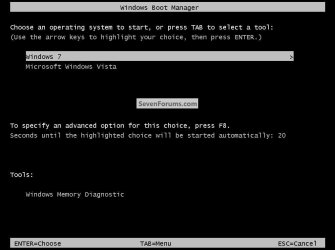
In a Windows managed dual boot you get a boot menu at system startup for the option to choose which OS to boot, the default OS, the last one to be installed will start automatically after 30 seconds if no selection is made in that time, the default OS, along with the default start time can be changed in the "Boot" tab of MSCONFIG very easily, below is a snip of the what the Windows boot menu looks like.

click to enlarge
Dual Boot.jpg
 

My Computer

Computer Manufacturer/Model Number
* BFK Customs *
OS
W 7 64-bit Ultimate
CPU
Intel Q9550 Yorkfield
Motherboard
ASUS P5Q Pro
Memory
8GB Dominator 8500C5D
Graphics Card(s)
ATI : XFX 5870
Sound Card
Realtek HD Audio 7-1
Monitor(s) Displays
1x 47" LCD HDMI & 3x 26" LCD HDMI
Screen Resolution
1920x1080P & 1920x1200
Hard Drives
1x 80GB Intel X25-M G2 SSD : 1x 500GB & 1x 640GB WD Caviar Black(s)
PSU
Corsair 620HX
Case
Cooler Master RC-690
Cooling
Tuniq Tower 120, 2x 140mm and 3x 120mm case fans
Keyboard
Microsoft 500
Mouse
Razer Diamondback 3G
Internet Speed
14 Mb/s
Other Info
1x Koutech 3Gb/s SATA HDD Hot Swap Rack
Win7 should configure a Dual Boot when you install the second copy. If not, use EasyBCD 2.0 to Add the other.
 
Back
Top