Dual boot winxp & win 7

quano

New member
Local time
9:16 PM
Messages
33
I've got 2 drives with OS on them - my old one with winxp, and my new one with win7. I was thinking it could be a good thing to be able to boot the winxp drive, if I'd like to run something from that installation. Is this possible? How would you configure this?
 

My Computer

OS
Windows 7 Home Premium x64
CPU
i5 750
Motherboard
P7P55D
Graphics Card(s)
Radeon 5850
Sound Card
SoundBlaster Audigy

My Computer

Computer type
PC/Desktop
Computer Manufacturer/Model Number
self build
OS
win 7 ultimate32bit, Win8.1pro wmc 32bit
CPU
amd phenom x4 9600
Motherboard
asus m2n32-sli deluxe
Memory
corsair twinxs 2x2gb
Graphics Card(s)
2x nvidia 1gb 8500gt
Sound Card
onboard
Monitor(s) Displays
23" PB Viseo 233d
Screen Resolution
1920x1080
Hard Drives
maxtor sata 500gb
maxtor sata 320gb
fujitsu sata200gb
PSU
oryxx tornado 750w
Case
thermaltake xaser lll
Cooling
artic freezer64 pro + 7 case fans
Can't get it to work, my computer will instantly reboot when selecting the Windows XP option in the boot loader. I tried setting the drive to another drive letter in bcdedit, which doesn't have win xp on it, and then the boot loader gave me an error message instead when I tried to load winxp. So I suppose it is sort of working, it just crashes or somehow fails to load winxp when using the correct drive letter. Any ideas?

The drive letter I'm supposed to give it is the one that shows up as winxp in windows 7, right? Because previously, my winxp drive was C drive, but in win7 that drive seems to be E, looking at the contents.
 

My Computer

OS
Windows 7 Home Premium x64
CPU
i5 750
Motherboard
P7P55D
Graphics Card(s)
Radeon 5850
Sound Card
SoundBlaster Audigy

My Computer

Computer Manufacturer/Model Number
* BFK Customs *
OS
W 7 64-bit Ultimate
CPU
Intel Q9550 Yorkfield
Motherboard
ASUS P5Q Pro
Memory
8GB Dominator 8500C5D
Graphics Card(s)
ATI : XFX 5870
Sound Card
Realtek HD Audio 7-1
Monitor(s) Displays
1x 47" LCD HDMI & 3x 26" LCD HDMI
Screen Resolution
1920x1080P & 1920x1200
Hard Drives
1x 80GB Intel X25-M G2 SSD : 1x 500GB & 1x 640GB WD Caviar Black(s)
PSU
Corsair 620HX
Case
Cooler Master RC-690
Cooling
Tuniq Tower 120, 2x 140mm and 3x 120mm case fans
Keyboard
Microsoft 500
Mouse
Razer Diamondback 3G
Internet Speed
14 Mb/s
Other Info
1x Koutech 3Gb/s SATA HDD Hot Swap Rack
yes the ntldr labels the xp installation as "E" drive , did you run the bcdedit as administrator and followed the guide to the letter, i myself have never used bcdedit ,so dont feel competent enough to assist you any further but please be patient another member will be along shortly and pick up on the thread :(

along came BFK while iwas typing my reply thanks BFK
 
Last edited:

My Computer

Computer type
PC/Desktop
Computer Manufacturer/Model Number
self build
OS
win 7 ultimate32bit, Win8.1pro wmc 32bit
CPU
amd phenom x4 9600
Motherboard
asus m2n32-sli deluxe
Memory
corsair twinxs 2x2gb
Graphics Card(s)
2x nvidia 1gb 8500gt
Sound Card
onboard
Monitor(s) Displays
23" PB Viseo 233d
Screen Resolution
1920x1080
Hard Drives
maxtor sata 500gb
maxtor sata 320gb
fujitsu sata200gb
PSU
oryxx tornado 750w
Case
thermaltake xaser lll
Cooling
artic freezer64 pro + 7 case fans

My Computer

Computer Manufacturer/Model Number
* BFK Customs *
OS
W 7 64-bit Ultimate
CPU
Intel Q9550 Yorkfield
Motherboard
ASUS P5Q Pro
Memory
8GB Dominator 8500C5D
Graphics Card(s)
ATI : XFX 5870
Sound Card
Realtek HD Audio 7-1
Monitor(s) Displays
1x 47" LCD HDMI & 3x 26" LCD HDMI
Screen Resolution
1920x1080P & 1920x1200
Hard Drives
1x 80GB Intel X25-M G2 SSD : 1x 500GB & 1x 640GB WD Caviar Black(s)
PSU
Corsair 620HX
Case
Cooler Master RC-690
Cooling
Tuniq Tower 120, 2x 140mm and 3x 120mm case fans
Keyboard
Microsoft 500
Mouse
Razer Diamondback 3G
Internet Speed
14 Mb/s
Other Info
1x Koutech 3Gb/s SATA HDD Hot Swap Rack
Hello quano, welcome to Seven Forums!


Leave both drives connected and do a startup repair on the Windows 7 with the W 7 install disk, that should get you the boot option menu at bootup; have a look at the tutorial at the link below.

http://www.sevenforums.com/tutorials/681-startup-repair.html?ltr=S


Thanks!

Startup repair did not find any issues.


The first article doesn't seem to cover my problem, as it assumes only one OS is installed. Besides, I did what it said (installing win 7 on a new drive), yet I did not get a boot screen like the one there. Instead it boots directly into Win7 (by default).

EasyBCD - I already tried this when using bcd. It's still a bcd-method, and it does not work.

Maybe something isn't quite right with my harddrive setting, as it doesn't even show up in bios when selecting boot device. I don't know if all drives are supposed to be shown there or not. I've got 5 drives, and the only one showing up is the win 7 drive. Yet they're all accessable in win7.
 

My Computer

OS
Windows 7 Home Premium x64
CPU
i5 750
Motherboard
P7P55D
Graphics Card(s)
Radeon 5850
Sound Card
SoundBlaster Audigy
All HD's need to show in your BIOS.

Which EasyBCD are you using?

When using EasyBCD are you doing Step 14/15?
 

My Computer

OS
ME/XP/Vista/Win7

My Computer

Computer Manufacturer/Model Number
* BFK Customs *
OS
W 7 64-bit Ultimate
CPU
Intel Q9550 Yorkfield
Motherboard
ASUS P5Q Pro
Memory
8GB Dominator 8500C5D
Graphics Card(s)
ATI : XFX 5870
Sound Card
Realtek HD Audio 7-1
Monitor(s) Displays
1x 47" LCD HDMI & 3x 26" LCD HDMI
Screen Resolution
1920x1080P & 1920x1200
Hard Drives
1x 80GB Intel X25-M G2 SSD : 1x 500GB & 1x 640GB WD Caviar Black(s)
PSU
Corsair 620HX
Case
Cooler Master RC-690
Cooling
Tuniq Tower 120, 2x 140mm and 3x 120mm case fans
Keyboard
Microsoft 500
Mouse
Razer Diamondback 3G
Internet Speed
14 Mb/s
Other Info
1x Koutech 3Gb/s SATA HDD Hot Swap Rack
All HD's need to show in your BIOS.

Which EasyBCD are you using?

When using EasyBCD are you doing Step 14/15?

I think they all show up, it just offers me to boot form one (sata 1).

1.7.2.

Step 14?
edit:
ah, reinstall. No, didn't.


Did you re-boot after the "startup repair"?


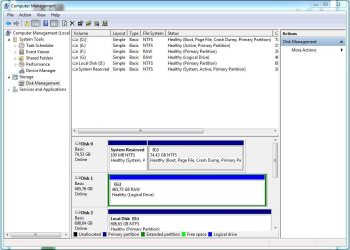
Right click computer, manage, disk management, please post a screen shot / snip.


http://www.sevenforums.com/general-...ed-method-uploading-posting-screen-shots.html

yes.
 

Attachments

  • Capture.JPG
    Capture.JPG
    91.5 KB · Views: 14

My Computer

OS
Windows 7 Home Premium x64
CPU
i5 750
Motherboard
P7P55D
Graphics Card(s)
Radeon 5850
Sound Card
SoundBlaster Audigy
... and which drive is XP on?
 

My Computer

Computer Manufacturer/Model Number
* BFK Customs *
OS
W 7 64-bit Ultimate
CPU
Intel Q9550 Yorkfield
Motherboard
ASUS P5Q Pro
Memory
8GB Dominator 8500C5D
Graphics Card(s)
ATI : XFX 5870
Sound Card
Realtek HD Audio 7-1
Monitor(s) Displays
1x 47" LCD HDMI & 3x 26" LCD HDMI
Screen Resolution
1920x1080P & 1920x1200
Hard Drives
1x 80GB Intel X25-M G2 SSD : 1x 500GB & 1x 640GB WD Caviar Black(s)
PSU
Corsair 620HX
Case
Cooler Master RC-690
Cooling
Tuniq Tower 120, 2x 140mm and 3x 120mm case fans
Keyboard
Microsoft 500
Mouse
Razer Diamondback 3G
Internet Speed
14 Mb/s
Other Info
1x Koutech 3Gb/s SATA HDD Hot Swap Rack
All HD's need to show in your BIOS.

Which EasyBCD are you using?

When using EasyBCD are you doing Step 14/15?

I think they all show up, it just offers me to boot form one (sata 1).

1.7.2.

Step 14?
edit:
ah, reinstall. No, didn't.


Did you re-boot after the "startup repair"?


Right click computer, manage, disk management, please post a screen shot / snip.


http://www.sevenforums.com/general-...ed-method-uploading-posting-screen-shots.html

yes.

Use EasyBCD 2, & do step 14/15
 

My Computer

OS
ME/XP/Vista/Win7

My Computer

OS
Windows 7 Home Premium x64
CPU
i5 750
Motherboard
P7P55D
Graphics Card(s)
Radeon 5850
Sound Card
SoundBlaster Audigy
Probably should've mentioned first of all that I'm using new hardware, i.e. new motherboard, graphics card, cpu, memory etc. My winxp install was configured with other hardware. I've tried to boot winxp in safe mode, but haven't really found a way to do this, as when I select winxp in the boot loader, it restarts instantly, and the boot loader doesn't offer me to start in safe mode directly (like it does with windows 7).
 
Last edited:

My Computer

OS
Windows 7 Home Premium x64
CPU
i5 750
Motherboard
P7P55D
Graphics Card(s)
Radeon 5850
Sound Card
SoundBlaster Audigy
Probably should've mentioned first of all that I'm using new hardware, i.e. new motherboard, graphics card, cpu, memory etc. My winxp install was configured with other hardware. I've tried to boot winxp in safe mode, but haven't really found a way to do this, as when I select winxp in the boot loader, it restarts instantly, and the boot loader doesn't offer me to start in safe mode directly (like it does with windows 7).

Try a Repair install of Win XP.
 

My Computer

OS
ME/XP/Vista/Win7
XP requires a Repair Install from boot when you change hardware. Boot XP CD, continue as if to Install, then when it discovers the installation, select R for Repair (not the first R given after bootup).

This will acclimate XP to the new hardware and start it up. If it doesn't give you the second "R" for Repair, after locating the installation, then it cannot be repaired and started.

You can now install EasyBCD 2.0 in XP, which requires Net Framework 2.0 install as well, to add 7 to the Boot Menu. Or install Easy 2.0 in Win7 which requires marking 7 active in XP Disk Management, booting into 7 DVD Repair to run Startup Repair repeatedly with reboots until it writes the MBR back to 7 and it starts.
 
XP requires a Repair Install from boot when you change hardware. Boot XP CD, continue as if to Install, then when it discovers the installation, select R for Repair (not the first R given after bootup).


Thanks Greg, I'll remember this.
 

My Computer

Computer Manufacturer/Model Number
* BFK Customs *
OS
W 7 64-bit Ultimate
CPU
Intel Q9550 Yorkfield
Motherboard
ASUS P5Q Pro
Memory
8GB Dominator 8500C5D
Graphics Card(s)
ATI : XFX 5870
Sound Card
Realtek HD Audio 7-1
Monitor(s) Displays
1x 47" LCD HDMI & 3x 26" LCD HDMI
Screen Resolution
1920x1080P & 1920x1200
Hard Drives
1x 80GB Intel X25-M G2 SSD : 1x 500GB & 1x 640GB WD Caviar Black(s)
PSU
Corsair 620HX
Case
Cooler Master RC-690
Cooling
Tuniq Tower 120, 2x 140mm and 3x 120mm case fans
Keyboard
Microsoft 500
Mouse
Razer Diamondback 3G
Internet Speed
14 Mb/s
Other Info
1x Koutech 3Gb/s SATA HDD Hot Swap Rack
Ok, couldn't find any repair install in the boot menu of the winxp cd. The only choice I had was to delete the old winxp installation or not. So that's what I did. Once installed, I installed EasyBCD on winxp and rewrote the MBR, together with the winxp entry. Now both OS:es will boot properly from the boot menu.
 

My Computer

OS
Windows 7 Home Premium x64
CPU
i5 750
Motherboard
P7P55D
Graphics Card(s)
Radeon 5850
Sound Card
SoundBlaster Audigy
Back
Top