Dual boot with Raid + non-Raid

hines57

New member
Local time
1:09 PM
Messages
2
I'm really hoping there are some hardware gurus here that can help me with this. I've searched to the ends of the "www" (well, it feels that way anyhow) and have found no conclusive answer to this question:

If I have a machine with XP installed on RAID-0, can I add a 3rd, non-Raid drive to an available SATA port, install Win7 on this single drive and then be able to boot from either the XP-RAID or Win7-SATA?
 
Last edited:

My Computer

OS
XP Pro, 32 bit
Hello hines57, welcome to Seven Forums!


The method in the info below would be the best way to go about it; just be sure to reconnect the SATA cables for the RAID into the original port.
   Information

The easiest way to do away with boot issues between separate Operating Systems (OS) is to use the BIOS one time boot menu to select which OS to boot at system startup, each motherboard has an individual hot-key to tap during system start-up to access this menu.

If you have 2 separate Hard Disk Drives (HDD) and have one OS installed to one HDD and you want to install another OS to the second HDD, disconnect the HDD with the first OS installed on it and leave only the HDD you want to install the second OS to connected.

Just be sure not to change where the original HDD SATA cable was connected, it has to be re-connected to the exact same port to avoid boot issues.

Install the second OS to the connected HDD and when complete and the system is booting good, power down and reconnect the first HDD with the first OS on it.

This way the OSs will boot independently of each other and there will be no boot conflicts between the 2 separate OSs to have to sort later.

Then set the BIOS to boot the HDD / OS you want as default and if you want to start the other (new) OS you use the BIOS one-time boot menu to select that HDD / OS to start when the PC is started.


My Computer

Computer Manufacturer/Model Number
* BFK Customs *
OS
W 7 64-bit Ultimate
CPU
Intel Q9550 Yorkfield
Motherboard
ASUS P5Q Pro
Memory
8GB Dominator 8500C5D
Graphics Card(s)
ATI : XFX 5870
Sound Card
Realtek HD Audio 7-1
Monitor(s) Displays
1x 47" LCD HDMI & 3x 26" LCD HDMI
Screen Resolution
1920x1080P & 1920x1200
Hard Drives
1x 80GB Intel X25-M G2 SSD : 1x 500GB & 1x 640GB WD Caviar Black(s)
PSU
Corsair 620HX
Case
Cooler Master RC-690
Cooling
Tuniq Tower 120, 2x 140mm and 3x 120mm case fans
Keyboard
Microsoft 500
Mouse
Razer Diamondback 3G
Internet Speed
14 Mb/s
Other Info
1x Koutech 3Gb/s SATA HDD Hot Swap Rack
Thank you for the response, but that info doesn't really address my question. I've set up dual boot machines on single, partitioned drives as well as 2 separate drives, and that works fine.

My question is regarding the problem of one drive being a RAID-0 and the other being a standard SATA drive. In this case, I'm not sure how the RAID controller will know that there is another bootable drive attached.

On my computer (an Abit MB) there is a separate "BIOS" menu where the RAID array is configured. The standard BIOS doesn't even see the RAID drives at all - in there, it looks like I have no drives installed.

I was just hoping I could find someone who has attempted this and see if they were able to make it work.
 

My Computer

OS
XP Pro, 32 bit
Hello again.


Why not "just do it" as I out-lined above, if it doesn't work you've lost nothing, just reconnect the RAID and go on from there; truthfully I have no experience with the type of set-up you have; keep checking back though as someone may have some info for you at any time.

Be sure to post back with an update so we'll know how it sorts out.
 

My Computer

Computer Manufacturer/Model Number
* BFK Customs *
OS
W 7 64-bit Ultimate
CPU
Intel Q9550 Yorkfield
Motherboard
ASUS P5Q Pro
Memory
8GB Dominator 8500C5D
Graphics Card(s)
ATI : XFX 5870
Sound Card
Realtek HD Audio 7-1
Monitor(s) Displays
1x 47" LCD HDMI & 3x 26" LCD HDMI
Screen Resolution
1920x1080P & 1920x1200
Hard Drives
1x 80GB Intel X25-M G2 SSD : 1x 500GB & 1x 640GB WD Caviar Black(s)
PSU
Corsair 620HX
Case
Cooler Master RC-690
Cooling
Tuniq Tower 120, 2x 140mm and 3x 120mm case fans
Keyboard
Microsoft 500
Mouse
Razer Diamondback 3G
Internet Speed
14 Mb/s
Other Info
1x Koutech 3Gb/s SATA HDD Hot Swap Rack
I'm really hoping there are some hardware gurus here that can help me with this. I've searched to the ends of the "www" (well, it feels that way anyhow) and have found no conclusive answer to this question:

If I have a machine with XP installed on RAID-0, can I add a 3rd, non-Raid drive to an available SATA port, install Win7 on this single drive and then be able to boot from either the XP-RAID or Win7-SATA?

Did you find an answer to this question? I am in the exactly same position as you, except that I have already tried to install twice unsuccessfully (with Raid 0 still connected), resulting in a boot up screen to choose between two W7 installations and the previous XP install. I did this before seeing this post. The XP installation is the only selection that works. Both Windows 7 installs failed before completion. I am considering disconnecting the XP Raid, but am worried that once I reinstall 7 again, the boot loader may not recognize the XP Raid any longer and I will lose that install.
 

My Computer

Computer Manufacturer/Model Number
Custom
OS
Windows 7 64
CPU
AMD|PH II X4 965 AM3 3.4G RT
Motherboard
ASUS M4A78T-E AM3 790GX/SB750 RT
Memory
2Gx2|GSK F3-10666CL8D-4GBHK R
Graphics Card(s)
GIGABYTE GV-R435OC-512I HD4350
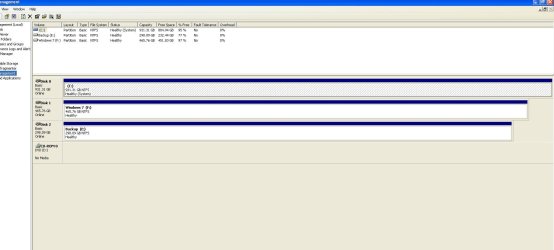
Please post back a screenshot of your full maximized Disk Management drive map with listings, using Snipping Tool in Start Menu. Tell us what is located on each drive.

To remove the unnecessary multi-boot menu, install EasyBCD 2.0 to XP after installing Net Framework 2.0 for it to run. Remove both Win7 entries, Save, Shut Down. Now unplug both Win7 HD's to restart and test XP. http://neosmart.net/blog/2010/welcome-to-easybcd-2/

Next plug back in the last-installed Win7 HD, use the one-time BIOS boot menu key to see if you can boot it separately from XP. If it won't start unplug the XP array, set WIn7 HD first to boot in BIOS setup, mark Win7 active and run Startup Repair up to 3 separate times with reboots until it starts. http://www.sevenforums.com/tutorials/71432-partition-mark-active.html?ltr=P

Once Win7 starts, power down to plug XP array back in to see if they will coexist booting preferred OS first in BIOS setup, or using the one-time BIOS Boot Menu key to boot the other.
 
There are three drives.

1. Raid 0 set is a pair of 500gb drives with the original XP Pro install.
2. The other 500 gig is a single mode Windows 7 install that never finished. I get a quick flash of a message and then a forced reboot before it finishes the installation.
3. The last drive is a 320GB backup drive.

When I tried to run the W7 repair option, it tells me it is the wrong version.
 

Attachments

  • Drive Map.JPG
    Drive Map.JPG
    99.2 KB · Views: 84

My Computer

Computer Manufacturer/Model Number
Custom
OS
Windows 7 64
CPU
AMD|PH II X4 965 AM3 3.4G RT
Motherboard
ASUS M4A78T-E AM3 790GX/SB750 RT
Memory
2Gx2|GSK F3-10666CL8D-4GBHK R
Graphics Card(s)
GIGABYTE GV-R435OC-512I HD4350

My Computer

Computer Manufacturer/Model Number
Rig 1
OS
Windows 7 Ultimate x64
CPU
AMD Phenom II X4 940 Black Edition @ 3.4GHz (AM2+)
Motherboard
Gigabyte GA-MA790X-UD4P (AM2+)
Memory
Corsair CM2X4096-8500C5 (4 X 2GB)
Graphics Card(s)
XFX Radeon HD 5770 / Diamond Radeon HD 5770 CrossFireX
Sound Card
Asus Xonar DS (PCI)
Monitor(s) Displays
Samsung SyncMaster 932bw+ (3)
Screen Resolution
4320x900
Hard Drives
OCZ Vertex 2 80 GB - Windows 7 System --
WD Caviar Black 1TB - Music, Movies, Vids, Pics --
WD Caviar Black 640GB - User Profiles & Games --
WD My Book 320GB external
PSU
Corsair CMPSU-750TX
Case
Cooler Master HAF 932
Cooling
Corsair Hydro Series H50
Keyboard
Logitech Desktop Wave
Mouse
Logitech LX8 Laser
Internet Speed
20 down / 2 up
Other Info
LG GGC-H20L Blu-Ray / HDDVD combo --
Hauppauge HVR-1250 --
Silverstone MFP-51 --
Logitech Webcam C600
Were you successful in the step to first install EasyBCD 2.0 to remove Win7 from the Dual Boot menu?

Did you unplug the RAID array before attempting to repair Win7?

Previously you stated that you had two Win7 installs, but now you say neither completed. If that's the case, try installing now to the single target HD, set first HD to boot, with XP array unplugged.

After install replug the XP array and see if you can boot it using one-time BIOS Boot Screen or by setting as first HD to boot in BIOS setup. Then try booting the other HD using BBS.

If Win7 will not install and boot in this manner then it is likely not possible. Your RAID controller stays in control in BIOS SATA settings and won't yield to another OS install to single HD not RAID'ed.
 
I apologize for not being more clear. My last post was just a clarification. The machine is in use and I won't be able to start trying your steps until probably wed or thurs. As soon as I get a chance to follow your advice, I will post back here. Thanks.
 

My Computer

Computer Manufacturer/Model Number
Custom
OS
Windows 7 64
CPU
AMD|PH II X4 965 AM3 3.4G RT
Motherboard
ASUS M4A78T-E AM3 790GX/SB750 RT
Memory
2Gx2|GSK F3-10666CL8D-4GBHK R
Graphics Card(s)
GIGABYTE GV-R435OC-512I HD4350
To remove the unnecessary multi-boot menu, install EasyBCD 2.0 to XP after installing Net Framework 2.0 for it to run. Remove both Win7 entries, Save, Shut Down. Now unplug both Win7 HD's to restart and test XP. Welcome to EasyBCD 2.0! — The NeoSmart Files

Well I did this, and well, now there is only a Windows 7 option. It removed the XP option. Very strange. I am going to try to install Windows 7 to the drive without the RAID and go from there.
 

My Computer

Computer Manufacturer/Model Number
Custom
OS
Windows 7 64
CPU
AMD|PH II X4 965 AM3 3.4G RT
Motherboard
ASUS M4A78T-E AM3 790GX/SB750 RT
Memory
2Gx2|GSK F3-10666CL8D-4GBHK R
Graphics Card(s)
GIGABYTE GV-R435OC-512I HD4350
Is there any way to remove the windows 7 bootloader from the XP Raid 0 drive so it will just boot to Windows XP?
 

My Computer

Computer Manufacturer/Model Number
Custom
OS
Windows 7 64
CPU
AMD|PH II X4 965 AM3 3.4G RT
Motherboard
ASUS M4A78T-E AM3 790GX/SB750 RT
Memory
2Gx2|GSK F3-10666CL8D-4GBHK R
Graphics Card(s)
GIGABYTE GV-R435OC-512I HD4350
Here is the latest.

I ran the BCedit and deleted the win 7 entries. I rebooted. XP entry was gone and one win 7 was there. I don't know why it did this, but it did.

The MB has three modes - IDE, RAID, AHCI. I have always been in RAID mode.
I disconnected everything but the single 500g disk. Tried to install 7 again and it still fails at first reboot.
I changed to AHCI and it was successful.
Tried to change it back to RAID to add the stripe, but it won't see the 7 install at all.
Went back to AHCI and of course it can't see the stripe.

Disconnected all but the stripe.
fixboot and fixmbr
reboot to Windows XP.

Now I will have two separate installs that I will just have to swap cables when time allows to install all of his programs to the 7 installation.
 

My Computer

Computer Manufacturer/Model Number
Custom
OS
Windows 7 64
CPU
AMD|PH II X4 965 AM3 3.4G RT
Motherboard
ASUS M4A78T-E AM3 790GX/SB750 RT
Memory
2Gx2|GSK F3-10666CL8D-4GBHK R
Graphics Card(s)
GIGABYTE GV-R435OC-512I HD4350
Have never heard of EasyBCD installed to XP to remove Win7 entries actually removing the XP entry. You did good using the bootrec commands to reinstate. EasyBCD has a boot disk to do this on Bootloader tab as well.

As XP is phasing out, you'll likely want to transfer over to 7 anyway. Wish there was a way to make them work together.

Maybe someone will know a workaround, but RAID tends to preclude options.
 
this is all pretty simple first create raid and install OS (I have windows server 2008 on RAID 0) then in BIOS setup raid controller and chose boot order for RAID cdrom/ide or sata Raid boot/ then originally created RAID. insert intallation disk for OS and install on IDE/SATA drive, but make sure you have drivers for your RAID motherboard since it is the same as in any RAID, after that you can easily chose whatever OS you want to boot from. www.good-service.org
 

My Computer

OS
64
Back
Top