Dual boot with XP SATA driver issue and no floppy

dcresx14

Banned
Local time
3:49 PM
Messages
10
Hi

This is my first post. I have a new Dell Studio laptop with Windows 7 Home Ed. with
a SATA hard drive. Because of work software I would like to add Windows XP (Dual Boot).

I only have the Windows XP software that came with my old laptop (from Dell)

I have read that I would need to get the SATA drivers to install Windows XP and that I would have to put them onto the install cd or a floppy (I can't use a floppy, don't have one). I also read that I couldn't add the drivers to the Install CD that I got from Dell.

Is there another way??

Drivers???? I got the drivers from Intel for my SATA hard drive. Do I need to get other drivers for other devices, to install XP????? or can I wait until after the install???

Thanks
 

My Computer My Computer

At a glance

windows 7
Computer Manufacturer/Model Number
Dell Studio 1749
OS
windows 7
If you system is set up to use AHCI for the hard drive controller driver, then you will need to add those drivers by using an external floppy or slipstream them into the install disc.

Do you have the Win 7 System Reserved (100mb) partition? If so pay close attention to how it needs to be handled.

The drivers you would need for a AHCI enabled XP install would be for XP for your system and should be something like an F6 disk install version of SATA drivers. If we knew the computer model, maybe we could check.
 

My Computer My Computer

At a glance

Windows 7 x64i7-2600K8 GGTX 480
Computer Manufacturer/Model Number
Homebuilt
OS
Windows 7 x64
CPU
i7-2600K
Motherboard
Asus P8Z77-v Pro
Memory
8 G
Graphics Card(s)
GTX 480
Sound Card
Onboard
Monitor(s) Displays
LG W2753V
Screen Resolution
1920x1080
Hard Drives
Crucial M4 128 G SSD
Saltgrass

I don't have a floppy drive and I have the software (for xp SP2) that was send with my old laptop for Dell.
But I read that adding the drivers to this cd can't be done????

I have a older version of Winxp (SP0) , can this be used?

I have a Dell Studio 1749, windows7 home premium 64bit, 4gb memory , 500gb sata Ahci harddrive

Thanks
 

My Computer My Computer

At a glance

windows 7
Computer Manufacturer/Model Number
Dell Studio 1749
OS
windows 7
I will assume from you post you are using AHCI.

Not having a floppy is not really a problem if you have a USB port. I got an external floppy and used it to install the drivers.

You might be right about the Dell XP CD..., depending on whether it is a full XP version or some type of recovery CD. If it is an OEM version, it might not install anyway.

I don't see any drivers for you new system on Dell, but you might check the Intel site for your chipset for those drivers. I checked but did not see any broken out as F6 installs, although they did seem to have XP drivers.
 

My Computer My Computer

At a glance

Windows 7 x64i7-2600K8 GGTX 480
Computer Manufacturer/Model Number
Homebuilt
OS
Windows 7 x64
CPU
i7-2600K
Motherboard
Asus P8Z77-v Pro
Memory
8 G
Graphics Card(s)
GTX 480
Sound Card
Onboard
Monitor(s) Displays
LG W2753V
Screen Resolution
1920x1080
Hard Drives
Crucial M4 128 G SSD

My Computer My Computer

At a glance

ME/XP/Vista/Win7
OS
ME/XP/Vista/Win7
theog

Thanks for your reply - If I can get the question below answer, I plan on doing this

I have a older version of Winxp (SP0) , can this be used?
 

My Computer My Computer

At a glance

windows 7
Computer Manufacturer/Model Number
Dell Studio 1749
OS
windows 7
If you are going to slipstream, why not slipstream to a SP3 version as well.

I did try this on my Dell CD for XP I got with my laptop and it would not work. Good Luck with yours, but it should tell you fairly quickly if you can slipstream it.
 

My Computer My Computer

At a glance

Windows 7 x64i7-2600K8 GGTX 480
Computer Manufacturer/Model Number
Homebuilt
OS
Windows 7 x64
CPU
i7-2600K
Motherboard
Asus P8Z77-v Pro
Memory
8 G
Graphics Card(s)
GTX 480
Sound Card
Onboard
Monitor(s) Displays
LG W2753V
Screen Resolution
1920x1080
Hard Drives
Crucial M4 128 G SSD
theog

Thanks for your reply - If I can get the question below answer, I plan on doing this

I have a older version of Winxp (SP0) , can this be used?

This works with Win XP sp2, all other sp I have not tried.
 

My Computer My Computer

At a glance

ME/XP/Vista/Win7
OS
ME/XP/Vista/Win7
saltgrass / theog

Thanks for the help. I've been busy with work and I hope to try slipstreaming the drivers into the SP0 version that I have and also try to see if I can get them into the Dell version today.

Thanks, again
 

My Computer My Computer

At a glance

windows 7
Computer Manufacturer/Model Number
Dell Studio 1749
OS
windows 7
I finally got around to doing this.

I created the new partition and I slipstream the drivers into my copy of windows XP (sp0)

I put the cd into the drive and restarted the computer.

I hit a key to boot from the disk , it copied all the files and said it was starting windows.
Then I get a blue screen with this error:

PCI.SYS - Address F748EOBF Base at F7487000 , DateStamp 3B7D855C

Any idea what this is ? What to do to get fix it?
 

My Computer My Computer

At a glance

windows 7
Computer Manufacturer/Model Number
Dell Studio 1749
OS
windows 7
I have a floppy disk now, I put the driver (controller) onto a disk

I put the cd into the drive and restarted the computer.

I hit a key to boot from the disk , I also hit the F6 button when it ask

It starts to copied the files, then i see the screen to add the drivers

I add the drivers , hit enter to complete the copying of the files

when it finish copying and it said starting windows.

Then I get a blue screen:

What am I doing wrong????? What to do to get fix it?
 

My Computer My Computer

At a glance

windows 7
Computer Manufacturer/Model Number
Dell Studio 1749
OS
windows 7
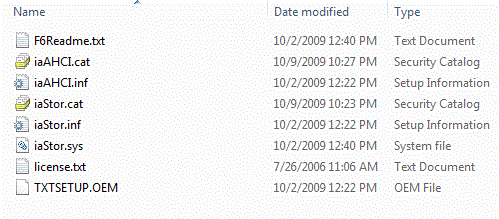
When I did mine, there were several choices as to type of chipset and such. I had to make sure the one I chose agreed with the chipset in my system. Attached is a list of files on my floppy.

I also have a floppy made by TEAC, an FD-05PUW. I can't remember if I had the floppy controller turned on in the bios, but I think I did.
 

Attachments

  • floppy.GIF
    floppy.GIF
    26.1 KB · Views: 7

My Computer My Computer

At a glance

Windows 7 x64i7-2600K8 GGTX 480
Computer Manufacturer/Model Number
Homebuilt
OS
Windows 7 x64
CPU
i7-2600K
Motherboard
Asus P8Z77-v Pro
Memory
8 G
Graphics Card(s)
GTX 480
Sound Card
Onboard
Monitor(s) Displays
LG W2753V
Screen Resolution
1920x1080
Hard Drives
Crucial M4 128 G SSD
Hi Saltgrass

I can't get it to get pass the "starting windows" then I get the blue screen.

This is what I have done:

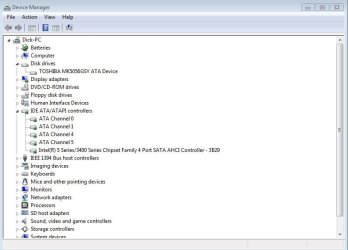
Picture below of what device manager looks like.

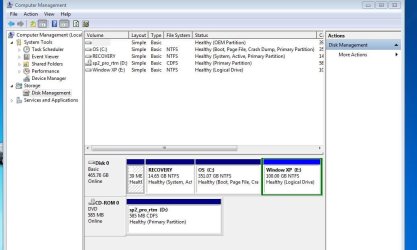
I created a partition. Below is what it looks like in disk management

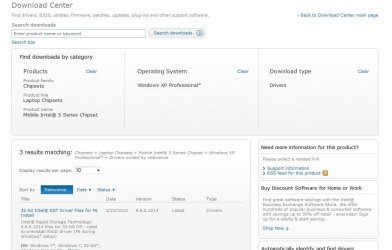
I got the drivers from Intel Download Center ( do I need 32 bit or 64 bit????)
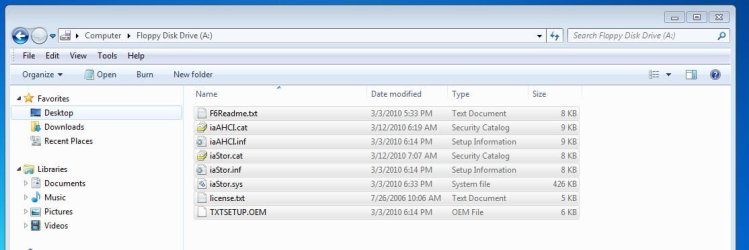
Put them on a disk. Below picture of the files and how I selected it.

I put the OS cd into the computer

re-started the computer - hit enter to boot from the cd and F6 to load the driver from floppy disk

I load the driver and hit enter to finish loading the files.

It said stating windows.

Them I get the blue screenDisk_St.JPG

32_Disk.JPG

Dev_Man.JPG

Intel_Download.JPG
 

My Computer My Computer

At a glance

windows 7
Computer Manufacturer/Model Number
Dell Studio 1749
OS
windows 7
What is the 14.65 G Recovery partition? Since it shows system, it is just like the System Reserved partition Win 7 adds. You probably need to put a drive letter on it as the tutorial suggests. If you do not, XP cannot find itself, but this normally results in another type of message. Since it is not a Win 7 partition, I do not know if this will effect your sytem, but you can take the drive letter off later.

There is an alternative where you set the XP partition active, but you show it as a logical partition and cannot do that.

The files you have look correct. When you select the .inf file in the F6 install, how many options do you get for chipsets? It should say the same thing as your Device Manager setting. I think I was given 4 options with my Intel 4 chipset..

You use a 32 bit for a 32 bit version of XP...
 

My Computer My Computer

At a glance

Windows 7 x64i7-2600K8 GGTX 480
Computer Manufacturer/Model Number
Homebuilt
OS
Windows 7 x64
CPU
i7-2600K
Motherboard
Asus P8Z77-v Pro
Memory
8 G
Graphics Card(s)
GTX 480
Sound Card
Onboard
Monitor(s) Displays
LG W2753V
Screen Resolution
1920x1080
Hard Drives
Crucial M4 128 G SSD
Saltgrass , Thanks for getting back to me

I will add a letter to the recovery partition and see what happens.

Are you saying that I have to change the partition from logical to active?
Can this be done or do I have to deleting it and adding it back in?

I get 4 option choices and I picked the one that is like the one in the device manager

Thanks , Again
 

My Computer My Computer

At a glance

windows 7
Computer Manufacturer/Model Number
Dell Studio 1749
OS
windows 7
No, you do not have to make the partition primary, but if you you are not looking to add partitions, you could. Use Partition Magic if in the future you desire to change it, or do what you suggest.

This is not related to your current install situation.
 

My Computer My Computer

At a glance

Windows 7 x64i7-2600K8 GGTX 480
Computer Manufacturer/Model Number
Homebuilt
OS
Windows 7 x64
CPU
i7-2600K
Motherboard
Asus P8Z77-v Pro
Memory
8 G
Graphics Card(s)
GTX 480
Sound Card
Onboard
Monitor(s) Displays
LG W2753V
Screen Resolution
1920x1080
Hard Drives
Crucial M4 128 G SSD
I finally got WinXP to install. To get it to install I had to change a
setting in my bios from AHCI to ATA. (in bios - advance - sata operation)
This work fine installing the software (XP).

But one problem. I can't boot into windows 7 without changing the setting
back to AHCI and into Winxp without changing it to ATA.

Does anyone know a way to get around this?

Thanks
 

My Computer My Computer

At a glance

windows 7
Computer Manufacturer/Model Number
Dell Studio 1749
OS
windows 7
You can Google for adding AHCI to XP after installation. I did it once a couple of months ago and it worked, sorry I do not remember the exact site I used for instructions.

In Win 7, all you have to do is change a registry entry, but it might be more complicated in XP.

If you can't get it to work, I will try to do it again.
 

My Computer My Computer

At a glance

Windows 7 x64i7-2600K8 GGTX 480
Computer Manufacturer/Model Number
Homebuilt
OS
Windows 7 x64
CPU
i7-2600K
Motherboard
Asus P8Z77-v Pro
Memory
8 G
Graphics Card(s)
GTX 480
Sound Card
Onboard
Monitor(s) Displays
LG W2753V
Screen Resolution
1920x1080
Hard Drives
Crucial M4 128 G SSD
Back
Top