Hi Friends,
I have XP 32 Bit on samsang 40 GB disk
I have taken another new SSD 80 GB for Win7 64bit
Both the systems are installed and do run
But when i boot with win7 and again boot back to xp
xp complains about Files system and starts to fix all 4 hard disk
similarly when i boot to win7 after booting my system with xp then win7 starts to complain about file system and start to fix all 4 hard disks for reading and writing
Linux partition(s) are not in use so Puppy Linux is kept in disk image file on ntfs system and do not disturb windows partition
What is the problem ? both the windows are installed on 2 different hard disks and
Swap Files are kept on other 2 physical hard disks- so each windows version has different physical disk and again different physical disk for swap file
all 4 disks are visible from xp and win7
Point to be noted --
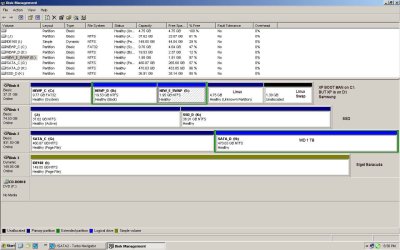
xp is on Fat32 and it is a disk 50% fat32 with xp's boot loader and 35% ntfs
+ small 15% partation for linux and its swap partition (40 GB hard disk)
win7 ssd has 2 ntfs partitions of 50% each (80 GB SSD)
160gb siget baracuda has single ntfs dynamic vol partition this is for data and on siget baracuda 160gb partition also holds xp swap file
Western digital 1 TB has 2 ntfs partitions of 50% each one of the partitions has win7 swap file
Regards
tgbssk
-------------- My System Details ------
System Manufacturer/Model Number
AMD
--------------------------------
OS
puppy linux / xp / win7
--------------------------------
CPU
Athlon 64 X2 Dual Core 5000+
--------------------------------
Motherboard
Gigabyte GA-M61PME-S2
--------------------------------
Memory
2GB DDR2
--------------------------------
Sound Card
on board Realtake
--------------------------------
Monitor(s) Displays
nVedia / Geforce6100/nGorce430/Rev 2.0
=============================================
Hard Drives
1 ) INTEL SSDSA2M080G2GN ( SSD SATA 80 GB)
2) SAMSUNG SP0411N (IDE 40 GB)
3) Seagate Barracuda ST3160215A-SCSI (160GB) ( on additional PCI IDE CARD ) Can be used with SATA connector card
4)Western Digital WD10EARS-00Y5B1 ( 1 TB SATA )
-----------------------------------
PSU
VIP Genunion 450 Wats
--------------------------------
Case
Full size cabinet
--------------------------------
Cooling
Cabinet fans, cpu fan , PSU inbuilt fan
I have XP 32 Bit on samsang 40 GB disk
I have taken another new SSD 80 GB for Win7 64bit
Both the systems are installed and do run
But when i boot with win7 and again boot back to xp
xp complains about Files system and starts to fix all 4 hard disk
similarly when i boot to win7 after booting my system with xp then win7 starts to complain about file system and start to fix all 4 hard disks for reading and writing
Linux partition(s) are not in use so Puppy Linux is kept in disk image file on ntfs system and do not disturb windows partition
What is the problem ? both the windows are installed on 2 different hard disks and
Swap Files are kept on other 2 physical hard disks- so each windows version has different physical disk and again different physical disk for swap file
all 4 disks are visible from xp and win7
Point to be noted --
xp is on Fat32 and it is a disk 50% fat32 with xp's boot loader and 35% ntfs
+ small 15% partation for linux and its swap partition (40 GB hard disk)
win7 ssd has 2 ntfs partitions of 50% each (80 GB SSD)
160gb siget baracuda has single ntfs dynamic vol partition this is for data and on siget baracuda 160gb partition also holds xp swap file
Western digital 1 TB has 2 ntfs partitions of 50% each one of the partitions has win7 swap file
Regards
tgbssk
-------------- My System Details ------
System Manufacturer/Model Number
AMD
--------------------------------
OS
puppy linux / xp / win7
--------------------------------
CPU
Athlon 64 X2 Dual Core 5000+
--------------------------------
Motherboard
Gigabyte GA-M61PME-S2
--------------------------------
Memory
2GB DDR2
--------------------------------
Sound Card
on board Realtake
--------------------------------
Monitor(s) Displays
nVedia / Geforce6100/nGorce430/Rev 2.0
=============================================
Hard Drives
1 ) INTEL SSDSA2M080G2GN ( SSD SATA 80 GB)
2) SAMSUNG SP0411N (IDE 40 GB)
3) Seagate Barracuda ST3160215A-SCSI (160GB) ( on additional PCI IDE CARD ) Can be used with SATA connector card
4)Western Digital WD10EARS-00Y5B1 ( 1 TB SATA )
-----------------------------------
PSU
VIP Genunion 450 Wats
--------------------------------
Case
Full size cabinet
--------------------------------
Cooling
Cabinet fans, cpu fan , PSU inbuilt fan
Last edited:
My Computer
At a glance
puppy linuxAthlon 64 X2 Dual Core 5000+2GBnone
- Computer Manufacturer/Model Number
- AMD
- OS
- puppy linux
- CPU
- Athlon 64 X2 Dual Core 5000+
- Motherboard
- Gigabyte GA-M61PME-S2
- Memory
- 2GB
- Graphics Card(s)
- none
- Sound Card
- Realtake
- Monitor(s) Displays
- nVedia / Geforce6100/nGorce430/Rev 2.0
- Hard Drives
- INTEL SSDSA2M080G2GN ( SSD SATA 80 GB)
SAMSUNG SP0411N (IDE 40 GB)
Seagate Barracuda ST3160215A-SCSI (160GB) ( on additional PCI IDE CARD ) Can be used with SATA connector card
Western Digital WD10EARS-00Y5B1 ( 1 TB SATA )
- PSU
- VIP Genunion 450 Wats
- Case
- Full size
- Cooling
- Cabinet fans, cpu fan , PSU inbuilt fan