dual boot Xp drive formated win 7 not recoverd after xp installlation

tkpro

New member
Local time
8:13 AM
Messages
5
hello friends i have read alot of threads before creating this
i tried different option but cant solve that.

i am having xp on c drive and win 7 on d drive if xp drive formatted win 7 will no recover even after installing xp on c drive
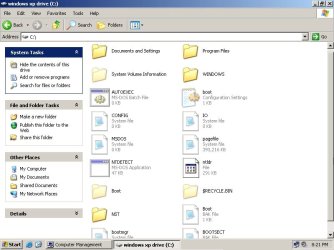
as boot mgr file was on c drive nd some others
i tried easy bcd vista boot loader .windows 7 startup recovery
but cant bring back 7
my question is only if xp is formatted and reinstalled how will we recover 7 again and remember 7 was installed after first installation of xp
i am not saying about two hard drives.i know virtual box stuff too etc,
please help to recover this issue i read alot of threads related to this issue but can find solution yet.\
thanks in advance
 

My Computer My Computer

At a glance

windows 7 32bit
OS
windows 7 32bit
Hello tkpro, welcome to Seven Forums!


You will need to mark the Windows 7 partition as Active and do the 3 separate startup repairs with the system restarts discussed in this tutorial at the link below to create a new set of boot files to the Windows 7 partition, have a thorough look and be sure to post back with any further questions you may have and to keep us informed.


Startup Repair - Run 3 Separate Times
 

My Computer My Computer

At a glance

W 7 64-bit UltimateIntel Q9550 Yorkfield8GB Dominator 8500C5DATI : XFX 5870
Computer Manufacturer/Model Number
* BFK Customs *
OS
W 7 64-bit Ultimate
CPU
Intel Q9550 Yorkfield
Motherboard
ASUS P5Q Pro
Memory
8GB Dominator 8500C5D
Graphics Card(s)
ATI : XFX 5870
Sound Card
Realtek HD Audio 7-1
Monitor(s) Displays
1x 47" LCD HDMI & 3x 26" LCD HDMI
Screen Resolution
1920x1080P & 1920x1200
Hard Drives
1x 80GB Intel X25-M G2 SSD : 1x 500GB & 1x 640GB WD Caviar Black(s)
PSU
Corsair 620HX
Case
Cooler Master RC-690
Cooling
Tuniq Tower 120, 2x 140mm and 3x 120mm case fans
Keyboard
Microsoft 500
Mouse
Razer Diamondback 3G
Internet Speed
14 Mb/s
Other Info
1x Koutech 3Gb/s SATA HDD Hot Swap Rack
mm i tried this already
i was saying xp is installed on c drive and 7 on d drive
then formatted c drive which contains xp and again installed xp on c drive now how will we get back win 7 on startup and windows 7 is on logical drive not on primay partition
thanks for u post bro
 

My Computer My Computer

At a glance

windows 7 32bit
OS
windows 7 32bit

My Computer My Computer

At a glance

W 7 64-bit UltimateIntel Q9550 Yorkfield8GB Dominator 8500C5DATI : XFX 5870
Computer Manufacturer/Model Number
* BFK Customs *
OS
W 7 64-bit Ultimate
CPU
Intel Q9550 Yorkfield
Motherboard
ASUS P5Q Pro
Memory
8GB Dominator 8500C5D
Graphics Card(s)
ATI : XFX 5870
Sound Card
Realtek HD Audio 7-1
Monitor(s) Displays
1x 47" LCD HDMI & 3x 26" LCD HDMI
Screen Resolution
1920x1080P & 1920x1200
Hard Drives
1x 80GB Intel X25-M G2 SSD : 1x 500GB & 1x 640GB WD Caviar Black(s)
PSU
Corsair 620HX
Case
Cooler Master RC-690
Cooling
Tuniq Tower 120, 2x 140mm and 3x 120mm case fans
Keyboard
Microsoft 500
Mouse
Razer Diamondback 3G
Internet Speed
14 Mb/s
Other Info
1x Koutech 3Gb/s SATA HDD Hot Swap Rack
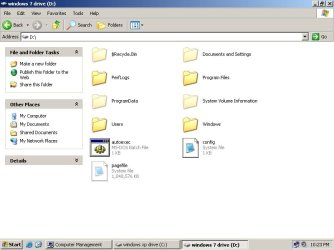
ok here is also my c and drive inside images
diskmang.jpg

c drive inside.jpg

d drive inside.jpg
 

My Computer My Computer

At a glance

windows 7 32bit
OS
windows 7 32bit
Have a look at Option Four of this tutorial at the link below to see how to convert the Windows 7 Extended/Logical to a Primary partition so it can be made the system volume (where the system boot files are stored) then the Windows 7 partition can be made the Active partition and the startup repairs can be done.

Partition Wizard : Use the Bootable CD

First download the Partition Wizard Bootable Disk (PWBD) ISO file to the desktop, be sure to get the PWBD and not the installed version; scroll down to see the download link for the bootable CD ISO file at this link below.

Partition Wizard Free Bootable CD

Then use ImgBurn to burn the ISO to a CD, at no greater than 4x speed with a verify; it was designed for use and works best from a CD rather that a DVD then boot the created CD to make the changes.

ImgBurn Free ISO Burning Software


After the Windows 7 partition is converted to a Primary partition and if you want to completely remove the XP installation, have a look at this tutorial at the link below.

Partition : Recover Space Used by an Older OS


Either way the Windows 7 partition needs to be a Primary partition.
 

My Computer My Computer

At a glance

W 7 64-bit UltimateIntel Q9550 Yorkfield8GB Dominator 8500C5DATI : XFX 5870
Computer Manufacturer/Model Number
* BFK Customs *
OS
W 7 64-bit Ultimate
CPU
Intel Q9550 Yorkfield
Motherboard
ASUS P5Q Pro
Memory
8GB Dominator 8500C5D
Graphics Card(s)
ATI : XFX 5870
Sound Card
Realtek HD Audio 7-1
Monitor(s) Displays
1x 47" LCD HDMI & 3x 26" LCD HDMI
Screen Resolution
1920x1080P & 1920x1200
Hard Drives
1x 80GB Intel X25-M G2 SSD : 1x 500GB & 1x 640GB WD Caviar Black(s)
PSU
Corsair 620HX
Case
Cooler Master RC-690
Cooling
Tuniq Tower 120, 2x 140mm and 3x 120mm case fans
Keyboard
Microsoft 500
Mouse
Razer Diamondback 3G
Internet Speed
14 Mb/s
Other Info
1x Koutech 3Gb/s SATA HDD Hot Swap Rack
i did that i made my d drive active in result it say boot mgr missing on start up coz it starts going to boot from win 7 drive u didn't seen my screen shots where i showed boot mgr file is in c drive.
how ever i fixed it through bootsect.exe /nt60 all now it says on start up
"A disk read error occurred Press Ctrl + Alt + Del to restart"


mmm i think i should now edit win 7 system32 bcd edit
may b it fix it
but right now i think im getting away from destination.if i bring back xp i think if i remove xp then it wont disturb win 7 what did u say
thanks
 

My Computer My Computer

At a glance

windows 7 32bit
OS
windows 7 32bit
Did you convert the Windows 7 partition to a Primary partition and then run the 3 separate startup repairs to the Windows 7 Primary partition to create a new set of "System" boot files to the Windows 7 partition?

Startup Repair - Run 3 Separate Times


Let's see another snip/screen-shot of Windows disk management.
 

My Computer My Computer

At a glance

W 7 64-bit UltimateIntel Q9550 Yorkfield8GB Dominator 8500C5DATI : XFX 5870
Computer Manufacturer/Model Number
* BFK Customs *
OS
W 7 64-bit Ultimate
CPU
Intel Q9550 Yorkfield
Motherboard
ASUS P5Q Pro
Memory
8GB Dominator 8500C5D
Graphics Card(s)
ATI : XFX 5870
Sound Card
Realtek HD Audio 7-1
Monitor(s) Displays
1x 47" LCD HDMI & 3x 26" LCD HDMI
Screen Resolution
1920x1080P & 1920x1200
Hard Drives
1x 80GB Intel X25-M G2 SSD : 1x 500GB & 1x 640GB WD Caviar Black(s)
PSU
Corsair 620HX
Case
Cooler Master RC-690
Cooling
Tuniq Tower 120, 2x 140mm and 3x 120mm case fans
Keyboard
Microsoft 500
Mouse
Razer Diamondback 3G
Internet Speed
14 Mb/s
Other Info
1x Koutech 3Gb/s SATA HDD Hot Swap Rack

My Computer My Computer

At a glance

ME/XP/Vista/Win7
OS
ME/XP/Vista/Win7
Theog>>>>> bro im just practicing and trying to troubleshoot this so this is not necessary i have big hard drive coz im not using windows on this machine for any purpose
its just experiment that im doing and cant recover it yet

Bare Foot Kid
THnx but i didnt got time to check this again as soon im going to run again i will post back what was result i just run one time startup recovery. thanks

gregrocker>>>> i tried with easy bcd and as well vistapro too
but cant get back 7 after formating c drive let me check the tip bare foot kid given
thanks
 

My Computer My Computer

At a glance

windows 7 32bit
OS
windows 7 32bit
Bare Foot Kid
THnx but i didnt got time to check this again as soon im going to run again i will post back what was result i just run one time startup recovery. thanks


Hello again, be sure to post back to keep us informed.
 

My Computer My Computer

At a glance

W 7 64-bit UltimateIntel Q9550 Yorkfield8GB Dominator 8500C5DATI : XFX 5870
Computer Manufacturer/Model Number
* BFK Customs *
OS
W 7 64-bit Ultimate
CPU
Intel Q9550 Yorkfield
Motherboard
ASUS P5Q Pro
Memory
8GB Dominator 8500C5D
Graphics Card(s)
ATI : XFX 5870
Sound Card
Realtek HD Audio 7-1
Monitor(s) Displays
1x 47" LCD HDMI & 3x 26" LCD HDMI
Screen Resolution
1920x1080P & 1920x1200
Hard Drives
1x 80GB Intel X25-M G2 SSD : 1x 500GB & 1x 640GB WD Caviar Black(s)
PSU
Corsair 620HX
Case
Cooler Master RC-690
Cooling
Tuniq Tower 120, 2x 140mm and 3x 120mm case fans
Keyboard
Microsoft 500
Mouse
Razer Diamondback 3G
Internet Speed
14 Mb/s
Other Info
1x Koutech 3Gb/s SATA HDD Hot Swap Rack
i did that i made my d drive active in result it say boot mgr missing on start up coz it starts going to boot from win 7 drive u didn't seen my screen shots where i showed boot mgr file is in c drive.
how ever i fixed it through bootsect.exe /nt60 all now it says on start up
"A disk read error occurred Press Ctrl + Alt + Del to restart"

If you cannot add Win7 using EasyBCD then you'll need to follow the steps given in Post #6 to convert the WIn7 partition to Primary, mark Active, then run Startup Repair 3 separate times.

It was not marked Active if it is a Logical partition. Convert it to Primary using the steps given, then mark it Active and run Startup Repair up to 3 separate times until WIn7 starts on its own.
 
Back
Top