Here's my story and I am in desperate need of help ASAP!
I have an audio interface that doesn't "play" nice with Win 7 64-bit, but I'm almost positive it'll work well within XP. The problem is, randomly during using my M-Audio ProjectMix I/O (firewire), the signal to the board will drop out. First the audio and then the m-audio control interface will lock up. This happens at random intervals, sometime 10 min and sometimes 2 hours but hardly reliable and required a full system restart. I have come to realize, after many hours of research, that even though they said it is compatible with Win 7, it actually isnt. I tried every last suggestion from them and spent even more money beyond the $1200 i paid for the board in attempts to fix this issue. Not to mention M-Audio has not even replied to ONE of my inquiries on their forum because i believe they wont admit it isn't compatible. Anyway, I digress...
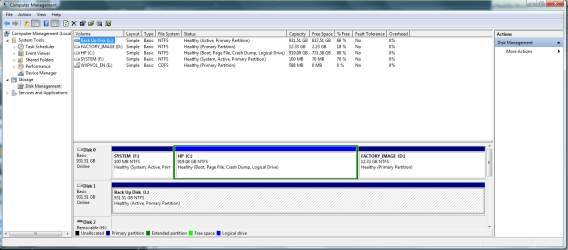
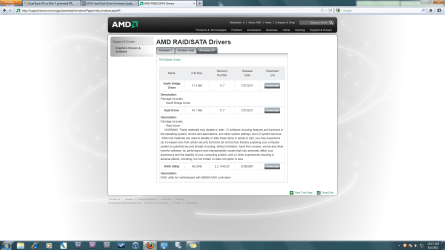
So now my new struggle is getting my PC to install XP. I have read literally every forum and tutorial on the web and I understand the process, i think. I've made a partition on C: but also have another drive available for the install. I load the XP start up with no problem and it installs all the drivers and when it goes to start Windows, i get a BSOD stating that there may be an issue with my hardware... to run chkdsk.... remove any new hardware... etc. I have tried removing the Firewire card i installed, the wireless card, the main hard drive (win 7) and the secondary drive (empty). From my research is seems to be that the proper SATA or RAID driver isnt being installed for XP. At least that's what i gather. I have tried slip streaming the sata drivers on HP Forum and choosing only the 32 bit and XP drivers. Ive tried including every driver in that bundle at once, leaving out the Intel drivers and inserting even only the AMD drivers. All of these lead me to a black screen before the setup even runs stating line 1xxxxx of the INF file \i386\txtsetup.sif is invalid. I CAN NOT find any driver that is specific to either my MB or my PC. Every day i go without this equipment working is another day im not making music or money. Someone please help!!!! I have also tried running XP in Virtual PC but that wont work considering you cant access any firewire devices or ports. Wondering if XP Mode is the same basis as a virtual computer or worth upgrading for????
Specs:
HP e9220y
Win 7 64-bit Home Premium (w/ hopefully XP Pro SP2)
AMD Phenom II X4 2.6 GHz
8 GB RAM
(2) Western Digital 1TB hard drives (WD10EADS)(one which holds Win 7 along with a XP Partition and another i just bought which only has my system backup)
ATI Radeon HD 4350 graphics card
Vantec FW 800/400 PCI-e card (Texas Instrument chipset)
M-Audio ProjectMix I/O (Firewire)
Motherboard specs:
Foxconn Aloe
H-RS780-uATX
Chipset: 785G
Socket: AM3
Product #: NY553AA-ABA
Build ID: 94NAV6PrA3
BIOS: AMI v. 5.05
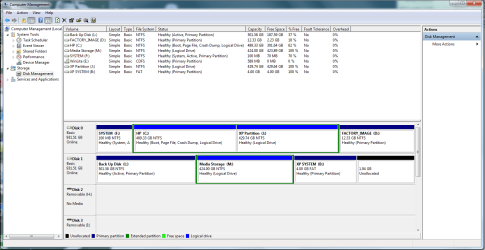
As you can see from the screenshot, i have tried different formats and actually just activated L:. havent tried to install... need sleep!! Wondering if i need to activate XP Partition J:. Dont mind B: drive
I have an audio interface that doesn't "play" nice with Win 7 64-bit, but I'm almost positive it'll work well within XP. The problem is, randomly during using my M-Audio ProjectMix I/O (firewire), the signal to the board will drop out. First the audio and then the m-audio control interface will lock up. This happens at random intervals, sometime 10 min and sometimes 2 hours but hardly reliable and required a full system restart. I have come to realize, after many hours of research, that even though they said it is compatible with Win 7, it actually isnt. I tried every last suggestion from them and spent even more money beyond the $1200 i paid for the board in attempts to fix this issue. Not to mention M-Audio has not even replied to ONE of my inquiries on their forum because i believe they wont admit it isn't compatible. Anyway, I digress...
So now my new struggle is getting my PC to install XP. I have read literally every forum and tutorial on the web and I understand the process, i think. I've made a partition on C: but also have another drive available for the install. I load the XP start up with no problem and it installs all the drivers and when it goes to start Windows, i get a BSOD stating that there may be an issue with my hardware... to run chkdsk.... remove any new hardware... etc. I have tried removing the Firewire card i installed, the wireless card, the main hard drive (win 7) and the secondary drive (empty). From my research is seems to be that the proper SATA or RAID driver isnt being installed for XP. At least that's what i gather. I have tried slip streaming the sata drivers on HP Forum and choosing only the 32 bit and XP drivers. Ive tried including every driver in that bundle at once, leaving out the Intel drivers and inserting even only the AMD drivers. All of these lead me to a black screen before the setup even runs stating line 1xxxxx of the INF file \i386\txtsetup.sif is invalid. I CAN NOT find any driver that is specific to either my MB or my PC. Every day i go without this equipment working is another day im not making music or money. Someone please help!!!! I have also tried running XP in Virtual PC but that wont work considering you cant access any firewire devices or ports. Wondering if XP Mode is the same basis as a virtual computer or worth upgrading for????
Specs:
HP e9220y
Win 7 64-bit Home Premium (w/ hopefully XP Pro SP2)
AMD Phenom II X4 2.6 GHz
8 GB RAM
(2) Western Digital 1TB hard drives (WD10EADS)(one which holds Win 7 along with a XP Partition and another i just bought which only has my system backup)
ATI Radeon HD 4350 graphics card
Vantec FW 800/400 PCI-e card (Texas Instrument chipset)
M-Audio ProjectMix I/O (Firewire)
Motherboard specs:
Foxconn Aloe
H-RS780-uATX
Chipset: 785G
Socket: AM3
Product #: NY553AA-ABA
Build ID: 94NAV6PrA3
BIOS: AMI v. 5.05
As you can see from the screenshot, i have tried different formats and actually just activated L:. havent tried to install... need sleep!! Wondering if i need to activate XP Partition J:. Dont mind B: drive
Attachments
My Computer
- Computer Manufacturer/Model Number
- HP e9220y
- OS
- Windows 7 Home Premium 64-bit
- CPU
- AMD Phenom II X4 2.6 GHz
- Motherboard
- Foxconn Aloe H-RS780-uATX
- Memory
- 8 GB
- Graphics Card(s)
- ATI Radeon HD 4350
- Monitor(s) Displays
- LG Flatron E2350
- Hard Drives
- (2) Western Digital 1TB (WD10EADS)