Dual-Boot XP/WIN 7 - How to Remove XP ?

thenoo

New member
Member
VIP
Local time
2:22 AM
Messages
140
I have XP Pro installed in a 15 Gbte Partition and WIN 7 installed on a 20 Gbte Partition in a Dual Boot setup. I now want to remove the XP and use only WIN 7.

How do I go about removing the XP fron this Dual-Boot setup, please ?
 

My Computer My Computer

Computer Manufacturer/Model Number
Home Built
OS
Windows 7 Home Premium x64
CPU
AMD 3000+ 2.00gHZ
Motherboard
ASUSTeK k8vsedx
Memory
2048 Mbs
Graphics Card(s)
RAEDON 9800 PRO
Monitor(s) Displays
Sony SDM-HS95P 19.1"vis
Hard Drives
2x500 Gbts
Hello thenoo, welcome to Seven Forums!


Before we make any specific recommendations will you please post a snip/screen-shot of the entire disk management drive map with a full description as to which drive/partition is which, so we can see what you have going on as there may be a fairly simple way to resolve the situation.

In the Windows start menu right click computer and click manage, in the left pane of the "Computer Management" window that opens click disk management and post a snip of that.


How to Upload and Post a Screenshot and File in Seven Forums
 

My Computer My Computer

Computer Manufacturer/Model Number
* BFK Customs *
OS
W 7 64-bit Ultimate
CPU
Intel Q9550 Yorkfield
Motherboard
ASUS P5Q Pro
Memory
8GB Dominator 8500C5D
Graphics Card(s)
ATI : XFX 5870
Sound Card
Realtek HD Audio 7-1
Monitor(s) Displays
1x 47" LCD HDMI & 3x 26" LCD HDMI
Screen Resolution
1920x1080P & 1920x1200
Hard Drives
1x 80GB Intel X25-M G2 SSD : 1x 500GB & 1x 640GB WD Caviar Black(s)
PSU
Corsair 620HX
Case
Cooler Master RC-690
Cooling
Tuniq Tower 120, 2x 140mm and 3x 120mm case fans
Keyboard
Microsoft 500
Mouse
Razer Diamondback 3G
Internet Speed
14 Mb/s
Other Info
1x Koutech 3Gb/s SATA HDD Hot Swap Rack
Hello thenoo, welcome to Seven Forums!


Before we make any specific recommendations will you please post a snip/screen-shot of the entire disk management drive map with a full description as to which drive/partition is which, so we can see what you have going on as there may be a fairly simple way to resolve the situation.

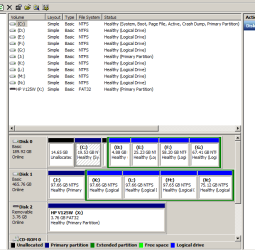
Ok here is a snip of the entire disk management drive map attached.

This shows the situation with WIN 7 booted which is installed in the 20 Gbte Partition on the C: drive on the first of the two hard drives. The Unallocated Space of just under 15 Gbtes shown to the left of this C drive is where the XP OS is installed.

When XP is booted this becomes the C:drive and the WIN 7 drive is then shown as 20 Gbtes of Unallocated Space.

Hope this gives you the information you need.
 

Attachments

  • Disk Management.PNG
    Disk Management.PNG
    14.9 KB · Views: 57

My Computer My Computer

Computer Manufacturer/Model Number
Home Built
OS
Windows 7 Home Premium x64
CPU
AMD 3000+ 2.00gHZ
Motherboard
ASUSTeK k8vsedx
Memory
2048 Mbs
Graphics Card(s)
RAEDON 9800 PRO
Monitor(s) Displays
Sony SDM-HS95P 19.1"vis
Hard Drives
2x500 Gbts
Can you re-snip the Disk Management and include the capacity and free space information?

Also, can you boot into XP and post the Disk Mangement info, including the capacity and free space info?

Just want to confirm the partitions.

Unallocated space is un-formatted space with no partition.
In order to use that space you need to add it to a partition or make a new partition and format it.
 

My Computer My Computer

Computer type
PC/Desktop
Computer Manufacturer/Model Number
76~2.0
OS
Windows 7 Ult x64 - SP1/ Windows 8 Pro x64
CPU
Intel Core i5-3570K 4.6GHz
Motherboard
Gigabyte GA-Z77X UD3H, f18
Memory
8GB (2X4GB) DDR3 1600 Corsair Vengeance CL8 1.5v
Graphics Card(s)
Sapphire HD 7770 Vapor-X OC 1GB DDR5
Sound Card
Onboard VIA VT2021
Monitor(s) Displays
22" LCD Dell
Screen Resolution
1680x1050
Hard Drives
Samsung 840Pro 128GB SSD,
Seagate Barracuda 500GB SATA2 7200rpm 32MB cache, Seagate Barracuda 1TB SATA2 7200rpm 32MB cache,
PSU
Corsair HX650W
Case
Cooler Master Storm Scout
Cooling
Corsair H80 2x12cm Noctua NF P12 , 2x14cm case fans
Keyboard
Logitech Wave
Mouse
CM Sentinel
Internet Speed
Dismal
Antivirus
Avast
Browser
Opera Next
Other Info
Haswell laptop: HP Envy 17t-j, i7-4700MQ, GeForce 740M 2GB DDR3, 17.3" Full HD 1920x1080, 16GB RAM, Samsung 840 Pro 128GB, 1TB Hitachi 7200 HDD,
Desktop: eSATA ports,
External eSATA Seagate 500GB SATA2 7200rpm,
External WD USB 500GB
As C is already marked System Active, you only need to delete XP.

I would boot free Partition Wizard bootable CD, rightclick on XP to Delete, OK.

Next rightclick on C partition to Resize, drag the left grey border all the way to the left to take up the deleted XP space, then drag the right grey border to the right to take up the sliver of space available there, OK. Apply all Steps.

Win7 should boot up, but if it doesn't have your Win7 DVD or Repair CD ready to boot, accept any offered Repair, then if it doesn't start boot back in to run Startup Repair up to 3 separate times to repair the MBR. http://www.sevenforums.com/tutorials/105541-startup-repair-run-3-separate-times.html
http://www.sevenforums.com/tutorials/2083-system-repair-disc-create.html
 
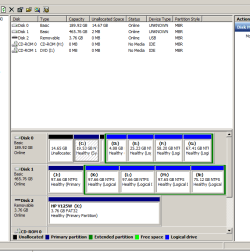
Can you re-snip the Disk Management and include the capacity and free space information?

I'm not exactly sure what you mean here . Is this what you want here ? ( see attachment "Disk Management Expanded"

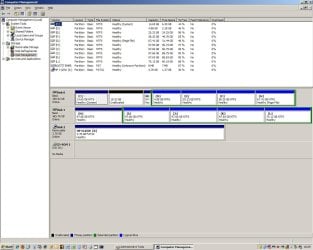
Also, can you boot into XP and post the Disk Mangement info, including the capacity and free space info?

I've done that with attachment "XP Management"

Just want to confirm the partitions.

Unallocated space is un-formatted space with no partition.
In order to use that space you need to add it to a partition or make a new partition and format it.

Understood
 

Attachments

  • Disk management_expanded.PNG
    Disk management_expanded.PNG
    14.5 KB · Views: 14
  • XP Management.JPG
    XP Management.JPG
    119.4 KB · Views: 15

My Computer My Computer

Computer Manufacturer/Model Number
Home Built
OS
Windows 7 Home Premium x64
CPU
AMD 3000+ 2.00gHZ
Motherboard
ASUSTeK k8vsedx
Memory
2048 Mbs
Graphics Card(s)
RAEDON 9800 PRO
Monitor(s) Displays
Sony SDM-HS95P 19.1"vis
Hard Drives
2x500 Gbts
That's unusual that each OS shows the other OS partition as unallocated.

Follow Gregs advice, Your Win7 partition is marked System, Active, so you can delete XP.

Like Greg mentioned be ready with your Win7 DVD or repair CD if needed.

Let us know how it goes.
 

My Computer My Computer

Computer type
PC/Desktop
Computer Manufacturer/Model Number
76~2.0
OS
Windows 7 Ult x64 - SP1/ Windows 8 Pro x64
CPU
Intel Core i5-3570K 4.6GHz
Motherboard
Gigabyte GA-Z77X UD3H, f18
Memory
8GB (2X4GB) DDR3 1600 Corsair Vengeance CL8 1.5v
Graphics Card(s)
Sapphire HD 7770 Vapor-X OC 1GB DDR5
Sound Card
Onboard VIA VT2021
Monitor(s) Displays
22" LCD Dell
Screen Resolution
1680x1050
Hard Drives
Samsung 840Pro 128GB SSD,
Seagate Barracuda 500GB SATA2 7200rpm 32MB cache, Seagate Barracuda 1TB SATA2 7200rpm 32MB cache,
PSU
Corsair HX650W
Case
Cooler Master Storm Scout
Cooling
Corsair H80 2x12cm Noctua NF P12 , 2x14cm case fans
Keyboard
Logitech Wave
Mouse
CM Sentinel
Internet Speed
Dismal
Antivirus
Avast
Browser
Opera Next
Other Info
Haswell laptop: HP Envy 17t-j, i7-4700MQ, GeForce 740M 2GB DDR3, 17.3" Full HD 1920x1080, 16GB RAM, Samsung 840 Pro 128GB, 1TB Hitachi 7200 HDD,
Desktop: eSATA ports,
External eSATA Seagate 500GB SATA2 7200rpm,
External WD USB 500GB
That's unusual that each OS shows the other OS partition as unallocated.

For what its worth , I set up this Dual Boot using advice from www.terabyteunlimited.com who use a "DOS-TYPE" Partition Manager called "BING" (Boot-It NT). I've used BING for many years mainly to create Image Files and have found it excellent if a little "techie" in use.
Although I used that system I am by no means an expert in Dual-Boot creation but they seemed to emphasise the importance of maintaining complete separation of the included OS's in their set-up thus ensuring that neither OS can "see" the other.

Whether this explains or gives a pointer to the fact that you use the word "unusual" in your quote above I am not competent to say - I merely mention it for information.


Follow Gregs advice, Your Win7 partition is marked System, Active, so you can delete XP.

Like Greg mentioned be ready with your Win7 DVD or repair CD if needed.

Let us know how it goes.

I will do all of your suggestions here and will report back.

Thanks for the patience and the help - both much appreciated.
 

My Computer My Computer

Computer Manufacturer/Model Number
Home Built
OS
Windows 7 Home Premium x64
CPU
AMD 3000+ 2.00gHZ
Motherboard
ASUSTeK k8vsedx
Memory
2048 Mbs
Graphics Card(s)
RAEDON 9800 PRO
Monitor(s) Displays
Sony SDM-HS95P 19.1"vis
Hard Drives
2x500 Gbts
Thanks for the feedback, that does explain it.

If 'they can't see each other' then it should be no problem to just delete XP.
 

My Computer My Computer

Computer type
PC/Desktop
Computer Manufacturer/Model Number
76~2.0
OS
Windows 7 Ult x64 - SP1/ Windows 8 Pro x64
CPU
Intel Core i5-3570K 4.6GHz
Motherboard
Gigabyte GA-Z77X UD3H, f18
Memory
8GB (2X4GB) DDR3 1600 Corsair Vengeance CL8 1.5v
Graphics Card(s)
Sapphire HD 7770 Vapor-X OC 1GB DDR5
Sound Card
Onboard VIA VT2021
Monitor(s) Displays
22" LCD Dell
Screen Resolution
1680x1050
Hard Drives
Samsung 840Pro 128GB SSD,
Seagate Barracuda 500GB SATA2 7200rpm 32MB cache, Seagate Barracuda 1TB SATA2 7200rpm 32MB cache,
PSU
Corsair HX650W
Case
Cooler Master Storm Scout
Cooling
Corsair H80 2x12cm Noctua NF P12 , 2x14cm case fans
Keyboard
Logitech Wave
Mouse
CM Sentinel
Internet Speed
Dismal
Antivirus
Avast
Browser
Opera Next
Other Info
Haswell laptop: HP Envy 17t-j, i7-4700MQ, GeForce 740M 2GB DDR3, 17.3" Full HD 1920x1080, 16GB RAM, Samsung 840 Pro 128GB, 1TB Hitachi 7200 HDD,
Desktop: eSATA ports,
External eSATA Seagate 500GB SATA2 7200rpm,
External WD USB 500GB
Back
Top