dual boot

palmieri

New member
Local time
6:41 PM
Messages
1
Location
salerno
Hi, on my Pentium 4 computer positioned because I AM A Hard Drives with XP operating system due windows7 respectively, in the departure of the initial stage of a duration of 5 seconds, you have the possibility to choose which tariff system partire.E propio NB All the ingredients that I can not a rate! Practice only to compare the string on the OS Windows 7 More than a disadvantage another, with the keyboard I can not select a commando No, I mean if I want to select for example the start and do it from the cd-rom or can not select him Which system do I want to do it and Leaving is not possible, then decide to pass far Seconds fine porcelain Marazzi to see what happens! START norlmalmente a boot occurred "OS win 7" can not perform any function or the mouse to the keyboard It is managed by the United Nations with the keyboard Silla "Loock scrool" Written lampeggia.Mi help please? Thanks
Listen
Read phonetically


Dictionary - View detailed dictionary
 

My Computer

OS
windows 7 ultimate 32 bit
Please try using this translator.
Yahoo! Babel Fish - Text Translation and Web Page Translation
You can type your posting in Italian then translate to English. Please post both in Italian and English.
Mike

Provi prego a per mezzo di questo traduttore. Yahoo! Babel Fish - Text Translation and Web Page Translation
Potete scriv il vostro invio a macchina in italiano quindi traducete all'inglese.
Invii prego entrambi in italiano ed inglese.
Mike

Ciò è il collegamento da raddoppiarsi caric il sistemaare il & di Windows; e XP in italiano.
http://www.microsofttranslator.com/bv.aspx?from=&to=it&a=http%3A%2F%2Fwww.sevenforums.com%2Ftutorials%2F8057-dual-boot-installation-windows-7-xp.html%3Fltr%3DD

Bing translator.
 

My Computer

Computer Manufacturer/Model Number
Hopalong/ Godzilla
OS
Windows7 Pro 64bit SP-1; Windows XP Pro 32bit
CPU
Intel Core i7-870 Lynnfield 2.93GHz LGA 1156 95W Quad-Core
Motherboard
ASUS P7P55D-E PRO
Memory
8GB@1400MHz Crucial Ballistix DDR3-1600 4x2GB
Graphics Card(s)
ASUS ENGTX460 DirectCU/2DI/1GD5 1GB 256-bit GDDR5
Sound Card
VIA Onboard
Monitor(s) Displays
Asus VS248H-P 24"; Samsung SyncMaster 941BW 19"ws
Screen Resolution
1920x1080; 1440x900
Hard Drives
Samsung 830 120GB SSD
Intel 320 120GB SSD
Western Digital Caviar Black WD7501AALS 750GB 7200 RPM SATA 3.0Gb/s
Western Digital Caviar Black WD6401AALS 640GB 7200 RPM SATA 3.0Gb/s
PSU
COOLER MASTER Silent Pro RS850-AMBAJ3-US 850W Modular
Case
COOLER MASTER HAF 932 RC-932-KKN5-GP Black
Cooling
Scythe "Mugen-2 Rev.B" (2 ScytheKaze-Jyuni PWM fans)
Keyboard
Logitech K-320
Mouse
Kensington
Antivirus
Avast Inernet Suite
Browser
IE 9 ; Chrome
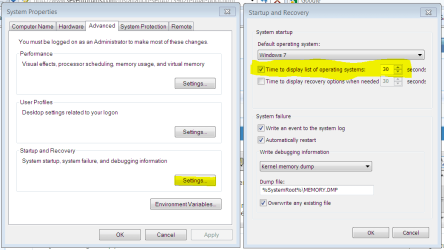
If you need more time to access the existing Dual Boot menu, go to Start>rightclick Computer>Properties>Advanced settings>Startup and set timer to 30 seconds as it should be by default.

Capture.PNG click to enlarge

Do you have separate hard drives available? This is a better method to Dual Boot via the BIOS instead of Windows.

If so please post back a screenshot of your Disk Management drive map and listings, using Snipping Tool in Start Menu.
 
hi, any help, i have wireless key board, and i have win7, xp installed, everything works fine, when at start up it gives me option which windows i want, my key board won't let me to chose either windows, when the 30 seconds is finished the windows 7 starts, how can i make my key board up and down keys to work to chose which windows i want.
 

My Computer

OS
asrock
Look in BIOS setup for settings which might relate to this like USB legacy settings, etc. Make a note of what you change so you can change it back if necessary. YOu may need to use a PS2 keyboard to navigate your BIOS.

You can also install EasyBCD 2.02, on Useful Utilities choose iReboot which will install a Dual Boot menu to your taskbar to reboot into the other OS.

Finally if you have separate HD's, the cleanest method to dual boot is via the BIOS, setting preferred OS HD as first to boot, then triggering the other when needed using one-time BIOS Boot Menu key given on first boot screen - providing your wireless keyboard will navigate the BIOS. The Win7-managed Dual Boot menu is actually in the Windows environment.
 
Back
Top