Dual boot

Boceefus

New member
Local time
8:12 AM
Messages
18
I have 2 hard drives with Windows 7 already installed on the main drive. I have a partition setup on the second drive for Windows XP. Can I just unplug the 7 drive and install XP on the other drive? Then plug the 7 drive back in to create dual boot? I'm a noob and thought I would give it a try. Thank you in advance for any help. :huh:
 

My Computer

OS
Windows 7
All you should have to do is install XP on the second hard drive, and after you start up the computer you will have a option to run 7 or XP
 

My Computer

Computer type
PC/Desktop
Computer Manufacturer/Model Number
Custom
OS
Windows 8.1 Pro x64
CPU
Intel Core i5-4570 CPU @ 3.20GHz
Motherboard
Gigabyte Z87-D3HP-CF
Memory
8GB DDR3-1596 - Dual Channel
Graphics Card(s)
NVIDIA GeForce GTX 750 Ti SC
Sound Card
Onboard
Monitor(s) Displays
Samsung
Screen Resolution
1920x1080
Hard Drives
SSD - 120GB
Second - 1TB
Antivirus
MSE
Browser
Chrome
Thank you for your reply. I tried that once and was given the option at boot up but if I chose 7 the computer would lock up.
 

My Computer

OS
Windows 7
You are correct to unplug the Win7 HD during install of XP to another HD. This keeps the OS's independent to come and go as you please.

When you plug back in Win7, set the preferred HD to boot first in BIOS setup. Then boot the other HD using the one-time BIOS Boot menu key given on first boot screen.
 
Last edited:
The Windows 7 disk is the unplugged disk. Just want to clarify the 7 disk is what I will be plugging in. Thank you for your help.
 

My Computer

OS
Windows 7
I have 2 hard drives with Windows 7 already installed on the main drive. I have a partition setup on the second drive for Windows XP. Can I just unplug the 7 drive and install XP on the other drive? Then plug the 7 drive back in to create dual boot? I'm a noob and thought I would give it a try. Thank you in advance for any help. :huh:

Hd 2, how many partitions are set up?
Best to install XP to partition 1.

Can you post a screen shot Disk management?
http://www.sevenforums.com/tutorials/9733-how-post-screenshot-seven-forums.html

Screenshot tools.
http://www.sevenforums.com/tutorials/9717-screenshot-paint.html
http://www.sevenforums.com/tutorials/51160-screenshot-upload-using-mwsnap.html
fscapture free download
 

My Computer

OS
ME/XP/Vista/Win7
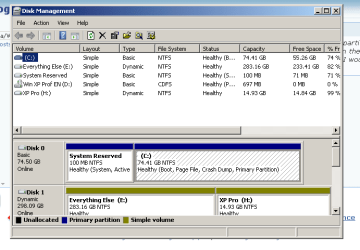
XP Pro (H) on disk 1 is where I will install XP. Hope this helps. Thank you for your help.
 

Attachments

  • Capture.PNG
    Capture.PNG
    11.1 KB · Views: 14

My Computer

OS
Windows 7
Hello Boceefus.


The really wise thing to do first would be to convert the "Disk 1" from a Dynamic disk to a Basic before you install XP so you don't run into serious issues along the way.


Download the zip then extract and then install Partition Wizard 4.2 from this link below to do so, and be sure to post back with any further questions you may have and to keep us informed.

partition wizard 4.2 free.zip - Windows Live
 

My Computer

Computer Manufacturer/Model Number
* BFK Customs *
OS
W 7 64-bit Ultimate
CPU
Intel Q9550 Yorkfield
Motherboard
ASUS P5Q Pro
Memory
8GB Dominator 8500C5D
Graphics Card(s)
ATI : XFX 5870
Sound Card
Realtek HD Audio 7-1
Monitor(s) Displays
1x 47" LCD HDMI & 3x 26" LCD HDMI
Screen Resolution
1920x1080P & 1920x1200
Hard Drives
1x 80GB Intel X25-M G2 SSD : 1x 500GB & 1x 640GB WD Caviar Black(s)
PSU
Corsair 620HX
Case
Cooler Master RC-690
Cooling
Tuniq Tower 120, 2x 140mm and 3x 120mm case fans
Keyboard
Microsoft 500
Mouse
Razer Diamondback 3G
Internet Speed
14 Mb/s
Other Info
1x Koutech 3Gb/s SATA HDD Hot Swap Rack
I installed XP then plugged the Windows 7 disk back in. There is no OS option screen. It just boots to Windows 7. What did I miss?
 

My Computer

OS
Windows 7
Hello again.


Please post another/new snip of disk management for us to see.
 

My Computer

Computer Manufacturer/Model Number
* BFK Customs *
OS
W 7 64-bit Ultimate
CPU
Intel Q9550 Yorkfield
Motherboard
ASUS P5Q Pro
Memory
8GB Dominator 8500C5D
Graphics Card(s)
ATI : XFX 5870
Sound Card
Realtek HD Audio 7-1
Monitor(s) Displays
1x 47" LCD HDMI & 3x 26" LCD HDMI
Screen Resolution
1920x1080P & 1920x1200
Hard Drives
1x 80GB Intel X25-M G2 SSD : 1x 500GB & 1x 640GB WD Caviar Black(s)
PSU
Corsair 620HX
Case
Cooler Master RC-690
Cooling
Tuniq Tower 120, 2x 140mm and 3x 120mm case fans
Keyboard
Microsoft 500
Mouse
Razer Diamondback 3G
Internet Speed
14 Mb/s
Other Info
1x Koutech 3Gb/s SATA HDD Hot Swap Rack
I installed XP then plugged the Windows 7 disk back in. There is no OS option screen. It just boots to Windows 7. What did I miss?

As stated earlier, when booting via BIOS you need to set the preferred HD to boot first in BIOS setup.

Then when you want to boot the other one, you tap the key given on first boot screen for BIOS Boot Menu to choose it.

If you need help finding the BIOS Boot menu key, look in your Manual on the Support Downloads webpage for your model computer or mobo, or let us know and we'll find it for you.
 
Dual Boot

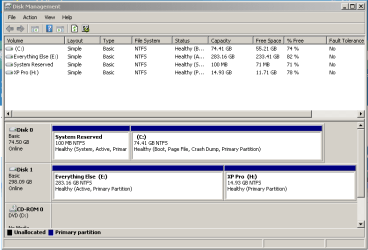
Here's the screen shot. I can get to the bios but I'm hoping to get the option for an OS rather than go to bios every time. Thank you all again for your help.
 

Attachments

  • Capture2.PNG
    Capture2.PNG
    10.6 KB · Views: 14

My Computer

OS
Windows 7
I thought you unplugged the other HD during install so you could use the cleanest method to Dual Boot, which is booting via the BIOS.

You don't have to go back to the BIOS setup every time to boot. Win7 will start up by default. If you want XP you simply tap the one-time BIOS Boot menu key to trigger it's HD.

If you want a Windows-managed Dual Boot, install EasyBCD 2.0 to Win7 to Add XP, accept boot files, autocompletes, Save, restart.
 
Mission accomplished. I used EasyBCD and good to go. Thank you all for your time and expertise. Have a great weekend.
 

My Computer

OS
Windows 7
No prob.

Did you know your screenshot reveals Win7 graphics are rendering in Win2000 mode?

To engage aero graphics, rightclick Desktop>Personalize, choose an aero theme, set up a Desktop Background slideshow using some of the spectacular choices. If you don't get the transparent frames, type aero in start search box to run aero troubleshooter.
 
Back
Top