dual boot

grungesabin

New member
Local time
11:04 AM
Messages
9
Location
Kathmandu, Nepal
Hello
I had dual booting on my system, win XP in C: and Server 2003 in D: i tried to replace XP with Windows 7 so i formatted C: (where XP was located) using windows 7 dvd now i am unable to get option to choose OS. My computer only boots from Windows 7 & how to over come it. Please suggest
 

My Computer

OS
Windows 7 and XP
Install EasyBCD 2.0 beta to Win7, after doing quick registration in their forum to use beta.

On Add/Remove tab, Add Win2k3 by name, type, drive letter should autocomplete, Save, restart computer
 
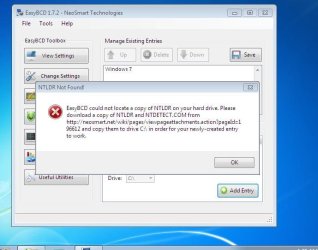
It didn't work instead it gave some error message(something related to NTLDR) while adding NT version.
 

My Computer

OS
Windows 7 and XP
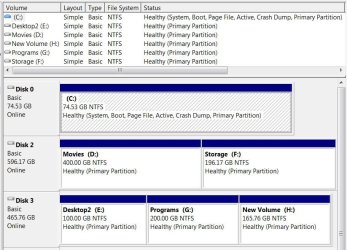
Please post back a screenshot of your full Disk Management drive map and listings using Snipping Tool in Start Menu.
 
Please post back a screenshot of your full Disk Management drive map and listings using Snipping Tool in Start Menu.


Hello grungesabin, welcome to Seven Forums!


This below is what he wanted.


clicl to enlarge
this.JPG
 

My Computer

Computer Manufacturer/Model Number
* BFK Customs *
OS
W 7 64-bit Ultimate
CPU
Intel Q9550 Yorkfield
Motherboard
ASUS P5Q Pro
Memory
8GB Dominator 8500C5D
Graphics Card(s)
ATI : XFX 5870
Sound Card
Realtek HD Audio 7-1
Monitor(s) Displays
1x 47" LCD HDMI & 3x 26" LCD HDMI
Screen Resolution
1920x1080P & 1920x1200
Hard Drives
1x 80GB Intel X25-M G2 SSD : 1x 500GB & 1x 640GB WD Caviar Black(s)
PSU
Corsair 620HX
Case
Cooler Master RC-690
Cooling
Tuniq Tower 120, 2x 140mm and 3x 120mm case fans
Keyboard
Microsoft 500
Mouse
Razer Diamondback 3G
Internet Speed
14 Mb/s
Other Info
1x Koutech 3Gb/s SATA HDD Hot Swap Rack
oops i m sorry ..... well i will give u details over here.....

C:\ loaded with XP which was later formatted with windows 7
d:\ loaded with server 2003
e:\ backups(personal files and folders)
and i have only one hard drive...Disk 0

After i formatted with windows 7 i couldnot get boot option and i m unable to load server 2003
 

My Computer

OS
Windows 7 and XP
You are likely receiving the error in EasyBCD because you are using the older version, which is why I specified you need to use beta version 2.0. Install after doing quick registration to use beta here: EasyBCD 2.0 Beta Builds - The NeoSmart Forums

When you attempt to Add Win2K3 it will ask if you want to load boot files. Say OK, it autocompletes, Save, Restart.

If this fails, then we need to see the Disk Management drive map and listings screenshot.
 
Last edited:
Hello
I had dual booting on my system, win XP in C: and Server 2003 in D: i tried to replace XP with Windows 7 so i formatted C: (where XP was located) using windows 7 dvd now i am unable to get option to choose OS. My computer only boots from Windows 7 & how to over come it. Please suggest

Hi there,if you want to get back your SERVER 2003 back in dualboot with 7,you just do this:
Insert your server 2003 cd into the cdrom
Boot the server 2003 cd
Follow all the steps until you press F8 to agreed
Choose R {recovery console}
Once in the recovery console you gonna wright this 2 command lines,one by one hitting enter.

COPY X:\i386\NTLDR C:

COPY X:\i386\NTDETECT.COM C:


{ replace the letter X on the command lines for the letter of your cd or dvd rom,like D or E for example,COPY D:\i386\NTLDR C:}

After doing that,type EXIT on the recovery console and hit enter and it will restart automatically.

Take the cd out the cdrom.

Then you must see if the duallboot is already present or not,IF NOT,pick up your windows 7 dvd insert it in the dvd rom bootup and do an startup repair,restart and everything will be fine.

Cheers.
 

My Computer

Computer Manufacturer/Model Number
HP
OS
WIN,XP,7,VISTA,SERVER
CPU
DualCore Intel Pentium D 925, 3000 MHz
Motherboard
Asus P5LP-LE (Leonite)
Memory
3072 MB (DDR2 SDRAM)
Graphics Card(s)
NVIDIA GeForce 7500 LE (256 MB)
Sound Card
Creative SB X-Fi Xtreme Audio
Monitor(s) Displays
19", 1024x768
Screen Resolution
1024x768
Hard Drives
WDC WD2500AAKS-00L9A0
SAMSUNG HD250HJ (250
Internet Speed
100.0 mbps
Thanks King64 i will try this as well and hey gregrocker i tried out with the new version of EasyBCD as well but it couldnot see the option Addr/Remove Entries
 

My Computer

OS
Windows 7 and XP
Then we need to see the Disk Management drive listings screenshot requested repeatedly.

Type Disk management in Start Search box.

Use Snipping tool in Start Menu.
 
Thank you guys for your support ans interest.... at last it worked.... i used EasyBCD to Add the Entry of Server 2003 and after that i copied the files ntldr and ntdetect.com to C: from bootable cd of server 2003. I will get back to you guys if i get any other issues.
 

My Computer

OS
Windows 7 and XP
Hello again mate, glad you found a solution that worked for you; thanks for the update.
 

My Computer

Computer Manufacturer/Model Number
* BFK Customs *
OS
W 7 64-bit Ultimate
CPU
Intel Q9550 Yorkfield
Motherboard
ASUS P5Q Pro
Memory
8GB Dominator 8500C5D
Graphics Card(s)
ATI : XFX 5870
Sound Card
Realtek HD Audio 7-1
Monitor(s) Displays
1x 47" LCD HDMI & 3x 26" LCD HDMI
Screen Resolution
1920x1080P & 1920x1200
Hard Drives
1x 80GB Intel X25-M G2 SSD : 1x 500GB & 1x 640GB WD Caviar Black(s)
PSU
Corsair 620HX
Case
Cooler Master RC-690
Cooling
Tuniq Tower 120, 2x 140mm and 3x 120mm case fans
Keyboard
Microsoft 500
Mouse
Razer Diamondback 3G
Internet Speed
14 Mb/s
Other Info
1x Koutech 3Gb/s SATA HDD Hot Swap Rack
Hey guys i think we donot need to copy those two files from bootable CD of server2003, this morning also i tried the same thing repeating the whole process, i just added the entry of Windows server 2003 and i click on write MRB button on EasyBCD it just worked fine.
 

My Computer

OS
Windows 7 and XP
EasyBCD 2.0 is automated so that you don't need to provide boot critical files any longer for XP or earlier.

You should only have to use the Add tab to add the OS and it will autocomplete, but sometimes it is dependent upon which OS if installed first.
 
Back
Top